
Short answer. You build custom TradingView indicators for DEX trading in the Pine Editor on tradingview.com: Create new → Indicator, paste Pine Script, save, Add to chart. They run on any DEX market TradingView lists (Hyperliquid perps and spot, dYdX perps, and Raydium, Orca, Uniswap, PancakeSwap and Aerodrome pools), but not inside DexScreener or DEX apps, whose embedded TradingView charts do not support Pine Script. For perps, Pine can also read Hyperliquid’s funding rate and open interest (_FR, _OI tickers), which we checked against Hyperliquid’s API. Build the signal on TradingView, then trade it on Hyperliquid.
Trade the signal on Hyperliquid
The DEX TradingView covers in the most depth. Code HOLYGRAIL takes 4% off every trading fee on your first $25M of volume.
We earn a commission when you sign up through our links; it never raises your fees.
Sources checked September 27, 2026: TradingView’s blog posts of September 21 and 23, 2026 on Hyperliquid derivative metrics; the Pine Script docs (first indicator, limitations, alerts, publishing); the Advanced Charts docs on custom indicators; tradingview.com/pricing; TradingView symbol search; DexScreener’s docs. The _FR/_OI values were matched against the Hyperliquid API on September 25, 2026.
1. How to create a custom indicator in TradingView (5 steps)
A custom indicator is a Pine Script program that TradingView runs on every bar of your chart. The procedure is the same for a stock or a DEX market; what changes for DEX trading is which symbol you open and which data the script can reach.
- Open a DEX symbol on tradingview.com. Search the market in the symbol box, for example HYPERLIQUID:BTCUSDC.P (Hyperliquid BTC perp) or a Raydium pool. Your indicator will calculate on that venue’s own candles.
- Open the Pine Editor. Select the “Pine Editor” tab at the bottom of the chart.
- Create a new indicator. Open the editor’s dropdown menu (the arrow beside the script name) and choose “Create new” → “Indicator”. Replace the template with your code; every script on this page starts with //@version=6, the current Pine Script version.
- Save. Press Ctrl+S (Cmd+S on macOS) and name the script. It is stored in your TradingView account and stays private unless you publish it.
- Add to chart, then set an alert. Click “Add to chart”. To be notified, create an alert (Alt+A / ⌥+A), pick your script as the condition and choose Once Per Bar Close.
You do not have to write code to get started. TradingView lists 400+ built-in indicators and 100,000+ community scripts on its pricing page. Community scripts are in the Community tab of the “Indicators, Metrics & Strategies” menu (or at tradingview.com/scripts). Pine’s publishing docs describe three kinds: open-source (you can read and copy the code), protected (closed code, free to add) and invite-only (closed code, usable only by people the author invites). An open-source script is the safest start for DEX trading, because you can check which symbol and timeframe it really requests. Every built-in, community or personal script takes one indicator slot, and the free plan has 2 per chart (see limits).
2. Where custom indicators run, and where they don’t
This is the question most DEX traders hit first. A Reddit thread that ranks on page 1 of Google (September 2026) asks how to load a Pine indicator into DexScreener’s TradingView chart, and it has no answer. The answer is that you can’t, and the reason is documented. DexScreener’s docs page on its charts (“TradingView Charts”) is about TradingView Advanced Charts, a library that websites embed. TradingView’s own documentation for that library says it ships more than 100 indicators, that the site’s developers can add custom indicators in JavaScript, that “users cannot create their own indicators”, and that “Pine Script® is not supported in the libraries.” The same applies to DEX apps that embed a TradingView chart.
| Chart | Runs your Pine script? | Why |
|---|---|---|
| tradingview.com (your account) | Yes | Pine Script runs here and only here. Built-ins, community scripts and your own scripts. |
| DexScreener charts | No | DexScreener’s docs page on its charts is about TradingView’s Advanced Charts library, and TradingView’s docs say Pine Script is not supported in that library. |
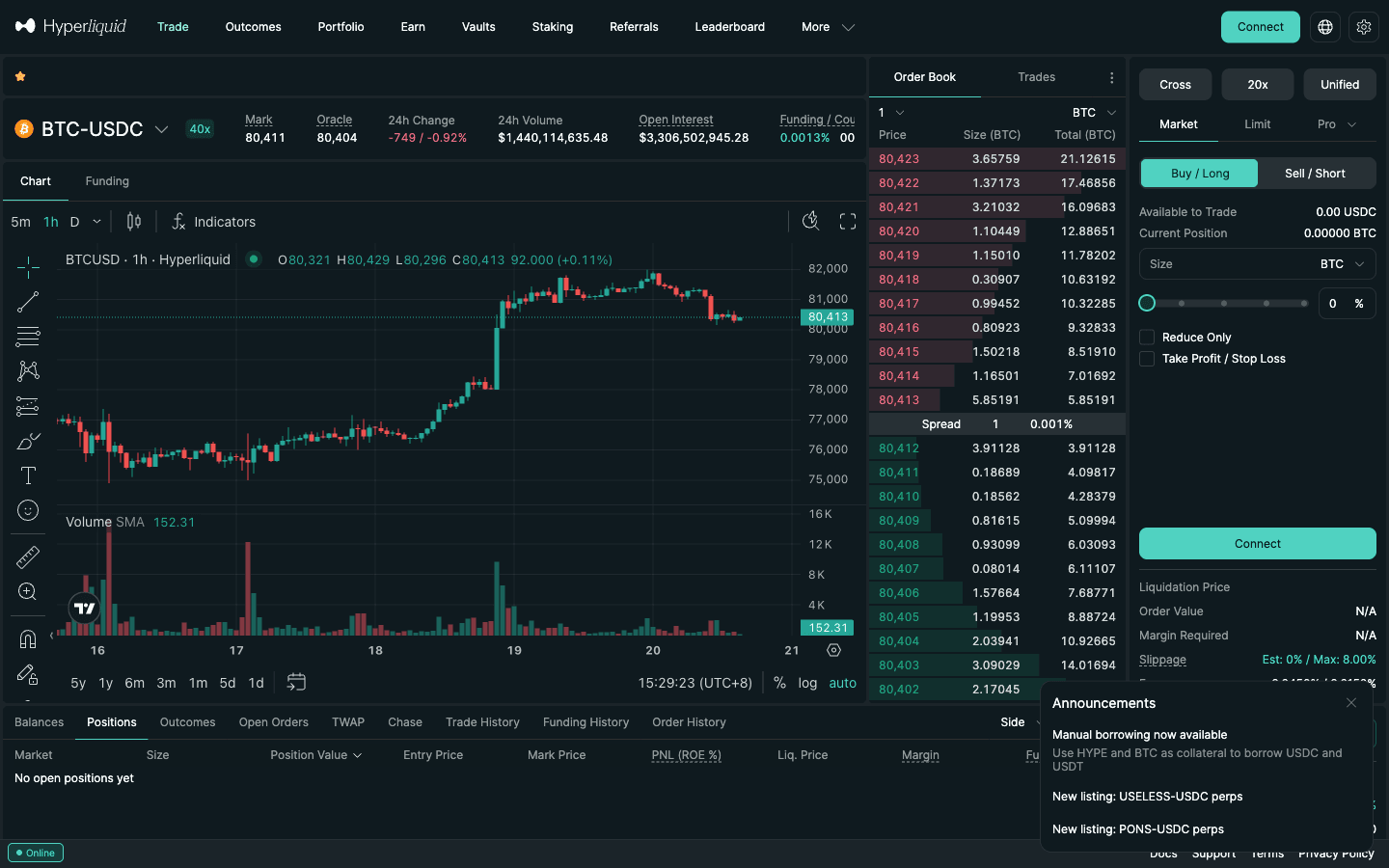
| Hyperliquid app (app.hyperliquid.xyz) | No | Its chart is built on TradingView’s Charting Library; it is not linked to your tradingview.com account. |
| Other DEX front-ends with a TradingView chart (Lighter, Aster, …) | No | Only the built-ins plus any JavaScript indicators the site’s own developers added. |
TradingView Advanced Charts docs (Custom indicators) and DexScreener docs (TradingView Charts), checked September 27, 2026.
The workaround is to run the analysis on tradingview.com and trade in the app. Open the same market on TradingView (next section), add your script there, and let an alert tell you when to act. For Hyperliquid this is exact: the HYPERLIQUID: symbols use Hyperliquid’s own order book, so the candles your script reads are the ones your orders fill against.
3. Which DEXs TradingView lists (September 27, 2026)
Pine Script cannot call outside APIs, so a custom indicator can only use markets TradingView itself carries. We queried TradingView’s symbol search exchange by exchange:
| DEX | Prefix | What is listed | Data for Pine |
|---|---|---|---|
| Hyperliquid | HYPERLIQUID: | Perps and spot (BTCUSDC.P, HYPEUSDC) | Price and volume, plus funding, OI and seven more derivative metrics |
| dYdX | DYDX: | Perps (BTCUSD.P, SOLUSD.P) | Price and volume |
| Raydium (Solana) | RAYDIUM: | Spot pools (SOLUSDT_7XAWHB) | Price and volume per pool |
| Orca (Solana) | ORCA: | Spot pools | Price and volume per pool |
| Uniswap | UNISWAP:, UNISWAP3ETH:, UNISWAP4ETH:, UNISWAP4BASE: | Spot pools (v2, v3, v4) | Price and volume per pool |
| PancakeSwap (BNB Chain) | PANCAKESWAP: | Spot pools | Price and volume per pool |
| Aerodrome (Base) | AERODROME: | Spot pools | Price and volume per pool |
| Lighter, Aster, edgeX, GMX, Jupiter, Drift | none found | — | Not a TradingView data source; use their own charts and APIs |
TradingView symbol search, queried September 27, 2026 with the search “SOL” per exchange (and “BTC” for dYdX). Raydium alone returned 50 results plus 992 more; LIGHTER, ASTER, EDGEX, GMX, JUPITER and DRIFT returned none.
Spot DEX symbols are per pool, not per token: RAYDIUM:SOLUSDT_7XAWHB is TradingView’s “Wrapped SOL / USDT on Solana” pool, named after the first characters of the pool address, and …_7XAWHB.USD is the same pool quoted in US dollars. So when you chart a low-cap Solana token, pick the pool with the most volume and keep the indicator on that pool, since two pools of the same token can print different wicks. Perp DEXs are the reverse: of the venues we cover, only Hyperliquid and dYdX are TradingView data sources. For Lighter, Aster and edgeX you can still chart the underlying coin on another venue, but not their own book, funding or open interest. How the venues compare is on best DEXs in 2026.
4. Indicator shortlist for perp traders, and Example 1
Most guides list the same families: trend, momentum, volatility, volume and liquidity. For a perp trader the useful question is what each one tells you and which perp-only number confirms it. Pick one tool per family: RSI, Stochastic and MACD are all momentum, so three of them agreeing is one opinion, not three.
| Indicator | Default settings | What it tells a perp trader | Pair it with |
|---|---|---|---|
| EMA (moving average) | 9 / 21 / 200 | Direction and slope: longs only above the 200 EMA, 9/21 crosses for timing. Crosses are late and whipsaw in ranges. | Funding: is the trend already crowded? |
| MACD | 12, 26, 9 | Momentum shift as the gap between two EMAs widens or narrows. | Divergence plus falling open interest |
| RSI / Stochastic | RSI 14; Stochastic 14, 3, 3 | Speed of gains vs losses. Stays “overbought” for days in a trend, so use it as a filter, not a signal. | Extreme RSI with extreme funding |
| Bollinger Bands | 20, 2 | Distance from a 20-bar mean. Band walks are common in crypto: fade a touch only when the move loses steam. | Fade only when open interest flushes |
| ATR | 14 (as % of price) | Average candle range. It does not predict direction; it sets your stop distance, and the stop sets your leverage. | Stop beyond the ATR, liquidation far beyond the stop |
| Supertrend | 10, 3 | ATR-based trailing line that flips with the trend; flips often in chop. | Use the line as your stop, not the liquidation price |
| Ichimoku Cloud | 9, 26, 52 | Trend plus levels from the midpoints of highs and lows; a thin, flat cloud means no signal. | Kijun as a level where liquidations cluster |
| VWAP / anchored VWAP | Daily anchor at 00:00 UTC, or an event | Average price paid, weighted by volume; intraday mean that trending days never revisit. | Funding flips around a VWAP reclaim |
| Volume | vs its 20-bar average | A spike above 2× average marks real participation. Volume delta through request.footprint() needs Premium or Ultimate. | Volume spike with rising open interest |
| Volume profile | Visible range | Volume traded at each price. Pine cannot read a DEX pool’s depth; traded volume by price is the nearest proxy. | Stops and liquidations sit beyond the nodes |
| Funding, open interest, liquidations | Hyperliquid built-ins and _FR/_OI tickers | Who is paying, how much is open, where it breaks: the perp-only layer (Examples 2–4). | This is the perp layer itself |
For fast timeframes see DEX scalping strategy. Example 1 folds four of the families into one script, which matters on the free plan’s 2 slots: EMA 9/21/200 for trend, RSI as a momentum filter, ATR as a volatility filter and a volume-spike marker. It flags a pullback to the 21 EMA that holds inside an uptrend.
//@version=6
indicator("DEX starter: EMA 9/21/200, RSI, ATR, volume", overlay = true)
maxAtr   = input.float(3.0, "Skip signals when ATR is above (% of price)", minval = 0.1)
emaFast  = ta.ema(close, 9)
emaSlow  = ta.ema(close, 21)
emaTrend = ta.ema(close, 200)
rsi      = ta.rsi(close, 14)
atrPct   = ta.atr(14) / close * 100
volSpike = volume > ta.sma(volume, 20) * 2
upTrend  = close > emaTrend and emaFast > emaSlow
pullback = upTrend and low <= emaSlow and close > emaFast and rsi > 40 and atrPct <= maxAtr
plot(emaFast, "EMA 9", color = color.teal)
plot(emaSlow, "EMA 21", color = color.orange)
plot(emaTrend, "EMA 200", color = color.gray, linewidth = 2)
plotshape(pullback, "Pullback in uptrend", shape.triangleup, location.belowbar, color.green, size = size.small)
barcolor(volSpike ? color.yellow : na, title = "Volume above 2x its 20-bar average")
alertcondition(pullback, "Pullback in uptrend", "Pullback to EMA 21 held in an uptrend")
It works unchanged on HYPERLIQUID:BTCUSDC.P, a dYdX perp or a Raydium pool. On small pools raise the ATR threshold only if you accept more slippage; a 3% hourly ATR on a thin pool is a warning, not an opportunity. The RSI filter (above 40) stops the script from buying a pullback that has already turned into a breakdown. For the mirror-image short signal, flip the comparisons.
5. Hyperliquid perps data in TradingView
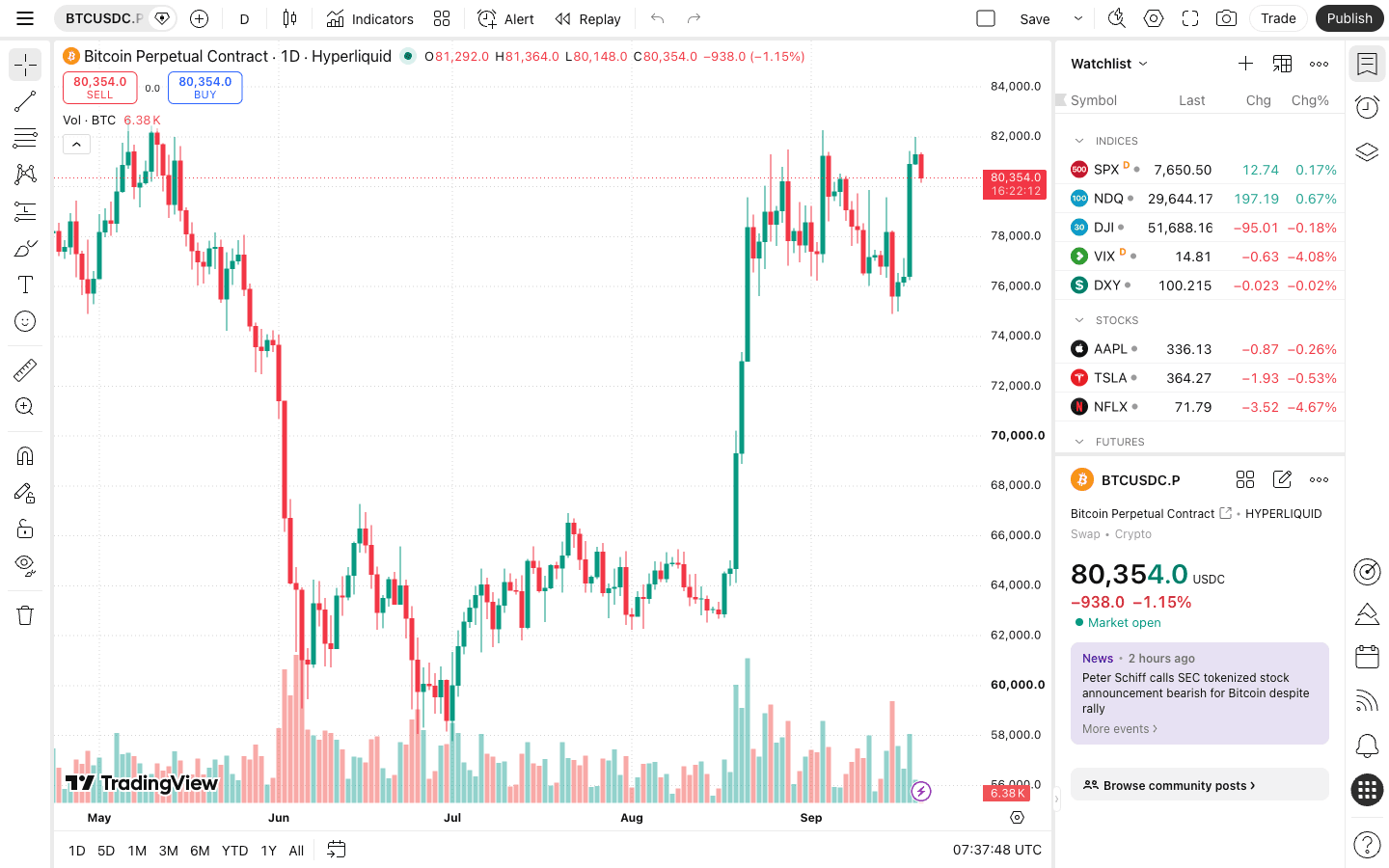
Hyperliquid is where TradingView goes furthest. Before July 2026 there was no Hyperliquid feed, so charting a Hyperliquid market on tradingview.com meant using a Binance or Bybit symbol as a proxy. On July 2, 2026 TradingView announced Hyperliquid and Trade[XYZ] data under the HYPERLIQUID: and HIP3XYZ: prefixes. On September 21, 2026 it added derivative metrics for “more than 170 Hyperliquid contracts” plus the HIP-3 markets of Trade[XYZ] and Paragon, over 300 contracts in all, and called Hyperliquid “the first decentralized exchange in our data set”. Two days later Hyperliquid was folded into TradingView’s aggregated open interest, funding and liquidation metrics.
| Data | Where in TradingView | Access from Pine Script |
|---|---|---|
| Price and volume (perps and spot) | HYPERLIQUID:BTCUSDC.P (spot has no .P) | Any Pine script on that chart, or request.security() |
| Open interest | Indicators → Fundamentals → “Crypto open interest” | request.security("HYPERLIQUID:BTCUSDC.P_OI", …) — value in US dollars |
| Funding rate | Indicators → Fundamentals → “Funding rate” | request.security("HYPERLIQUID:BTCUSDC.P_FR", …) — hourly rate as a fraction |
| Liquidations, long/short ratios, mark, index, premium, basis | Indicators → Fundamentals (nine metrics in total) | Built-in indicators; we found no documented ticker suffix for these |
| Aggregated OI / funding / liquidations | Indicators → Fundamentals → Derivatives → Aggregated | Built-in; now includes Hyperliquid next to eight CEXs |
| HIP-3 markets (stocks, commodities, indices) | HIP3XYZ: (Trade[XYZ]) and HIP3PARA: (Paragon) | Same metrics, same approach |
TradingView blog posts of July 2, September 21 and September 23, 2026 (the last two re-read September 27, 2026); TradingView symbol search and chart pages.
Symbol names follow one pattern: the coin, then USDC, then .P for a perpetual. The BTC perp is HYPERLIQUID:BTCUSDC.P, the HYPE perp HYPERLIQUID:HYPEUSDC.P, and HYPE spot is HYPERLIQUID:HYPEUSDC. Candles and volume come from Hyperliquid’s own order book, not from a CEX average, which matters for stops and liquidations: a wick on Binance is not necessarily a wick on Hyperliquid. Chart setup itself is covered in our Hyperliquid TradingView guide; this page is about building indicators on top of that data.
6. Built-in derivatives indicators
Before writing code, check whether a built-in does the job. Built-ins cost one indicator slot like any script and need no maintenance.
- Funding rate (Fundamentals). On a Hyperliquid symbol it shows Hyperliquid’s hourly rate. TradingView’s own post points out that Hyperliquid pays funding every hour while most CEXs pay every eight, so do not compare the raw numbers one to one.
- Crypto open interest (Fundamentals). Rising price with rising OI means new positions are opening; rising price with falling OI is often shorts closing. Our open interest guide covers how to read it.
- Liquidations and the two long/short account metrics. These count accounts, not notional: many small longs can sit against a few large shorts.
- Mark price, index price, premium and basis. Hyperliquid triggers TP/SL orders and liquidations on the mark price, so plotting mark beside last price explains “why did my stop fire”.
- Aggregated OI and funding combine nine exchanges (Binance, Bitget, Bybit, Coinbase, Deribit, HTX, Kraken, OKX, Hyperliquid), and aggregated liquidations combine six. Aggregated funding is weighted by each exchange’s open interest. Useful context, but for a Hyperliquid trade use the non-aggregated Hyperliquid series.
7. Funding and OI in Pine Script: the _FR and _OI tickers
A built-in cannot feed your own logic, so for custom signals you need the metric as a series. TradingView serves each derivative metric as its own ticker: append _OI or _FR to a perp symbol. Its data feed types these series as “derivative-metrics”. We tested the Hyperliquid versions on September 25, 2026:
HYPERLIQUID:BTCUSDC.P_OIopens as “BTCUSDC.P Open Interest” and read 3,380,586,782. A few minutes later Hyperliquid’s API put BTC open interest times the mark price at $3.375B, so the series is open interest in US dollars, counted on one side.HYPERLIQUID:SOLUSDC.P_OIread 725,131,762 against $725.3M from the API.HYPERLIQUID:BTCUSDC.P_FRread 0.125e-4, i.e. 0.0000125, exactly the API’s hourly funding of 0.00125%. So the series is the hourly funding rate as a fraction; multiply by 100 for percent. (_FUNDINGdoes not exist.)
We found no public TradingView documentation for either suffix, so treat both as working but undocumented, and pass ignore_invalid_symbol = true so a missing series returns na instead of breaking the script. For the other seven metrics we found no documented ticker; use the built-ins.
8. Example 2: Hyperliquid funding rate panel
A separate pane showing the hourly rate in percent, coloured by sign, with the 0.00125% baseline marked. Paste it into a new indicator as in section 1 and click “Add to chart”.
//@version=6
indicator("Hyperliquid funding (% per hour)", precision = 5)
perp = input.symbol("HYPERLIQUID:BTCUSDC.P", "Hyperliquid perp")
// _FR = hourly funding as a fraction; x100 for percent
fr = request.security(perp + "_FR", timeframe.period, close, ignore_invalid_symbol = true) * 100
plot(fr, "Funding %/h", color = fr >= 0 ? color.teal : color.red, style = plot.style_columns)
hline(0.00125, "Baseline 0.00125%/h", color = color.gray)
hline(0, "Zero", color = color.silver)
plot(fr * 8, "8h equivalent %", display = display.data_window)
plot(fr * 24 * 365, "Annualised %", display = display.data_window)
The two extra plots only appear in the Data Window. They let you compare Hyperliquid with an 8-hour CEX rate (multiply by 8) or read an annualised carry without cluttering the pane. Over the 30 days to September 25, 2026, BTC’s hourly funding on Hyperliquid summed to 0.766%. It was positive in 93% of hours and exactly at the baseline in 72% of them, so a panel that stays mostly flat at 0.00125% is normal. The mechanics are in Hyperliquid funding rate explained.
9. Example 3: open interest vs price
This compares the percentage change in open interest with the percentage change in price over a lookback. It shades bars where price rose while OI fell, meaning the rally came from shorts closing rather than new longs.
//@version=6
indicator("Hyperliquid OI change vs price", precision = 2)
perp = input.symbol("HYPERLIQUID:BTCUSDC.P", "Hyperliquid perp")
len  = input.int(24, "Lookback (bars)", minval = 1)
oi = request.security(perp + "_OI", timeframe.period, close, ignore_invalid_symbol = true)
px = request.security(perp, timeframe.period, close)
oiChg = (oi / oi[len] - 1) * 100
pxChg = (px / px[len] - 1) * 100
plot(oiChg, "OI change %", color = color.orange)
plot(pxChg, "Price change %", color = color.blue)
hline(0, "Zero", color = color.gray)
bgcolor(pxChg > 0 and oiChg < 0 ? color.new(color.red, 85) : na, title = "Price up, OI down")
On an hourly chart a lookback of 24 compares with the same hour yesterday. Because perp is an input, one copy of the script works on any Hyperliquid market, including HIP-3 symbols. The two request.security() calls count toward the 40-call limit, and adding a CEX series for comparison (for example Binance’s OI ticker) uses one more.
10. Example 4: funding alert
Pine gives you two ways to raise alerts. alertcondition() (indicators only) creates a named condition you pick in the alert dialog. alert() is the newer function; TradingView’s docs say it “more or less supersedes” alertcondition(), and its message can carry live values. This script does both and marks the bars on the chart.
//@version=6
indicator("Hyperliquid funding alert", overlay = true)
perp  = input.symbol("HYPERLIQUID:BTCUSDC.P", "Hyperliquid perp")
level = input.float(0.01, "Alert above (% per hour)", step = 0.001)
fr = request.security(perp + "_FR", timeframe.period, close, ignore_invalid_symbol = true) * 100
hot = fr > level
plotshape(hot, "Funding above level", shape.triangledown, location.abovebar, color.red)
alertcondition(hot, "Funding above level", "Hyperliquid funding is above your level")
if hot and barstate.isconfirmed
    alert("Funding " + str.tostring(fr, "#.#####") + "%/h on " + perp, alert.freq_once_per_bar_close)
The default of 0.01% per hour is eight times the baseline (0.08% per 8 hours). Create the alert from the chart (Alt+A on Windows, ⌥+A on macOS) and choose this script as the condition. Then pick either the “Funding above level” condition or the script’s alert() calls, set the frequency to Once Per Bar Close, and choose where it goes: app, email, webhook and others. Alerts expire after 2 months on Essential and Plus; on Premium and Ultimate they can run without expiry.
Signal ready? Execute on Hyperliquid
178 perps (as of October 20, 2026), gas-free orders and hourly funding: the same data your indicator reads. Join with HOLYGRAIL for 4% off fees on your first $25M.
11. From alert to webhook
Hyperliquid is not a TradingView broker, so an indicator cannot place a trade by itself. The usual chain is TradingView alert → webhook → your server or a bridge service → a Hyperliquid API wallet that can trade but not withdraw. TradingView’s webhook rules, from its help center:
- Webhooks are available on paid plans only (Essential and up), and two-factor authentication must be enabled.
- Requests come from four fixed IP addresses, only to ports 80 and 443, with a 3-second timeout and no IPv6.
- A message that is valid JSON is sent as
application/json; anything else as plain text. Never put API keys or secrets in the message.
Bridge services that list Hyperliquid include Autoview (the platform is free; connecting a live exchange costs $39.99 a month) and Algoway ($9 a month for TradingView alert automation). A self-hosted receiver using the official Python SDK is the other route. The full setup, including API wallet permissions, is in the Hyperliquid TradingView guide, the Hyperliquid API guide and our API key security checklist. For alerts that stop at a notification, see price and liquidation alerts.
12. Plan limits and Pine limits
| Basic | Essential | Plus | Premium | Ultimate | |
|---|---|---|---|---|---|
| Indicators per chart | 2 | 5 | 10 | 25 | 50 |
| Price alerts | 3 | 20 | 100 | 400 | 1,000 |
| Indicator/strategy alerts | No | Yes | Yes | Yes | Yes |
| Alert duration | 1 month | 2 months | 2 months | No expiry | No expiry |
| Webhook alerts | No | Yes | Yes | Yes | Yes |
| request.*() calls per script | 40 | 40 | 40 | 40 | 64 |
| Price (annual billing, per month) | $0 | $12.95 | $29.95 | $59.95 | $199.95 |
tradingview.com/pricing and the Pine Script docs (Limitations), checked September 27, 2026. Prices change; check the pricing page.
- Indicator slots are the first wall on the free plan: 2 per chart. The cheapest workaround is to merge several indicators into one script, as Example 1 does with EMAs, RSI, ATR and volume. You can do the same with funding, open interest and your entry signal. Each
plot()in a merged script is free; only the script counts as a slot. - Request calls: a script can make up to 40 unique
request.*()calls (64 on Ultimate). Repeating a call with identical arguments usually does not count again, but a scanner that loops over 50 different symbols will hit the limit. - Plot counts: 64 per script.
plot(),plotshape(),barcolor(),bgcolor()andalertcondition()all count;hline()does not.
13. Writing Pine with AI: a checklist
Chatbots write plausible Pine quickly, and plausible is the problem: they mix versions and invent functions or tickers. Before you trust an AI-written indicator on a DEX chart:
- It starts with
//@version=6and compiles in the Pine Editor with no errors or warnings. - Every
request.security()uses a symbol that exists on TradingView (search it first) and leaveslookaheadat its default, off. - Alert logic waits for the bar to close (
barstate.isconfirmedor Once Per Bar Close). - Units are what you think:
_FRis a fraction per hour,_OIis dollars. - You have watched it on live bars for a while before wiring it to a webhook that trades.
14. Pitfalls: repainting, units, hourly funding
- Repainting.
request.security()defaults tolookahead = barmerge.lookahead_off; keep it that way for anything you backtest. On a live bar values change until it closes, so trigger alerts Once Per Bar Close (or checkbarstate.isconfirmed, as in Example 4). TradingView’s docs recommend this to avoid repainting alerts. - Units.
_FRis a fraction per hour;_OIis dollars on one side. If you compare a Hyperliquid hourly rate with a Binance 8-hour rate without multiplying by 8, Hyperliquid looks eight times cheaper than it is. - Venue-specific prices. An indicator on
BINANCE:BTCUSDT.Pis not an indicator on Hyperliquid. Hyperliquid’s mark price blends its oracle, its own book and CEX perp prices, so levels differ slightly; use theHYPERLIQUID:symbol when your stop lives there. - Pool-specific prices. On spot DEXs each pool is its own symbol. An indicator on a thin pool can fire on a wick that the main pool never printed.
- Missing data. A new or delisted market may have no
_OIor_FRseries;ignore_invalid_symbol = truereturnsna, so guard your logic withna()checks before comparing. - Lighter and Aster. Their funding and OI exist only in their own APIs. If you trade there, log the data yourself and use TradingView for price structure only.
If you are new to on-chain trading, start with what a DEX is and how to use Hyperliquid.
15. FAQ
Can you create custom indicators in TradingView?
Yes, on every plan including the free one. Open the Pine Editor at the bottom of a tradingview.com chart, choose Create new → Indicator, paste or write Pine Script (version 6), save it with Ctrl+S and click Add to chart. The script is private to your account unless you publish it. On a DEX symbol such as HYPERLIQUID:BTCUSDC.P it calculates on that exchange’s own data.
Can I use my custom Pine Script indicator on DexScreener’s TradingView chart?
No. DexScreener’s documentation page on its charts (“TradingView Charts”) is about TradingView’s Advanced Charts library, and TradingView’s Advanced Charts documentation states that Pine Script is not supported in its libraries: site owners add custom indicators in JavaScript, and users cannot create their own. Find the same pool on tradingview.com instead (Raydium, Orca, Uniswap, PancakeSwap and Aerodrome pools are listed) and run the script there.
Can I chart low-cap Solana DEX coins in TradingView?
Often, yes. TradingView lists individual Raydium and Orca pools: a search for “SOL” on the RAYDIUM exchange returned 50 results plus 992 more on September 27, 2026. Each pool symbol is the pair plus the start of the pool address (for example RAYDIUM:SOLUSDT_7XAWHB), with a “.USD” version quoted in dollars. If a new token’s pool is not listed, Pine cannot chart it; use DexScreener for the chart and TradingView only for listed markets.
Does TradingView have Hyperliquid data?
Yes. Hyperliquid perps are listed under the HYPERLIQUID: prefix (for example HYPERLIQUID:BTCUSDC.P), with candles and volume from Hyperliquid’s own book. Since September 21, 2026 TradingView also offers nine derivative metrics, including funding rate and open interest, for more than 170 Hyperliquid contracts under Indicators → Fundamentals, plus the HIP-3 markets of Trade[XYZ] (HIP3XYZ:) and Paragon (HIP3PARA:).
How do I get Hyperliquid funding rate or open interest into Pine Script?
Request the metric ticker with request.security(). Appending _OI to a Hyperliquid perp (HYPERLIQUID:BTCUSDC.P_OI) returns open interest in US dollars, and appending _FR (HYPERLIQUID:BTCUSDC.P_FR) returns the hourly funding rate as a fraction, so 0.0000125 means 0.00125% per hour. We checked both against the Hyperliquid API on September 25, 2026. Neither suffix is in TradingView’s public docs that we found, so keep ignore_invalid_symbol = true in case the naming changes.
Can I use custom indicators inside the Hyperliquid app?
No. app.hyperliquid.xyz uses the TradingView Charting Library for its chart, but it is not linked to your tradingview.com account and does not run your Pine scripts. Build and run custom indicators on tradingview.com, then place orders in the Hyperliquid app or automate them through the API.
Can TradingView place orders on Hyperliquid?
Not directly: Hyperliquid is not a TradingView broker. Alerts can send a webhook to your own server or a bridge service, which then signs an order with a Hyperliquid API wallet. Webhook alerts need a paid TradingView plan and two-factor authentication.
Are Lighter or Aster available on TradingView?
Not as exchange data sources: TradingView’s symbol search returned no LIGHTER or ASTER exchange on September 27, 2026 (nor edgeX, GMX, Jupiter or Drift). You can chart their tokens on other venues, and Lighter’s app has its own TradingView-based chart, but a Pine script cannot read Lighter’s or Aster’s order books, funding or open interest.
Are TradingView indicators free, and how many can I use?
The built-in indicators (400+) and public community scripts (100,000+) are free to add, and the Pine Editor works on the free Basic plan. The limit is slots: TradingView’s pricing page lists 2 indicators per chart on Basic, 5 on Essential, 10 on Plus, 25 on Premium and 50 on Ultimate. One custom script counts as one indicator, so combining several signals in one script saves slots.
What is the most profitable indicator on TradingView?
None is profitable on its own, and TradingView publishes no ranking by profit; popularity and “likes” measure attention, not returns. Test any indicator as a Pine strategy on the exact DEX symbol you trade and include costs: a market-in, market-out round trip on Hyperliquid at the base tier costs 0.09% before funding and slippage.
What are the “big 3” indicators?
There is no official list. The phrase usually means one trend tool (a moving average such as the 200 EMA), one momentum oscillator (RSI) and MACD; some lists swap in volume or Bollinger Bands. Example 1 on this page combines EMAs, RSI, ATR and volume in one script.
Can TradingView use AI to create indicators?
We found no built-in AI code generator in TradingView’s Pine Script documentation (checked September 27, 2026). General chatbots can draft Pine code, but check the output: it must start with //@version=6, compile in the Pine Editor without warnings, keep lookahead off, and not invent functions or ticker names.
What is a good funding rate alert level for Hyperliquid?
Start from the baseline. Hyperliquid funding is hourly and sits at 0.00125% per hour when the perp trades at the oracle price; over the 30 days to September 25, 2026, 72% of BTC’s hourly readings were exactly at that baseline. A level several times the baseline, such as 0.01% per hour (0.08% per 8 hours), flags crowded longs. The cap is 4% per hour.
Put your indicator to work
Hyperliquid: 0.045% taker / 0.015% maker at the base tier, 4% less with HOLYGRAIL on your first $25M. Fee details in Hyperliquid fees.
Code details: Hyperliquid referral code HOLYGRAIL.
Disclosure: HOLYGRAIL is our Hyperliquid referral code; we earn a share of referred accounts’ fees at no cost to you. We have no relationship with TradingView, DexScreener, Autoview or Algoway. TradingView listings, docs and prices were checked on September 27, 2026; the Hyperliquid tickers and values were checked on tradingview.com and against the Hyperliquid API on September 25, 2026. TradingView features and prices change. The scripts are examples, not trading advice.