
1. Hyperliquid explained in 60 seconds
Hyperliquid is a decentralized exchange for perpetual futures (contracts that track a coin's price with no expiry; the basics: what are perpetual futures) and spot that runs on its own layer-1 blockchain. The order book, margin engine, funding and liquidations all live in the chain's state (HyperCore), which is why placing an order is free, fills return in well under a second, and every position on the exchange is publicly visible. You keep custody: your account is a wallet address, and the exchange never holds your keys.
As of October 20, 2026 the public API lists 178 perpetual markets and 336 spot pairs, with about $4B of perp volume in the past 24 hours; on September 20, 2026 BTC ($1.4B) and ETH ($1.1B) led the volume. Trading fees go to the community — the HLP vault, an assistance fund that buys and burns the HYPE token, and market deployers — rather than to a company. For the full background read the Hyperliquid review; this page is the hands-on tutorial.
2. What you need before you start
- An email address or an EVM wallet. Rabby, MetaMask, Coinbase Wallet, OKX Wallet and anything on WalletConnect work; Phantom works too. Email login needs nothing installed. Our wallet comparison covers the trade-offs.
- Collateral. Perps are margined in USDC. The simplest route is USDC on Arbitrum plus a little ETH for gas. You can also send USDC on Ethereum, Base or Polygon (email login), or native BTC, ETH, SOL and several other assets, and sell them for USDC on Hyperliquid.
- No crypto yet? Buy USDC on any exchange you already use and withdraw it on the Arbitrum network (or the Hyperliquid network, if the exchange offers it) to your wallet or deposit address. The Deposit window also has a card on-ramp run by an independent provider, Swapped.com, with its own fees and country rules. Every route is compared in the Hyperliquid deposit guide.
- A permitted location. The interface terms exclude residents of the United States and Ontario, Canada, and sanctioned jurisdictions. There is no KYC, but the rules still apply to you; details in section 15.
- Ten minutes. That is genuinely how long the setup takes.
3. Step 1: Open a Hyperliquid account
There is no registration form. Go to app.hyperliquid.xyz (using this link also pre-fills the referral code) and click Connect at the top right. The window offers Log in with Email at the top and, below it, your browser wallet ("Default Wallet"), WalletConnect, OKX Wallet and Coinbase Wallet.
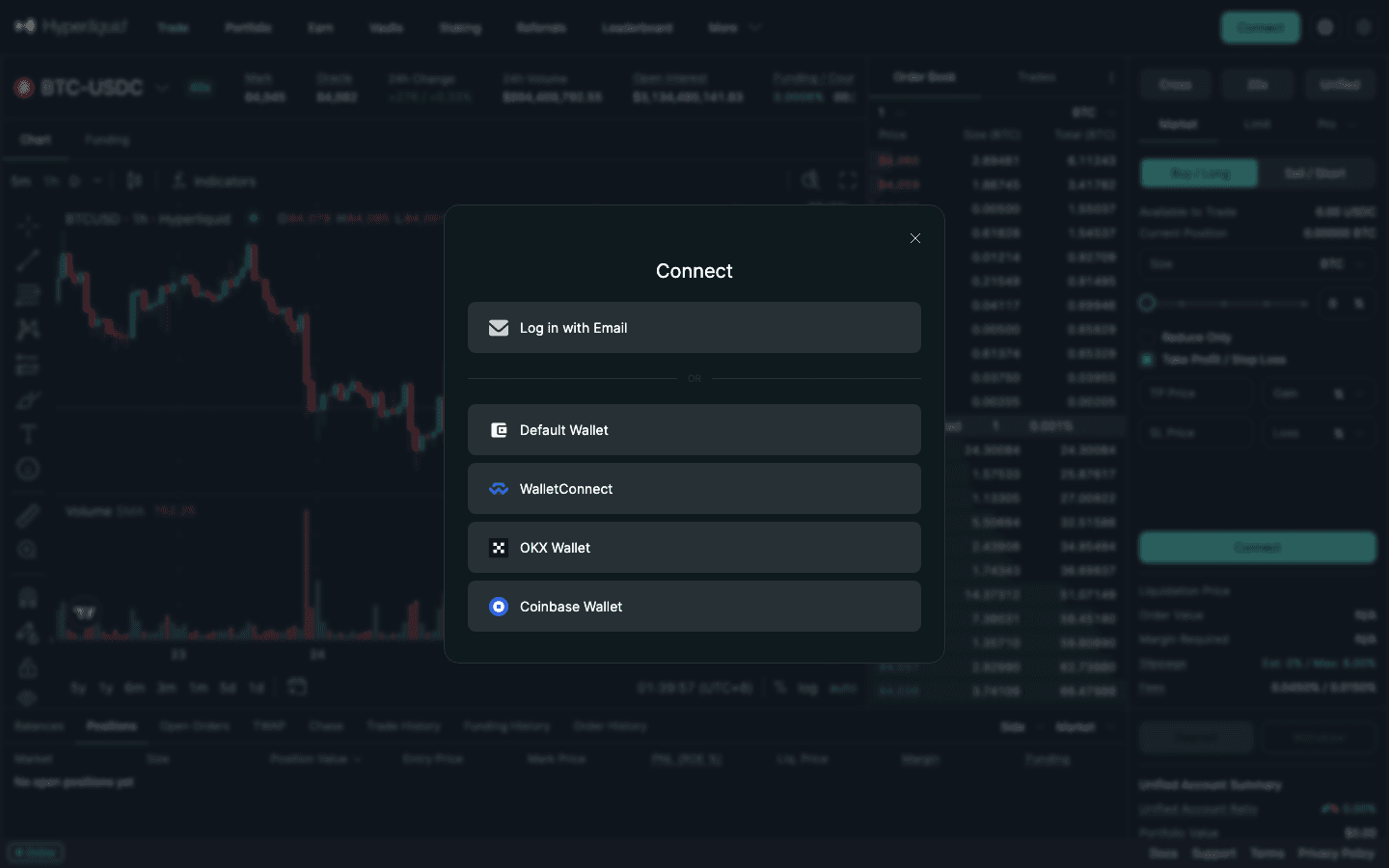
Option A: log in with email
- Click Log in with Email, enter your address and press Submit. A 6-digit code arrives within seconds; type it in.
- You are logged in. Behind the login Hyperliquid has created an embedded wallet for you (the login window is provided by Privy). It is a real address: you can view it in the top-right menu, and you can later click Export Email Wallet in the settings dropdown to copy its private key into Rabby or MetaMask.
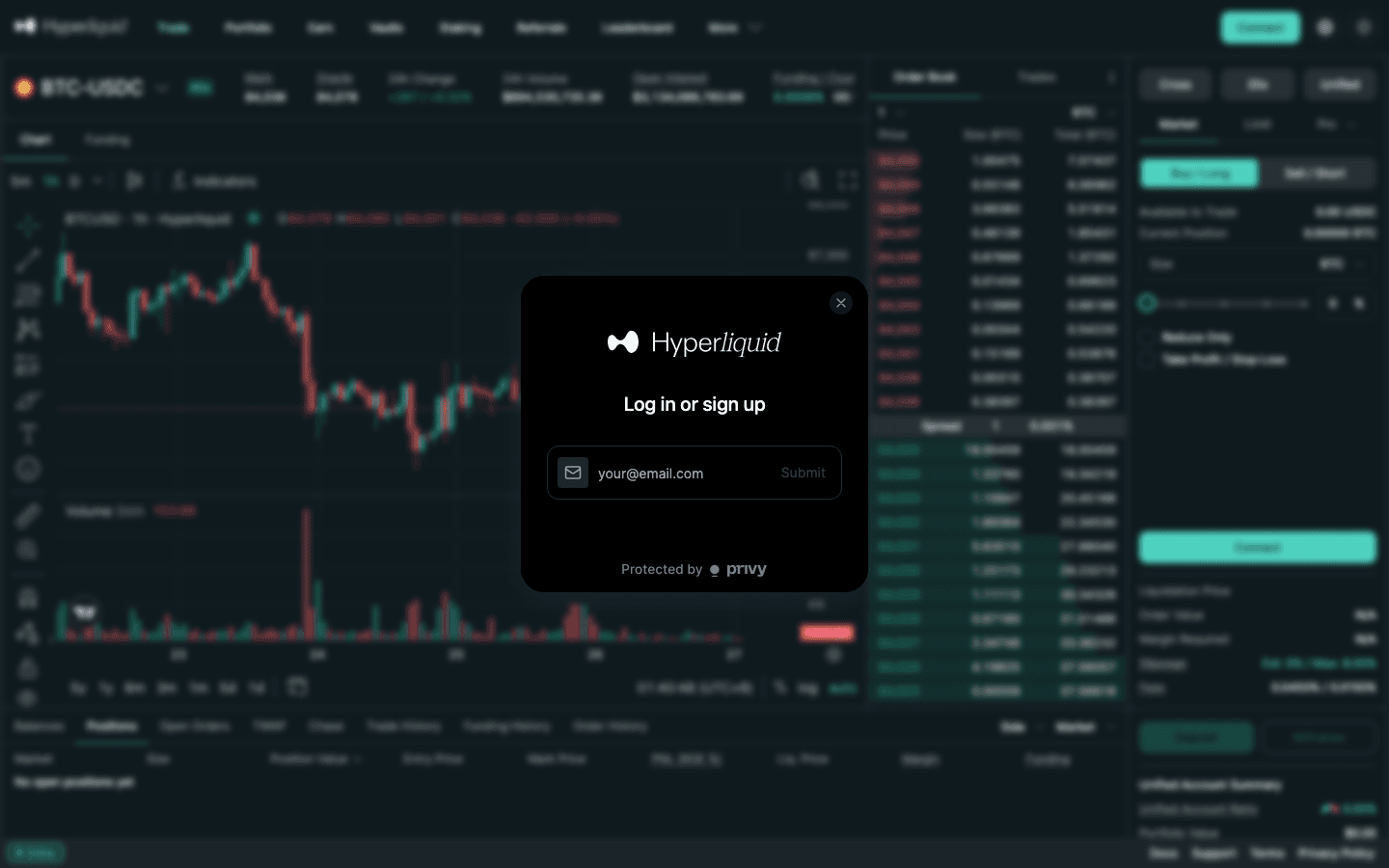
Option B: connect a wallet
- Choose your wallet from the list. A pop-up in the extension (or the mobile wallet app) asks to connect to Hyperliquid — approve it.
- Your address is now your account. Nothing else is created; the same address on another device shows the same balances.
Which to pick? Email is faster and fine for a first deposit. A hardware-backed wallet is safer for a balance you care about. You can always move funds between the two later, since both are ordinary addresses.
4. Step 2: Enable trading
With a wallet login the order form shows a single button: Enable Trading. Click it and your wallet asks you to sign a message. This is a signature, not a transaction — it costs nothing and moves nothing; it simply authorises the front-end to send orders on behalf of your address. Sign it once and the order form unlocks. Email accounts skip this step entirely.
If the button does nothing: allow pop-ups for the site, make sure the wallet is unlocked, and try again. The network your wallet is on does not matter for the signature; it only matters when you deposit.
5. Step 3: Enter your referral code (before your first trade)
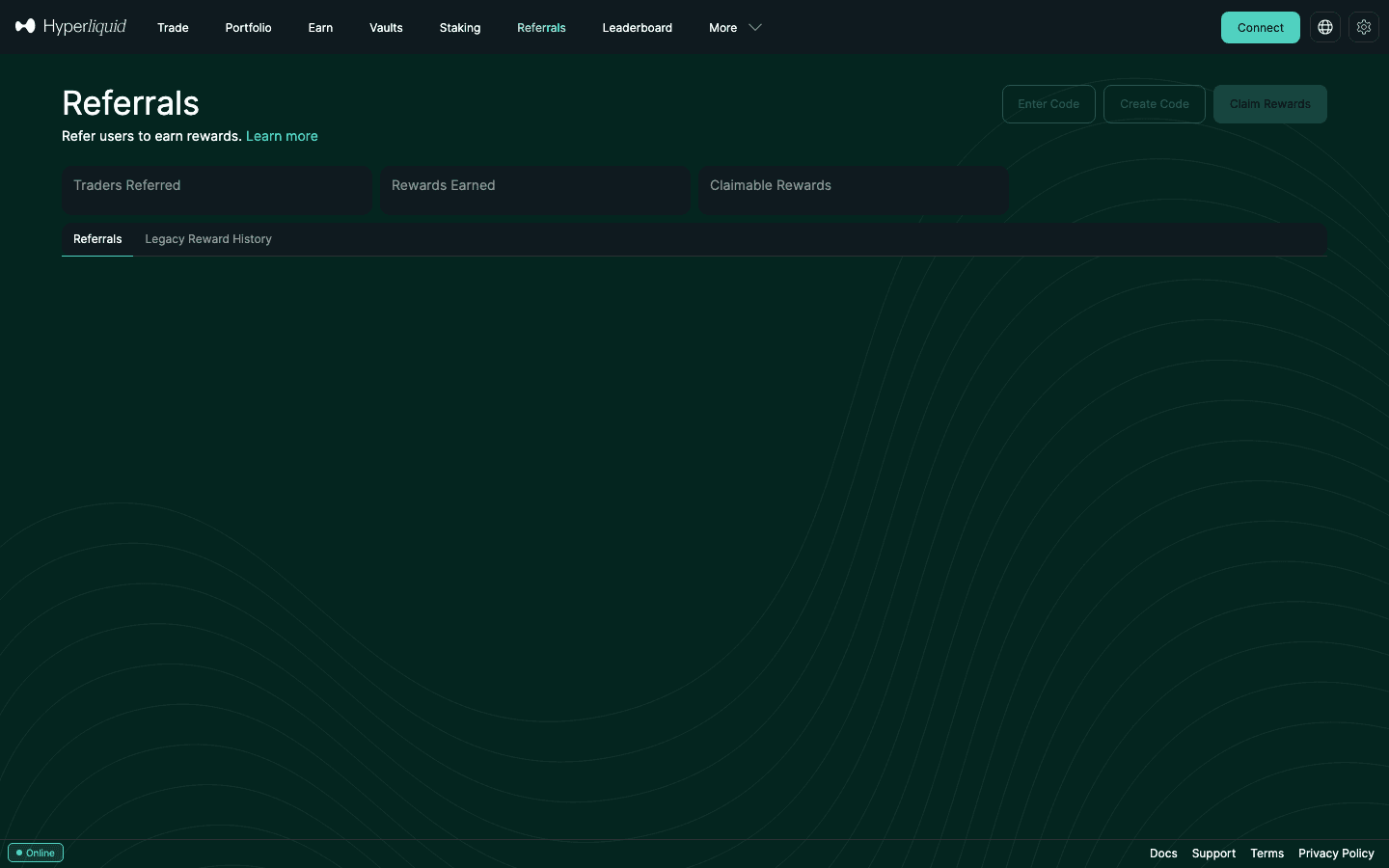
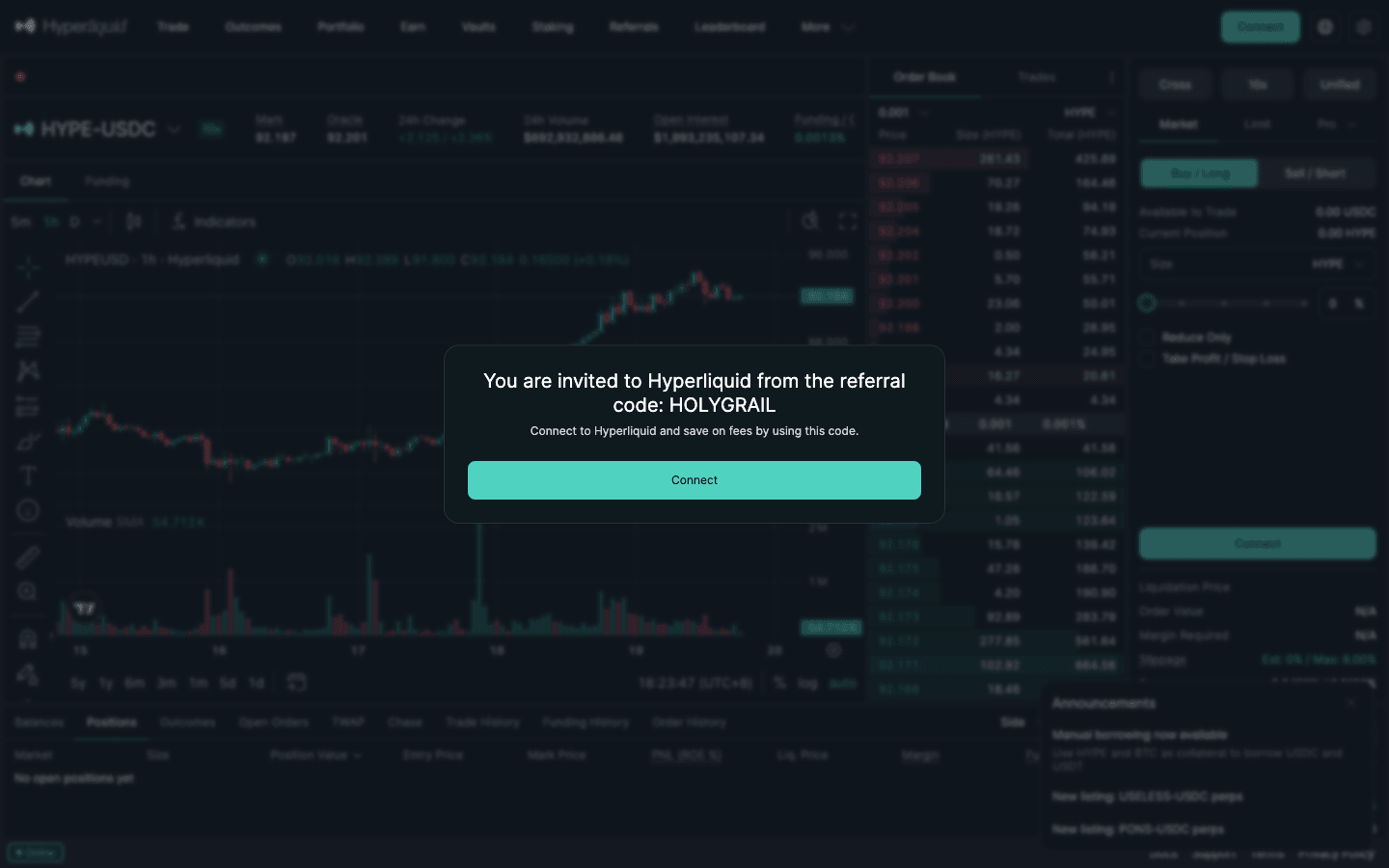
Open the Referrals tab, click Enter Code and type HOLYGRAIL, or arrive through our referral link, which shows an invitation prompt you accept with one click. Per the official docs, a referral code gives 4% off trading fees on your first $25M of volume. It covers trades placed after the code is set, so enter it before your first order; Hyperliquid stops accepting a code once your account passes $10,000 of volume, and a code cannot be changed once set. It does not apply to vaults or sub-accounts, and costs you nothing. Details and the exact maths: Hyperliquid referral code guide.
6. Step 4: Deposit USDC
Click Deposit (bottom right of the trade page). The window shows the supported routes and, for email accounts, a deposit address and QR code:
| Route | Notes | Minimum | Arrival |
|---|---|---|---|
| USDC on Arbitrum (Deposit button, wallet login) | Type the amount and confirm in your wallet; the default CCTP route deducts a flat 0.2 USDC Circle fee | 5 USDC | About a minute |
| USDC on Arbitrum / Ethereum / Base / Polygon (email login) | Send from an exchange or wallet to the deposit address shown; arrives as USDC on HyperCore | 5 USDC | Minutes (Ethereum gas is a few dollars) |
| Direct from a CEX | Some exchanges offer Hyperliquid (HyperCore or HyperEVM) as a USDC withdrawal network; funds sent to HyperEVM must be moved to HyperCore in Portfolio | 5 USDC | Minutes |
| Native BTC, ETH, SOL, AVAX, ZEC and others (via Unit) | Credited to your spot balance; sell for USDC before trading perps | 0.0003 BTC · 0.007 ETH · 0.12 SOL · 1.5 AVAX · 120 ENA (per-asset, see docs) | Chain confirmation time |
| Card / bank (fiat on-ramp) | Run by an independent provider, Swapped.com; its own payment methods, countries and fees | Set by the provider | Provider-dependent |
For a wallet login on Arbitrum you type an amount and confirm the transaction in the wallet; for email login you send USDC from an exchange or another wallet to the address shown. Deposits are free on Hyperliquid's side — you pay the source chain's gas and, on the default Arbitrum route, Circle's 0.2 USDC forwarding fee. Respect the minimums: the official docs state that USDC deposits below 5 USDC are not credited (a wallet account loses them outright; an email account gets sub-5 USDC redirected to its email wallet and loses anything under 1 USDC), and each native asset has its own floor — 0.0003 BTC, 0.007 ETH, 0.12 SOL, 1.5 AVAX, 120 ENA — below which the deposit is lost.
Where the money shows up. The order form shows your account mode next to Cross and the leverage button. In the default Unified account (the docs recommend it for most users) there is one USDC balance that pays for perps and spot alike, so nothing needs moving. In Standard mode, perps and spot have separate balances: deposits land in Perps, and you move USDC between the two with the transfer button in the balances panel. Chain-by-chain instructions are in the Hyperliquid deposit guide. Holding USDC on Ethereum, Base or Solana, or ETH instead of USDC? Our guide on how to bridge to Hyperliquid compares the bridges, their fees and the HyperCore vs HyperEVM trap.
7. Step 5: Read the trade page
The Trade tab is where everything happens. Reading it top to bottom:
- Market header: the pair (for example BTC-USDC), its max leverage badge (40x for BTC), mark price and oracle price, 24h change and volume, open interest, and the current funding rate with a countdown to the next hourly payment.
- Chart: a TradingView chart; TP/SL and limit orders can be dragged directly on it.
- Order book and trades: bids in green, asks in red, cumulative size per level, and the spread (for BTC typically a single $1 tick).
- Order form: margin mode (Cross / Isolated), leverage and account mode buttons, then Market / Limit / Pro tabs, Buy/Long or Sell/Short, size (in the coin, USDC or a percentage of available margin), Reduce Only, and a Take Profit / Stop Loss checkbox. Below it: liquidation price, order value, margin required, slippage and the fee line (0.0450% / 0.0150% at the base tier).
- Bottom panel: Balances, Positions, Open Orders, TWAP, Chase, Trade History, Funding History and Order History. Deposit and Withdraw buttons sit at the bottom right.
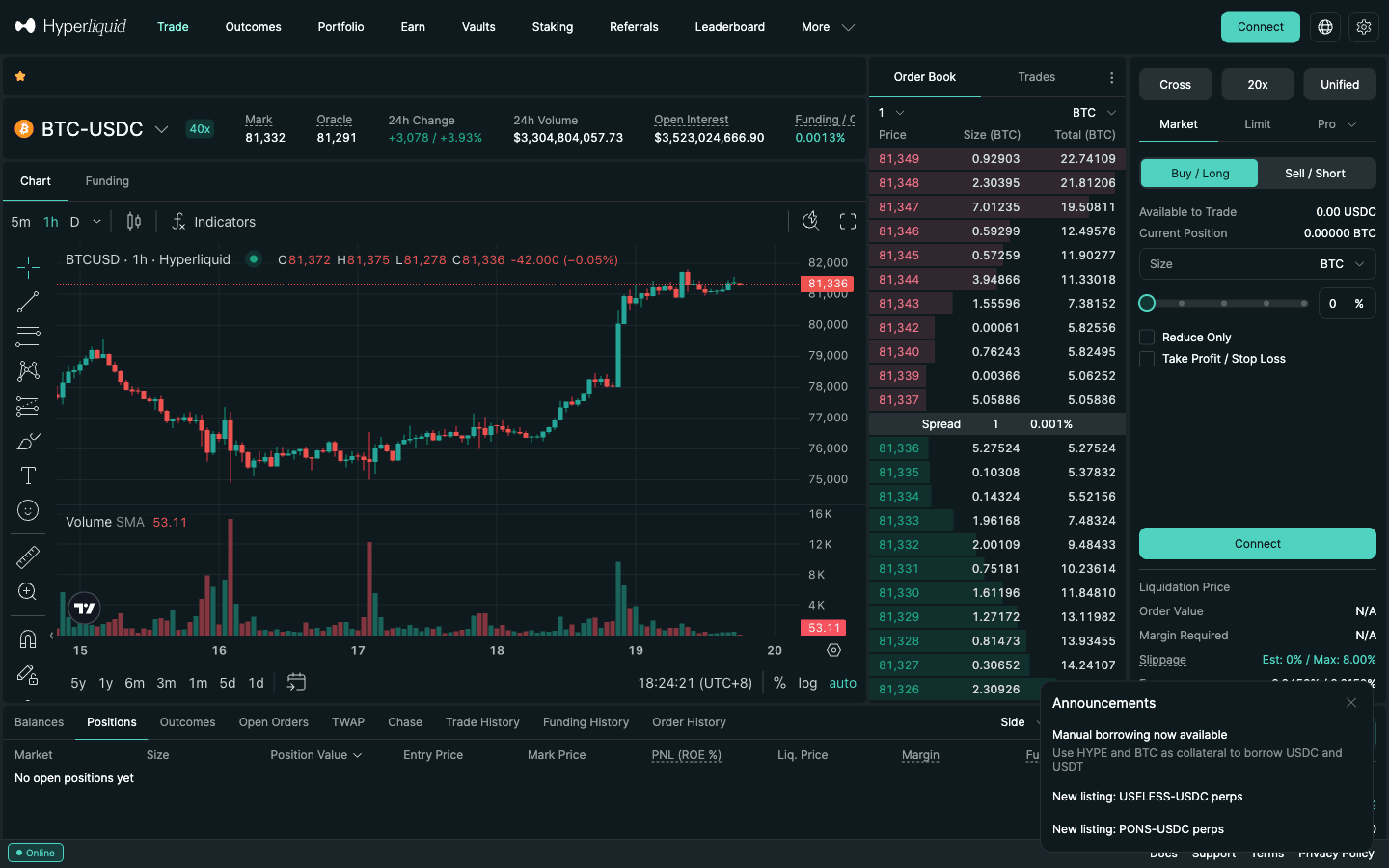
8. Step 6: Place your first perpetual trade (worked example)
A perpetual lets you go long or short a coin with USDC as collateral, without owning the coin. Say you deposit $1,000 USDC and expect BTC, at about $84,000 when the screenshots below were taken (September 27, 2026), to rise.
Haven’t set a referral code yet? Set HOLYGRAIL before your first trade. The discount only covers trades placed after the code is set. Open Referrals → Enter Code and type HOLYGRAIL (step 3): 4% off your fees on your first $25M of volume, accepted only while your account has traded $10,000 or less, and it cannot be changed once set.
- Select the market. Click the pair name in the header and choose BTC.
- Set margin mode to Isolated. Click Cross above the order form and tick Isolated, so this position can only lose the margin you assign to it.
- Set leverage. Click the leverage button (it shows the current setting, for example 20x) and drag the slider to 5x. Leverage can be any integer from 1 up to the market's cap (40x on BTC), but the cap is not a suggestion.
- Choose the order type. Market for an immediate fill; Limit to name your price and pay the lower maker fee if it rests.
- Enter the size. Type 5,000 in USDC (or use the slider). At 5x, margin required = 5,000 ÷ 5 = $1,000 — your whole deposit. A safer first trade uses 2,000–3,000 so there is margin to spare. The smallest order Hyperliquid accepts is $10 of position value (see Hyperliquid minimum order size by pair).
- Attach a stop-loss (next section).
- Check the ticket — liquidation price, margin required and fee — then click Place Order and Confirm. You can tick "Don't show this again" to skip the confirmation later.
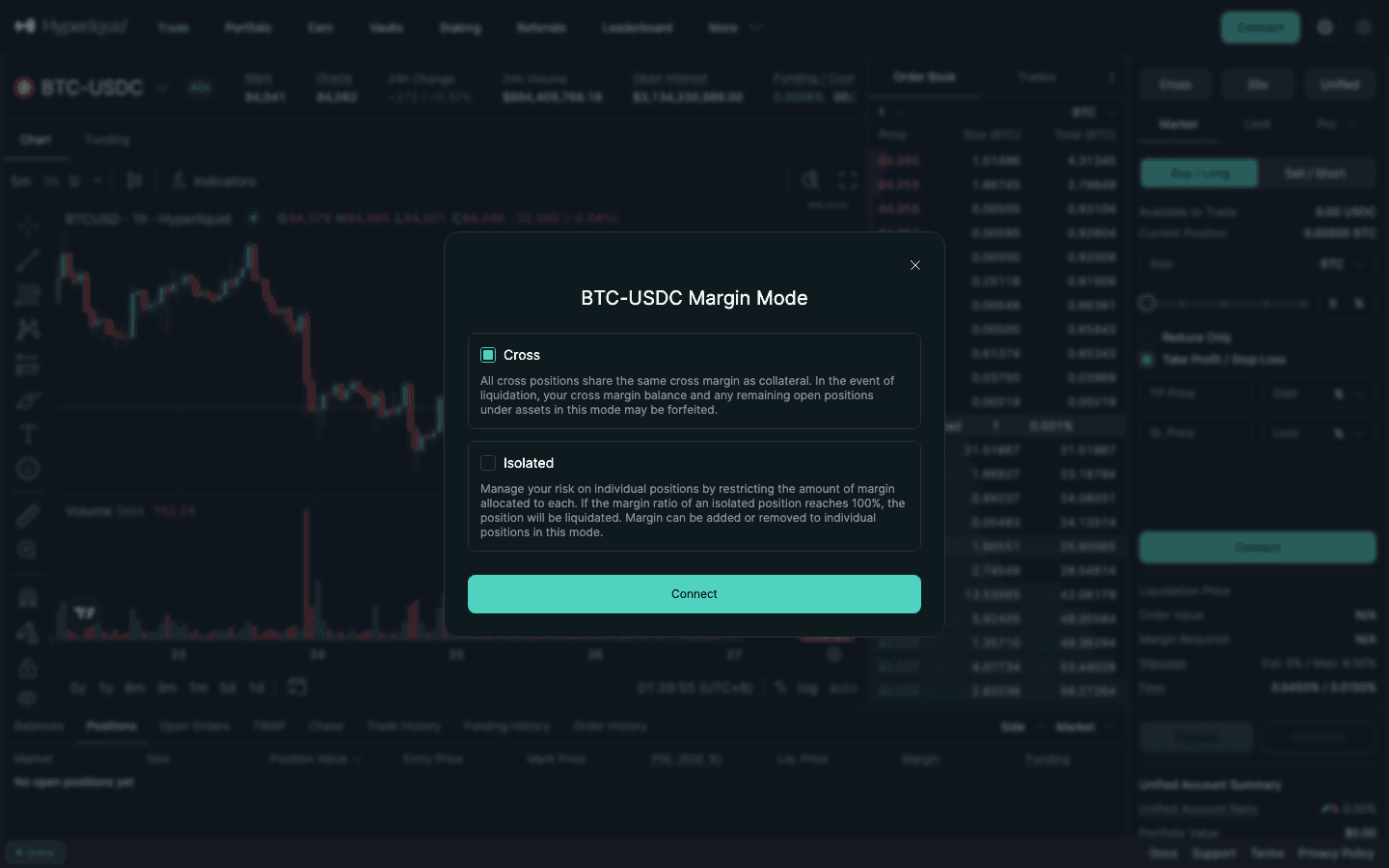
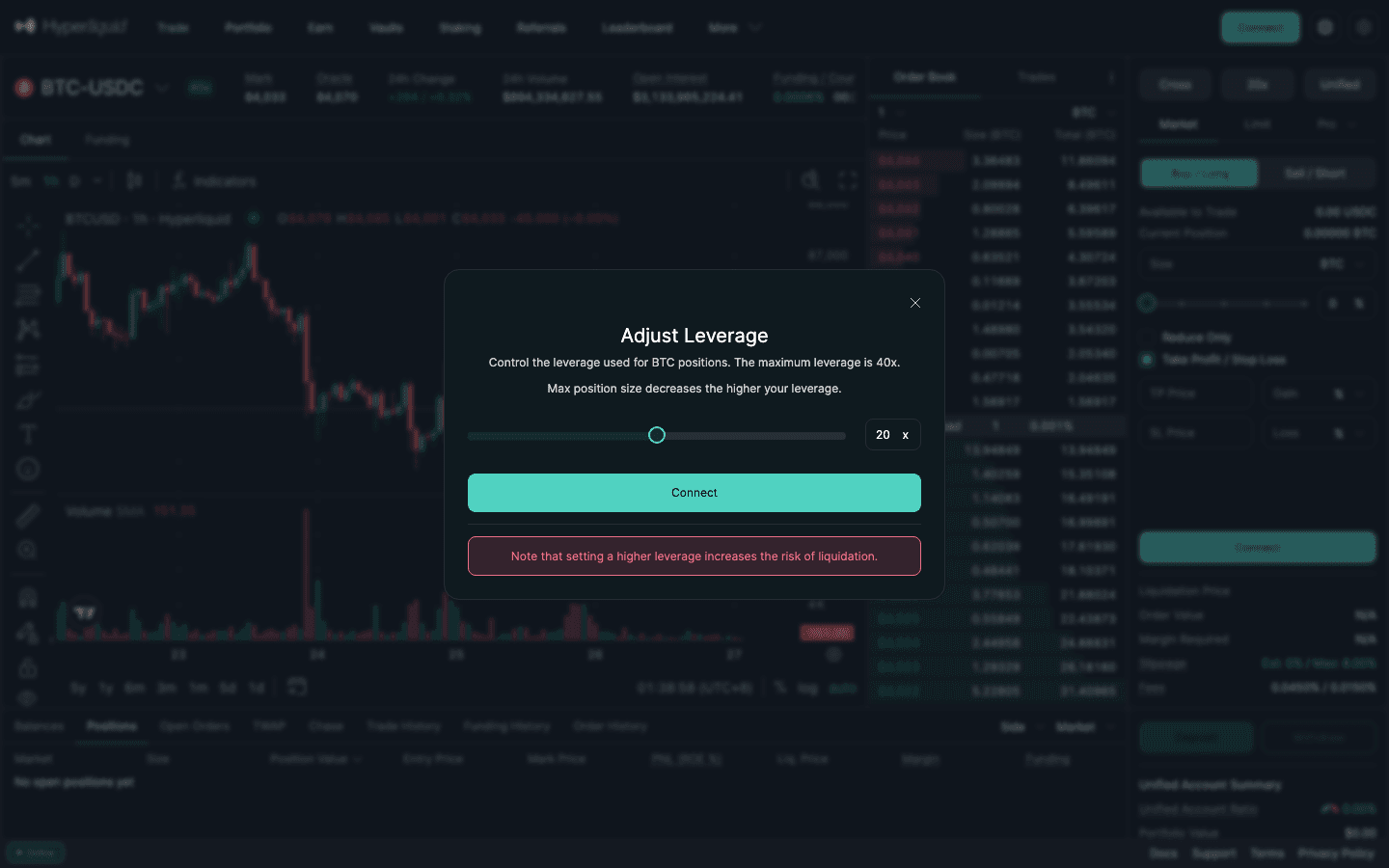
What the numbers mean. A $5,000 market buy costs 0.045% = $2.25 in fees (another $2.25 to close at market; $0.75 if you close with a resting limit). Maintenance margin on Hyperliquid is half the initial margin at max leverage: for BTC (40x) that is 1.25% of notional, so this position is liquidated when its equity falls below about $62.50 — a loss of roughly $937 on the $1,000 of margin, which at 5x is a drop of about 19% to roughly $68,000. An $81,500 stop closes it long before that. Full formulas: liquidation price calculator.
How to set a take-profit and stop-loss on Hyperliquid
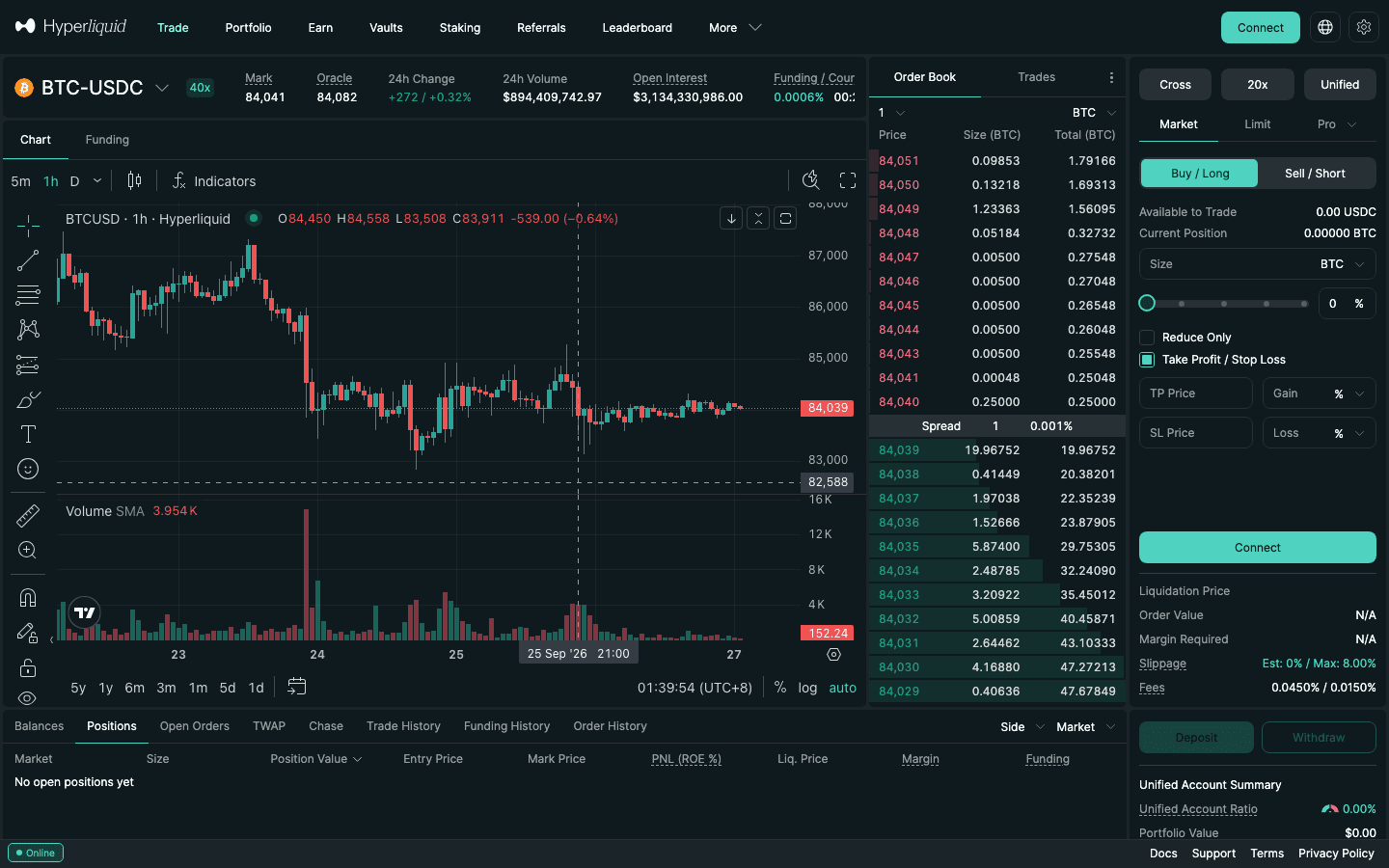
Tick Take Profit / Stop Loss in the order form. Four fields appear: TP Price and Gain %, SL Price and Loss %. Type either the price or the percentage and the other fills in. In the example, a stop at $81,500 and a take-profit at $88,000. Both trigger on the mark price, not the last trade, so a single wick on another venue will not stop you out.
These are market TP/SL orders (10% slippage tolerance) sized to the order they are attached to. They are only placed once that order fills completely: if you cancel a partly filled limit order, its TP/SL is cancelled too, so check the Positions tab after a limit entry. For a limit-price exit or a partial TP/SL, set TP/SL on the open position in the Positions tab, or use a Stop Limit / Take Limit order. The trailing stop tutorial covers stops that follow the price.
9. Step 7: Manage and close the position
- Positions tab shows size, position value, entry price, mark price, PnL (ROE %), liquidation price, margin and accumulated funding. Click the position to add or remove isolated margin, adjust TP/SL, or close part of it.
- Funding is paid or received every hour between longs and shorts; Hyperliquid takes no cut. The interest component is 0.00125% per hour (0.01% per 8 hours). When the perp trades above spot, longs pay shorts. On a $5,000 long at the baseline rate that is $0.0625 an hour — negligible — but on a crowded altcoin rally it can exceed your trading fee many times over. Check the header rate before holding overnight. More in the funding rate guide.
- Closing: click Market or Limit next to the position in the table, or place an opposite-side Reduce Only order. Realised PnL is added to your USDC balance at once.
- Cross vs isolated later: once you are comfortable, cross margin lets unrealised profit on one position back another. The trade-off is explained in cross vs isolated margin.
10. Step 8: How to buy HYPE on Hyperliquid (spot)
Perps are contracts; if you want to own the HYPE token itself, buy it on the spot market:
- Click the pair name in the header, switch the market list to Spot and choose HYPE/USDC.
- In a Standard account, move USDC from Perps to Spot first; in the default Unified account your USDC is already available.
- Click Buy, enter the amount in HYPE or USDC and place a market or limit order. Spot fees at the base tier are 0.070% taker / 0.040% maker, and spot volume counts double toward your fee tier.
- Your HYPE appears under Balances. From there you can hold it, stake it (below) or send it to another address.
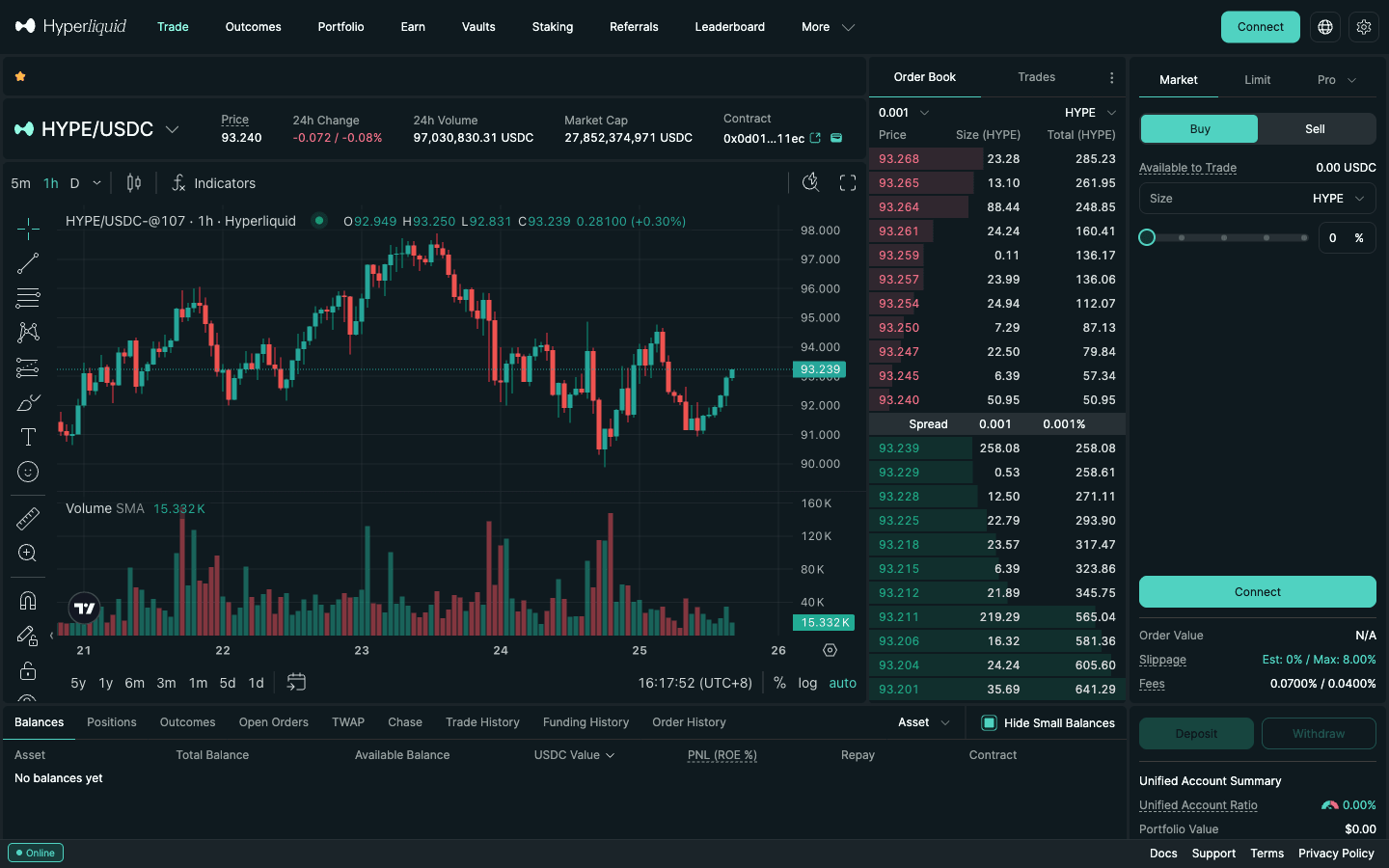
What HYPE is, its supply and where else it trades are covered in the HYPE token guide; spot order mechanics are in the spot trading guide. If you only want price exposure with leverage, the HYPE perp works like the BTC example above (maximum 10x).
11. Step 9: Withdraw
Click Withdraw at the bottom right of the trade page, choose the asset and destination chain, enter the amount and sign. USDC to Arbitrum carries a flat 0.2 USDC fee plus a tiny HyperEVM gas fee (Circle CCTP route) and should arrive within 5 minutes; other assets pay their native chain's network fee. Open positions' margin cannot be withdrawn, and unrealised profit can only be taken out while the remaining margin stays at or above the initial requirement and 10% of your total notional. Step-by-step: how to withdraw from Hyperliquid.
12. Trading on your phone: does Hyperliquid have an app?
Yes, in two forms. The web app at app.hyperliquid.xyz adapts to a phone screen: Markets, Trade and Account tabs sit at the bottom, and the Trade tab puts the order type, Cross/Isolated, leverage, Buy/Long and Sell/Short and the TP/SL checkbox next to a compact order book. On Android there is also an official app on Google Play published by Hyperliquid Corp. There is no official iOS app; on iPhone, open the web app in Safari and add it to the Home Screen. Setup, login and the Android download are in our Hyperliquid app guide.
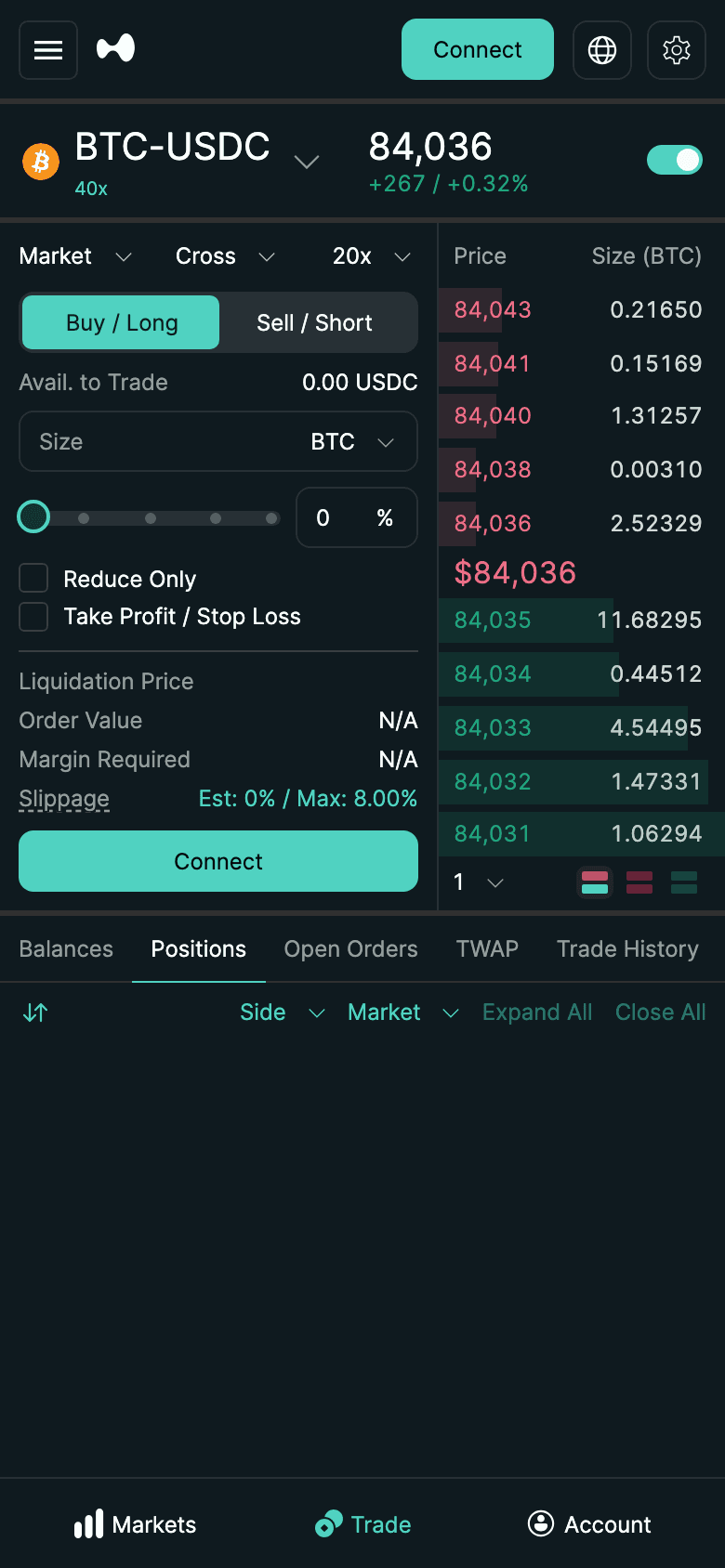
Third-party apps. Besides the official web app, Hyperliquid's onboarding docs name Dexari, MetaMask and Phantom (checked October 15, 2026); Based and Liquid also trade on Hyperliquid. They are convenient native apps, but they usually add a builder fee on top of Hyperliquid's (on perps: Based +0.025%, Liquid +0.05%, fomo +0.05%; the protocol cap is 0.1%). Your Hyperliquid referral code follows your account into apps you connect with the same wallet, such as Based and Liquid (MetaMask publishes only an all-in rate, so the effect of a code there is not published): the referral discount also applies to orders placed through apps with a builder code (checked against mainnet fills on October 1, 2026), so with HOLYGRAIL set you pay 4% less on Hyperliquid's part of the fee; the builder fee itself is not discounted. The catch: apps such as Phantom often set their own Hyperliquid referral code on accounts that have none, so enter a code on Hyperliquid before you start using an app. A code cannot be added after $10,000 of volume either: join with HOLYGRAIL using the same wallet before you connect any app. fomo is different: it has no wallet connection (Apple, Google or email only) and creates its own wallet and Hyperliquid account for you, so HOLYGRAIL cannot apply there; use fomo's own referral code instead (ours: DailyWiseKite). Some apps also run their own referral program on top: Based, Liquid and fomo (our links). For the lowest cost, trade in the official web app with a Hyperliquid code.
Trading on your phone? HOLYGRAIL first, then Based
Based is a native Hyperliquid app for iPhone, Android, web and desktop, with the lowest add-on fee among the full Hyperliquid phone apps we compare (+0.025% on perps). To keep Hyperliquid's 4% referral discount inside it, do both steps with one wallet.
- Join Hyperliquid with
HOLYGRAILfrom the wallet you will use on your phone. In the Rabby or MetaMask app, open its browser, go to app.hyperliquid.xyz/join/HOLYGRAIL, connect and confirm the code. That takes 4% off Hyperliquid's part of every fee for your first $25M of volume, and a code can only be added while the account has traded $10,000 or less. Step 1: join Hyperliquid with HOLYGRAIL → - Open Based with that same wallet. Our link opens app.based.one with Based code
HOLYGRAILfilled in (Based's own program, separate from Hyperliquid's). Link the wallet from step 1 instead of signing in with email or Google: those make a new wallet, which is a different Hyperliquid account without the discount. In the phone app, choose Connect Mobile to link your existing wallet (Based docs, checked October 19, 2026). Step 2: open Based →No Connect Mobile option? Based's route from a computer
From a computer: open app.based.one/accounts in a desktop browser, choose Add Hyperliquid account and connect the wallet, then scan the QR code shown on the computer with the phone app via Home → profile picture → Create new wallet → Link to Hyperliquid wallet. Despite the menu name, this links the wallet's existing Hyperliquid account instead of creating a new one; a wallet linked this way can trade, but deposits and withdrawals are done on app.hyperliquid.xyz.
Why this order: apps such as Phantom often set their own Hyperliquid referral code on accounts that have none, so enter a code on Hyperliquid before you start using an app.
What it costs. Based adds a 0.025% builder fee on top of Hyperliquid's fee on perps: 0.0682% taker with HOLYGRAIL (0.0432% Hyperliquid + 0.025% Based), 0.070% without. That is about $0.68 per $1,000 traded, against $0.43 on app.hyperliquid.xyz directly. The 4% only comes off Hyperliquid's part; HOLYGRAIL does not discount Based's builder fee. The cheapest way to trade on a phone is still the official web app (or the official Android app), which has no builder fee: Hyperliquid app guide.
Both are our referral links: Hyperliquid pays us 10% of the Hyperliquid fees of people who join with HOLYGRAIL, and Based pays us 60% of its builder fee from people who sign up with our Based code. Based documents no discount for you from its code, and it does not raise your fee.
13. Order types you will actually use
| Order | What it does | Use it for |
|---|---|---|
| Market | Fills now at the best available price (max slippage shown in the ticket, default 8%) | Getting in or out immediately |
| Limit | Rests on the book at your price or better; pays the lower maker fee if it rests | Most entries and exits |
| Stop Market / Stop Limit | Activates when the trigger price is crossed | Stop-losses, breakout entries |
| Take Market / Take Limit | Activates when price reaches a favourable trigger | Taking profit at a level |
| Trailing Stop | Trigger follows the best mark price by a fixed distance or % | Letting winners run |
| Scale | Several limit orders spread across a price range | Averaging into a position |
| TWAP | Splits a large order into sub-orders at least 30 s apart, 5 min to 7 days | Big size without moving the book |
| Chase | Post-only limit that re-prices to stay at the top of the book | Maker fills without babysitting |
Time-in-force options on limit orders are GTC (rests until filled or cancelled), Post Only / ALO (rejected if it would take liquidity — guarantees the maker fee) and IOC (fills what it can, cancels the rest). Deeper dive: Hyperliquid order types.
14. What trading on Hyperliquid costs
| Cost | Amount (base tier) | Notes |
|---|---|---|
| Perp taker fee | 0.045% | 0.0432% with a referral code; falls with 14-day volume |
| Perp maker fee | 0.015% | 0% above $500M 14-day volume; rebates for large makers |
| Spot fees | 0.070% / 0.040% | Spot volume counts double toward your tier |
| HIP-3 perps (stocks, commodities) | 0.009% taker in growth mode; 0.09% otherwise | Set by each market's deployer; shown in the fee line |
| Gas on orders | None | Place, cancel, modify, TP/SL, funding, liquidation — all free |
| Deposit | Source-chain gas (+ 0.2 USDC on the default Arbitrum CCTP route) | Cents on Arbitrum or Base |
| Withdrawal (USDC → Arbitrum) | 0.2 USDC flat + tiny HyperEVM gas (HYPE) | Deducted from the amount |
| Funding | Variable, hourly | Peer-to-peer; 0.00125%/h interest component |
Staking HYPE cuts fees a further 5–40% depending on tier. Every rate, with tiers and examples, is in Hyperliquid fees explained.
Hyperliquid Fee Calculator — Your Hyperliquid fee per trade, month and year at your tier, with HYPE staking, the HOLYGRAIL discount and app builder fees. — Open the calculator →15. Where is Hyperliquid allowed? US and restricted regions
Hyperliquid has no sign-up form and no KYC, so nothing checks your country when you connect. The rules are in the interface Terms of Use (last updated June 15, 2026; we re-read them on October 15, 2026, unchanged):
- §1.6 Restricted Persons may not use the interface: (a) people and entities residing, located, incorporated or registered in the United States or Ontario, Canada; (b) those in jurisdictions under economic sanctions or export controls; (c) citizens of those sanctioned territories, wherever they live.
- §1.7 adds a separate "Excluded Persons" list for outcome (prediction) markets, which Hyperliquid designates from time to time.
- §1.9 makes you responsible for checking that leveraged, derivative and outcome trading is legal where you live, and you confirm you are not using any method to disguise your location.
So: US residents cannot use Hyperliquid, and a VPN does not change that; it breaches the terms. We do not cover workarounds. Other countries are not named in the terms, but local law on crypto derivatives still applies to you, and taxes apply wherever you live; our Hyperliquid restricted countries guide quotes §1.6 word for word and adds notes on Canada, the UK, Singapore and Japan. "No KYC" is not anonymity either: every trade and position is public on-chain. More on what no-KYC does and does not mean in our no-KYC exchange guide.
16. Beyond your first trade: testnet, vaults, staking and HIP-3
Practise on testnet first
app.hyperliquid-testnet.xyz is a copy of the app with mock money. Its faucet at /drip gives 1,000 mock USDC, but only to addresses that have already deposited on mainnet; email logins get a different address on testnet, so export the email wallet into an extension first. This is Hyperliquid's demo account; there is no funded or prop account from Hyperliquid itself. Walkthrough: Hyperliquid testnet guide (faucet, test HYPE, chain ID). Testnet practises the order ticket, not a strategy: to test a strategy on past prices, download candles and funding from the API and follow our guide to backtest a Hyperliquid strategy.
Vaults (HLP)
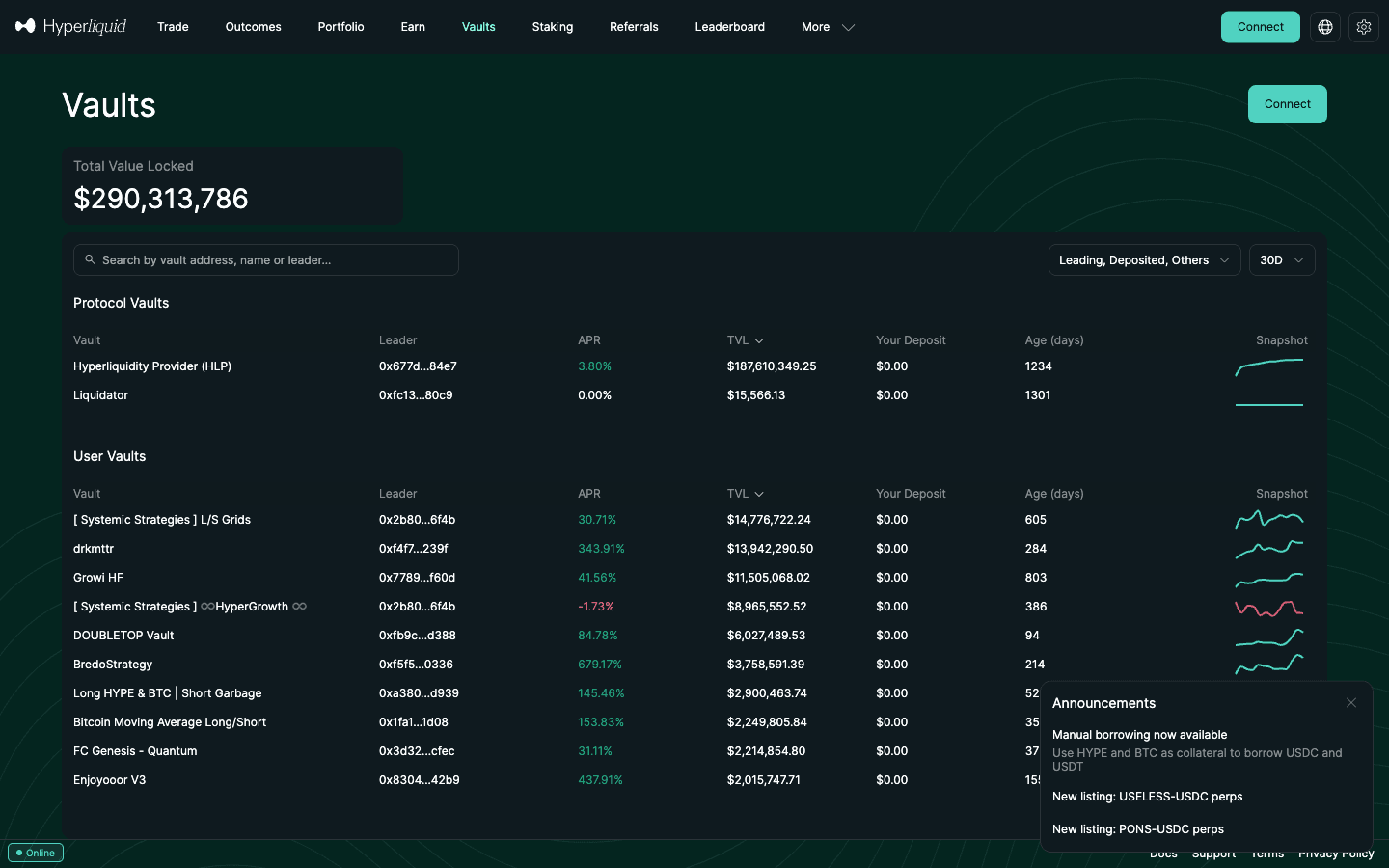
The Vaults page lists HLP, the protocol's market-making vault, and user vaults run by individual traders. Pick one, click Deposit and enter an amount. HLP deposits can be withdrawn 4 days after your latest deposit; user vaults lock for 1 day. Returns can be negative. Guide: Hyperliquid vaults.
Staking HYPE
On the Staking page, transfer HYPE from spot to your staking balance, choose a validator and delegate. Delegations lock for 1 day, and unstaking back to spot goes through a queue of 7 days. Staked HYPE earns validator rewards and a 5–40% fee discount by tier. Guide: Hyperliquid staking.
HIP-3: stock, index and commodity perps
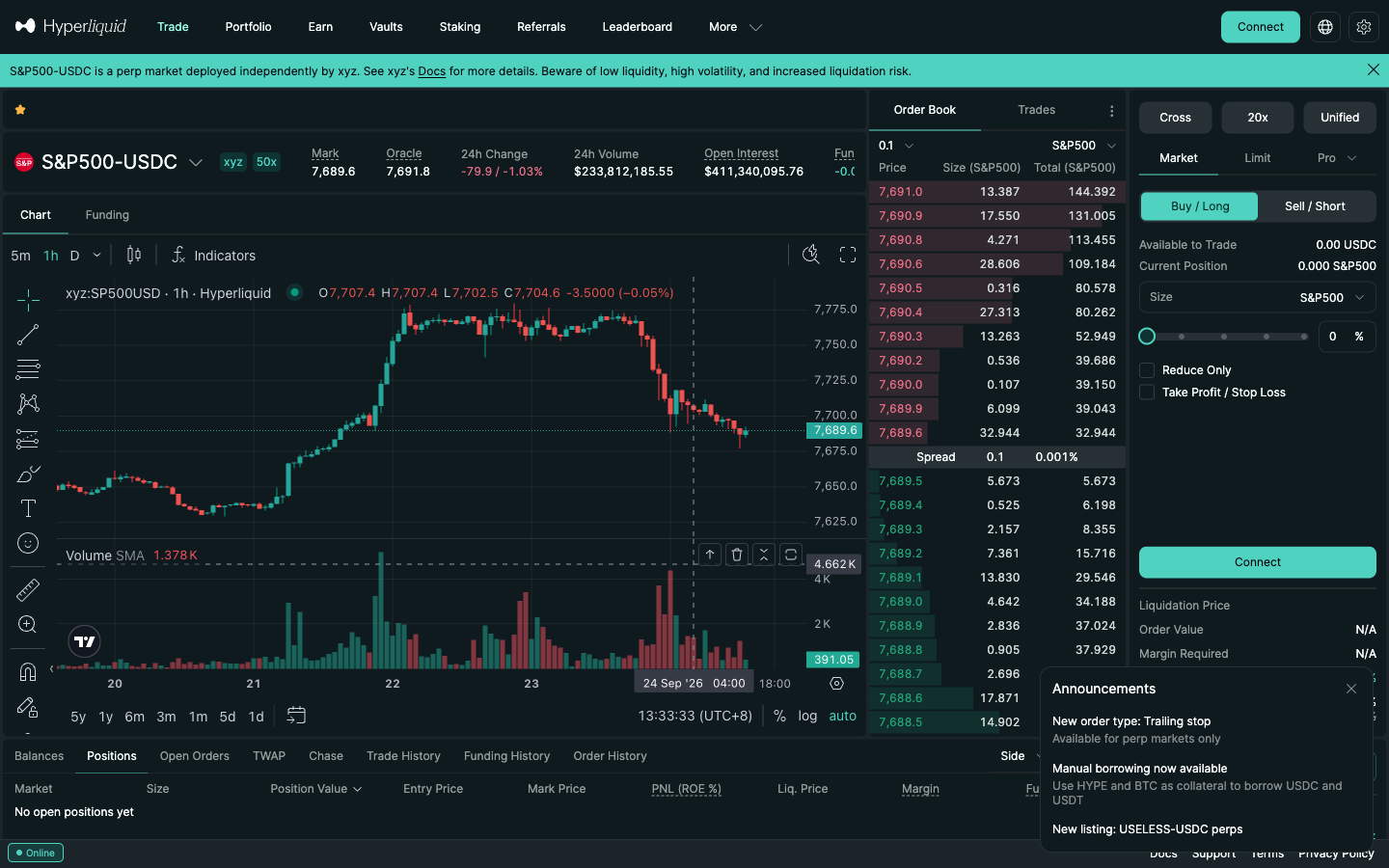
HIP-3 markets are perps deployed by third parties on Hyperliquid, such as the stock, index and commodity perps on trade.xyz (for example S&P500-USDC). They appear in the same market selector and trade from the same account. Fees are set per deployer: at the base tier, trade.xyz's growth-mode markets charge 0.009% taker, and a HIP-3 market outside growth mode typically 0.09%. Check the fee line before trading. Guide: trade.xyz stock perps.
17. Eight beginner mistakes to avoid
- Trading before entering a referral code. Trades placed before the code is set pay full fees, and once your account passes $10,000 of volume Hyperliquid no longer accepts a code, so you lose 4% off for up to $25M of volume.
- Using the max leverage badge as a target. 40x means a 2.5% move wipes your margin. Start at 2–5x.
- Cross margin on day one. One bad position can consume collateral you thought belonged to another.
- No stop-loss. If a position reaches backstop liquidation, its remaining maintenance margin is not returned to you; a stop-loss you set yourself exits earlier and keeps what is left.
- Ignoring funding. Check the rate and countdown in the header before holding through a hot rally.
- Depositing an unsupported token. Only send the assets the deposit window lists, on the chains it lists.
- Sending less than the minimum. Under 5 USDC (or under the per-asset floor for native deposits, e.g. 0.0003 BTC) is not credited and cannot be recovered. Test with a small but above-minimum amount.
- Typing the domain from memory. The trading site is app.hyperliquid.xyz; bookmark it. Lookalikes such as "hyperliguid.xyz" exist, and real support never DMs you first (official links).
18. Is Hyperliquid the right place for you?
If you want CEX-style perps with self-custody, no KYC and the deepest on-chain BTC/ETH liquidity, yes. If zero taker fees matter more, look at Lighter (0% standard tier); if you need 100x+ leverage, Aster goes higher than Hyperliquid's 40x BTC / 25x ETH / 20x SOL caps. Fund it from an exchange or a wallet, or through the third-party card on-ramp in the Deposit window. The full verdict is in the Hyperliquid review.
Start trading with 4% lower fees
Open Hyperliquid with code HOLYGRAIL — the discount is applied to your first $25M of volume automatically.
FAQ
How do I use Hyperliquid for the first time?
Go to app.hyperliquid.xyz, click Connect and log in with your email (6-digit code) or connect an EVM wallet such as Rabby or MetaMask, click Enable Trading and sign the gas-free message, enter a referral code (HOLYGRAIL gives 4% off your first $25M of volume), deposit USDC (Arbitrum is the usual route; minimum 5 USDC), pick a market on the Trade page, set leverage and margin mode, enter a size, and click Place Order. The whole flow takes under ten minutes.
How do I trade on Hyperliquid step by step?
1) Connect: open app.hyperliquid.xyz and log in with email or a wallet (wallets also click Enable Trading). 2) Enter a referral code on the Referrals page, because the discount only covers trades placed after it is set. 3) Deposit USDC: Arbitrum USDC through the Deposit button, at least 5 USDC. 4) Choose a market and set isolated margin with a modest leverage. 5) Enter a size, add a stop-loss and click Place Order, then Confirm.
Where are the official Hyperliquid docs and Discord?
The docs are at hyperliquid.gitbook.io/hyperliquid-docs (the "Docs" link in the app footer) and the Discord server is discord.gg/hyperliquid. Support only happens in the Discord "open-ticket" channel or through the email form linked from the docs' Support Guide, and replies can take up to 48 hours. Anyone who messages you first claiming to be Hyperliquid support is an impersonator. The network status page is hyperliquid.statuspage.io (checked October 15, 2026). All official links →
Where is Hyperliquid allowed?
The interface Terms of Use (last updated June 15, 2026, §1.6; re-read October 15, 2026) exclude "Restricted Persons": people and companies residing, located or registered in the United States or Ontario, Canada, anyone in a jurisdiction under economic sanctions or export controls, and citizens of those sanctioned territories wherever they live. In Canada only Ontario is named, so the other provinces are not excluded by the Terms, though their own securities rules still apply. Other countries are not named, but §1.9 makes you responsible for checking that leveraged and derivative trading is legal where you live and forbids disguising your location. Restricted countries, incl. Canada →
Can I use Hyperliquid in the US?
No. US residents are Restricted Persons under §1.6 of the interface terms and may not use app.hyperliquid.xyz, and §1.9 forbids using a VPN or any other method to disguise your location. We do not cover workarounds. US traders who want regulated crypto futures have to use a venue licensed in the US.
How do I buy HYPE in the US?
Not on Hyperliquid. Its HYPE/USDC spot market is part of the same interface, and US residents are Restricted Persons under §1.6, so the spot steps on this page do not apply to you; we do not cover workarounds. Whether a US-licensed exchange lists HYPE is up to that exchange, so check its own asset list. What the Terms say about the US →
Do I need KYC to trade on Hyperliquid?
No. There is no identity verification: an email address or a self-custody wallet is the account. That does not change who may use it: the interface terms still exclude residents of the United States and Ontario, Canada, and sanctioned jurisdictions, and on-chain activity is public and traceable. You are responsible for checking that leveraged trading is legal where you live.
Is there a Hyperliquid demo account or funded account?
There is a demo, but no funded account. The demo is the testnet at app.hyperliquid-testnet.xyz: the same interface with mock USDC. Its faucet (1,000 mock USDC at /drip) only works for addresses that have already deposited on mainnet, and email logins get a different address on testnet, so export your email wallet into a wallet extension first. A funded account is different: Hyperliquid's docs describe no funded-account or prop-trading program (checked October 15, 2026). "Get funded to trade Hyperliquid" offers come from separate prop firms with their own fees and rules, so read who runs them before you pay an evaluation fee. Hyperliquid testnet guide → · Hyperliquid funded accounts and prop firms →
Does Hyperliquid have an app?
Yes. The official app is the web app at app.hyperliquid.xyz, which works in any phone browser (Markets, Trade and Account tabs at the bottom), plus an Android app on Google Play published by Hyperliquid Corp. There is no official iOS app; iPhone users add the web app to the Home Screen. Third-party apps such as Based, Dexari, MetaMask and Phantom also trade on Hyperliquid, but they usually add a builder fee (Based +0.025%, Liquid +0.05%, fomo +0.05% on perps). A Hyperliquid referral code follows your account into apps you connect with the same wallet, such as Based and Liquid (MetaMask publishes only an all-in rate): the referral discount also applies to orders placed through apps with a builder code (it comes off Hyperliquid's part of the fee; the app's builder fee is charged in full). But apps such as Phantom often set their own Hyperliquid referral code on accounts that have none, so enter a code on Hyperliquid before you start using an app, and no code can be added after $10,000 of volume. fomo is different: it has no wallet connection (Apple, Google or email only) and creates its own wallet and Hyperliquid account for you, so HOLYGRAIL cannot apply there; use fomo's own referral code instead.
How do I buy HYPE on Hyperliquid?
Deposit USDC, open the Trade page and pick HYPE/USDC in the market selector (the Spot list), choose Buy, enter an amount and place a market or limit order. Spot fees at the base tier are 0.070% taker / 0.040% maker. In the default Unified account the same USDC balance pays for spot and perps; in Standard mode, transfer USDC from Perps to Spot first. The HYPE token itself (supply, staking, where else it trades) is covered in our HYPE token guide. HYPE token guide →
How do I enable trading on Hyperliquid?
After connecting a wallet, click the "Enable Trading" button in the order form. Your wallet asks you to sign a message — it is a signature, not a transaction, so it costs no gas. It authorises the site to submit orders for your address. Email logins skip this step. If the button stays greyed out, refresh, make sure the wallet is unlocked, and check you have not blocked pop-ups.
What is the minimum to start trading on Hyperliquid?
The official docs set a minimum deposit of 5 USDC on the Arbitrum bridge and the other USDC routes: a wallet-connected account that sends less than 5 USDC loses it, and an email account has sub-5 USDC redirected to its email wallet (under 1 USDC is lost). Native deposits have their own minimums — 0.0003 BTC, 0.007 ETH, 0.12 SOL, 1.5 AVAX, 120 ENA — below which funds are lost. The smallest perp order is $10 of position value, so a few dollars of margin at modest leverage is technically enough; start with an amount you can afford to lose entirely while you learn.
Cross or isolated margin for a first trade?
Isolated. Cross margin (the default) shares your cross balance across positions, so a bad trade can drain collateral from good ones. Isolated margin limits the loss on a position to the margin you assigned to it and lets you add or remove margin later. Switch it with the Cross button above the order form before placing the order.
Disclosure: HOLYGRAIL is our referral code; we earn a share of referred accounts' fees. Procedures, fees and margin rules were read from the official Hyperliquid docs, the Terms of Use and the live app (screenshots dated in their captions), and market figures from the public API on the dates above. Leveraged trading can lose more than you expect; nothing here is financial advice.