
Every Hyperliquid explorer and scan tool: direct links (all free; nothing to sign)
| Tool | Open | Use it for |
|---|---|---|
| Official explorer | app.hyperliquid.xyz/explorer | Tx hash, block, an address’s action log, token pages (HyperCore) |
| HypurrScan | hypurrscan.io | Any wallet’s positions, PnL, liq. prices, balances, vaults, staking |
| HyperEVMScan | hyperevmscan.io | HyperEVM (chain 999): EVM txs, contracts, ERC-20s, gas |
| Hyperscan | hyperscan.com | HyperEVM (chain 999) + CoreWriter feed of EVM → HyperCore actions |
| Hyperdash | hyperdash.com | Trader profiles: PnL, cohort, copy score, positions and fills (also a trading front-end) · Hyperdash review |
| Leaderboard | app.hyperliquid.xyz/leaderboard | Wallets ranked by PnL, ROI, volume (1D–all-time) |
| Testnet explorer | app.hyperliquid-testnet.xyz/explorer | Testnet orders and transfers (play money) · Hyperliquid testnet guide |
Or use the lookup box at the top to open one address, hash or block in all of them at once.
1. Which Hyperliquid explorer do you need?
Hyperliquid runs two execution environments on one chain. HyperCore holds the order books, perp positions, spot balances, vaults and staking; HyperEVM is the Ethereum-compatible layer where DeFi apps and ERC-20 tokens live. Trading state lives on HyperCore, so an Etherscan-style explorer will never show you a perp position. The second split is between block explorers (what happened, transaction by transaction) and wallet views (what an address holds right now). Pick the tool by the question:
| You want to… | Use |
|---|---|
| Confirm an order, cancel, deposit or withdrawal landed on-chain | Official explorer → paste the tx hash or your address |
| See a wallet’s open positions, PnL and liquidation prices | HypurrScan → Perps tab (or API clearinghouseState) |
| Check your own PnL and account value history | Official Portfolio page (connect your wallet) or HypurrScan |
| Find profitable wallets to study | Leaderboard (filter by volume) → HypurrScan |
| Look up a token: supply, price, deployer, token ID | Official explorer token page or HypurrScan token page |
| Check a vault’s TVL, APR and monthly returns | HypurrScan vault view + app.hyperliquid.xyz/vaults |
| Verify a HyperEVM contract, token transfer or bridge tx | HyperEVMScan or Hyperscan |
| Follow HyperEVM → HyperCore actions from contracts | Hyperscan → HyperCore → CoreWriter |
| Debug a complex transaction or incident step by step | BlockSec Phalcon (EVM-style debugger) |
| Get alerts or watch many wallets at once | A tracker from the whale tracker guide, or the WebSocket (DIY) |
| Test a bot or strategy with play money | Testnet app + testnet explorer |
| Export your own trade history | HypurrScan EXPORT, or API userFillsByTime |
What you can check across these tools, in one list: transactions and blocks (official explorer), wallet positions, PnL, balances and orders (HypurrScan), token supply and price (token pages), network stats such as fees, stablecoin supply, liquidations and HLP returns (HypurrScan Dashboard and Stats) and HyperEVM contracts and transfers (HyperEVMScan, Hyperscan). If what you want is alerts, whale lists or a multi-wallet dashboard, that is a wallet tracker rather than an explorer: see our Hyperliquid wallet tracker guide, which compares those tools.
Hyperliquid scan, Hyperscan, HypurrScan: which is which?
Look-alike names send people to the wrong tool, and when we searched “hyperscan hyperliquid”, Google showed “Including results for hypurrscan hyperliquid” (US results, October 4, 2026). When someone says “Hyperliquid scan” they usually mean HypurrScan, the wallet view of HyperCore. Hyperscan is a different product for the EVM side:
| Name | Address | Layer | Use it for |
|---|---|---|---|
| HypurrScan | hypurrscan.io | HyperCore | Wallet positions, PnL, liquidation prices, vaults, staking, network stats (community-built) |
| Hyperscan | hyperscan.com | HyperEVM (chain 999) | EVM transactions and contracts, plus the CoreWriter feed of EVM → HyperCore actions (hl.eco; listed in the official docs) |
| HyperEVMScan | hyperevmscan.io | HyperEVM (chain 999) | The Etherscan build: ERC-20 transfers, approvals, verified contracts, gas (listed in the official docs) |
| Official explorer | app.hyperliquid.xyz/explorer | HyperCore | The ground truth for transaction hashes, blocks and an address’s signed actions |
A fourth look-alike, HyperScanner (hyperscanner.app, “Hyperliquid Insights”), is a separate third-party analytics site with address search and user, spot and vault pages. None of these needs a login; if a “scan” site asks you to connect a wallet and sign just to view data, close it.
2. How to read a wallet on HypurrScan
The question most people bring to an explorer, “what is this wallet holding, and how is it trading?”, is answered by HypurrScan. It reads the same public chain as the official explorer and presents it per wallet. It is not run by the Hyperliquid team, and it is what most people mean by “Hyperliquid scan”. Three steps, shown on a public leaderboard wallet on October 19, 2026 (numbered boxes are ours):
Step 1: search the address and read the Overview
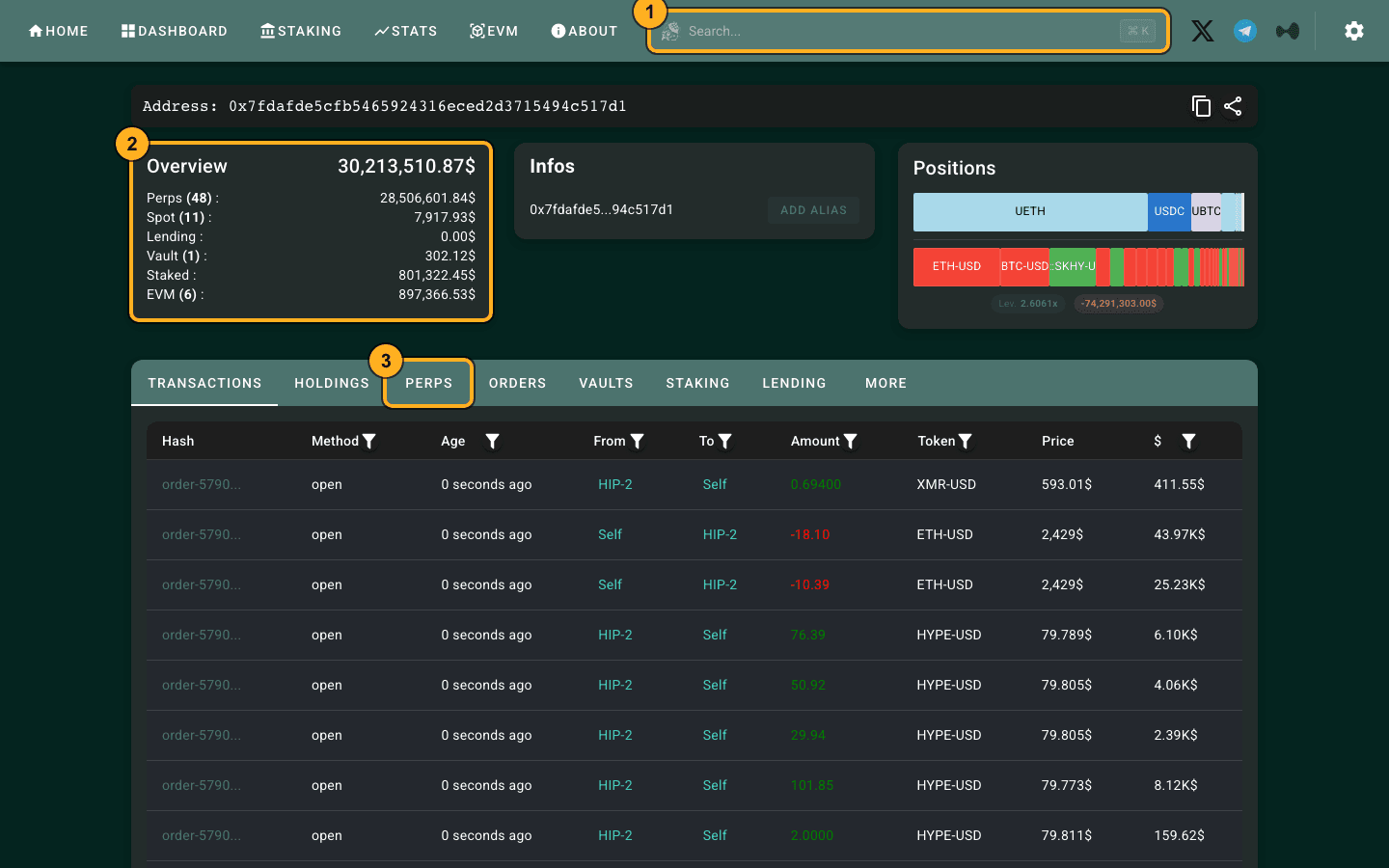
- Search box (1). Paste the 0x address (or press ⌘K / Ctrl+K). The direct URL is
hypurrscan.io/address/0x…; vault addresses redirect to a vault view. Transaction hashes and token IDs work in the same box. - Overview (2). The total across HyperCore and HyperEVM, split into Perps (with the number of open positions), Spot, Lending, Vault, Staked and EVM. On October 19, 2026 this wallet showed about $30.2M: $28.5M in 48 perp positions and $0.80M staked. The Positions bar beside it shows the book at a glance (red short, green long) with the account’s leverage.
- Tabs (3). TRANSACTIONS opens by default; the next two steps use PERPS and TRANSACTIONS. HOLDINGS lists spot tokens, ORDERS resting orders, and VAULTS, STAKING and LENDING the deposits.
Step 2: open PERPS for positions, entry and liquidation price
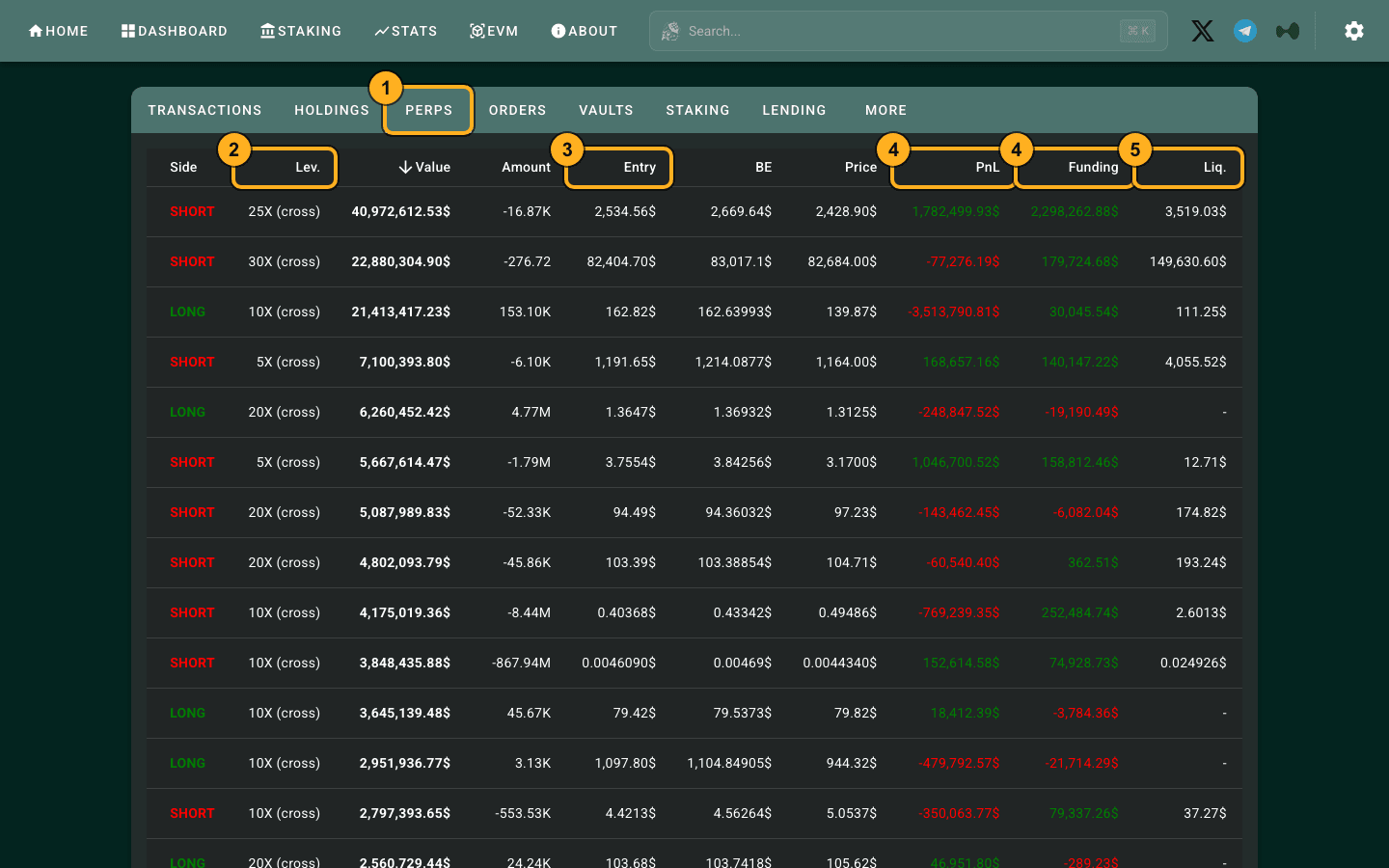
Each row is one open position: Token, Side, Lev., Value, Amount, Entry, BE, Price, PnL, Funding and Liq. On a phone the table scrolls sideways. The top row here was an ETH short of about 16.87K ETH at 25× cross, entry $2,534.56, liquidation $3,519.03, with about +$1.78M unrealized PnL on top of +$2.30M of funding received. Column by column:
| Column | How to read it |
|---|---|
| Account value | Margin balance plus unrealized PnL across all perp positions. HypurrScan adds spot, vault, staked and EVM balances on top for a total. |
| Withdrawable | What could be pulled out right now without closing positions — the gap to account value is margin in use. |
| Side / Lev. | LONG or SHORT and the leverage setting, with cross or isolated. Cross means the whole account backs every position. |
| Value / Amount | Position notional in USD and the size in coins. A negative amount is a short. |
| Entry / BE | Average entry price and break-even price (entry adjusted for fees and funding paid so far). |
| PnL / Funding | Unrealized PnL at the mark price and cumulative funding received (positive) or paid (negative) on that position. |
| Liq. | Estimated liquidation price. For cross positions it depends on every other position, so it moves as the whole book moves. |
Step 3: use TRANSACTIONS for fills, hashes and the CSV export
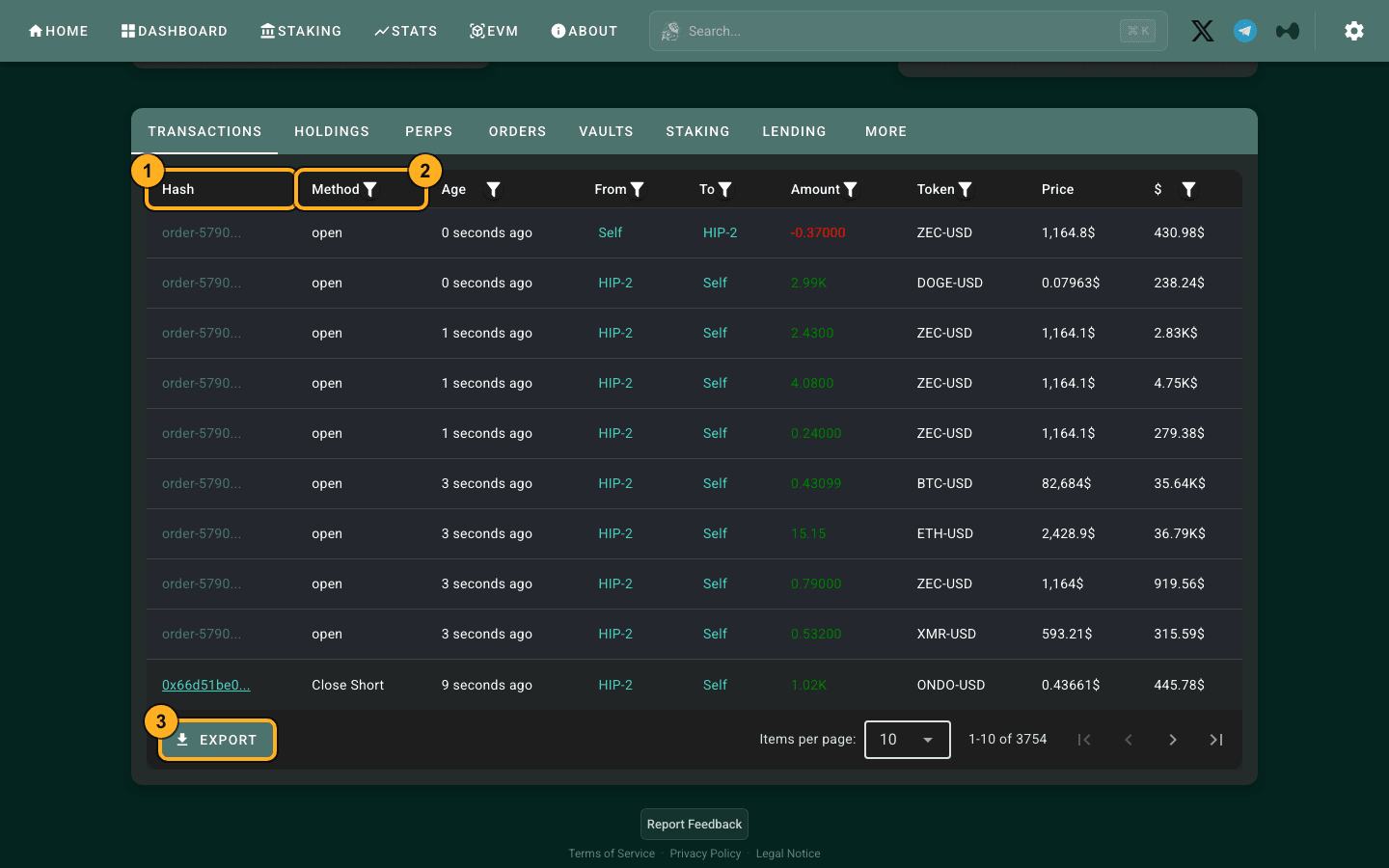
- Hash (1). Fills such as “Close Short” carry a 0x hash: click it to open the transaction, or paste it into the official explorer for proof it landed. Rows with an
order-…id and Method “open” are order events rather than fills. - Method filter (2). Filter by method to keep only fills (Open Long, Close Short and so on), or only transfers. Token, From, To, Amount and $ have filters too.
- EXPORT (3). Downloads the ledger as CSV, the quickest way to keep your own trade history. For a date range from the source, the API’s
userFillsByTimereturns the same fills (see the free API method).
Optional: ADD ALIAS labels an address locally, and Bundles group several addresses (a trader’s master and sub-accounts, say) to follow their combined activity. To keep following a wallet with alerts, that is a wallet tracker’s job: our Hyperliquid whale tracker guide compares them.
Every figure needs a date. On September 20, 2026 the same wallet (shown on the leaderboard as “BobbyBigSize”) had a HypurrScan overview of about $66.0M, with $56.5M in 44 perp positions and $9.4M staked; its ETH short was then 21,830 ETH at 25× cross (entry $2,407.36, liquidation $4,765), showing −$3.9M unrealized PnL offset by +$1.8M of funding. On September 26, 2026 the overview was $48.8M, and on October 19, 2026 $30.2M. A “top traders are short” headline hides exactly this kind of change.
Is HypurrScan official, and is it safe?
Not official, and safe for looking things up. Its own About page (read October 19, 2026) describes HypurrScan as “a community-built explorer for Hyperliquid” for people who need more than “the official explorer”, and links to app.hyperliquid.xyz/explorer. Looking up an address, hash or token needs no account, no wallet connection and no signature; the optional sign-in is an account “for premium API rates”. The exception is its Tools page (wrap or unwrap HYPE to WHYPE, and the HyperEVM block size setting): that one connects a wallet and sends transactions, so use it only deliberately and only on hypurrscan.io. The other risks are the usual ones: a look-alike domain (type hypurrscan.io or bookmark it), a pop-up that asks you to connect and sign just to “view” something (close it), and lag (if a page sits on “Fetching…”, check the official explorer, which is the ground truth). Viewing data never touches your funds.
HypurrScan vs the official Hyperliquid explorer
| Official explorer | HypurrScan | |
|---|---|---|
| Run by | Hyperliquid (inside the app) | A community team, not Hyperliquid |
| Address page shows | Signed actions, newest first (an action log) | Balances, open positions with liquidation price, orders, fills, vaults, staking |
| Transactions and blocks | Yes, the reference view | Yes, decoded |
| Extras | Token pages | Dashboard, Stats, validator list, Feed, Bundles of several addresses, CSV export, HyperEVM tab |
| Best for | Proving a tx landed | Reading what a wallet holds and how it trades |
In practice you use both: HypurrScan to understand a wallet, the official explorer to confirm a specific transaction. The lookup box opens the same address in each.
Beyond one wallet: Dashboard, Staking and Stats
- Dashboard: 24-hour fees, spot stablecoin supply by token (USDC, USDH, USDT, USDe), TWAP buy and sell pressure for the next hour and day, the current spot-token and HIP-3 deployment auction prices, and trending tokens.
- Staking: every validator with stake, blocks, status, commission and uptime. On September 26, 2026 it showed 27 of 35 validators active with 440.84M HYPE of active stake. Read it before choosing where to delegate; our HYPE staking guide covers the fee discounts staking unlocks.
- Stats: charts for trading fees, spot stablecoins, volume by venue, liquidations by side, active traders, auction prices, HIP-2 liquidity and HLP’s month-by-month returns back to 2023.
- Vault view: opening the HLP address shows TVL, depositors, leader commission, all-time PnL (+$138.3M on September 26, 2026) and the monthly return grid. The official figures right now: HLP TVL $179.1M (as of October 20, 2026), APR 3.5%. Read Hyperliquid vaults explained before depositing.
HypurrScan API, EVM explorer and testnet
- API: HypurrScan publishes its own API with Swagger docs at api.hypurrscan.io/ui. The spec sets a global limit of 1,000 requests per minute per IP, with a weight per endpoint, and warns that experimental endpoints can change at any time. It covers what HypurrScan adds on top of the chain: token holders (also at a past time), TWAPs, token details, auctions and deploys, delegations, transfers, bridges, fees and the unstaking queue. Signing in to a HypurrScan account is only for premium API rates. For positions, orders and fills, the official Hyperliquid API is the primary source.
- EVM explorer: the EVM tab (hypurrscan.io/evm) browses HyperEVM transactions, contracts and tokens with built-in transaction tracing; its trace API is documented at trace.hypurrscan.io/docs. More in HyperEVM explorers.
- Testnet: testnet.hypurrscan.io is HypurrScan Testnet, the same interface on testnet blocks. The official testnet explorer is covered below.
Want your own fills in the explorer?
Open Hyperliquid with code HOLYGRAIL: 4% off trading fees on your first $25M, applied automatically. Every order you place shows up in the explorer as soon as its block commits.
3. The official Hyperliquid block explorer, screen by screen
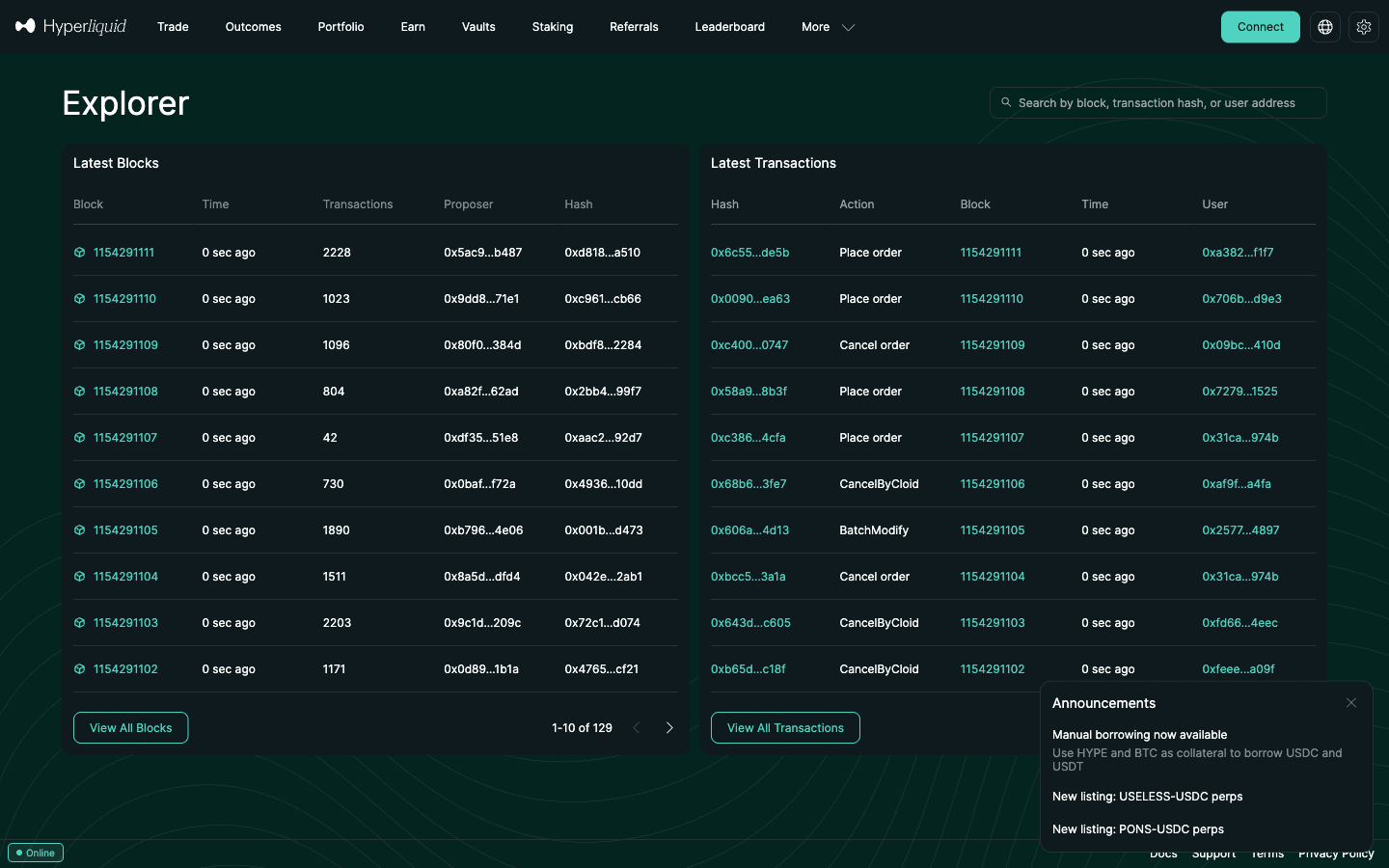
Open app.hyperliquid.xyz/explorer. On September 26, 2026 at 16:38 UTC the chain was at block 1,161,988,403, up from 1,154,114,049 when we first wrote this guide on September 20, with individual blocks carrying anywhere from a few dozen to a couple of thousand transactions. Every order and cancel on Hyperliquid is an on-chain transaction, not an off-chain database write. The home page has two panels:
- Latest Blocks: height, age, transaction count, proposer (validator) address and block hash. Click a height to list the block’s transactions.
- Latest Transactions: hash, action (Place order, Cancel order, CancelByCloid, Net child vaults, transfers and so on), block, time and the user address that signed it.
The search box accepts a block number, a transaction hash or a 0x address, and each has a stable URL you can bookmark or share: /explorer/block/…, /explorer/tx/0x…, /explorer/address/0x… and /explorer/token/0x…. An address page lists the account’s signed actions newest first, 10 per page, with the exact block and timestamp of each; for the HLP vault address it showed a “Net child vaults” action roughly every 10 seconds. What the address page does not show is balances or open positions: it is an action log, not a portfolio. A transaction page shows the block, time, signer and the full action payload, which is how you prove that a specific order or withdrawal was included.
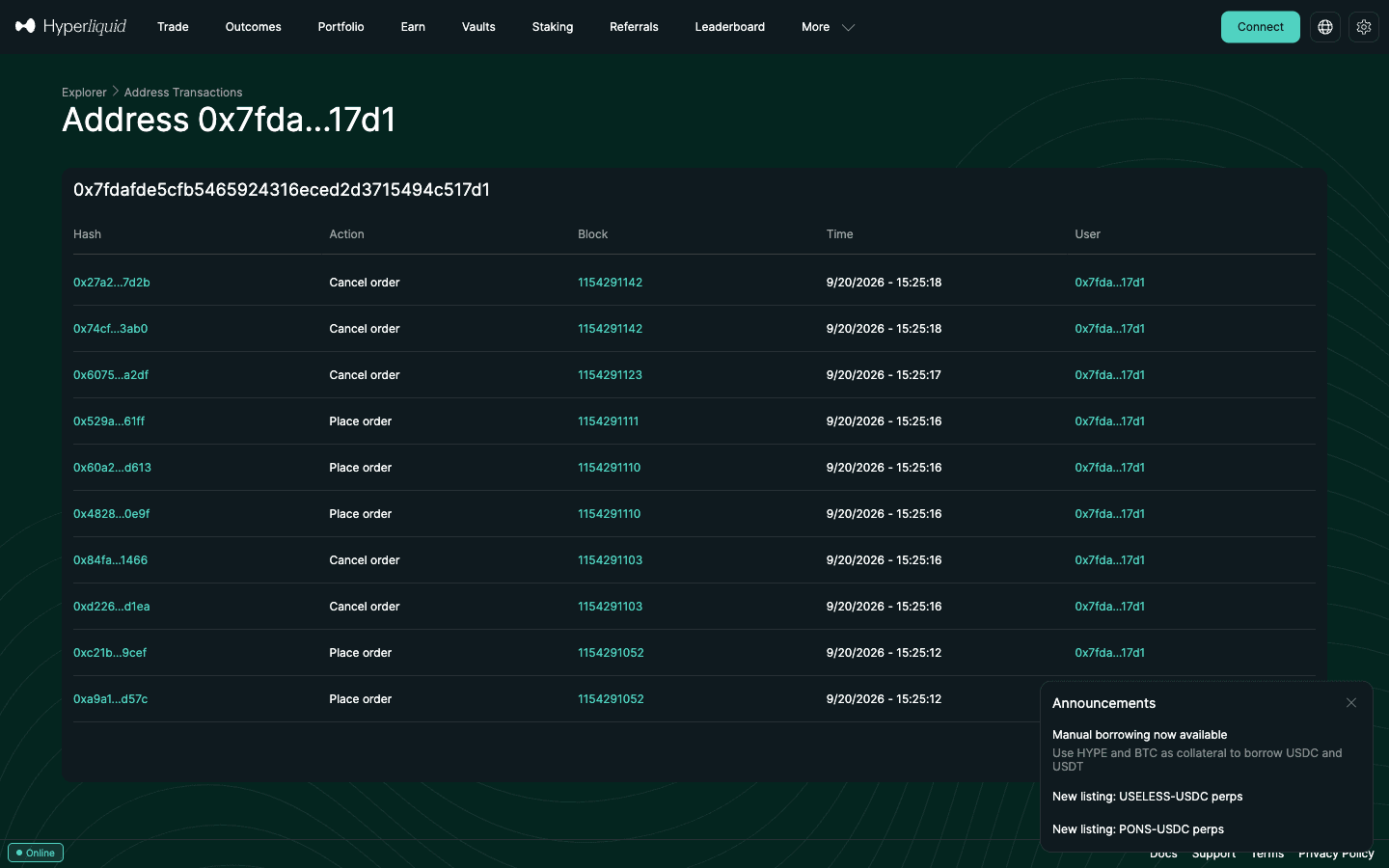
When to use it: proving that a specific order, deposit or withdrawal landed, checking what a vault leader did at a given minute, or auditing every action an agent wallet signed. For anything about state (positions, equity, PnL) move to HypurrScan. There is no login anywhere in the explorer. Of the views in this guide, only the app’s Portfolio page needs a connected wallet, because it shows your own account (account value and PnL over 24 hours, 7 days and 30 days, sampled every 15 minutes per the docs). New to Hyperliquid? Join with HOLYGRAIL before you connect and deposit.
4. Hyperliquid wallet search: finding an address in the first place
An explorer is only useful once you have a 0x address. The reliable sources:
- The leaderboard at app.hyperliquid.xyz/leaderboard. The official data behind it ranked 46,914 accounts on September 26, 2026, by PnL over 1D / 7D / 30D / all-time, with account value, PnL, ROI and volume. It excludes accounts with less than $100,000 of account value and less than $10M of volume (meeting either one gets you listed), and ROI is PnL divided by the larger of $100 and starting value plus maximum net deposits. Click a row to open the address, then paste it into HypurrScan. The top of the 30-day table is dominated by stakers whose “PnL” is HYPE price appreciation with zero volume (the top six rows showed $0.00 volume on September 26, 2026), so filter by volume before calling anyone a trader (column by column: how to read the Hyperliquid leaderboard). New to Hyperliquid? Join with HOLYGRAIL before you connect a wallet to the app.
- Vault pages on app.hyperliquid.xyz/vaults show the leader’s address; the vault itself has an address too, and both are searchable. New to Hyperliquid? Join with HOLYGRAIL before your first deposit.
- Transaction hashes shared on X or Discord: paste one into the official explorer to recover the signing address.
- ENS names are not resolved by the official explorer or HypurrScan; Dexly’s explorer accepts them.
- Your own address: the top-right menu in the app, next to Deposit. Sub-accounts and vaults have their own addresses and must be searched separately; an API (agent) wallet address always shows empty because agents only sign.
5. Token pages, token IDs and prices
Every spot token on HyperCore has a 16-byte token ID, and the official explorer has a page for each at app.hyperliquid.xyz/explorer/token/<tokenId>. HYPE’s is 0x0d01dc56dcaaca66ad901c959b4011ec (token index 150). On September 26, 2026 its page showed the name and full name, max supply 1,000,000,000, total supply about 998.9M, circulating supply about 298.7M, the current price and market cap in USDC, minimum lot size, the non-circulating balances, genesis balances and the deploy time.
To find any other token’s ID: click it from the HypurrScan dashboard (its URLs use the same ID, hypurrscan.io/token/0x…), or call the API with spotMeta, which lists every token with its name, index, tokenId and, where one exists, the linked HyperEVM contract address. The token page is also where the docs point you to catch UI renames: BTC/USDC in the app is UBTC/USDC on chain. For live prices and depth, the trade screen is still the better place; the token page gives you supply and ownership.
6. HyperEVM explorers: HyperEVMScan and alternatives
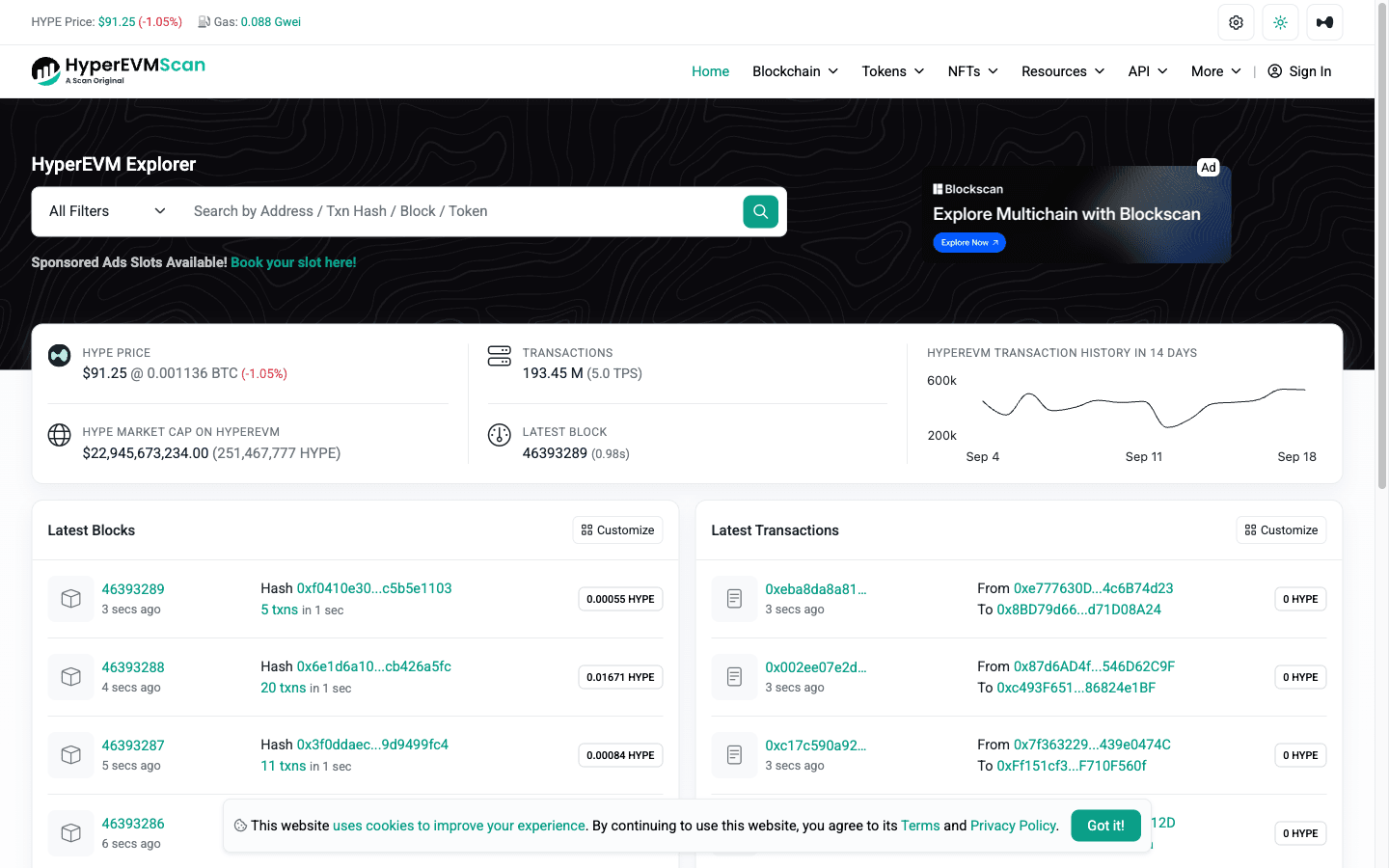
Short answer: use HyperEVMScan (hyperevmscan.io), the Etherscan-built explorer for HyperEVM, chain ID 999. Hyperliquid’s onboarding docs name two block explorers for the network (read October 19, 2026): HyperEVMScan (hyperevmscan.io) and Hyperscan (hyperscan.com). To add the network to a wallet, use chain ID 999 and RPC https://rpc.hyperliquid.xyz/evm (Chainlist has it). On September 26, 2026 HyperEVMScan showed block 46,954,159, about 196 million transactions in total, and gas around 0.09 gwei, paid in HYPE.
| HyperEVM explorer | Open | Best for |
|---|---|---|
| HyperEVMScan | hyperevmscan.io | Etherscan menus: ERC-20 transfers and approvals, verified contracts, gas, CSV (in the official docs) |
| Hyperscan | hyperscan.com | Blocks and contracts plus the CoreWriter feed of EVM → HyperCore actions (hl.eco; in the official docs, which also list it as the Blockscout explorer) |
| HypurrScan EVM | hypurrscan.io/evm | HyperEVM transactions, contracts and tokens with transaction tracing, next to the same wallet’s HyperCore view |
| Owlscan | owlscan.org | Listed on the docs’ builder-tools page; it did not load for us on September 27 or October 19, 2026, so we do not link it |
Purrsec is gone. Some older guides still name Purrsec as a HyperEVM explorer. On October 19, 2026 purrsec.com served an unrelated gambling page, and it is in neither of the docs’ explorer lists, so do not open it or connect a wallet there.
- HyperEVMScan is the Etherscan build: familiar menus for transactions, internal and cross-chain transactions, verified contracts, token transfers, top accounts, a gas tracker, CSV download and contract tools (verify, read, diff). Use it for ERC-20 transfers and approvals, verifying a contract before you interact, and HYPE gas.
- Hyperscan is hl.eco’s explorer (it credits QuickNode). Besides the usual blocks and transactions (it counted 233,555 in the previous 24 hours on September 26, 2026), it has a HyperCore menu whose CoreWriter feed shows “every EVM to HyperCore action, decoded and labeled”, for example a contract sending USDC from spot to a user’s perp balance. Address pages link a “Trader profile”. It is the better choice when you are following money between HyperEVM contracts and HyperCore.
Never use either for perp positions: the blocks with thousands of order transactions are HyperCore blocks and do not appear here. Transfers between the two sides show up on both, though. A HyperCore → HyperEVM transfer (the “Transfer to/from EVM” button, or sending HYPE to the system address 0x2222…2222) appears as a ledger update in the official explorer and as a matching transfer on the HyperEVM explorers. For contracts acting on HyperCore (the EVM → HyperCore direction), Hyperscan’s CoreWriter feed is the view built for it.
7. Hyperliquid testnet explorer
The testnet has its own copy of the app and explorer at app.hyperliquid-testnet.xyz/explorer, with the same layout and search box. Use it to confirm that a bot’s orders, cancels and agent-wallet approvals behave as intended before you point it at mainnet. The faucet at app.hyperliquid-testnet.xyz/drip gives 1,000 mock USDC, but only to addresses that have deposited on mainnet, and email logins get different addresses on mainnet and testnet. The HyperEVM testnet is chain ID 998, with RPC https://rpc.hyperliquid-testnet.xyz/evm. Our Hyperliquid testnet guide walks through the setup.
8. Debuggers, trackers and portfolio apps built on the same data
Several products rank for “Hyperliquid explorer” but do a different job from the block explorers above. None of them has data the chain does not publish; they differ in presentation and extras.
- BlockSec Phalcon: a transaction debugger from a security firm. Paste a hash to get fund flow, balance changes, invocation flow, a gas profiler and a simulator. Its Hyperliquid page pitches order matching, margin impact and liquidation analysis “on HyperEVM”. It is built for developers and incident researchers; for everyday checks the official explorer is enough.
- Dexly explorer: wallet positions, PnL and history with ENS search and whale lists. It feeds Dexly’s copy-trading product.
- HyperTracker: a wallet and whale tracker with cohorts, position and liquidation heatmaps, alerts and multi-wallet aggregation; it says it tracks more than 1.6 million wallets.
- CoinStats HyperEVM explorer: a portfolio app’s view of HyperEVM addresses, with transaction filters and PnL for EVM holdings.
- DeBank and other portfolio apps: HyperCore is not an EVM chain, so they show perp positions only if they built a Hyperliquid integration. DeBank has one; on September 26, 2026 it listed a wallet’s Hyperliquid perps with side, leverage, margin and P&L but no entry, funding or liquidation price.
Hyperdash (which acquired the HypeRPC data service) and Telegram bots add alerts on top of the same feeds. Our wallet tracker guide compares them side by side, and our Hyperdash review covers that one in depth.
9. The free API method: track any wallet without a key
Everything the explorers show comes from the public info endpoint, and you can call it yourself with no account, no key and no signature. The rate limit is 1,200 weight per minute per IP; clearinghouseState costs only 2. One POST returns the full position set:
curl -X POST https://api.hyperliquid.xyz/info \
  -H "Content-Type: application/json" \
  -d '{"type":"clearinghouseState","user":"0x7fdafde5cfb5465924316eced2d3715494c517d1"}'
On September 20, 2026 that returned accountValue of about $53.66M for the perp account, withdrawable of $34.81M, and 34 entries in assetPositions, each with coin, signed size szi (negative = short), entryPx, positionValue, unrealizedPnl, leverage type and value, and liquidationPx: the same numbers HypurrScan renders. The default query covers the main perp dex only; HIP-3 positions such as xyz:GOLD need a dex field in the request (or the allDexsClearinghouseState WebSocket subscription), which is why HypurrScan showed 44 positions against the API’s 34. Other useful request types:
userFills: up to 2,000 fills per response (the most recent 10,000 are available) with price, size, direction (“Close Short”),closedPnl, fee and the L1hash;userFillsByTimefor a date range. Fills that were part of a liquidation carry aliquidationobject (liquidated user, mark price, method).openOrders/frontendOpenOrders: resting orders;historicalOrdersfor the recent order log.userFundinganduserNonFundingLedgerUpdates: funding payments; deposits, withdrawals, transfers and liquidations.spotClearinghouseStatefor spot balances,delegationsfor HYPE staking,spotMetafor token IDs.portfolio: PnL and account-value history windows, the same data the Portfolio graphs and leaderboard use.
For live monitoring, subscribe on the WebSocket to userFills, orderUpdates or clearinghouseState for the address. Reads are unauthenticated, so you can watch any wallet’s stream and forward messages to a chat bot. User-specific subscriptions are capped at 10 unique users per IP. The Hyperliquid API guide covers the endpoints and limits in detail.
10. For developers: explorer API, weights and bulk data
The official explorer is backed by explorer requests on the same API host, and the rate-limit page prices every explorer request at weight 40 (against the 1,200-per-minute IP budget), with blockList additionally capped at one call per block; older blocks not recently queried “may be weighted more heavily”. That makes the explorer API fine for looking up a transaction and wrong for scraping history. For bulk data the docs point to the hyperliquid-archive S3 bucket (L2 book snapshots and asset contexts, uploaded roughly monthly with no guarantee of timeliness, requester pays) and to running a non-validating node, which streams every block to disk. For a trade-history export the docs link a third-party tool from the Enigma team; HypurrScan’s EXPORT button covers the common case.
11. Limits and gotchas
- No explorer shows what an address will do next. Positions are current state; the leaderboard’s 30-day PnL includes unrealized moves and, for stakers, HYPE price changes.
- Sub-accounts and vaults are separate addresses. A whale’s master address may look flat while three sub-accounts carry the risk. Search each one.
- HIP-3 markets have a prefix (
xyz:GOLD,xyz:CL) and sit under the same address, though the API returns them per HIP-3 dex (thedexfield); do not mistake them for unknown tokens. - Liquidation prices for cross positions are estimates that shift with every other position and with the mark price, which blends external CEX prices. The number you see is not a guaranteed trigger.
- Privacy is zero. Trading without KYC is not anonymity: anyone who links your address to you can see every trade. Keep strategy accounts unlinked from public identities.
- Third-party sites can lag, change or disappear. The official explorer and the API are the ground truth; when HypurrScan shows “Fetching…”, the API still answers.
- Never sign anything to view data. Reading the chain needs no wallet connection. A site that asks you to connect and sign to “see your positions” is a phishing risk.
- Lighter’s explorer works differently. Lighter is a zero-knowledge rollup on Ethereum: accounts are looked up by a numbered index rather than an address alone, and every batch of trades is proven on Ethereum. See our Lighter explorer guide.
Trade what the explorer shows you, with 4% lower fees
Open Hyperliquid with code HOLYGRAIL; the discount applies automatically to your first $25M in volume. No KYC, and every fill you make appears in the explorer as soon as its block commits. See Hyperliquid fees for the full fee schedule and our Hyperliquid review for the rest.
FAQ
What is HypurrScan, and what is its official link?
HypurrScan is a free, community-built explorer for Hyperliquid at hypurrscan.io. Paste any 0x address to see that wallet’s balances, open perp positions with entry and liquidation price, orders, fills, vaults and staking, or paste a transaction hash or token ID. It is not run by the Hyperliquid team (the official explorer is app.hyperliquid.xyz/explorer), and looking things up needs no login or wallet connection. Type hypurrscan.io yourself or bookmark it, because look-alike domains exist.
How do I see a wallet’s fills and transactions on HypurrScan?
Open the address on hypurrscan.io and stay on the TRANSACTIONS tab. Fills such as Open Long or Close Short carry a 0x hash you can click; rows with an order-… id and Method “open” are order events. Use the Method filter to keep only fills, and EXPORT to download the ledger as CSV. For a date range straight from the source, the API’s userFillsByTime returns the same fills.
Why is HypurrScan not loading?
Check the address first: HypurrScan is hypurrscan.io (hypurrscan.com is a parked ad page, checked October 20, 2026). HypurrScan is a JavaScript app that loads its data in your browser from api.hyperliquid.xyz and api.hypurrscan.io, so a blank page or endless spinner usually means JavaScript or one of those domains is blocked by an ad, script or privacy blocker or a DNS filter: allow them and hard-reload. Paste the full 42-character 0x address; HyperEVM tokens and contracts are on its EVM tab or hyperevmscan.io, and testnet wallets on testnet.hypurrscan.io. If it is down, the official explorer at app.hyperliquid.xyz/explorer and Hyperdash read the same chain data.
Does HypurrScan have an API?
Yes. Its About page links API documentation at api.hypurrscan.io/ui (Swagger) and EVM API documentation at trace.hypurrscan.io/docs. The spec sets a global limit of 1,000 requests per minute per IP, with a weight per endpoint, and warns that experimental endpoints can change at any time. It covers holders, TWAPs, token details, auctions, delegations, transfers, bridges and fees; a HypurrScan account is only needed for premium rates. For positions, orders and fills, the official Hyperliquid API at api.hyperliquid.xyz/info is the primary source and needs no key.
What is the official Hyperliquid explorer?
The official Hyperliquid explorer is built into the app at app.hyperliquid.xyz/explorer. It lists HyperCore blocks and transactions in real time and opens any block number, transaction hash, address or token. An address page is a log of the actions that address signed (orders, cancels, transfers, vault operations), not a portfolio: for open positions and PnL use HypurrScan or the public API.
Do I need to log in or connect a wallet to use the Hyperliquid explorer?
No. The official explorer, HypurrScan, HyperEVMScan, Hyperscan and the leaderboard are all public pages: paste an address or hash and read. Nothing asks for a signature. The only page that needs a wallet connection is the app’s own Portfolio page, because it shows the connected account. Be wary of any “explorer” that asks you to connect and sign just to view data.
Is HypurrScan official? Is it safe?
HypurrScan is not official: its About page calls it a community-built explorer for Hyperliquid, and the official explorer is app.hyperliquid.xyz/explorer. It is free, and looking up any address, transaction or token needs no account, wallet connection or signature (the optional sign-in is only for premium API rates), so viewing data cannot touch your funds. Only its Tools page (wrap HYPE, HyperEVM block size) connects a wallet and sends transactions; use it only deliberately. Type hypurrscan.io yourself or bookmark it, close any look-alike site that asks you to connect and sign to view data, and confirm a specific transaction on the official explorer if HypurrScan lags.
HypurrScan vs Hyperliquid explorer: which should I use?
Use HypurrScan to read a wallet: balances, open positions with entry and liquidation price, orders, fills, vaults and staking, plus a dashboard and stats. Use the official explorer (app.hyperliquid.xyz/explorer) to confirm that a specific transaction or block exists: its address page is a log of signed actions, not a portfolio. Both read the same public chain, and both are free with no login.
Is Hyperscan the same as HypurrScan?
No, although the names are easy to confuse. HypurrScan (hypurrscan.io) is the community explorer for HyperCore: wallets, perp positions, PnL, vaults and staking. Hyperscan (hyperscan.com) is hl.eco’s explorer for HyperEVM, chain 999, listed in the official docs next to HyperEVMScan; it adds a CoreWriter feed of EVM → HyperCore actions. HyperScanner (hyperscanner.app) is a separate third-party analytics site. For “what is this wallet holding” use HypurrScan; for EVM contracts and tokens use Hyperscan or HyperEVMScan.
What is HyperEVMScan? Does Hyperliquid have an EVM explorer?
HyperEVMScan (hyperevmscan.io) is the Etherscan-built explorer for HyperEVM, Hyperliquid’s EVM chain (chain ID 999, RPC rpc.hyperliquid.xyz/evm). The onboarding docs list it with hyperscan.com as the network’s block explorers, and HypurrScan has an EVM tab too. They show EVM transactions, verified contracts, ERC-20 tokens and gas. Perp trading does not happen on HyperEVM, so positions never appear there; they live on HyperCore and show up in the official explorer and HypurrScan. Purrsec, named in some older guides, no longer serves an explorer.
Is there a Hyperliquid or HypurrScan testnet explorer?
Yes, both: the official app.hyperliquid-testnet.xyz/explorer, and HypurrScan Testnet at testnet.hypurrscan.io for a wallet view of testnet addresses. The testnet faucet gives 1,000 mock USDC, but only to addresses that have deposited on mainnet (email logins get different mainnet and testnet addresses). The HyperEVM testnet is chain ID 998.
How do I look up a Hyperliquid wallet’s positions?
Paste the address into the lookup box at the top of this page, or into hypurrscan.io and open the PERPS tab: every open position with side, leverage, size, entry, break-even, unrealized PnL, funding and liquidation price. The same data is free from the API by POSTing type clearinghouseState and the address to https://api.hyperliquid.xyz/info. Every Hyperliquid position is public, so no permission is needed. To follow a wallet over time, with alerts or many wallets at once, use a Hyperliquid wallet tracker: our whale tracker guide compares them and opens any address in four of them at once.
How do I check my own PnL on Hyperliquid?
Connect your wallet in the app and open Portfolio: it shows account value and PnL graphs over 24 hours, 7 days and 30 days, where PnL means account value plus withdrawals minus deposits. The docs say the graphs are sampled every 15 minutes and on deposits and withdrawals, so they are not meant for precise accounting. For trade-by-trade records use HypurrScan’s TRANSACTIONS tab (with CSV export) or the API’s userFillsByTime.
Can I track multiple Hyperliquid wallets at once?
The official explorer shows one address at a time. HypurrScan lets you label addresses with ADD ALIAS and group several into a Bundle to follow their combined activity. Multi-wallet dashboards and alerts come from third-party trackers such as HyperTracker, Hyperdash, Dexly and Telegram bots. DIY: the WebSocket lets one IP follow up to 10 unique users through user-specific subscriptions.
Can I use a Hyperliquid explorer to investigate liquidations?
Yes. In the API, every fill carries the L1 transaction hash and, when it was part of a liquidation, a liquidation object with the liquidated user, the mark price and the method (market or backstop); non-funding ledger updates include liquidations too. Open the hash in the official explorer to see the block. HypurrScan’s Stats tab charts liquidations by side, and BlockSec’s Phalcon markets a transaction debugger for liquidation analysis.
How often is explorer data updated?
The official explorer and HypurrScan read the chain live: new blocks and transactions appear seconds after they commit, and positions reprice with the mark price. The Portfolio graphs are sampled every 15 minutes. Third-party trackers can lag or go down; when in doubt, the official explorer and the API are the source of truth.
Why doesn’t DeBank or Zerion show my Hyperliquid positions?
Perp positions sit on HyperCore, which is not an EVM chain, so a portfolio app only shows them if it has built a dedicated Hyperliquid integration; otherwise you see only HyperEVM tokens. DeBank has one: on September 26, 2026 it listed a wallet’s Hyperliquid perps with side, leverage, margin and P&L, but no entry, funding or liquidation price. Also check that you searched the right address: sub-accounts, vaults and email-login wallets each have their own. HypurrScan shows the full position table.
How do I find a token’s page or price on the Hyperliquid explorer?
Each spot token has a token ID (for HYPE: 0x0d01dc56dcaaca66ad901c959b4011ec). Open app.hyperliquid.xyz/explorer/token/ followed by that ID to see name, full name, token index, max, total and circulating supply, price, market cap, lot size, genesis balances and deploy time. Token IDs are listed by the API’s spotMeta request, and HypurrScan’s token pages (hypurrscan.io/token/…) link them from the dashboard.
Is my Hyperliquid trading history public?
Yes. Every order, fill, transfer, deposit and withdrawal on HyperCore is on-chain and readable by address, and there is no private mode. Anyone who knows your address can see your positions and PnL in the explorer, HypurrScan or the API. If that matters to you, separate strategies across sub-accounts and avoid linking your trading address to a public identity.
Disclosure: HOLYGRAIL is our referral code; we earn a share of referred accounts’ fees at no cost to you. We have no relationship with HypurrScan, HyperEVMScan, Hyperscan, BlockSec, Dexly, HyperTracker, CoinStats or DeBank. Explorer screens, leaderboard figures and API responses were read on the dates given and will have changed since; wallet examples are public on-chain data cited for illustration, not endorsements or trade recommendations.