Hyperliquid TradingView Guide: How to Automate Trades from TradingView to Hyperliquid (Plus Charts, Metrics and Alerts)
Can TradingView trade on Hyperliquid?
Not natively. Hyperliquid is a TradingView data source, not a broker, so there is no “connect broker” button and the trading panel cannot send Hyperliquid orders.
To automate trades, a TradingView alert sends a webhook to a relay (a service or your own server running the Hyperliquid SDK), and the relay places the order with a Hyperliquid API wallet that can trade but cannot withdraw: alert → webhook → relay → API wallet. The whole setup takes about 35 minutes; webhooks need a paid TradingView plan (Essential and up) and two-factor authentication.
A 6-step setup from alert to filled order, nine relays compared on price, builder fees and testnet support, a fix for every common error, and the Hyperliquid charts and derivative metrics now live on TradingView.
By BLTZ · Published · Updated · Checked on tradingview.com, app.hyperliquid.xyz, the Hyperliquid docs and each relay’s own site · How we verify
How to automate trades from TradingView to Hyperliquid (6 steps)
Join Hyperliquid with HOLYGRAIL and deposit USDC~10 min Open the account with a referral code (ours is HOLYGRAIL, 4% off fees on your first $25M of volume) before you connect any relay. Hyperliquid takes one referral code per account, only while your volume is at most $10,000, and it cannot be changed later. Deposit at least 5 USDC (smaller deposits can be lost).Join Hyperliquid with HOLYGRAIL →
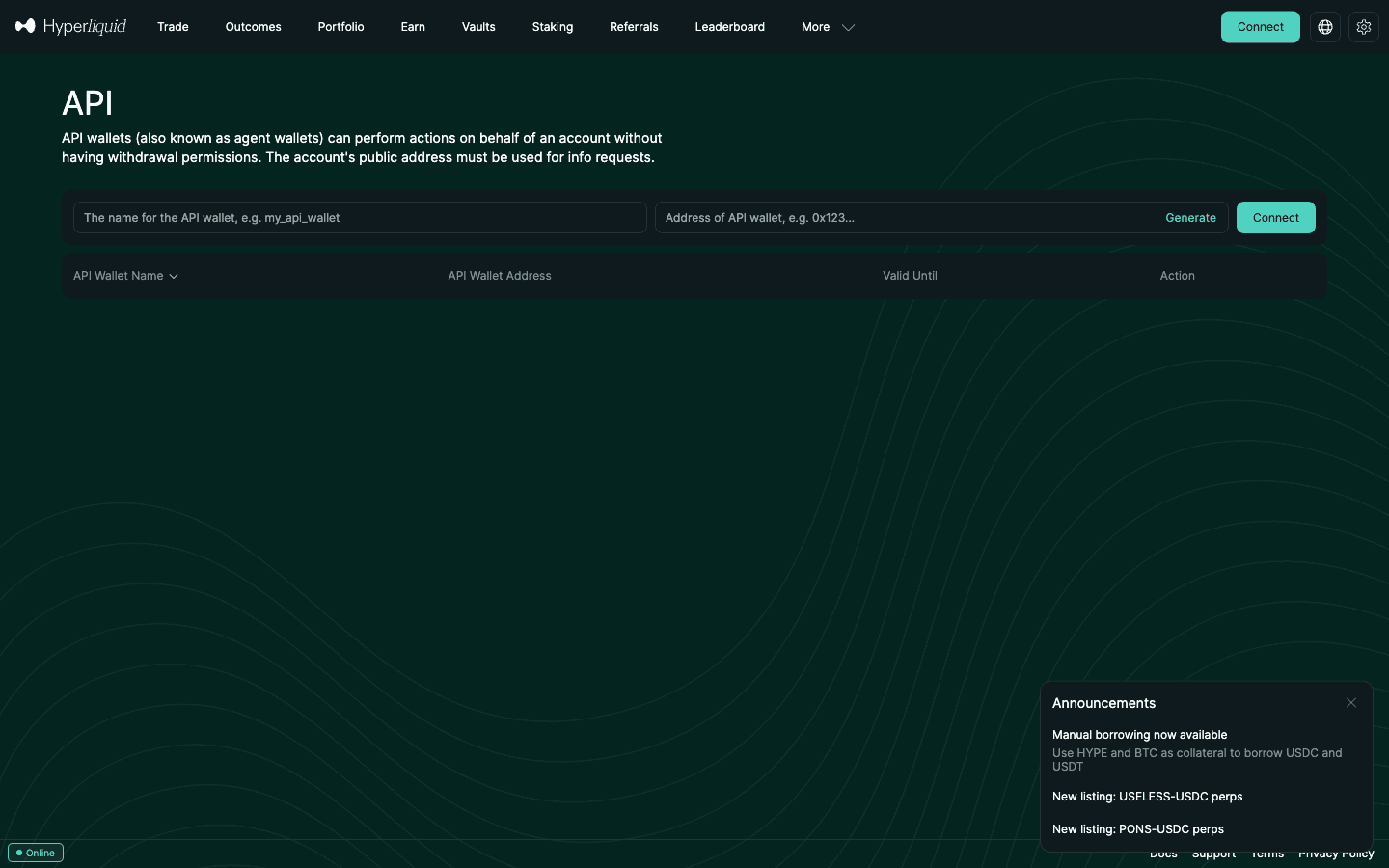
Create an API wallet~3 min app.hyperliquid.xyz/API → name it (e.g. tv-relay), set validity (max 180 days), copy the private key before you authorise, and note your master address. The API wallet can trade but cannot withdraw.
Choose a relay and connect the API wallet~5 min A service (table in section 4) or your own server with the Hyperliquid SDK. Paste the API key and your master address. If the relay charges a builder fee, you approve its maximum once with your main wallet.
Copy the webhook URL and the alert message~2 min The relay gives you a URL and a JSON or command format. Keep a secret token in the message, never your private key.
Create the TradingView alert~5 min Paid plan (Essential $12.95/mo and up) and two-factor authentication. Condition → Notifications: tick Webhook URL and paste the URL → Message: paste the JSON. Alerts on Essential and Plus expire after 2 months.
Test small, then go live~10 min Use the relay’s testnet or demo mode, or send one $10 order on mainnet. Check the fill in Hyperliquid’s Trade History, not just the alert log.
Times are our estimates for a first setup. Details for each step are in sections 2–8 below.
Step 1: open the account your alerts will trade
Join Hyperliquid with referral code HOLYGRAIL before you connect a relay: 4% off trading fees on your first $25M of volume, gas-free orders, 178 perp markets. The code can only be set once.
We earn a commission when you sign up through our links; it never raises your fees.
1. What TradingView can and cannot do with Hyperliquid
People who search “hyperliquid tradingview” mean five different things. Four exist today; one does not, and knowing which is which saves an afternoon of looking for a “Connect broker” button that is not there.
Layer
Exists?
Detail (September 2026)
Hyperliquid price data inside TradingView
Yes
HYPERLIQUID: prefix for perps and spot; HIP3XYZ: for Trade[XYZ]. Candles and volume are Hyperliquid-only
Funding, open interest, liquidations on TradingView
Yes (new)
Nine derivative metrics for 170+ Hyperliquid contracts, announced by TradingView on September 21, 2026
TradingView chart inside the Hyperliquid app
Yes
app.hyperliquid.xyz loads TradingView Charting Library v28.5; not linked to your tradingview.com account
Broker integration (trade panel → Hyperliquid)
No
Hyperliquid is not a TradingView broker (no broker page on tradingview.com). Orders go through the app, the API or a webhook relay
Alerts that place Hyperliquid orders
Via a relay
TradingView webhook → your server or a relay service → Hyperliquid API wallet
So automation always has the same shape: TradingView alert → webhook POST → relay → Hyperliquid exchange endpoint. TradingView decides when; the relay decides what order and signs it. Everything below is about making that chain reliable and cheap. For native, code-free automation inside Hyperliquid (TWAP, scale orders, trailing stops) see the Hyperliquid trading bot guide.
2. Step 1: account, referral code and deposit
Set up the account before any relay, for one reason most relay guides skip: Hyperliquid takes one referral code per account, only while your cumulative volume is at most $10,000, and a code cannot be changed once set. Several relays push their own during onboarding: TV-Hub (TVHUB), Gainium (a GAINIUM join link), WunderTrading (its “Sign up now” link carries WUNDERTRADING) and AstraBit (ASTRABIT, required for its Freemium tier). Decide which code you want first.
What the code does: 4% off your trading fees on the first $25M of volume, so a base-tier taker fee of 0.045% becomes 0.0432%. It does not apply to sub-accounts. It does apply to orders that carry a builder code (the fee some relays add, section 12): the discount comes off Hyperliquid’s part of the fee and the relay’s builder fee is added on top (checked on mainnet fills on October 1, 2026).
Deposit: USDC on Arbitrum is the standard route (every other way to deposit USDC is in our deposit guide); deposits under 5 USDC can be lost. Walkthrough with screenshots: how to use Hyperliquid.
Check it worked: app.hyperliquid.xyz/referrals shows “You are using the code: …” once a code is set.
Type a name (for example tv-relay) and generate the API wallet. Set its validity; the maximum is 180 days.
Copy the private key when it is generated, before you authorise, and store it only in the relay or your server.
Authorise with a signature from your main wallet.
Note your master account address (the wallet you connected). Relays need it to read balances and positions; the API wallet address returns an empty account.
app.hyperliquid.xyz/API (September 2026): “API wallets (also known as agent wallets) can perform actions on behalf of an account without having withdrawal permissions.”
Managing expiry. An API wallet stops signing on its expiry date whether you use it or not, and a strategy that silently stops trading is worse than one that never started. Name every wallet after the relay that uses it, put the expiry date in your calendar a week early, and when it comes, generate a new wallet under the same name and paste the new key into the relay. An account can hold 1 unnamed and 3 named API wallets, plus 2 more per sub-account, so one wallet per relay is realistic. Do not reuse an old API wallet address; the docs warn its nonce state may be pruned. More: agent wallet setup and API key security.
A relay receives the webhook, turns it into a Hyperliquid order and signs it with your API wallet. We read each service’s own Hyperliquid and pricing pages on September 27, 2026. All of them connect with an API wallet (trade-only) rather than your main key. We have no relationship with any of them.
Relay
How you pay
Builder fee (perps)
Test mode
Spot
Asks for its own Hyperliquid referral code
TV-Hub
Free + builder fee; 7-day trial
0.01% (spot 0.03%)
Demo toggle → Hyperliquid testnet
Yes
Yes: TVHUB
WunderTrading
Free plan + builder fee; 7-day PRO trial
0.035%
Paper-trading demo
Not stated
Yes: its “Sign up now” link carries WUNDERTRADING
Gainium
Free plan pays builder fees; paid plans use bot credits
0.045% on the free plan (spot 0.07%); none on paid plans
Paper trading
Yes
Yes: GAINIUM
AstraBit
Credits, from $0.33/day per Basic bot; billing starts after the first trade
None listed
Not stated
No (perps only)
Yes: ASTRABIT (for its Freemium)
hypr.run
Tokens: 10 free a day, a webhook costs 0.5 token; paid packs and subscriptions
None listed
Not stated
Yes (perps, spot, XYZ)
No
Autoview
Platform free; $39.99/month per live exchange
None listed
Hyperliquid testnet (free)
Yes
No
AlgoWay
$9/month TradingView automation; 14-day trial
None listed
Not stated
Perps documented
No
Tickerly
From $14/month
None listed
Not stated
Not stated
No
Self-hosted (Python SDK)
Your server
None
Hyperliquid testnet
Yes
No
“None listed” = the pricing page names no builder fee. “Not stated” = not on the pages we read. TradersPost shows Hyperliquid as “Coming Soon”; goodcryptoX and TradingView To Anywhere did not load for us on September 27, 2026 (the latter’s forum guide describes Hyperliquid spot commands only), so they are not in the table.
How to choose. Builder-fee relays cost nothing until you trade and then charge on every fill; subscriptions cost the same whether you trade $1,000 or $1M. Section 12 has the arithmetic. Beyond price, ask three questions before you paste a key: does it accept an API wallet (walk away if it wants withdrawal rights or your seed phrase), what happens to an alert that arrives while it is down, and can you see the exact order each alert produced? Autoview’s page, for example, accepts “your HyperLiquid wallet secret key” with an optional API wallet address; give it the API wallet key, never the main one.
Builder-fee approval. A relay that charges a builder fee asks you to sign an ApproveBuilderFee with your main wallet (an API wallet cannot sign it). That caps what it may charge; Hyperliquid limits builder fees to 0.1% on perps and 1% on spot (not on the buy side of spot), and you can hold 10 approvals at once and remove them at app.hyperliquid.xyz/builderCodes. Background: builder codes explained.
5. Steps 4–5: the TradingView alert, message and JSON fields
Open a chart, ideally the Hyperliquid market itself (HYPERLIQUID:BTCUSDC.P), and create the alert from a price level, an indicator or a Pine strategy. Webhook notifications need Essential or higher (from $12.95/month billed annually; the free Basic plan has a cross in that row of the pricing table) and two-factor authentication on your TradingView account. On the free plan, TV-Hub documents one workaround: tick Send Email instead of Webhook and it processes the email the same way; Basic only has 3 price alerts (no indicator or strategy alerts), so this suits simple price-level entries.
Condition: the strategy (“Order fills only”), or the indicator with “Once per bar close” so a wick does not fire it.
Expiration: Basic alerts last 1 month, Essential and Plus 2 months; only Premium and Ultimate have alerts that do not expire. Put the expiry in the same calendar as your API wallet.
Notifications: tick Webhook URL and paste the relay’s URL there. Pasting it into the Message box is the most common first-day mistake.
Message: the JSON or command format your relay documents. A valid JSON message is sent as application/json; anything else as text/plain.
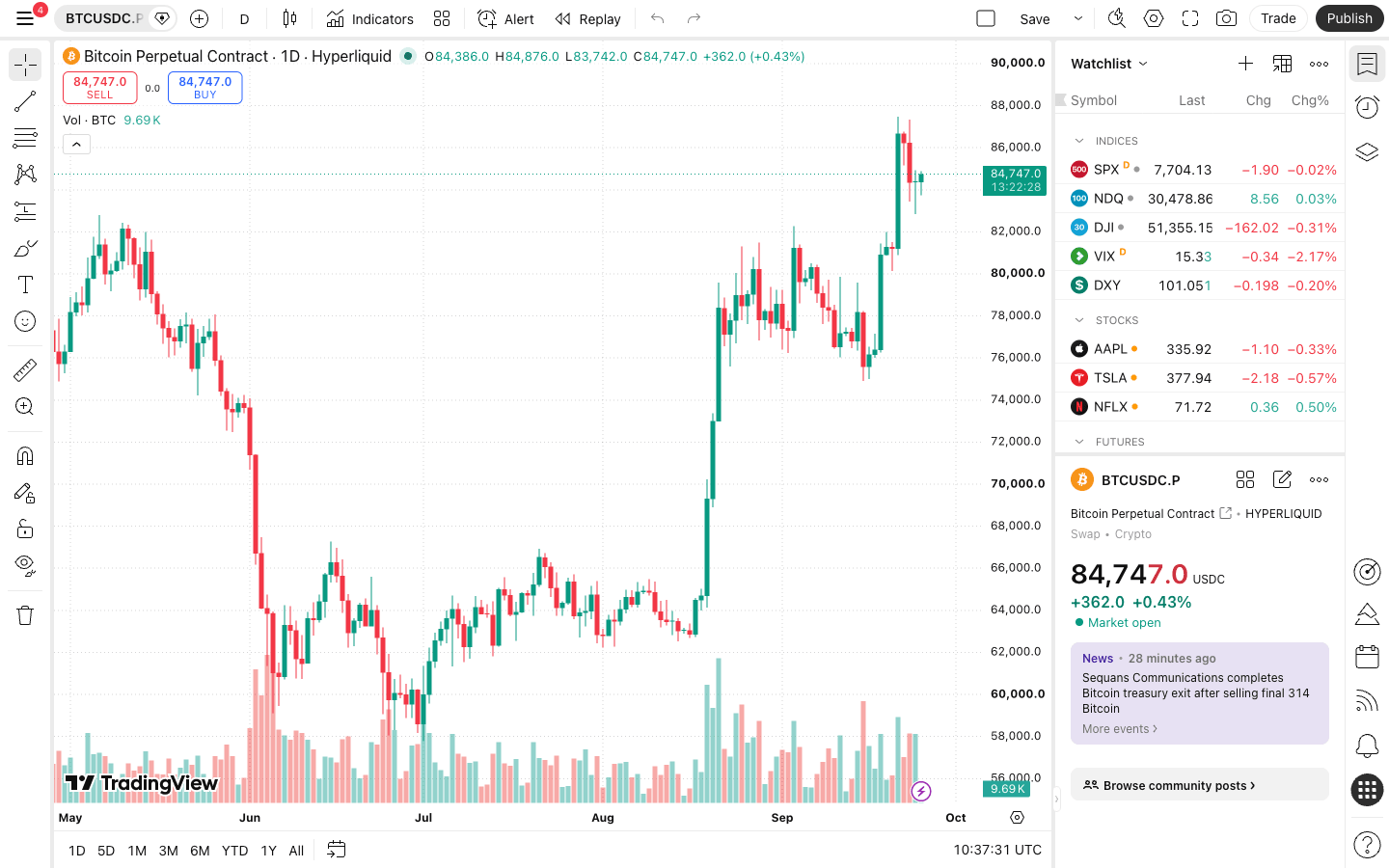
TradingView with the HYPERLIQUID:BTCUSDC.P symbol (Bitcoin Perpetual Contract · Hyperliquid, daily), September 25, 2026: create alerts on the Hyperliquid market itself so they fire at Hyperliquid prices.
Fields a strategy alert should carry
Field
Value in the alert
Why
secret
your-token
A shared password your relay checks. Not a private key, not your TradingView password
ticker
{{ticker}}
TradingView sends BTCUSDC.P; the relay must map it to the Hyperliquid coin BTC
action
{{strategy.order.action}}
“buy” or “sell” from a Pine strategy. For indicator alerts, type it yourself
contracts
{{strategy.order.contracts}}
Order size in coins. Must be worth at least $10
price
{{close}}
Reference or limit price; Hyperliquid accepts at most 5 significant figures
time
{{timenow}}
Alert time; derive the client order ID (cloid) from it so a resent webhook cannot fill twice
reduce_only
true / false
Your relay’s field for exits: an exit can only shrink a position, never flip it
Field names depend on the relay; the table shows what the message needs to say, not a standard. A minimal strategy message (braces escaped here; type real ones): { "secret": "your-token", "ticker": "{{ticker}}", "action": "{{strategy.order.action}}", "contracts": "{{strategy.order.contracts}}", "price": "{{close}}", "time": "{{timenow}}" }.
Strategy alerts vs indicator alerts
The strategy.order.* placeholders only exist on Pine strategies, which is why strategy alerts are the easiest to automate: one alert carries every entry and exit. With an indicator (or a drawn line), create one alert per action and type the side and size into each message yourself, for example "action": "buy", "contracts": "0.002" on the long alert and a reduce-only sell on the exit alert. TradingView’s webhook rules: requests come from four IP addresses (52.89.214.238, 34.212.75.30, 54.218.53.128, 52.32.178.7), only ports 80 and 443 are accepted, the receiving server must answer within 3 seconds, IPv6 is not supported, and TradingView warns against putting credentials in the body.
6. Alerts without automation: price, liquidation and Telegram
Not every alert needs to place an order. If you trade by hand, these alerts tell you when to look, with no API wallet, relay or paid plan (features read September 25, 2026 on TradingView’s help center, Hyperliquid’s app and docs and Hyperdash’s docs):
Price alert on Hyperliquid’s own price. On tradingview.com, open HYPERLIQUID:BTCUSDC.P (or your market), press Alt + A (Option + A on macOS) or click the plus button on the price scale, pick reaches, exceeds or falls below, and choose app notification or email. Name it after the action you plan (“BTC 80k: add to long”). The free Basic plan allows 3 active price alerts, Essential 20, Plus 100, Premium 400 and Ultimate 1,000.
Liquidation warning, level 1 (no code). Read the liquidation price in Hyperliquid’s Positions tab and set a TradingView price alert a few percent before it; update it whenever you add margin or size. Check the distance first with the liquidation price calculator. On cross margin the liquidation price moves with the whole account, so a fixed alert drifts.
Liquidation warning, level 2 (a script, no keys). Hyperliquid’s public info endpoint returns liquidationPx for every open position of any address (clearinghouseState). A small script can alert on distance instead of a fixed level: warn under 15% from liquidation, act under 5%, tighter on volatile alts.
Level 3: an order that acts for you. A reduce-only stop-loss or trailing stop closes the position while you sleep; keep it well inside the liquidation price so it fires first (trailing stop tutorial).
Telegram. Hyperdash’s public channel (t.me/hyperdashflows) posts every Hyperliquid liquidation of $50,000 or more, large TWAPs and open-interest surges: useful context for checking your own margin. For alerts on your own account, create a bot with @BotFather and have your script call the Bot API’s sendMessage; the bot only sends messages and never needs a wallet. Any “alert bot” that asks for a seed phrase or private key is not an alert bot. Wallet-level alerts for addresses you follow are in the whale tracker guide.
Fill notifications. The Hyperliquid web app shows fills of resting orders while the tab is open; the official Android app adds push notifications for order fills on the master account and its sub-accounts. We found no price or liquidation alerts in either.
When one of these alerts keeps telling you to place the same order, that is the point to automate it with the webhook steps above.
7. Self-hosted bridge with the Python SDK
If you can run a small web service, the official hyperliquid-python-sdk (0.24.0 in September 2026) does the EIP-712 signing for you. No builder fee, no third party holding your key, and your referral discount applies to every order.
Configure:pip install hyperliquid-python-sdk; the API wallet key signs, and account_address is your master address.
Expose one HTTPS endpoint on port 443 (FastAPI, Flask, a serverless function). Reply 200 at once and place the order after replying, so you stay inside the 3-second limit.
Verify the sender: reject requests without your secret token; optionally allow only TradingView’s four IPs.
Map the ticker: TradingView sends BTCUSDC.P; Hyperliquid wants the coin BTC. Strip the quote and suffix, read side and size, then send a market or limit order worth at least $10.
Make it idempotent: derive a client order ID (cloid, a 128-bit hex string) from the alert time so a re-delivered webhook cannot double-fill, and log every request.
Exit reduce-only and cap notional per alert in code.
Rate limits rarely bind alert-driven trading: REST requests share 1,200 weight per minute per IP, and an unbatched order weighs 1. The address limit (one action per 1 USDC traded, plus a 10,000-action starting buffer) matters only for high-frequency bots. Details: Hyperliquid API guide.
8. Step 6: test, then go live
Testnet first: Autoview and TV-Hub route to the Hyperliquid testnet, WunderTrading and Gainium have paper trading, and a self-hosted bridge just points at the testnet URL. See the testnet guide. Label testnet windows; confusing them with mainnet is an expensive mistake.
Then one small live order: $10 of notional is the minimum on perps (10 of the quote token on spot).
Watch fills, not alerts. A delivered webhook is not a filled order. Check Trade History in the app, or subscribe to userFills over WebSocket and alert yourself on rejections.
Spot automation: use the pair without .P (HYPERLIQUID:HYPEUSDC), confirm your relay supports spot (table above), and remember that a builder fee on spot can be up to 1% (charged on the sell side).
Set up the account your alerts will trade
Sign up with HOLYGRAIL for 4% off fees on your first $25M of volume, on every order you place: in the app, through a self-hosted bridge or through a relay, including one that adds a builder fee (the discount comes off Hyperliquid’s part of the fee).
The relay shows a zero balance or “user not found”
You entered the API wallet address as the account address
Use your master address (the wallet you log in with). The API wallet only signs
Everything worked, then orders stopped months later
The API wallet expired (max 180 days)
Generate a new one under the same name, paste the new key into the relay
The alert stopped firing after a month or two
TradingView alert expiry: 1 month on Basic, 2 months on Essential and Plus
Re-create the alert, or use Premium/Ultimate where alerts do not expire
“Order must have minimum value of $10.”
Order worth less than $10 on perps (spot: 10 of the quote token)
Raise the size or use a percentage-of-equity size in the relay
Limit price rejected
More than 5 significant figures, or more than 6 minus the asset’s size decimals
Round the price in the relay, or send market orders
Spot order fails although the account holds USDC
In Standard account mode spot and perps balances are separate
Move USDC to the spot balance in the app, or check your account mode
Nothing reaches the relay
Webhook URL pasted into the Message box, Webhook box unticked, no 2FA, or a plan without webhooks
URL goes in Notifications → Webhook URL; enable 2FA; Essential or higher
Relay logs “invalid JSON”
Curly quotes, a trailing comma, or an unquoted placeholder; TradingView then sends text/plain
Paste the message into a JSON validator; use straight quotes
“Unknown asset” or the wrong market traded
TradingView ticker sent unchanged (BTCUSDC.P), or a HIP-3 market that needs the relay’s own naming
Map the ticker to BTC; check the relay’s symbol list for HIP-3 and spot
TradingView logs a failed delivery, but the order filled
The relay answered after 3 seconds
Reply 200 first, trade after; a cloid stops the retry from filling twice
10. Hyperliquid charts and derivative metrics on TradingView
Hyperliquid perps are margined in USDC and carry TradingView’s .P perpetual suffix: HYPERLIQUID:BTCUSDC.P, HYPERLIQUID:ETHUSDC.P, HYPERLIQUID:HYPEUSDC.P. Spot pairs drop the suffix (HYPERLIQUID:HYPEUSDC), Trade[XYZ] stock, index and commodity perps use HIP3XYZ: (Trade[XYZ] guide) and Paragon uses HIP3PARA:. Candles and volume are Hyperliquid’s own; the HYPE pages Google shows first (HYPEUSD, HYPEUSDT) aggregate or use other exchanges.
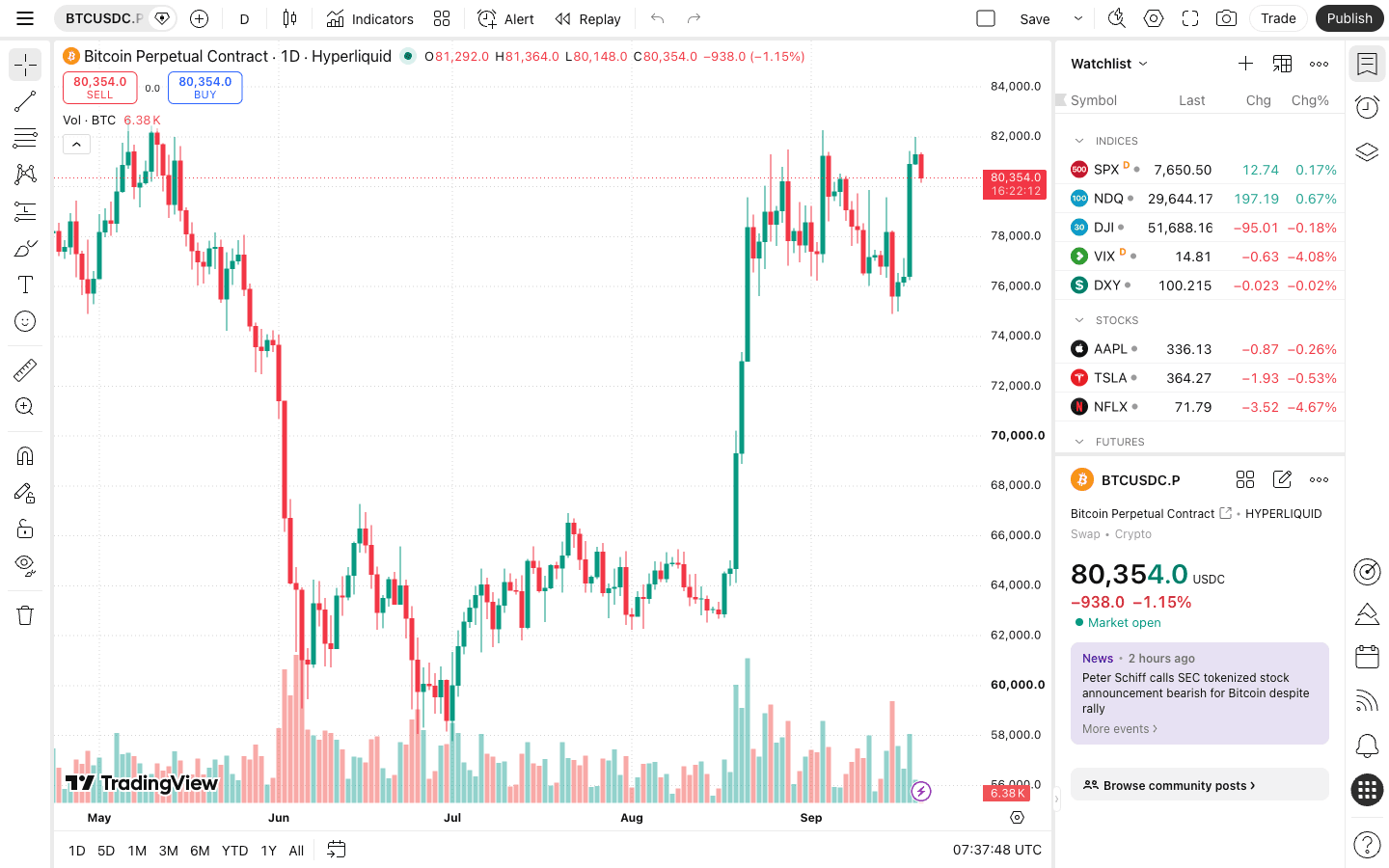
HYPERLIQUID:BTCUSDC.P on tradingview.com (September 2026): price and volume come from Hyperliquid’s own order book.
New in September 2026: on September 21 TradingView added nine derivative metrics for more than 170 Hyperliquid contracts plus HIP-3 markets from Trade[XYZ] and Paragon (over 300 contracts): open interest, funding rate, liquidations, long/short ratio (accounts), long/short accounts %, mark price, index price, premium and basis. Hyperliquid is the first decentralized exchange in TradingView’s derivatives data set. Add them from Indicators → Fundamentals on a HYPERLIQUID: perp. On September 23 TradingView also folded Hyperliquid into its aggregated open interest, funding and liquidation metrics (Aggregated toggle; also in the crypto screener and heatmap).
Two reading notes. Hyperliquid pays funding every hour, so its funding line is not comparable one-to-one with Binance’s 8-hour prints; BTC funding sat at the 0.00125%/hour baseline in 72% of the 720 hours to September 25, 2026 and summed to 0.7664% over those 30 days, about $77 on a $10,000 long. And TP/SL and liquidations trigger on the mark price, so plotting mark beside last price explains “why did my stop fire”. More: funding explained, open interest guide, custom TradingView indicators.
11. The in-app chart and multi-chart workspaces
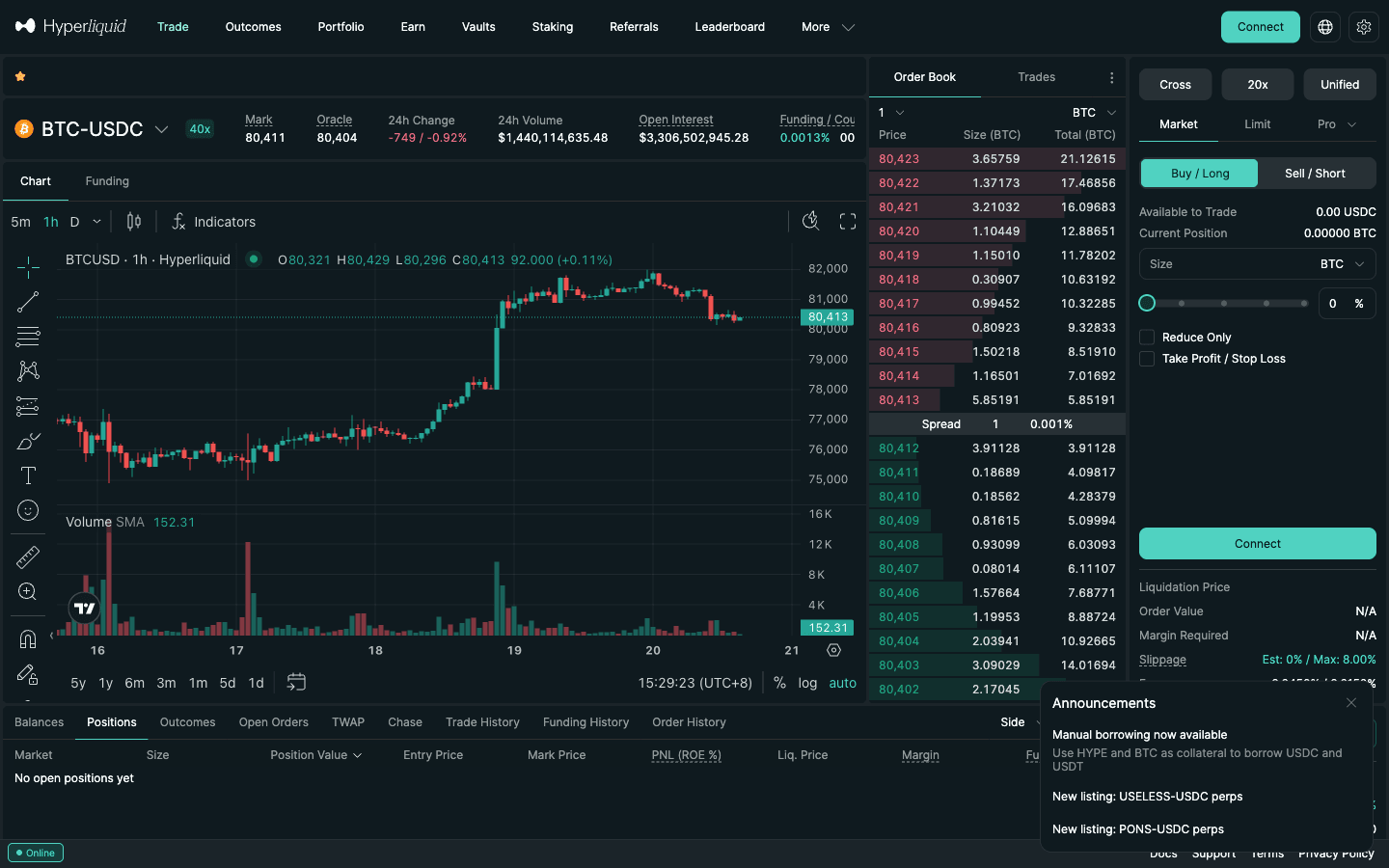
The chart in the official Hyperliquid app on app.hyperliquid.xyz says “Chart by TradingView” and loads TradingView’s Charting Library (version 28.5 on September 25, 2026): favourite intervals, the Indicators dialog, drawing tools (trend lines, Fibonacci, patterns, measurement), a Funding tab and fullscreen. It is not linked to your tradingview.com account, so layouts, Pine scripts and server-side alerts do not appear there; pick one place to draw your levels.
The Hyperliquid trade page (September 2026): TradingView Charting Library on the left, Hyperliquid’s order book and order form on the right.
The app shows one market per chart; we found no layout switcher. For several charts, open the app in more than one window (/trade/BTC, /trade/ETH) or build a TradingView layout: 2 charts per tab on Essential, 4 on Plus, 8 on Premium, 16 on Ultimate, 1 on the free plan. A four-chart layout covers most traders: BTC on 1h–4h for context, your market on the execution timeframe, ETH or SOL with funding, and your market again with open interest and liquidations. From August 26 to September 25, 2026, 38.6% of Hyperliquid BTC perp volume traded between 12:00 and 17:00 UTC (trading sessions guide). As of Tue, 20 Oct 2026 03:53 UTC, Hyperliquid listed 178 perp markets with $4.03B of 24-hour perp volume; new listings can take time to appear on TradingView.
12. What automation costs: builder fees vs subscriptions
Item
Cost (September 2026)
TradingView webhooks
Essential $12.95/mo, Plus $29.95, Premium $59.95, Ultimate $199.95 (billed annually). Free Basic: 3 price alerts, no webhooks
Relay, subscription
AlgoWay $9/mo, Tickerly from $14/mo, Autoview $39.99/mo per live exchange; hypr.run tokens
Relay, builder fee (per fill, on top of Hyperliquid’s fee)
TV-Hub 0.01%, WunderTrading 0.035%, Gainium free plan 0.045%; cap 0.1%
Self-hosted bridge
A small always-on server; no builder fee
Hyperliquid fill fee (base tier)
0.045% taker / 0.015% maker; 4% off with a referral code, also on orders that carry a builder code; no gas
Worked example: one $10,000 market order, and a month of automation
A market order pays the taker fee. Monthly figures assume a strategy that trades $50,000 of notional a day for 30 days ($1.5M), all as taker, at the base fee tier.
Route
Hyperliquid fee
Builder fee
Total per $10,000
Total per month ($1.5M)
None (app, self-hosted bridge, subscription relay) No builder fee; the referral discount applies
$4.32
$0.00
$4.32
$648
TV-Hub 0.01% per fill
$4.32
$1.00
$5.32
$798
WunderTrading 0.035% per fill
$4.32
$3.50
$7.82
$1,173
Gainium (free plan) 0.045% per fill; paid plans use credits instead
$4.32
$4.50
$8.82
$1,323
Maximum Hyperliquid allows 0.1% on perps
$4.32
$10.00
$14.32
$2,148
Every row includes the 4% referral discount on Hyperliquid’s part of the fee (0.0432% instead of 0.045%): Hyperliquid applies it to builder-coded orders too, while the builder fee itself is charged in full (checked on mainnet fills on October 1, 2026). At this volume a builder fee costs more than any subscription in the table, while at a few hundred dollars a day it costs less. Sending limit orders where the strategy allows it helps more than either: the maker fee is 0.015% against 0.045% taker, and above $5M of 14-day volume the tier drops to 0.04% / 0.012%. Full schedule: Hyperliquid fees.
13. Security checklist
API wallet only. Never give a relay, bot or person your main wallet key or seed phrase. The only main-wallet signature a relay may ask for is the one-time builder-fee approval.
One named API wallet per relay, with its expiry in your calendar; revoke builder approvals you no longer use at app.hyperliquid.xyz/builderCodes.
Secret in the message, key on the server. The alert carries a token; the private key never leaves the relay.
Cap size, exit reduce-only, so a misfiring strategy cannot flip you into a max-leverage position.
Separate sub-account. Sub-accounts unlock after $100,000 of volume and share your fee tier; fund the bot’s sub-account with only what the strategy may lose (the referral discount does not apply to sub-accounts).
14. Limitations and which setup fits you
If you…
Use
You trade by hand and want better charts
TradingView layout + Hyperliquid app side by side (section 11)
You want funding and OI on the chart
Hyperliquid derivative metrics on TradingView (section 10)
You want to be pinged at a level, then decide
TradingView push/email alerts; execute in the app
You have a tested strategy and no code
A relay service with an API wallet (section 4)
You can run a small Python service
Self-hosted webhook → SDK bridge, testnet first (section 7)
No broker link. A Pine strategy’s backtest does not include Hyperliquid fees, builder fees or hourly funding unless you model them (how to backtest a Hyperliquid strategy with both).
Charting the spot pair, trading the perp.HYPEUSDC and HYPEUSDC.P differ by the perp premium; alerts on the wrong one fire at the wrong price.
Latency. Alert → webhook → relay → order adds seconds; this setup suits strategies on 1-minute bars and slower, not scalping the order book.
Our honest recommendation: run alerts manually for a month and log what they would have done. If the manual version does not make money, a relay only automates the losses around the clock.
Trade Hyperliquid with lower fees
Referral code HOLYGRAIL: 4% off trading fees on your first $25M of volume, no gas on orders, 178 perp markets you can chart on TradingView. Enter it before you pass $10,000 of volume.
How do I automate trades from TradingView to Hyperliquid?
TradingView cannot send orders to Hyperliquid by itself, so you add a relay. 1) Open a Hyperliquid account (with a referral code, before you connect any relay) and deposit USDC. 2) Create an API wallet at app.hyperliquid.xyz/API; it trades but cannot withdraw. 3) Connect it to a relay service or your own server running the Hyperliquid SDK. 4) Copy the relay's webhook URL and message format. 5) Create a TradingView alert with the webhook URL (paid plan and 2FA required). 6) Test on testnet or with a $10 order.
Is there a native TradingView integration for Hyperliquid? Can I trade it directly from TradingView?
For charts, yes: Hyperliquid perps and spot pairs are TradingView symbols (HYPERLIQUID:BTCUSDC.P), and the chart inside app.hyperliquid.xyz is TradingView’s Charting Library. For trading, no: Hyperliquid is not a TradingView broker, so TradingView's trading panel cannot place Hyperliquid orders. That panel only works with TradingView’s listed brokers, such as Binance, Bybit and OKX, and tradingview.com has no broker page for Hyperliquid (checked October 6, 2026). You chart on TradingView and execute on app.hyperliquid.xyz, or you automate with alert → webhook → relay → Hyperliquid API wallet, as in the 6 steps above.
Can you automate trading using TradingView?
Yes, through alerts. A Pine strategy or an indicator fires an alert, and the alert's webhook notification sends an HTTP POST to a service that places the order. TradingView's own trading panel only works with its listed brokers, and Hyperliquid is not one of them. Webhook notifications need Essential ($12.95/month billed annually) or higher and two-factor authentication.
Can TradingView be used with webhooks?
Yes. Tick Webhook URL in the alert's Notifications tab and paste an HTTPS or HTTP URL (ports 443 or 80 only). TradingView sends the Message as the request body, with an application/json header when the message is valid JSON. Your server must answer within 3 seconds, and requests come from four fixed IP addresses you can allowlist.
How can I automate trades from TradingView to Hyperliquid for free?
Only for simple price alerts. The free TradingView Basic plan has no webhook notifications, no indicator or strategy alerts and 3 price alerts that expire after 1 month; TV-Hub accepts those alerts by email (tick Send Email instead of Webhook). Automating a Pine strategy or an indicator needs Essential at $12.95/month billed annually. On the relay side you can pay nothing up front: hypr.run gives 10 free tokens a day (20 webhook executions), WunderTrading and TV-Hub have free plans paid through a builder fee on each fill, Autoview's testnet is free, and a self-hosted bridge costs only a small server. Browser-extension tools such as TradingView To Anywhere's Alert Detector watch an open TradingView tab instead of using webhooks; they stop when your browser does, and we have not tested them.
Is there a fully automated trading bot for Hyperliquid?
Yes: grid, DCA and signal bots from services such as WunderTrading, Gainium and AstraBit run on Hyperliquid with an API wallet, and Hyperliquid itself offers TWAP and scale orders without any bot. "Fully automated" still means you choose the strategy, the size and the stop; no bot makes an untested strategy profitable. Our trading bot guide compares the options.
Does TradingView have an AI trading bot?
TradingView does not place trades on Hyperliquid for you, AI or otherwise. Some relay and bot services market AI features, but the path is the same: a signal (from Pine, an indicator or a model) becomes an alert or API call, and a relay places the order with your API wallet. Judge any AI bot by its logged fills on testnet, not by its marketing.
Which relay should I pick?
If you can run a small server, a self-hosted bridge has no builder fee and keeps your key in your own environment. Without code, compare the total cost at your volume: a builder fee (TV-Hub 0.01%, WunderTrading 0.035%, Gainium free plan 0.045% per fill) grows with every trade, a subscription (AlgoWay $9/month, Autoview $39.99/month per live exchange) does not. Check that the relay accepts an API wallet, supports testnet, and shows the order each alert produced.
A relay asks me to use its Hyperliquid referral code. Should I?
You can only have one. Hyperliquid accepts a referral code while your account volume is at most $10,000, and once set it cannot be changed. The 4% discount applies to your first $25M of volume on every order, including orders a relay sends with a builder code: Hyperliquid’s part of the fee is discounted, the relay’s builder fee is not (checked on mainnet fills on October 1, 2026). Set the code you want before you connect any relay.
Is Hyperliquid on TradingView?
Yes, as a data source. Hyperliquid perps are listed under the HYPERLIQUID: prefix with a .P suffix (HYPERLIQUID:BTCUSDC.P), spot pairs without it (HYPERLIQUID:HYPEUSDC), and Trade[XYZ] HIP-3 markets under HIP3XYZ:. Since September 21, 2026 TradingView also shows funding, open interest, liquidations and six other derivative metrics for 170+ Hyperliquid contracts.
Is it safe to connect a TradingView bot to Hyperliquid?
Only through an API wallet (agent wallet) created at app.hyperliquid.xyz/API: it can place and cancel orders but cannot withdraw. Never give a relay your main wallet key or seed phrase. Builder-fee relays also ask you to approve a maximum fee with your main wallet, which is a normal one-time signature (at most 0.1% on perps). Put a secret in the alert, cap size in the relay and fund a sub-account with only what the bot may lose.
Disclosure: HOLYGRAIL is our Hyperliquid referral code; we earn a share of referred accounts’ fees, and it never raises yours. We have no affiliation with TradingView or any relay named here. Plan limits, webhook rules and each relay’s pricing were read on their own sites on September 27, 2026; Hyperliquid fees and limits come from Hyperliquid’s documentation; market counts and volume refresh at build time from the public API.