
Short version. On Aster Pro, use post-only or chase orders to pay 0% maker, stop market with Reduce Only on mark price for stop-losses, a trailing stop (callback 0.1–5%) to ride trends, TWAP or scaled orders for size, and a hidden order when you don’t want a large bid seen. Every pair has a $5 minimum notional, but BTCUSDT’s 0.001 BTC lot makes its real minimum about $85. 1001x mode has only market, limit, TP and SL.
Try these orders on Aster
Register with referral code DTLpLc (open the link before you first connect your wallet), then place a post-only order to see the 0% maker fee in action.
We earn a commission when you sign up through our links; it never raises your fees.
1. Every Aster order type at a glance
Aster Pro is a central limit order book, so it behaves like a centralized exchange’s futures screen: you pick an order type in the ticket, then tick the modifiers you want. The table lists everything Aster documents for its order-book perpetuals as of September 25, 2026.
| Name | Kind | What it does | Fee side |
|---|---|---|---|
| Market | Order type | Fills now at the best available price | Taker |
| Limit | Order type | Fills at your price or better; rests on the book otherwise | Maker if it rests, taker if it crosses |
| Stop limit | Order type | At the stop price, places a limit order at your limit price | Maker or taker |
| Stop market | Order type | At the stop price, sends a market order | Taker |
| Trailing stop | Order type | Stop follows the best price by a callback rate, then sends a market order | Taker |
| Post only | Order type / TIF | Limit that is rejected if it would fill immediately | Maker only |
| Hidden order | Checkbox / TIF | Limit order that never shows on the public book; the position stays private | Maker when it rests |
| Scaled order | Strategy | Up to 110 limit orders across a price range | Maker per sub-order if it rests |
| TWAP | Strategy | Splits size into slices over 1 minute to 7 days | Shown per strategy |
| Chase order | Strategy | Post-only limit that re-prices to the best bid/ask every second | Maker only |
| TP/SL | Modifier | Exit orders attached to a position, triggered by mark or last price | Depends on the exit order |
| Reduce only | Modifier | Can only shrink or close a position | Same as the order |
| BBO | Modifier | Prices a limit at the best bid/ask (Counterparty 1, Queue 1, up to the fifth level) | Maker with post-only |
| GTC / IOC / FOK | Time in force | Rest until cancelled / fill what you can now / all or nothing | — |
| Slippage tolerance | Market setting | Turns a market order into an IOC limit at best price ± your tolerance | Taker |
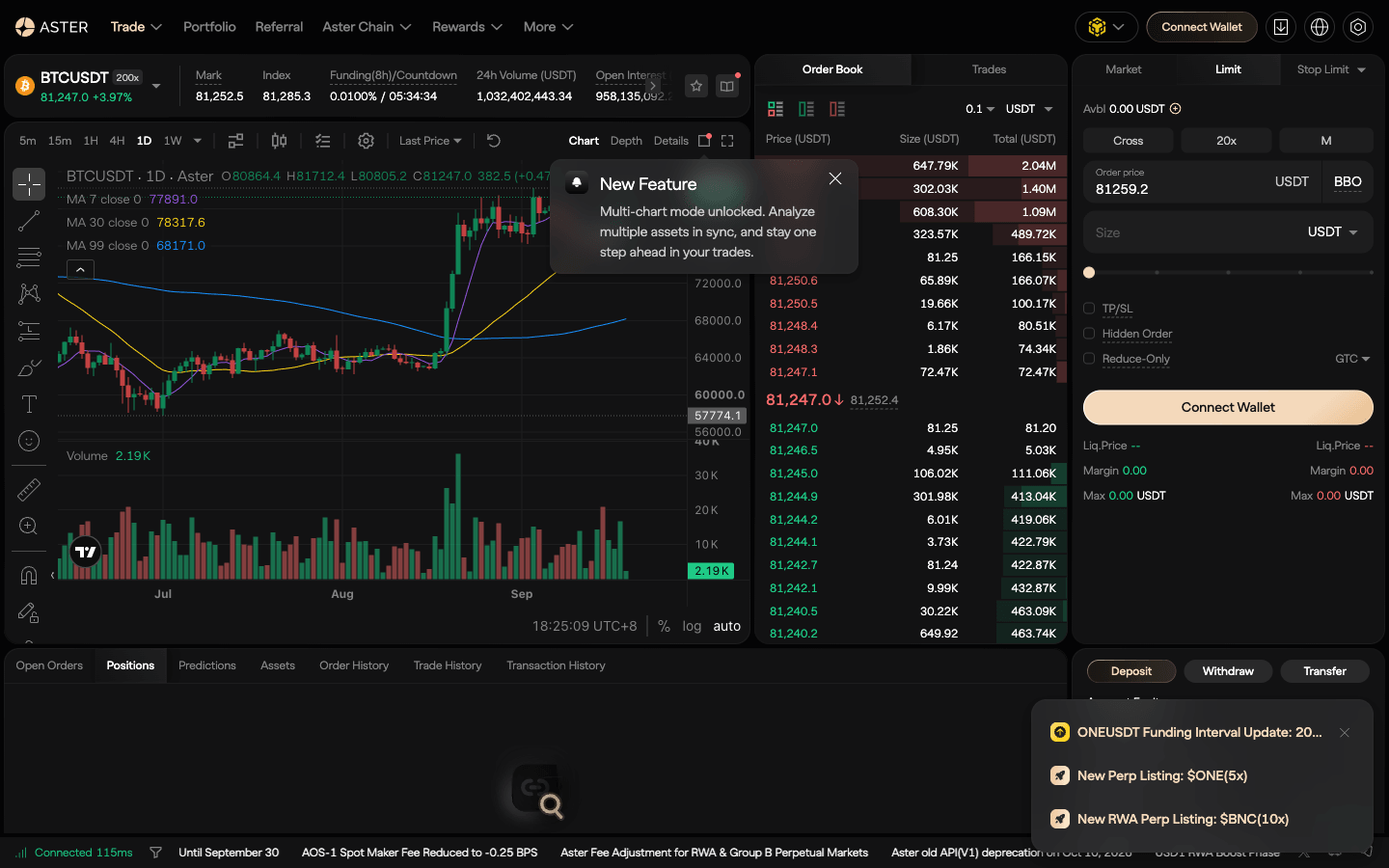
2. Market, limit, stop limit and stop market
Market fills immediately at the best available price. You pay the taker fee and the spread, plus slippage if your size walks the book. Each pair also has a market take bound in the API — the furthest from the mark price a market order may fill: 2% on BTCUSDT and ETHUSDT, 5–10% on most smaller pairs (388 of 584 pairs were at 10% on September 25, 2026).
Limit names your price. Aster’s docs use BTC at 62,000 with a limit buy at 61,800: the order sits on the book until the market trades there. If your limit price is already through the book (a buy above the best ask), it fills at once as a taker.
Stop limit has two prices. When the stop price trades, Aster places a limit order at your limit price. The docs’ example: long from 62,000, stop 61,500, limit 61,480 — if BTC gaps straight through 61,480, the order may never fill.
Stop market sends a market order when the stop is hit. It will fill, but the price may be worse: the same 61,500 stop “may be 61,490 or 61,470 depending on conditions.” For a stop-loss you cannot afford to miss, use stop market; use stop limit when a bad fill is worse than no fill, for example on a thin altcoin.
3. TP/SL, Reduce Only and the OCO question
TP/SL lets you attach a take-profit and a stop-loss when you open a position. Each can trigger on:
- Mark price — the fair price Aster uses for liquidation checks, built from funding data and a basket of spot exchanges. More stable in volatile markets.
- Last price — the latest trade on Aster’s book. Reacts faster, but a single wick can trigger it.
Since liquidation runs on mark price, triggering the stop-loss on mark price keeps both on the same reference. Watch out in the API: workingType defaults to CONTRACT_PRICE (last price), so set MARK_PRICE explicitly if that is what you want.
Reduce Only guarantees an order can only shrink or close a position — never open one or flip it. Aster recommends it for partial closes, for TP/SL that should act only as exits, and when scaling out. Without it, a stop sized larger than your position turns a long into a short.
OCO. Aster lists no separate one-cancels-the-other order. The TP/SL pair covers the usual use: long BTC at 62,000 with SL 61,500 and TP 63,000, both reduce-only — whichever triggers first closes the position, and the other has nothing left to close. After an exit, check that the leftover order is gone.
How to set a TP/SL bracket on Aster, step by step
A bracket is an entry with its exits decided in advance: a stop-loss where the idea is proven wrong and a take-profit where you get paid. This is the order form as it appeared on asterdex.com (Pro, BTCUSDT) on September 25, 2026:
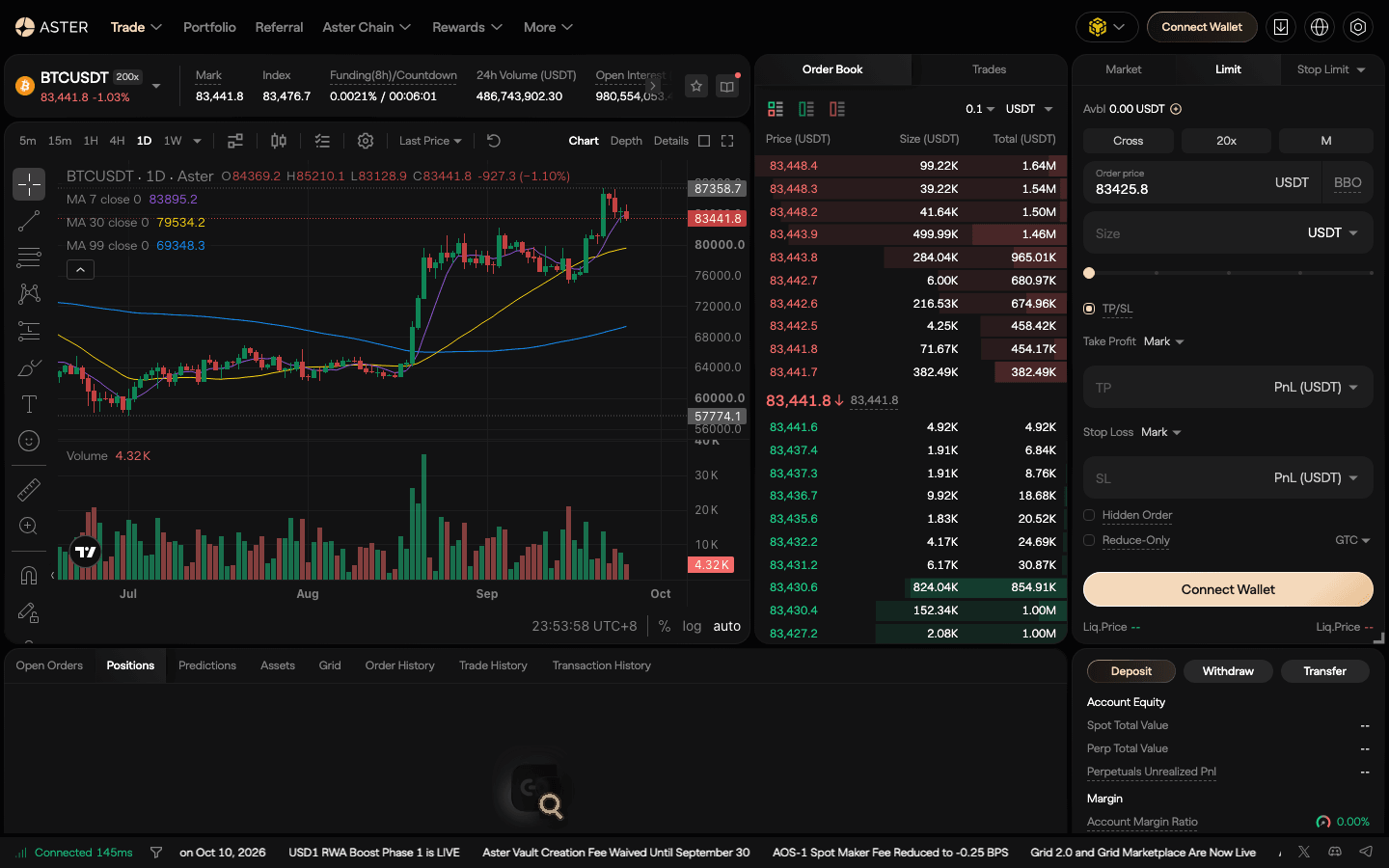
- Choose the margin mode first. The Cross button above the ticket switches to Isolated. Aster's margin docs are explicit: you cannot change the margin mode after a position or an open order exists on that contract. Set the leverage (the 20x button) at the same time.
- Pick the entry type. Limit (or Post Only from the order-type menu) if you can wait, so the entry pays the 0% maker fee; Market if the level is running away.
- Tick TP/SL. Two blocks appear, Take Profit and Stop Loss. Each has a trigger switch, Mark or Last (Mark is pre-selected), and an input whose unit you choose: Price (USDT), PnL (USDT) ("set TP/SL prices based on estimated PnL") or ROI (%).
- Enter the levels as prices. PnL and ROI inputs are convenient, but a price ties the stop to the chart level that invalidates the trade. Keep the stop-loss on Mark, the same reference Aster uses for liquidation, so a single wick on the book does not stop you out.
- Check Liq.Price before you submit. The ticket shows an estimated liquidation price. It must sit well beyond your stop. If it does not, lower the leverage or the size, not the stop.
- Submit, then verify. Open Orders should show the entry and, once filled, the position should carry the TP and SL. After the trade closes, make sure no stray exit order is left behind.
Three rules keep brackets safe. Reduce Only on every exit, so a mismatch in size can only shrink the position. Mind the conditional-order cap: BTCUSDT allows at most 10 conditional (stop, take-profit, trailing) orders per symbol, so a many-step ladder should use plain Reduce-Only limit orders. And remember that when a liquidation starts, Aster cancels all your open orders first, including the take-profit; a stop placed beyond the liquidation price never gets a chance to fire.
Worked example: a $5,000 account, BTC long
| Step | Number | How it is worked out |
|---|---|---|
| Risk per trade | $50 | 1% of a $5,000 account |
| Entry / stop (mark) | 84,000 / 83,500 | Stop below the level that breaks the setup; $500 away (0.6%) |
| Size | 0.1 BTC ($8,400) | $50 ÷ $500 per BTC. BTCUSDT's step is 0.001 BTC, so 0.1 is a valid size |
| Leverage and margin | 10x → $840 | Notional ÷ leverage |
| Liquidation (isolated) | ≈ 75,840 (−9.7%) | Margin + PnL = maintenance margin, with BTCUSDT's $400–$300k bracket (up to 150x, MMR 0.33%, maintenance amount 1); fees ignored. Far beyond the 0.6% stop |
| Take-profits | 84,500 (1R) and 85,000 (2R) | 40% at each, 20% left on a 2% trailing stop |
| Fees, worst case | ≈ $3.34 | Stop fills as a market order: 0.04% × 0.1 × 83,500. A Post Only entry and resting limit take-profits pay 0% |
Illustrative prices near the BTCUSDT mark on September 25, 2026 (about 83,900). Leverage brackets and fees from Aster's trading-rules and fee pages on the same day.
The single TP field covers one target. To scale out as above, set the TP/SL for the stop (and optionally the final target), then place separate Reduce-Only limit sells at 84,500 (0.04 BTC) and 85,000 (0.04 BTC). They rest on the book as maker orders, so they cost nothing when they fill. The runner can use a trailing stop; Aster's own example uses a 2% callback. Funding on BTCUSDT settles every 8 hours; at a rate of 0.01% one settlement costs $0.84 on this position, so a multi-day swing should include it in the plan.
Bracket mistakes that cost money
- Stop on last price: a wick on the book stops you out, and the price then reaches your target without you.
- Stop Limit as protection in a fast market: the trigger fires, the limit never fills, and you are unprotected. Use a stop that exits at market for protection.
- Size not linked to the stop: a big notional with a tight stop still loses a lot if the price gaps through it.
- Moving the stop further away after entry: it turns a defined-risk trade into a hope trade.
- Stale full-size exits after a manual partial close: without Reduce Only, a leftover order can open a position the other way.
4. Trailing stop
A trailing stop uses a callback rate instead of a fixed stop price. For a long, the stop sits that percentage below the highest price reached since you placed the order and never moves down; for a short, it sits above the lowest price and never moves up. When price reverses by the callback rate, Aster sends a market order to close.
Aster’s example: long BTC from 95,000 with a 2% callback. BTC rises to 100,000, so the stop moves to 98,000. If BTC then drops to 98,000, a market sell closes the position with roughly 3,000 of profit per BTC locked in. The short version: short from 105,000, BTC falls to 100,000, the stop sits at 102,000, and a rebound to 102,000 triggers a market buy.
- API:
TRAILING_STOP_MARKETwithcallbackRatefrom 0.1 to 5 (1 means 1%) on the single-order endpoint, plus an optionalactivationPrice— the trail only starts once price has reached it. Setting a sell activation price below the current price returns error −2021 “Order would immediately trigger.” - Choosing the callback: it has to be wider than normal noise. A 0.5% trail on BTC triggers on ordinary intraday swings; 2–3% gives a trend room.
- Cost: the exit is a market order, so it pays the taker fee.
5. Post only, BBO and time in force
Post only guarantees maker status: if the order would match immediately, Aster rejects it instead. Example from the docs: BTC at 62,000, post-only sell at 62,001 — rejected if a buyer is already there, posted as a maker order if the best bid is 62,000. With maker at 0% and taker at 0.04%, this one setting is the biggest fee lever on the venue.
BBO fills in the price for you: for a buy, the lowest current ask; for a sell, the highest bid. Options such as Counterparty 1 and Queue 1 move the price to the other side of the book or back into the queue, down to the fifth-best level. Combined with post-only, it joins the queue at 0%; if the market moves before confirmation, the order may fail to place rather than take.
Time in force:
- GTC (good till cancelled) — stays open until filled or cancelled. The default.
- IOC (immediate or cancel) — fills what is available now, cancels the rest. A 1 BTC order with 0.6 available fills 0.6 and cancels 0.4.
- FOK (fill or kill) — fills in full or not at all. A 1 BTC order with 0.9 available fills nothing.
Hedge Mode. By default you are in One-Way Mode (one net position per contract). Hedge Mode lets you hold a long and a short in the same contract at once. Switch in Settings → Position Mode; it cannot be changed while you have open positions or open orders.
6. Hidden orders and hidden positions
A hidden order is a limit order that shows nothing about its size or presence on the public order book — for its entire life. It still sits inside the normal matching engine and trades against visible orders, and margin, matching and liquidation work on the full size. Once it fills, the result is a hidden position: excluded from public data feeds and portfolio analytics, so nobody else sees its size, direction or PnL.
How to place one: choose the contract, leverage and size, tick Hidden Order (hidden orders are always limit orders), and submit. It appears under Open Orders with a “not visible” icon but not in the public book. Through the API it is simply timeInForce=HIDDEN, available on all 584 trading pairs (September 25, 2026).
Hidden vs iceberg vs dark pool. An iceberg order shows part of its size; a dark pool hides everything but splits liquidity away from the main book. Aster’s hidden order is invisible and trades against the main book. Hyperliquid, by comparison, has no native hidden or iceberg order (its order schema has no display-size field). The trade-off: a hidden bid does not attract other traders the way a visible one can, and it earns no queue signal — use it when not being seen matters more.
Cost. Aster documents no extra fee for hiding. A hidden order that rests and fills later is a maker fill (0%); the part that crosses the spread on submission pays the taker fee (0.04% on General pairs at VIP 1). Keep hidden limits a tick behind the touch to stay maker. It is worth it for a large bid or offer that would move expectations if seen, a take-profit you do not want mapped, or a position you would rather not see copied; for a small scalp, post-only or chase does the same job.
Account Privacy on Aster Chain, and what it does not hide
A hidden order hides one order and the position it creates. Account Privacy applies to the whole account: it is a setting on Aster Chain, Aster's own layer 1 (launched March 16, 2026; zero gas on trades). With it off, Aster's docs say all trader activity is published on-chain. With it on, balances and open positions are hidden, every order is encrypted and verified with zero-knowledge proofs, each trade uses a fresh one-time stealth address, and a viewer pass lets you (or your accountant) verify the private history on the explorer. While it is on, internal transfers to other users are not allowed. Hyperliquid is the opposite by design: every order, fill and liquidation is public, which is why its positions can be tracked and copied (Aster vs Hyperliquid).
- Deposits and withdrawals still cross public chains; anyone can see a wallet sending USDT to Aster's bridge.
- Aster itself is not blind: core chain contracts and the RPC are not open-sourced yet and there are no external validators in Phase 1, so you trust Aster's operators with matching.
- Risk is unchanged: a hidden position is liquidated at the same price (liquidation maths).
- Taxes still apply. Privacy from other traders is not privacy from a tax authority; keep exports and use the viewer pass when you need to prove your history.
7. Scaled orders
A scaled order places up to 110 limit sub-orders across a price range in one go. You enter the lowest and highest price, total size, order count and a size distribution:
- Equal (flat): the same size at each price. No directional bias.
- Increasing: larger sizes at higher prices — for selling, to raise your average sell price.
- Decreasing: smaller sizes at higher prices — for buying, to lower your average buy price.
- Random: sizes vary randomly within a variance you set, up to 10%, to obscure the pattern.
Worked example. Buy 0.5 BTC between 82,000 and 84,000 in 20 orders, equal: each sub-order is 0.025 BTC, roughly every 105 dollars. Each sub-order is well above the 0.001 BTC minimum and must land on the 0.1 tick. Keep the whole range below the best ask so every order rests as a maker at 0%; a sub-order priced through the book would trade immediately as a taker. You need margin for the full 0.5 BTC before confirming.
8. TWAP
TWAP (time-weighted average price) splits a large order into smaller slices executed at regular intervals, aiming for an average close to the period’s time-weighted price. Aster suggests it when your size is larger than the liquidity on the book, or when you expect volatility without a clear direction.
- Settings: symbol, direction, total size, total time from 1 minute to 7 days. Find it under Order Type → TWAP.
- Margin: order cost = total size × last price ÷ leverage must stay below “Available for Order” for the whole run. If any slice fails this check, the whole strategy stops. Reduce-only TWAPs are exempt.
- Limits: up to 30 TWAP strategies per account at once; Multi-Asset Mode is supported.
- Monitoring: Strategy Overview → Running shows average fill price, duration, total size and Filled %; the Stop button ends it. Execution is best effort — a TWAP does not guarantee a full fill, and slippage can occur.
Example. Selling 5 BTC (about $423,000 at the September 25 mark of $84,582) at 10x over 4 hours needs about $42,300 of available margin throughout. Aster’s docs do not say whether slices post or take, so budget the taker rate ($169 at 0.04%) and check the fee column in the strategy details afterwards.
Put hidden, scaled and chase orders to work
They are built into Aster Pro — no bot needed. Sign up with DTLpLc.
9. Chase orders
A chase order is a limit order that re-prices itself every second to follow the best bid (buys) or best ask (sells), until it fills, you cancel it, or the market runs past a limit you set. Every chase order is post-only, so every fill is a maker fill at 0%. Aster calls it the first native chase order on a DEX, built into the matching engine.
- Best bid/ask mode: the buy price moves up to Bid1 whenever Bid1 rises — fastest maker fill.
- Gap mode: price = Bid1 − offset (buy) or Ask1 + offset (sell), a fixed distance behind the touch — better price, slower fill.
- Max chase difference: absolute or percentage. For a buy, the cap is the original Bid1 + offset or Bid1 × (1 + %); once the order would have to go above it, it cancels.
- Rules: up to 5 active chase orders per pair; no editing after submission (cancel and re-place); only the price moves, never the quantity.
- API:
POST /fapi/v3/chase. The gap (chaseOffset) is absolute only for now; the max distance accepts absolute or percentage.
Example. You want to buy 0.1 BTC without paying $3.38 of taker fee on $8,458. A chase at the best bid with a 0.3% max chase difference follows the market up to about $254 above your start and then gives up — you either pay $0 as a maker or don’t trade.
10. Market order slippage tolerance
Set a slippage tolerance on a market order and Aster converts it into an IOC limit order: limit = best ask + tolerance for a buy, best bid − tolerance for a sell. Tolerance can be an amount (minimum one tick) or a percentage (minimum 0.1%), capped by the pair’s market order price cap. With a best ask of 100 USDT and a 1% tolerance, nothing fills above 101; whatever cannot fill inside the band is cancelled. It is a per-order version of the market take bound, and it is the right default for any market order larger than the top few levels of the book.
11. Fees by order type
Aster charges by fill side, not by order type: a fill that rests first is maker (0%), a fill that takes liquidity is taker. On General crypto pairs at VIP 1 that is 0% / 0.04%; Group B pairs are 0.1% taker; RWA perps 0.0125% (Aster’s 5% discount for paying in ASTER is documented for spot only, not these perps). For a $10,000 BTCUSDT fill:
| Order | Fill side | Fee |
|---|---|---|
| Market, stop market, trailing stop, take-profit market | Taker | $4.00 |
| Limit or stop limit that crosses the spread | Taker | $4.00 |
| Limit, hidden, scaled or stop-limit order that rests, then fills | Maker | $0 |
| Post-only (GTX) and chase orders | Maker (never taker) | $0 |
| Same $10,000 on a Group B pair (e.g. MEMEUSDT) | Taker | $10.00 |
| Same $10,000 on an RWA perp (e.g. gold) | Taker | $1.25 |
Rates from docs.asterdex.com Fees and VIP Program pages, September 25, 2026. Full schedule, VIP tiers and funding: Aster fee structure.
A trader who enters with a post-only limit and exits with a take-profit limit pays $0 on a $10,000 round trip; the same trade with market orders both ways costs $8.00. Stops are the exception you should accept: a stop market exit that costs $4 is cheaper than a stop limit that never fills.
12. Tick size, lot size and minimum order
Every Aster perp has its own price step (tick size), quantity step (lot size or step size), minimum quantity and $5 minimum notional. Orders that break them are rejected, which matters most for bots and for scaled orders that split size into small pieces. Values from the public exchangeInfo endpoint at 09:55 UTC on September 25, 2026, with mark prices from the same minutes:
| Pair | Tick size | Lot (step) size | Smallest valid order | Limit price band vs mark | Market take bound |
|---|---|---|---|---|---|
| BTCUSDT | 0.1 | 0.001 | 0.001 BTC ≈ $84.58 | ±2% | 2% |
| ETHUSDT | 0.01 | 0.001 | 0.002 ETH ≈ $5.41 | ±2% | 2% |
| SOLUSDT | 0.01 | 0.01 | 0.05 SOL ≈ $5.91 | ±3% | 3% |
| HYPEUSDT | 0.001 | 0.01 | 0.06 HYPE ≈ $5.60 | ±2% | 2% |
| XRPUSDT | 0.0001 | 0.1 | 3.3 XRP ≈ $5.11 | ±3% | 3% |
| DOGEUSDT | 0.00001 | 1 | 52 DOGE ≈ $5.00 | ±5% | 5% |
| BNBUSDT | 0.01 | 0.01 | 0.01 BNB ≈ $7.76 | ±2% | 2% |
| XAUUSD1 (gold) | 0.01 | 0.001 | 0.002 XAU ≈ $8.60 | ±5% | 5% |
| ASTERUSDT | 0.0001 | 0.01 | 6.87 ASTER ≈ $5.00 | +5% / −5% | 5% |
Source: fapi.asterdex.com/fapi/v1/exchangeInfo (608 symbols listed, 584 trading, all with MIN_NOTIONAL 5) and premiumIndex, September 25, 2026. “Smallest valid order” is the smallest multiple of the lot size that clears both the minimum quantity and $5 at that moment.
The rules that decide whether an order is accepted
- Price filter: (price − minPrice) must be a whole multiple of the tick size. A BTCUSDT limit at 84,582.05 is rejected; 84,582.0 or 84,582.1 is fine.
- Lot size: quantity must be at least minQty and a multiple of the step. 0.0015 BTC is invalid; 0.001 or 0.002 is fine.
- Market lot size: market orders have their own cap — 120 BTC on BTCUSDT, 2,000 ETH on ETHUSDT. Larger size needs limit orders or a TWAP.
- Minimum notional: price × quantity ≥ $5 (market orders use the mark price). On BTC the lot size binds first: 0.001 BTC ≈ $85. On ETH the $5 binds: 0.001 ETH is only $2.70, so 0.002 ETH is the minimum.
- Percent price: a buy limit must be at or below mark × multiplierUp and a sell at or above mark × multiplierDown — ±2% on BTCUSDT, ±5% on DOGE and gold. A far-away limit outside the band is rejected, so ladder deep bids as they come into range.
- Order counts: up to 200 open orders per symbol, of which at most 10 can be conditional (stop, take-profit, trailing). A scaled order of 110 sub-orders therefore uses more than half of a pair’s allowance.
Rounding without adding risk
Round quantities down to the step (never up — that adds risk), then re-check the $5 notional. Round passive buy prices down and sell prices up to the tick so they stay behind the touch. For stops, round in the direction that keeps your planned risk, then recompute your liquidation distance. Bots should load the filters at start-up and refresh them daily rather than hard-coding them, and must not use pricePrecision or quantityPrecision as the tick or step — Aster’s API docs say so explicitly. Code examples: Aster API guide; cross-venue minimums: DEX minimum trade size comparison.
13. Pro vs 1001x vs Shield Mode
Aster has three ways to trade perps, and the order types differ a lot. Everything above applies to Pro, the order book.
| Pro (order book) | 1001x | Shield Mode | |
|---|---|---|---|
| How orders fill | Central limit order book on Aster Chain | Oracle-priced against the ALP liquidity pool (BNB Chain, Arbitrum) | No order book; mark price = last price |
| Order types | Everything on this page | Market, limit, take profit, stop loss | No order book: choose direction, margin and leverage (20x minimum) |
| Max leverage | Per pair and size (BTCUSDT 200x up to $400 notional) | BTC/USD 1001x, ETH/USD 250x, other crypto 75x, forex 200x | 20x minimum, up to 1001x; forex up to 500x, stocks 50x |
| Margin | Cross or isolated; single- or multi-asset collateral | Isolated per position | Isolated per position; no hedge mode |
| Fees | 0% maker / 0.04% taker (General pairs, VIP 1) | 0.08% open + 0.08% close below 500x; PnL-based close fee at 500x+; $0.50 / $0.20 execution fee | 0.03% flat, or 15–20% of profit |
Sources: docs.asterdex.com 1001x (Leverage, Fees & Slippage, Order Types, Managing Positions, Degen Mode) and Shield Mode (User Tutorial, Fees & Specs, Position Mode, Forex, Stock Market) pages, September 25, 2026. The Shield fee page still mentions a limited-time zero-fee launch event; check the ticket.
- 1001x limit orders are not order-book orders. Aster warns they may not execute even when the target is reached: the mark price (aggregated across exchanges) may not have got there, may not have stayed long enough, or the order may be larger than the available open interest.
- 1001x at 500x and above (“Degen”): no opening fee, a PnL-based closing fee of max(PnL × 15% ÷ notional, 0.03%), no margin top-ups, and net profit capped at about 500% (500x/750x) or 300% (1001x).
- Shield Mode positions are isolated with no hedge mode and no margin top-ups; funding is charged hourly; a position is closed automatically once its profit passes a threshold (50,000 USDT on BTC and ETH, 3,000 USDT on RWA and stocks). Fees: a flat 0.03% of notional on opening and on closing, or a profit share charged only on winning trades (15%–20% in the docs). The live BTCUSDT ticket on September 27, 2026 showed a 10% profit share, a 10x minimum leverage and “Max Profit Per Position” 80,000 USDT: the ticket is what applies.
Leverage limits per pair and size are in the Aster leverage and margin guide.
14. Order types in the API
Aster’s V3 futures API is Binance-style. The UI names map to parameters like this:
| UI name | V3 parameters |
|---|---|
| Limit (GTC) | type=LIMIT, timeInForce=GTC |
| Post only | timeInForce=GTX |
| Hidden order | timeInForce=HIDDEN |
| IOC | timeInForce=IOC (FOK is in the UI docs but not in the V3 enum) |
| Stop limit / stop market | STOP (price + stopPrice) / STOP_MARKET (stopPrice) |
| Take profit | TAKE_PROFIT / TAKE_PROFIT_MARKET |
| Trailing stop | TRAILING_STOP_MARKET with callbackRate 0.1–5 (1 = 1%) and optional activationPrice |
| Trigger on mark price | workingType=MARK_PRICE (API default is CONTRACT_PRICE, i.e. last price) |
| Reduce only / close all | reduceOnly=true (not in Hedge Mode) / closePosition=true on STOP_MARKET or TAKE_PROFIT_MARKET |
| BBO | pegPriceType=COUNTERPARTY_1 or QUEUE_1 plus pegOffset |
| Chase | POST /fapi/v3/chase (default GTX, maxChaseOffset absolute or percentage) |
| Self-trade prevention | stpMode=EXPIRE_TAKER, EXPIRE_MAKER or EXPIRE_BOTH |
From github.com/asterdex/api-docs (V3, futures), September 25, 2026. TWAP and scaled orders have no documented V3 endpoint; they are app features.
Two details catch people out. priceProtect=TRUE on a stop blocks the trigger if mark and last price differ by more than the pair’s triggerProtect (2% on BTCUSDT) — useful in a flash crash, but your stop may not fire. And self-trade prevention defaults to Cancel Maker Only: if two of your strategies cross, the resting order is cancelled and the incoming one keeps matching.
15. Common mistakes
- Taking by habit. 0.04% vs 0% on every entry and exit is the largest avoidable cost on Aster. Default to post-only.
- No Reduce Only on exits. An oversized stop fill flips your position.
- Last-price stops in a wick. Liquidation uses mark price; your stop probably should too — and the API defaults to last price.
- Stop limits on thin pairs. A gap through your limit leaves you with no exit.
- Off-tick or undersized orders from bots. Read the filters; 0.001 ETH is below $5.
- Assuming 1001x limit orders behave like book orders. They trigger on mark price and may not fill.
- Leaving a TWAP without margin headroom. One failed slice ends the whole strategy.
New to perps on a DEX? Start with what a DEX is, Aster for beginners and the best DEX comparison. Comparing tools across venues: Hyperliquid order types and Lighter order types.
16. Beyond orders: Grid 2.0, vaults, Earn and every Aster feature at a glance
- Grid 2.0 and the Grid Marketplace. Native futures grids (neutral, long or short) now run in a dedicated Grid Bot sub-account, so they no longer interfere with manual positions; cross grids share margin (one per pair), isolated grids have their own (up to 50 per account), and margin must be in the market's settlement asset. The Marketplace lists running grids with PnL, ROI and range: Copy takes the parameters, Reverse flips a long grid to short. With Account Privacy on, your grids never appear there. Bots and the API: Aster automated trading.
- Vaults (AOS3). A manager trades a vault account and investors own a share of its net asset value. Managers stake 100 ASTER (returned if lifetime PnL is positive, burned otherwise) and invest at least $100, keeping 10% by default; investors deposit from 100 of one stablecoin. The profit share (0–100%) applies only to realized profit, every new deposit resets the lock-up for your whole position, and vaults trade perps only. A Private vault hides its positions from you too, so prefer Public vaults with a record. Hyperliquid's are far larger (Hyperliquid vaults).
- Aster Earn. On September 30, 2026 asBNB (BNB liquid staking via Lista DAO and Binance Launchpools) showed 1.55% on $78M, and asUSDF 2.4% on $6M; ALP, the pool behind 1001x, held $5.6M and moves with traders' PnL. USDF is minted 1:1 from USDT, which goes to the custodian Ceffu for delta-neutral positions on Binance; redeeming costs 0.1% and takes 1–2 days, up to 7 for large amounts. These are CeDeFi products with custodial and exchange risk (Aster staking).
- Predictions, OTC and Aster Code. Event markets (Japan is among the restricted regions on its Service Region page); private OTC block trades within ±8% of mark via a shared deal code; and Aster Code, which lets builders holding 100 ASTER run a front-end with a user-approved builder fee. Points: the Stardust programme ran March 30 – August 30, 2026 (Aster points).
| Feature | Where | What it does | Best for |
|---|---|---|---|
| Hidden order | Pro order form checkbox (API timeInForce=HIDDEN) | Limit order invisible on the public book | Anyone placing size |
| Hidden position | Automatic for fills from hidden orders | Size, direction and PnL kept out of public feeds | Swing and size traders |
| Account Privacy | Account setting on Aster Chain | Hides balances and positions; ZK-encrypted orders, one-time stealth addresses | Anyone who dislikes being tracked |
| Shield Mode | Trade → Shield | No order book; flat fee or profit share | Short, high-leverage trades |
| 1001x | More → 1001x | Pool-based perps (ALP) on BNB Chain and Arbitrum | Tiny-margin bets |
| Grid 2.0 + Marketplace | Trade → Grid | Bots in their own sub-account; copy or reverse live grids | Range traders |
| Vaults (AOS3) | Trade → Vaults | Deposit with a manager; public, private or flexible privacy | Passive investors, managers |
| Aster Earn | More → Earn | asBNB, asUSDF, ALP | Idle BNB or stablecoins |
| Predictions and OTC | Trade → Prediction / OTC Trading | Event markets; private block trades within ±8% of mark | Specialists |
docs.asterdex.com and the asterdex.com menus, September 25, 2026.
Which to use first: a swing trader with size uses hidden limit entries, TP/SL with Reduce Only and Account Privacy; a fee-minimiser posts only (0% maker); small high-risk bets belong in Shield or 1001x with the profit caps understood; passive money goes to a public vault with a record or asUSDF, sized to the counterparty risk.
Trade privately on Aster
Hidden orders, Account Privacy and 0% maker on every order-book perp. Referral code DTLpLc (open the link before you first connect your wallet).
FAQ
What order types does Aster support?
Aster Pro (the order-book perps) supports market, limit, stop limit, stop market, trailing stop and post-only orders; the modifiers TP/SL (mark or last price), Reduce Only and BBO; time-in-force GTC, IOC and FOK; plus hidden orders, scaled orders (up to 110 sub-orders), TWAP (1 minute to 7 days) and chase orders. 1001x mode offers only market, limit, take profit and stop loss. (docs.asterdex.com, checked September 25, 2026.)
What is a hidden order on Aster?
A limit order that never appears on the public order book. You tick Hidden Order in the order form (hidden orders are always limit orders); it rests in the matching engine and trades against normal orders, and the resulting position is excluded from public data feeds, so its size, direction and PnL are visible only to you. In the API it is timeInForce=HIDDEN.
How does the Aster trailing stop work?
You set a callback rate instead of a stop price. For a long, the stop stays that percentage below the highest price reached after placing it and never moves down; when price falls back by the callback rate, a market sell fires. Aster’s example: entry 95,000, 2% callback, BTC rises to 100,000, stop moves to 98,000. Through the API the callback rate is 0.1% to 5%, with an optional activation price.
How long can an Aster TWAP run?
From 1 minute to 7 days. You choose direction, total size and total time; up to 30 TWAP strategies can run per account. Your account must keep enough margin for the full size for the whole run (reduce-only TWAPs are exempt), and if any slice fails the margin check the whole strategy stops. Execution is best effort, so slippage can occur.
What is the minimum order size on Aster?
Every trading perp has a $5 minimum notional, but the lot size can force a larger minimum. On September 25, 2026, BTCUSDT’s minimum quantity of 0.001 BTC was worth about $84.58, so that is the real minimum for BTC. ETHUSDT needed 0.002 ETH (about $5.41) to clear $5. Read LOT_SIZE and MIN_NOTIONAL from the exchangeInfo endpoint for any pair.
How do I set a take profit and stop loss on Aster?
In the Pro order form, choose Limit or Market, tick TP/SL, and fill in Take Profit and Stop Loss. Each has its own trigger (Mark or Last; Mark is the default) and you can enter the level as a price in USDT, an estimated PnL in USDT or an ROI %. Pick Cross or Isolated first, because the margin mode cannot be changed once a position or open order exists. Put the stop-loss on mark price, and use extra Reduce-Only limit orders if you want to take profit in several steps.
Does Aster have OCO orders?
There is no separate OCO order type in Aster’s docs. The TP/SL modifier does the same job for a position: attach a take profit and a stop loss with Reduce Only on, and whichever triggers first closes the position so the other has nothing left to close. Check the other order is gone after an exit.
Which Aster order types avoid the taker fee?
Post-only (GTX) and chase orders can only fill as maker, so they always pay 0% on Aster’s order-book perps. Plain limit, hidden, scaled and stop-limit orders pay 0% if they rest before filling. Market, stop market, take-profit market and trailing stop exits pay the taker fee: 0.04% on General pairs at VIP 1.
What is the difference between a hidden order and Account Privacy on Aster?
A hidden order hides one limit order and the position it creates. Account Privacy is an account-level setting on Aster Chain that hides your balances and open positions and routes every order through ZK-verifiable encryption and a fresh one-time stealth address; a viewer pass lets you verify your own history. While Account Privacy is on, internal transfers to other users are not allowed.
Start trading on Aster
0% maker on every perp, hidden and chase orders built in. Referral code DTLpLc.
Want the deepest DEX order books as well? Hyperliquid with code HOLYGRAIL takes 4% off your fees on the first $25M of volume.
Disclosure: DTLpLc is our Aster referral code; we receive a share of referred accounts’ fees. Order mechanics are from docs.asterdex.com and Aster’s API docs; tick sizes, lot sizes and prices from Aster’s public API, all checked on October 14, 2026. Aster can change parameters at any time — the order ticket shows what applies. Nothing here is financial advice.