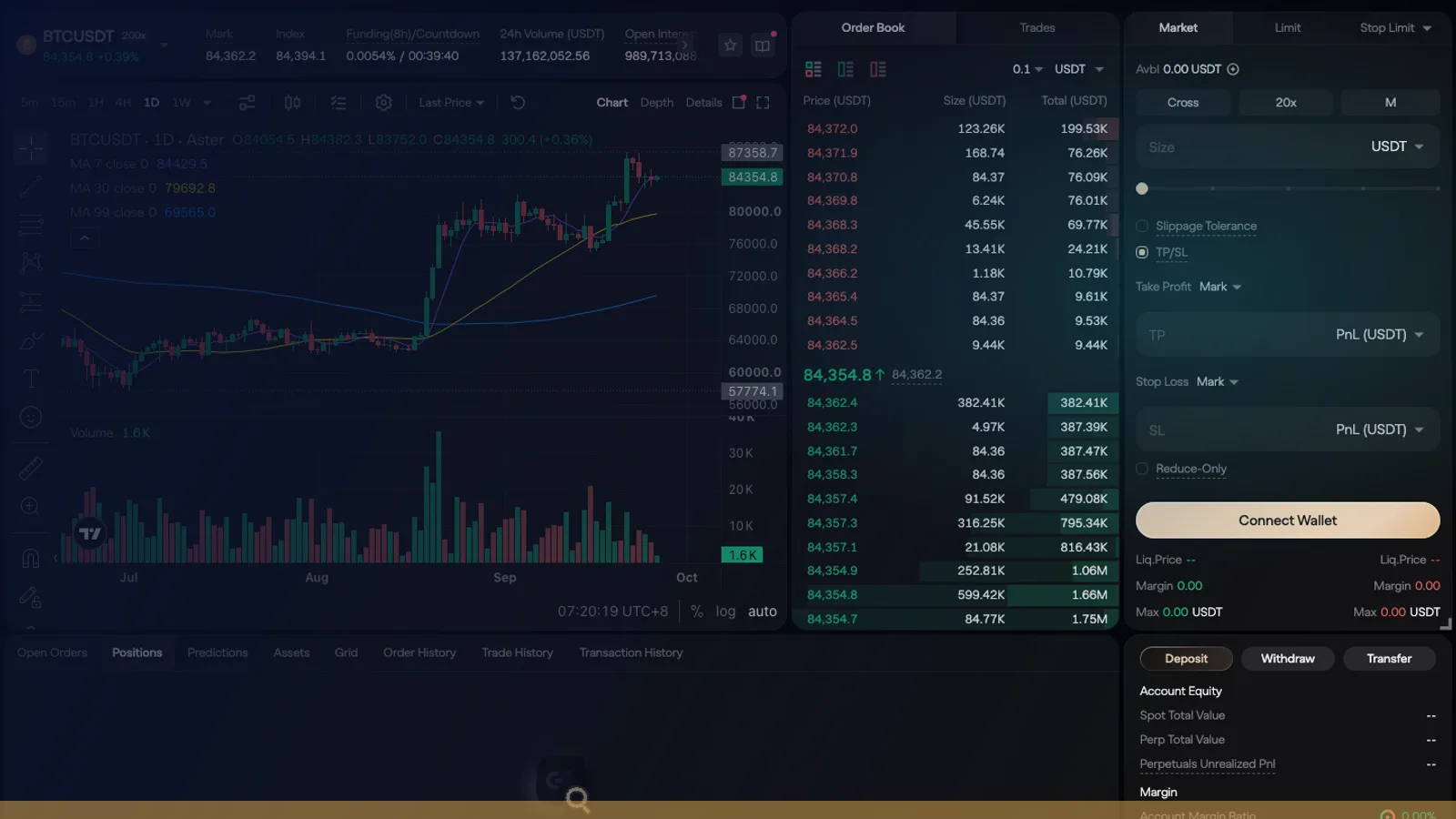
To use Aster DEX, open asterdex.com, click Connect Wallet (or log in with email), click Deposit and send USDT or USDC, then go to Trade → Perp, set a low leverage and place a Market or Limit order with TP/SL. Maker orders cost 0% and market orders 0.04% on crypto pairs. Here are the six steps, then a screenshot and the details for each one.
- Connect: Open asterdex.com, pick a chain in the dropdown and click Connect Wallet (or Log in with Email), then sign the message.
- Deposit: Click Deposit, keep Perpetual Account, choose the network and send USDT or USDC.
- Open Pro: Go to Trade → Perp (Pro mode) and pick a market such as BTCUSDT.
- Set margin and leverage: Choose Cross or Isolated and lower the leverage to 2–5x.
- Place the order: Choose Market or Limit, enter the size in USDT, tick TP/SL and submit.
- Manage and withdraw: Watch the position in Positions, close it, then click Withdraw.
What is Aster DEX? Aster is a decentralized perpetual futures exchange (a perp DEX) on its own blockchain, Aster Chain. You trade crypto, stock and commodity perpetuals from your own wallet, with no account at a company holding your funds. Its docs call it privacy-focused: orders are encrypted until they execute. On October 14, 2026 its order book listed 604 perpetual markets. If DEXs are new to you, how a DEX works takes five minutes.
Open Aster with our invite code
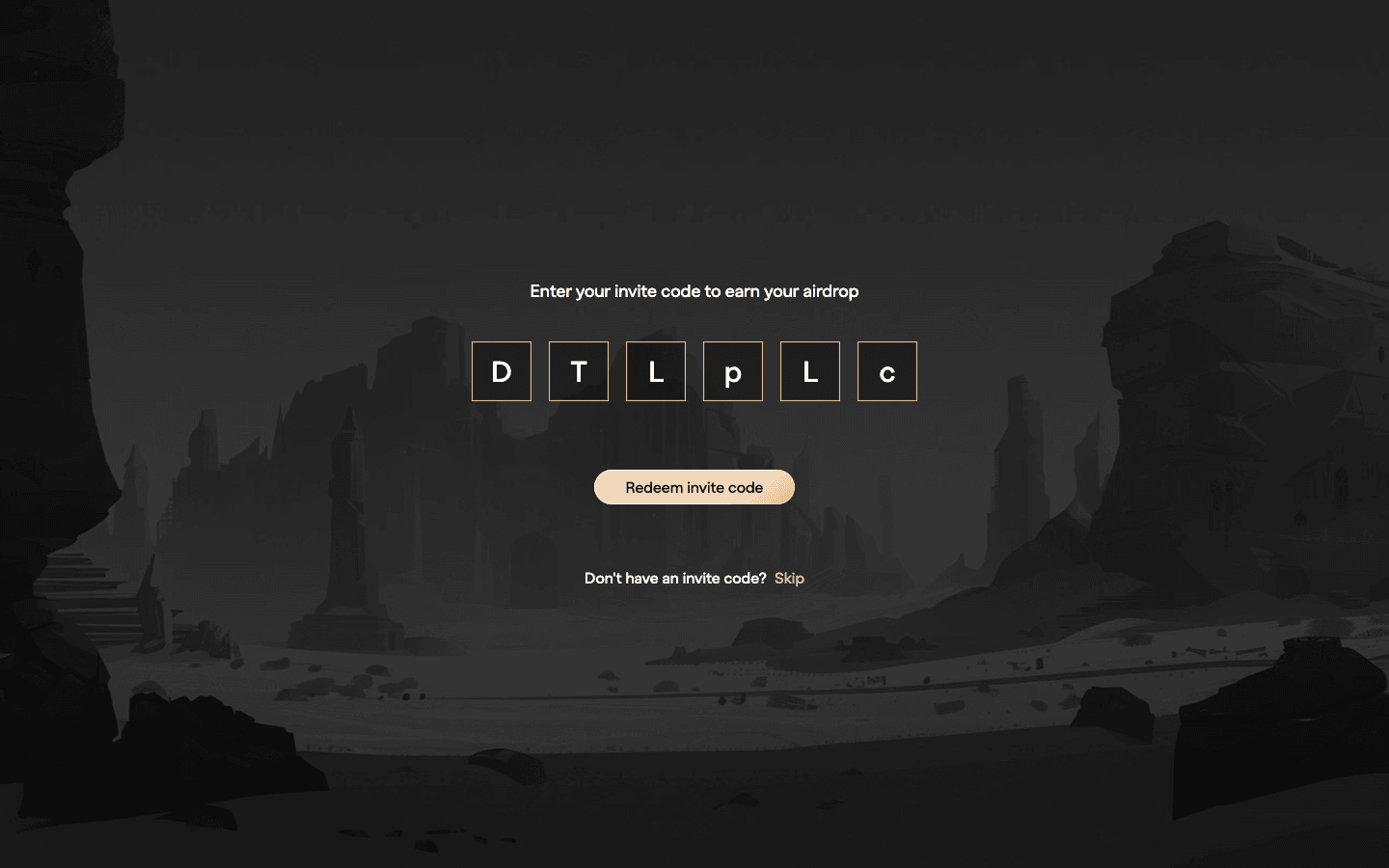
Our link opens Aster with referral code DTLpLc filled in: 5% of your fees back for 365 days. Maker orders 0%, taker 0.04% on crypto pairs.
We earn a commission when you sign up through our links; it never raises your fees.
1. Before you start: what you need
- A wallet or an email. Aster supports Rabby, MetaMask, Binance Wallet and any WalletConnect wallet. With email, Aster creates a wallet address for you, but that account can only receive USDT on Arbitrum One only.
- Stablecoins on a supported chain. USDT or USDC on BNB Chain, Arbitrum, Ethereum or Solana are the simplest. Aster also accepts USD1, BNB, ETH, SOL and several Aster tokens as collateral (details in step 2).
- A little gas. To connect on BNB Chain your wallet must hold at least 0.001 BNB; on other chains you need the chain’s gas token for the deposit transaction.
- Where you live. Aster’s Terms and Conditions (February 25, 2026) prohibit use from the United States, Canada, the United Kingdom, China, North Korea, Russia, Ukraine, Cuba, Iran, Venezuela, Syria and sanctioned regions. If you live there, don’t use Aster, and don’t use a VPN to get around it. Lighter excludes the US, Canada and the UK too, while Hyperliquid and edgeX exclude only Ontario in Canada (perp DEX restrictions by country).
- Ten minutes and a small test amount. The whole flow, including a test deposit, usually takes less than a quarter of an hour on a fast chain.
2. Step 1: connect a wallet or log in with email
With a wallet (recommended, you keep control of the keys):
- Go to asterdex.com. Our link attaches the invite code: you see “Enter your invite code to earn your airdrop” with DTLpLc filled in and a Redeem invite code button.
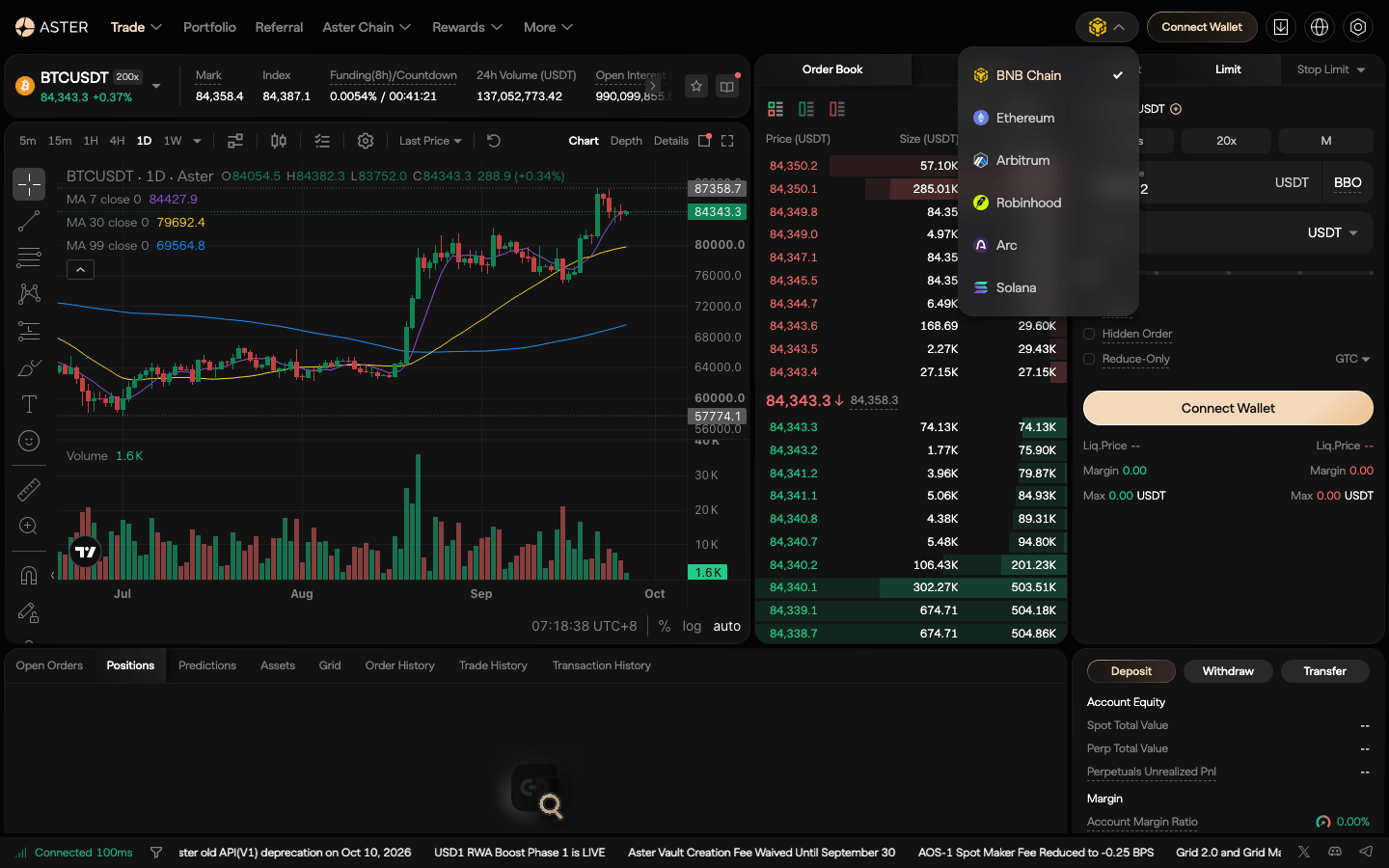
- Pick the chain in the dropdown at the top right (it shows the BNB Chain logo by default). On September 27, 2026 it offered BNB Chain, Ethereum, Arbitrum, Robinhood, Arc and Solana.
- Click Connect Wallet. The Connect with Aster window lists Log in with Email, WalletConnect, Safe Wallet, Binance Wallet and any browser wallet you have installed (MetaMask, Rabby…).
- Choose your wallet and approve the signature request. This is a message signature, not a token approval, and costs no gas.
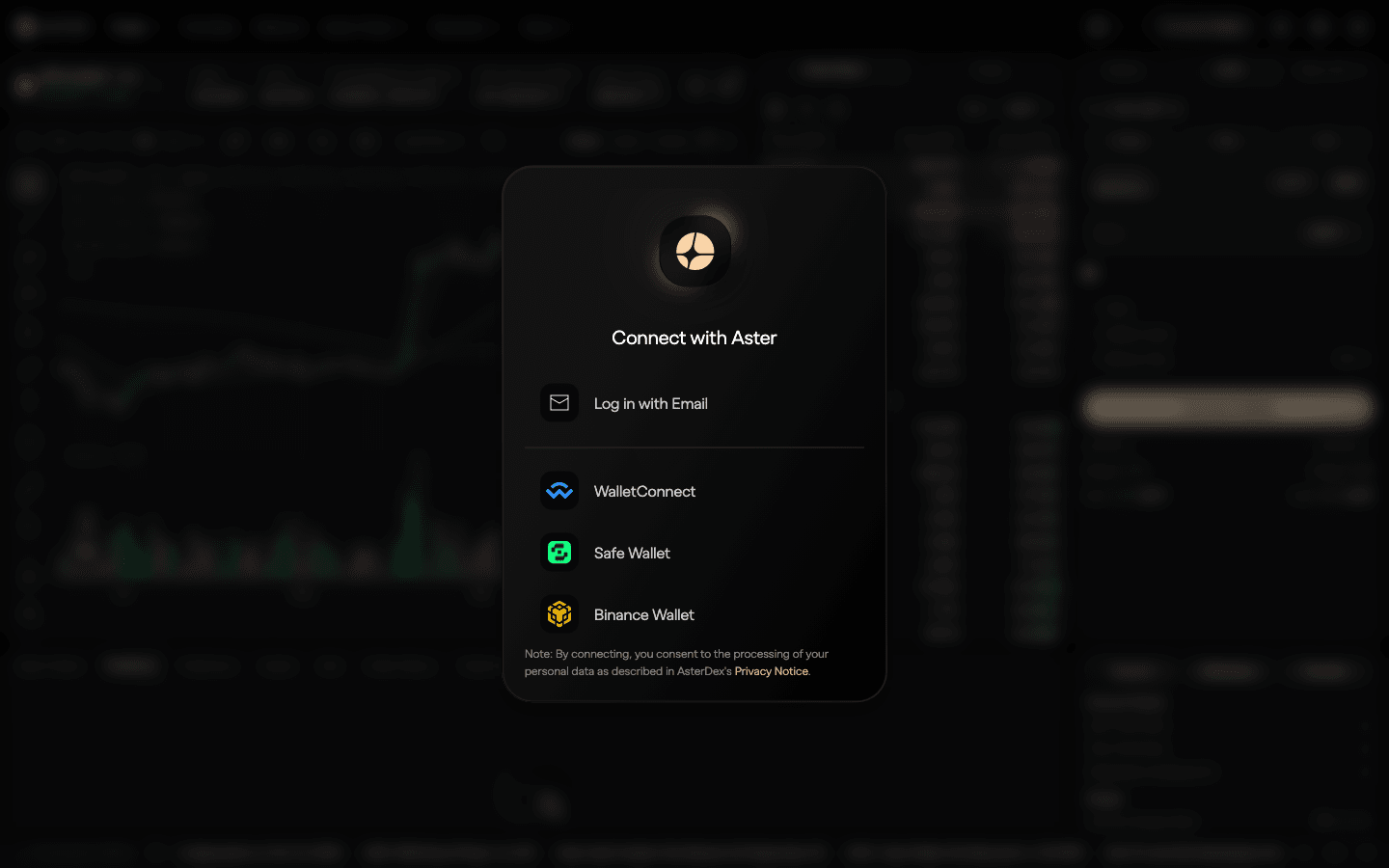
With email: choose Log in with Email, enter your address, type the 6-digit code you receive, create a password, and sign the pop-up message. Aster generates a wallet address for your email; fund it only with USDT on Arbitrum One, because Aster does not refund deposits of the wrong asset or on the wrong network. The email route is convenient but less portable: if you later want to use other chains, a wallet is simpler.
3. Step 2: deposit on the right chain
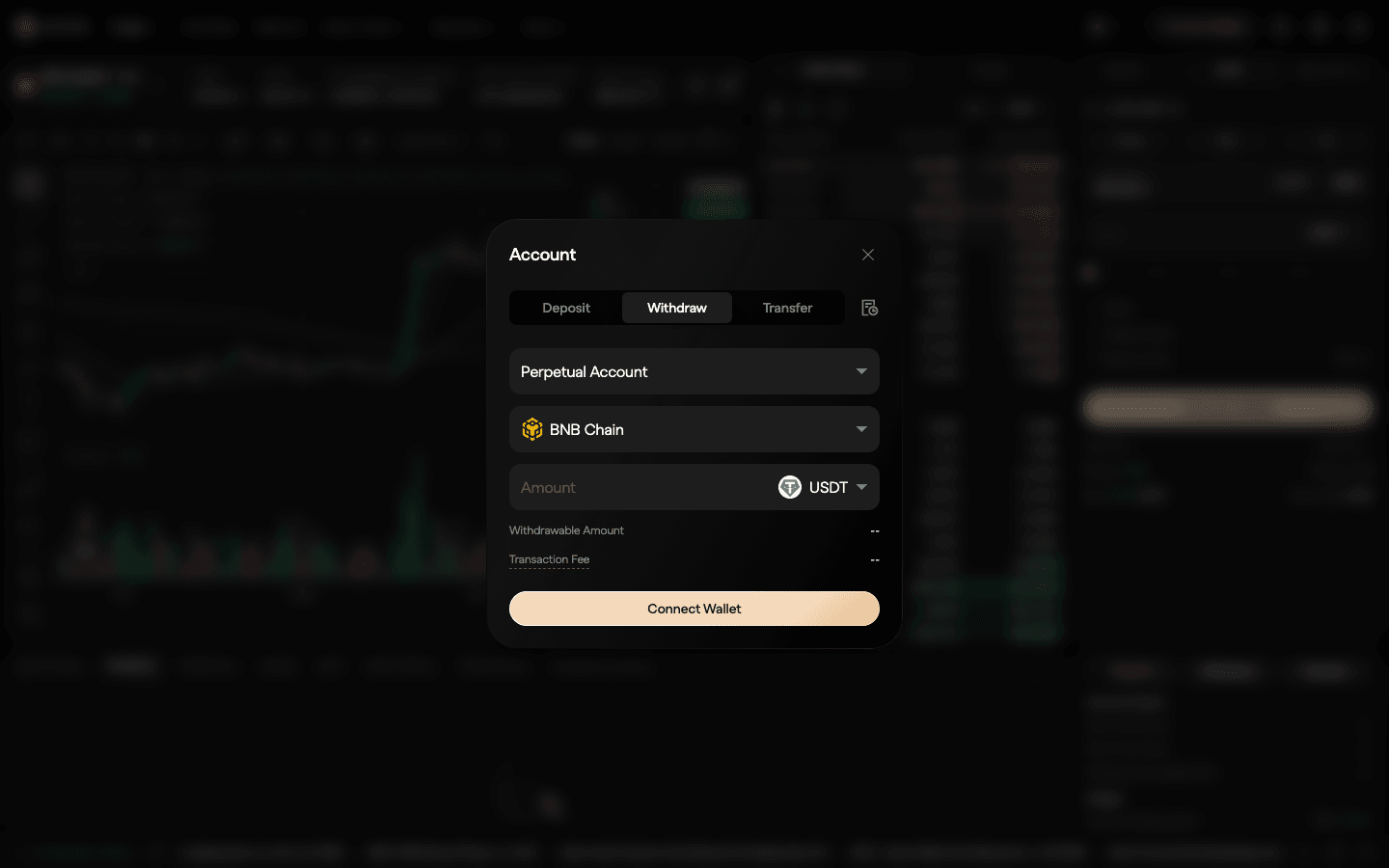
Click Deposit (under the order form, or next to Avbl). The Account window opens with three tabs, Deposit, Withdraw and Transfer:
- Account: the first field reads Perpetual Account. Keep it for perp trading. Aster also has a spot account (its balance shows as Spot Total Value); if you ever fund the wrong one, move the money with the Transfer tab instead of withdrawing.
- Network: choose the chain you are sending from.
- Token and Amount: pick USDT (or another asset) and the amount, then confirm in your wallet. Buy/Deposit with Binance Pay is an alternative if you hold funds on Binance.
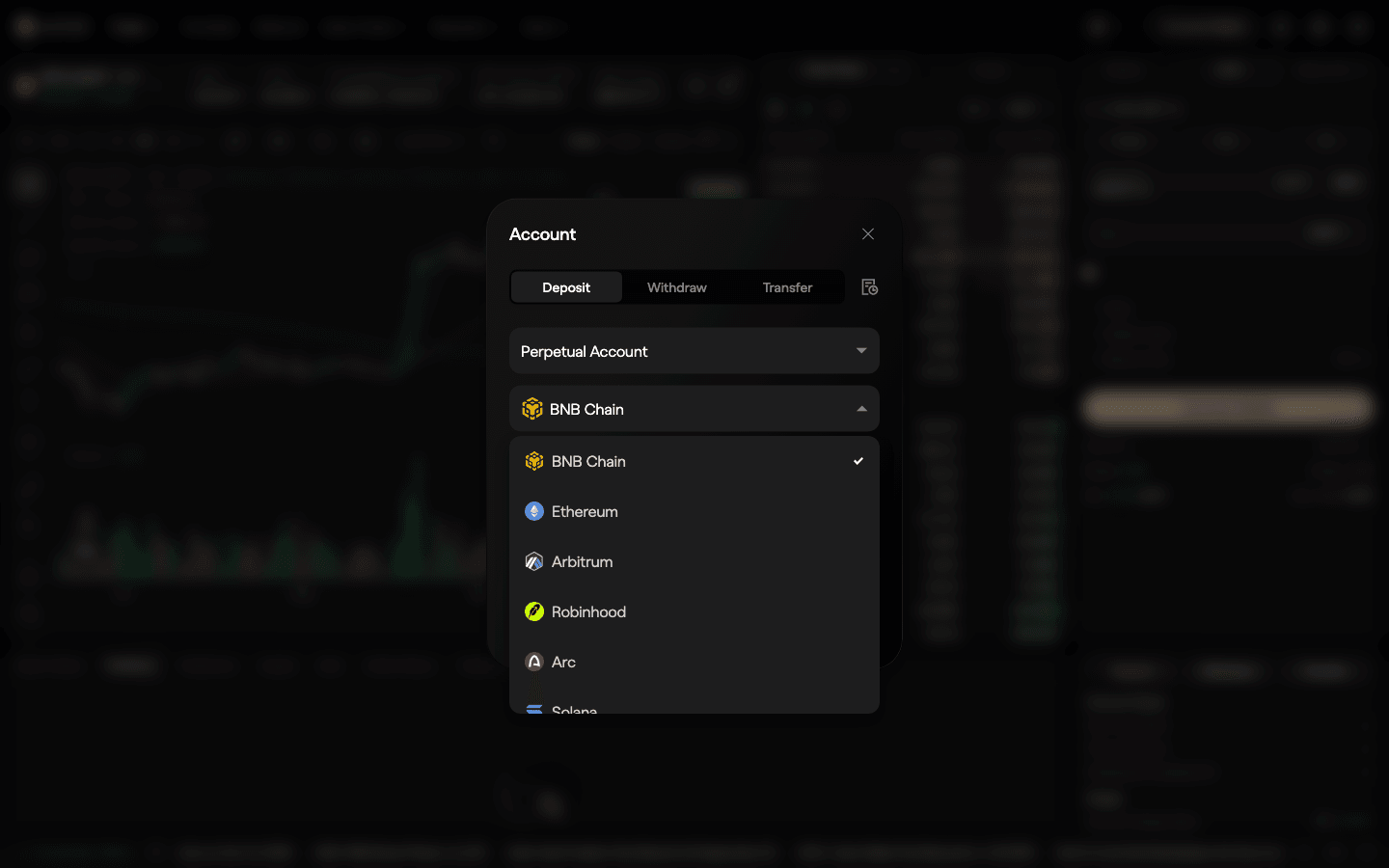
Aster’s public deposit API listed these assets for the perpetual account on September 27, 2026:
| Chain | Assets you can deposit to the perp account | Notes |
|---|---|---|
| BNB Chain | USDT, USDC, USD1, U, BNB, asBNB, slisBNB, WBETH, BTC, ETH, CAKE, LISTA, USDF, ASTER, TWT, lisUSD and some stock tokens | Needs ≥ 0.001 BNB to connect |
| Arbitrum | USDT, USDC, USDC.e, ETH | The only route for email accounts (USDT) |
| Ethereum | USDT, USDC, USD1, U, ETH | Slower and pricier gas |
| Solana | USDT, USDC, USD1, SOL, JLP | Use a Solana wallet |
| Arc | USDC | Newer route |
| Robinhood Chain | USDG | Newer route |
Aster charges no deposit fee (0 USDT); you pay only the source chain’s gas. Aster Chain validators confirm deposits, which usually arrive in 1–5 minutes, longer from Ethereum, and land in your cross-margin balance. Coming from a centralized exchange? Withdraw USDT to your own wallet on one of these chains first, then deposit. Send a small test amount before a large one. The Aster deposit and withdrawal guide covers every route and what to do if you send the wrong token.
Collateral modes. By default your account is in Single-Asset Mode, where USDT or USD1 margins the matching markets. Multi-Asset Mode (a switch under Deposit / Withdraw / Transfer) lets BTC, ETH, BNB, ASTER and other assets count as margin at a haircut, in cross margin only, and can auto-convert collateral when a balance goes negative. As a beginner, deposit USDT and stay in Single-Asset Mode.
4. Step 3: open Pro (Perp), not Shield or 1001x
Hover over Trade in the top menu. Under Core you see Perp, Spot, Shield and Prediction; under Advanced, Grid, Vaults and OTC Trading. For your first trades click Perp, which Aster calls Pro mode: a normal order book with limit orders, stops and TP/SL.
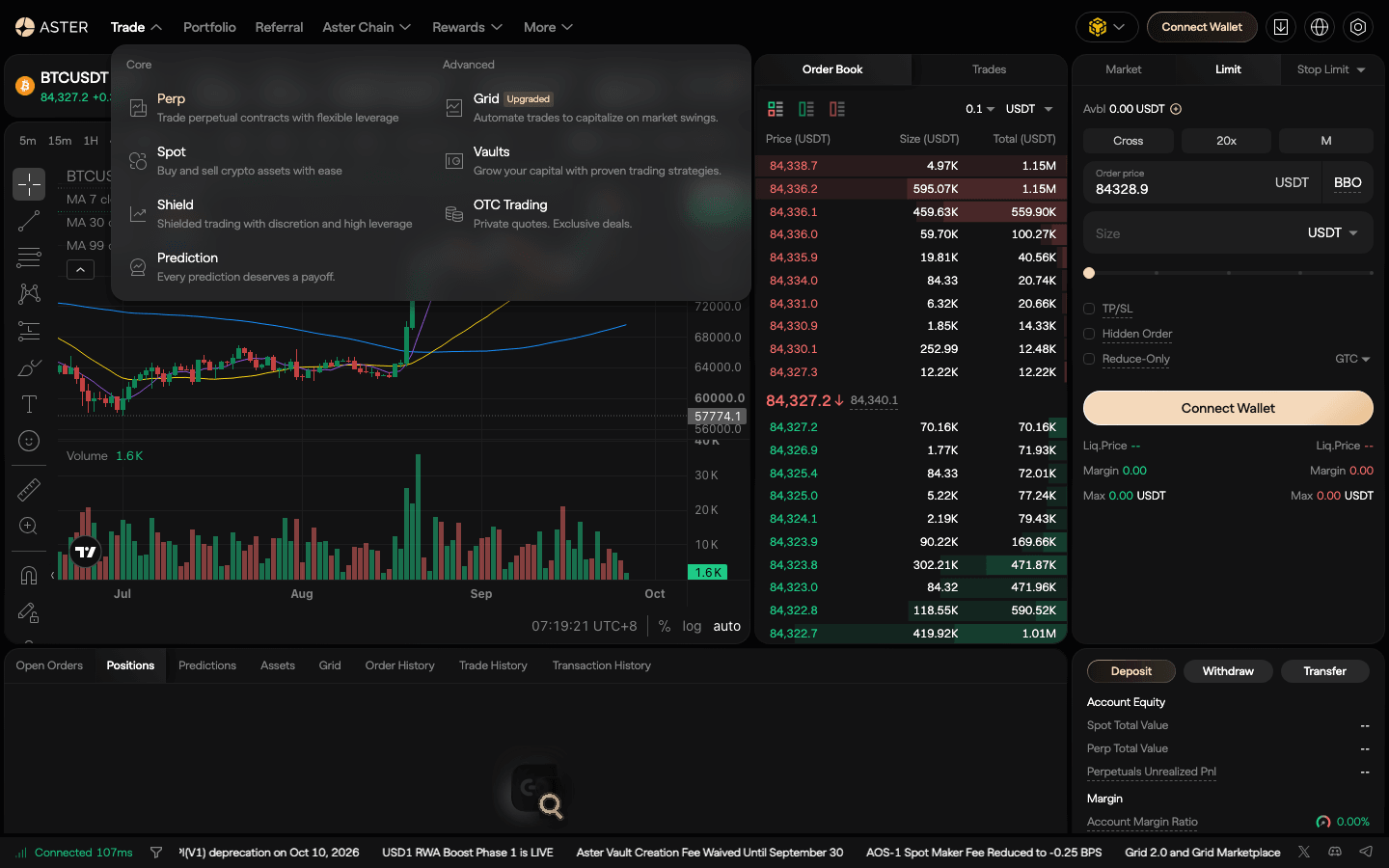
| Pro (Perp) | Shield | 1001x | |
|---|---|---|---|
| What it is | Order book, 604 perps | Simplified, private positions on selected pairs | Older pool-based mode (on-chain liquidity is the counterparty) |
| Leverage | Bracketed by size (BTC 150x to $300,000) | 20x to 1001x | BTC/USD 1001x, ETH/USD 250x, other crypto 75x |
| Fees | 0% maker / 0.04% taker | 15–20% of profit, or 0.03% flat | 0.08% open and close below 500x |
| For beginners? | Yes | Only after you understand leverage | No; not in the Trade menu any more |
Shield’s minimum is 20x, so even its lowest setting is aggressive; at 1001x, a 0.1% move against you is the whole margin. The Aster trading pairs page compares the three modes in more detail.
5. Step 4: set margin and leverage, place your first trade
Perp opens on BTCUSDT. The header shows the symbol with its headline leverage (“BTCUSDT 200x”), last price, Mark and Index price, Funding(8h)/Countdown, 24h Volume and Open Interest. Click the symbol to pick another market; tabs include Favorites, Futures, Spot and Prediction, and filters such as Top, New, Meme, AI, Stocks and Commodities.
- Margin mode. Click Cross. The BTCUSDT Margin mode window offers Cross and Isolated; the switch applies only to that contract. Isolated limits the loss to the margin you assign to the position, which is easier to reason about for a first trade.
- Leverage. Click 20x (the default). The Adjust leverage window has a slider from 1x to 200x on BTCUSDT; set 2–5x and confirm. The change also applies to open positions and orders on that market.
- Order type. Market fills now at the best price (taker, 0.04%) and adds a Slippage Tolerance option. Limit rests at your price (maker, 0%, if it does not cross the book). The third tab opens Stop Limit, Stop Market, Trailing Stop, Post Only, TWAP, Scaled Order and Chase Order.
- Price and size. For a limit order, type the Order price or click BBO for the best bid/offer. Enter Size in USDT (notional, not margin). The minimum order is 5 USDT on every market, but BTCUSDT’s minimum quantity is 0.001 BTC, about $84 at the September 27, 2026 price.
- TP/SL. Tick TP/SL. Take Profit and Stop Loss each trigger on Mark (the default) or Last price, and you enter them as PnL (USDT), price or ROI.
- Options. Hidden Order keeps a resting limit order off the public book; Reduce-Only makes sure an order can only shrink a position; GTC / IOC set the time in force.
- Check, then submit. Read Liq.Price, Margin and Max under the form, then submit the buy (long) or sell (short) order. If your wallet asks for another signature, check that the site is asterdex.com: trading never needs a token “approve”.
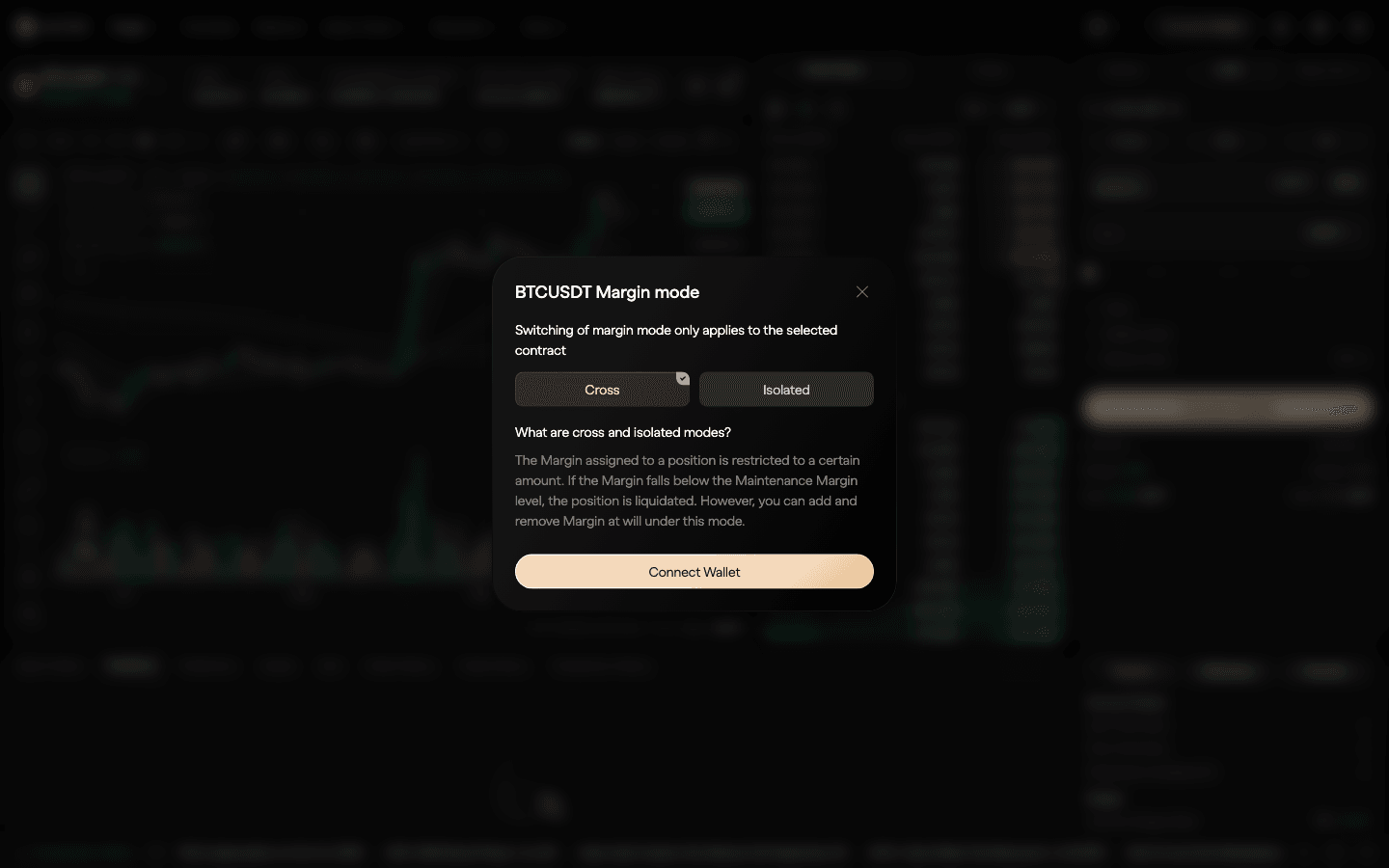
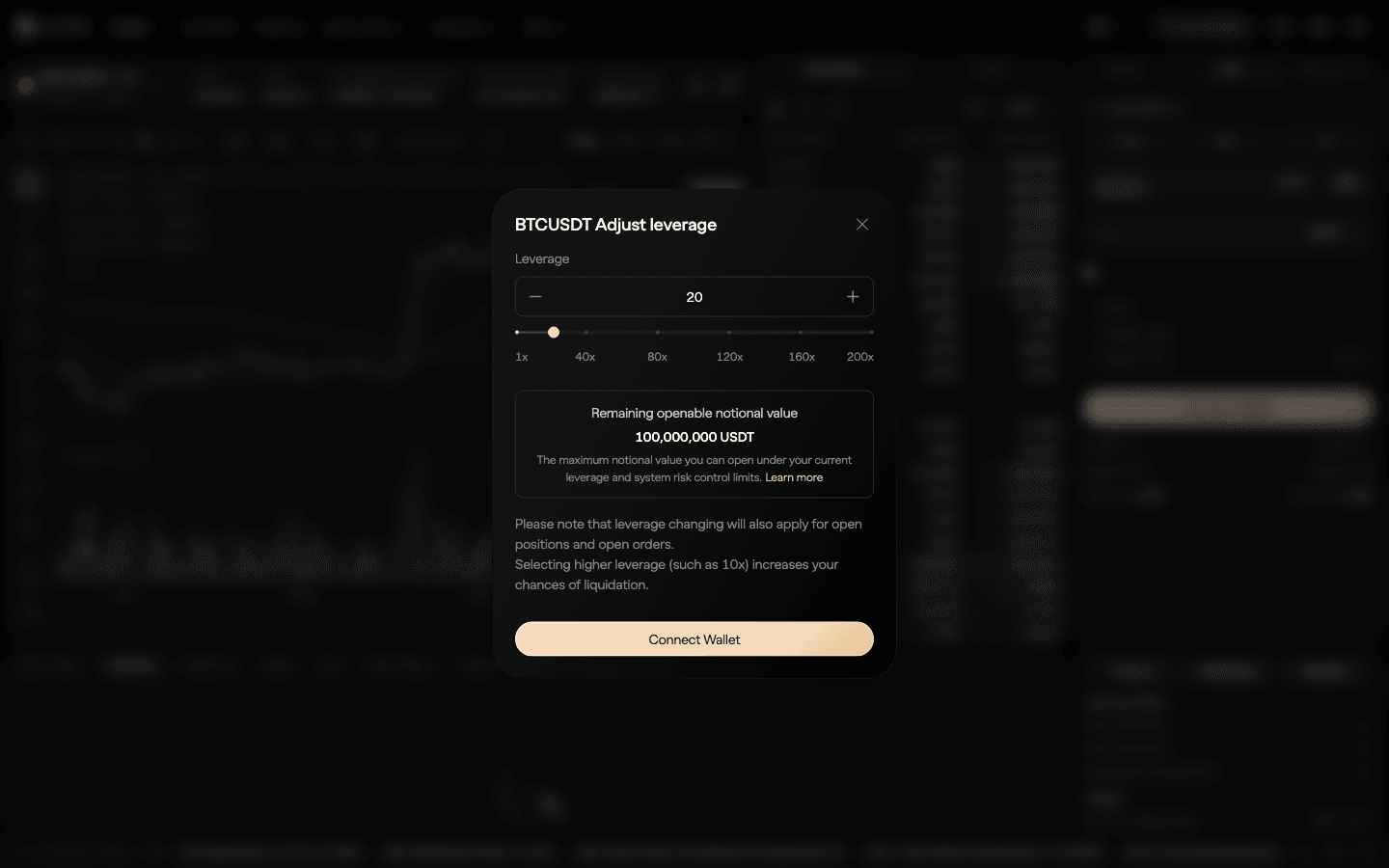
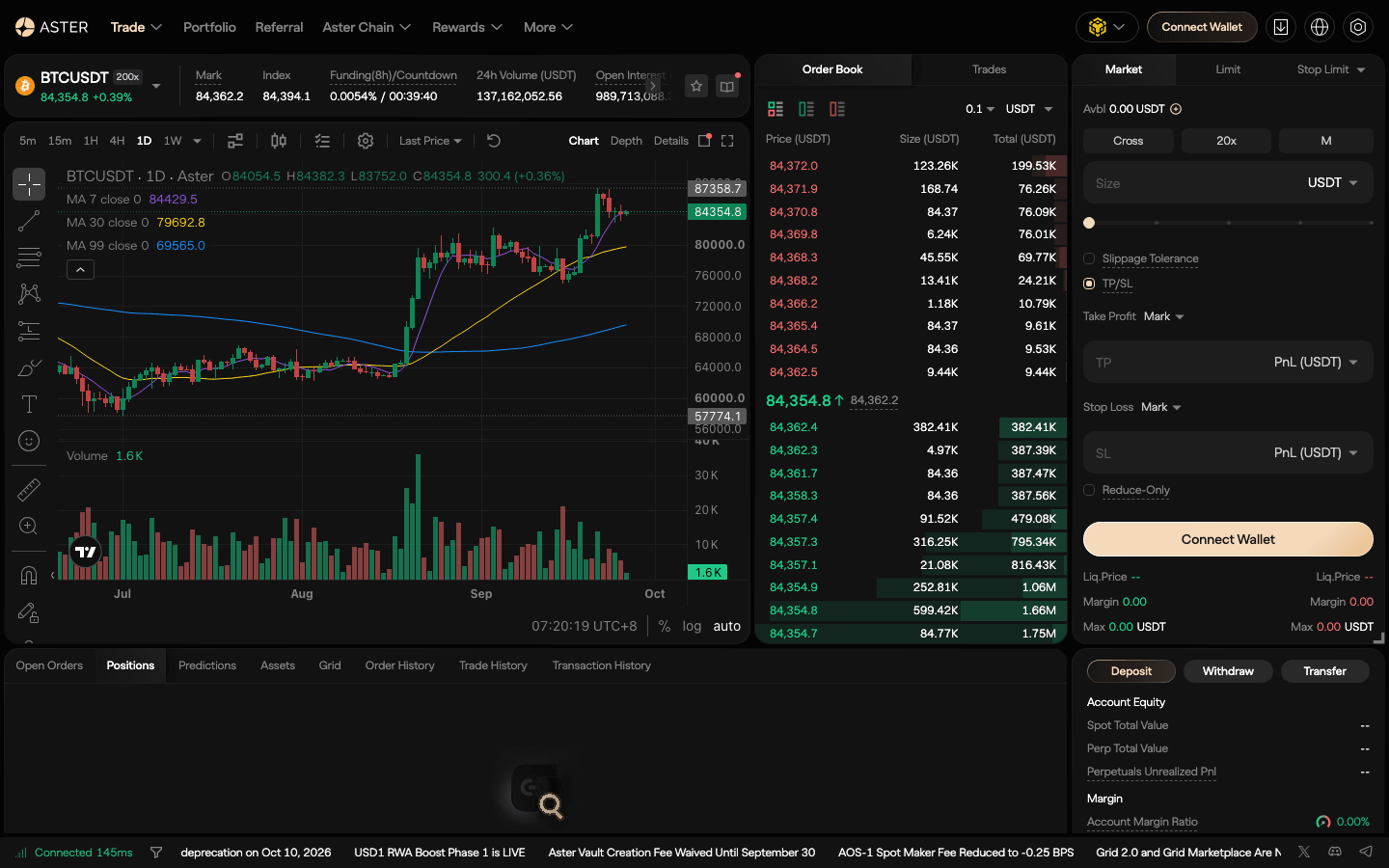
Worked example. You deposit $100 and open a $1,000 BTCUSDT long at 10x, Isolated, with a market order. Taker fee: $1,000 × 0.04% = $0.40. A $1,000 position sits in BTC’s second leverage bracket (maintenance margin rate 0.33%, minus a fixed maintenance amount), so maintenance is about 0.23% of notional and the position is liquidated after roughly a 9.8% fall, before fees and funding. At 5x the same $1,000 needs $200 of margin and survives roughly a 19.8% fall. The form’s Liq.Price shows the exact figure; the leverage and margin guide explains the math.
Ready for your first Aster trade?
Limit orders cost 0% on Aster Pro. Referral code DTLpLc returns 5% of your taker fees.
6. Step 5: manage and close the position
Your trade appears in the Positions tab under the chart, next to Open Orders, Predictions, Assets, Grid, Order History, Trade History and Transaction History. From there you can add or remove isolated margin, edit TP/SL, or close at market or with a limit order. Things to watch:
- Funding. BTCUSDT settles funding every 8 hours (cap ±0.3% per interval); many other pairs settle every 4 hours, and some every 1 or 2 hours. The countdown is in the header. Longs pay shorts when the rate is positive.
- Mark price. Liquidations and, by default, TP/SL use the mark price, not the last trade, so a wick on the chart does not always trigger your stop.
- Leverage creep. If the price moves against you, your effective leverage rises. Add margin or cut the position before the liquidation price gets close.
The Aster order types guide covers trailing stops, scaled orders and Chase orders once you are comfortable.
7. Step 6: withdraw
- Click Withdraw under the order form. The same Account window opens on the Withdraw tab with Perpetual Account selected.
- Select the network, token and amount. The window shows your Withdrawable Amount and the Transaction Fee, which is gas for the destination chain, deducted from the withdrawal; Aster’s docs say it can be as low as 1 USDT.
- Approve in your wallet. Withdrawals are batched and usually take about 30 seconds; Ethereum takes longer.
If losses, funding or fees left a token with a negative balance (possible in Multi-Asset Mode), fix it first: click Withdraw on that token, then Rebalance, or deposit the missing amount. The rebalance shows as “auto-conversion” in your transaction history.
8. What it costs: fees, funding, leverage
| Cost | Aster Pro (September 2026) | Example on $1,000 |
|---|---|---|
| Taker fee, crypto pairs (VIP 1) | 0.04% | $0.40 per side |
| Maker fee, all pairs | 0% | $0 |
| Taker fee, stocks and commodities | 0.0125% (1.25 bps) | $0.125 |
| Taker fee, Group B pairs | 0.10% | $1.00 |
| Funding | Every 1, 2, 4 or 8 hours by pair; BTCUSDT cap ±0.3% per 8 hours | At 0.01% per interval: $0.10 |
| Deposit | No Aster fee; source-chain gas | Chain gas only |
| Withdrawal | Destination-chain gas, from about 1 USDT | ~$1+ |
Leverage is capped by bracket: on BTCUSDT 200x only up to $400 of notional, then 150x up to $300,000, and lower above that. Most small caps are capped at 5x. The 5% “pay fees in ASTER” discount applies to spot trading only. The full schedule and VIP tiers are in the Aster fee guide.
9. Aster on mobile
Aster’s docs send you to a Download beta link on asterdex.com. The Android app is on Google Play and as an APK. The iPhone app is listed only in some countries’ App Stores (Taiwan, for example); on September 25, 2026 it was not in the US or Japan App Store. In the app you tap Connect wallet, choose a network and a wallet, and approve the connection and the signature, the same flow as on desktop. You can also open asterdex.com in a phone browser or in the browser inside MetaMask or Trust Wallet. The Aster mobile guide walks through the app.
10. Airdrop and points: what is live
Many “how to use Aster” guides are really airdrop guides, so here is where things stand in Aster’s own docs. The ASTER token airdrop claim closed on October 17, 2025; unclaimed tokens went to ecosystem development. Since then Aster has run points programs in stages. The latest one listed on September 27, 2026 is Stage 6, “Aster Convergence”, which scores trading fees and maker liquidity, position size and time, using ASTER/asBNB/USDF as margin, PnL and referrals, and warns that farmed points may be adjusted. Check the Rewards menu or docs.asterdex.com for the current stage before you trade for points. Our Aster points guide explains the scoring.
11. Can you make money on Aster?
You can, but most people who trade leveraged perps lose money, and every related search for “how to use Aster DEX to make money” skips that. What actually helps:
- Pay less. Limit orders cost 0% as maker on Pro, against 0.04% for market orders; over many trades that difference adds up.
- Size so a mistake is survivable. Risk a small, fixed share of your account per trade and always set a stop.
- Low-risk yield is a different product. Aster Earn (asBNB, USDF) and staking carry their own risks; see the Aster staking guide.
None of this is financial advice. Trade only money you can afford to lose.
12. Safety and fake sites
- Use the real URL. Type asterdex.com or use a bookmark; docs are at docs.asterdex.com. Aster’s own airdrop page warns about phishing and says claiming never needs an “approve” transaction. The same goes for logging in, which is a free signature. A site asking you to approve a token to “connect” or “claim” is a scam.
- Watch the name. Aster (token ASTER) is not Astar Network (ASTR). The names are easy to mix up when you search for the site or buy the token, so check the domain and the ticker.
- Know what you are trusting. Aster Chain’s docs say core chain contracts and RPC are not open-sourced “at the moment” and external validators are not supported in Phase 1. Don’t keep more on any exchange than you are actively trading.
- Start small. Send a test deposit, make a small trade, withdraw it, then scale up.
- Always set a stop. Use TP/SL on entry and Reduce-Only for exits.
- Mind the hype modes. 1001x and Shield are built for very high leverage; a tiny move liquidates you.
More in our DEX security guide.
13. Aster vs Hyperliquid vs Lighter for a first trade
| Aster | Hyperliquid | Lighter | |
|---|---|---|---|
| Sign-up | Wallet or email | Wallet or email | Wallet or email |
| Deposit | BNB Chain, Arbitrum, Ethereum, Solana, Arc, Robinhood Chain | USDC on Arbitrum and other routes | Many chains via deposit addresses |
| Taker / maker | 0.04% / 0% | 0.045% / 0.015% (tier 0) | 0% / 0% (Standard) |
| Perp markets | 604 | 178 + HIP-3 | 213 |
| Best for | Breadth, maker-heavy trading, BNB Chain users | Deepest books, most volume | Zero fees on the Standard account |
For most first-time perp traders we point to Hyperliquid for depth (code HOLYGRAIL gives 4% off fees on your first $25M; see how to use Hyperliquid). Aster makes sense if you already hold assets on BNB Chain, want its long list of markets or trade mostly with limit orders. The head-to-head is in Aster vs Hyperliquid; all venues are compared in the best DEX guide.
14. FAQ
How do I use Aster DEX for the first time?
Open asterdex.com, pick a chain in the dropdown and click Connect Wallet (or choose Log in with Email), then sign the message. Click Deposit, keep Perpetual Account selected, choose the network and send USDT or USDC. Open Trade → Perp, pick a market such as BTCUSDT, set Cross or Isolated and a low leverage, choose Market or Limit, enter a size in USDT, tick TP/SL and submit. Start small: the minimum order is 5 USDT.
What is Aster DEX?
Aster is a decentralized perpetual futures exchange (a “perp DEX”) that runs on its own blockchain, Aster Chain. You trade crypto, stock and commodity perpetuals from your own wallet; the docs describe it as privacy-focused, with orders encrypted until execution. It had 604 perpetual markets on its order book on October 14, 2026, plus spot, Shield and 1001x modes.
Can you use Aster DEX in the US?
No. Aster’s Terms and Conditions (last updated February 25, 2026) list the United States as a Prohibited Jurisdiction, together with Canada, the United Kingdom, China, North Korea, Russia, Ukraine, Cuba, Iran, Venezuela, Syria and sanctioned regions. Residents of those places may not use the service; do not use a VPN to get around it.
How does a DEX like Aster work?
Instead of opening an account with a company that holds your money, you connect a self-custody wallet and sign messages to trade. Your collateral sits in the exchange’s on-chain system and orders are matched by the protocol; you can withdraw to your own wallet at any time. Our what-is-a-DEX guide explains the difference between order-book perp DEXs like Aster and swap DEXs like Uniswap.
Which chains can I deposit to Aster from?
Aster’s deposit API on September 27, 2026 listed BNB Chain (USDT, USDC, USD1, BNB, asBNB, USDF, ASTER and more), Ethereum (USDT, USDC, USD1, U, ETH), Arbitrum (USDT, USDC, USDC.e, ETH), Solana (USDT, USDC, USD1, SOL, JLP), Arc (USDC) and Robinhood Chain (USDG). Aster charges no deposit fee and deposits usually arrive in 1–5 minutes. Email accounts can only receive USDT on Arbitrum One.
What are Aster’s trading fees?
On the Pro order book: 0% maker and 0.04% taker on crypto pairs at VIP 1, 0.10% taker on Group B pairs and 1.25 bps taker on stocks and commodities. The 5% discount for paying in ASTER applies to spot fees only, not perps. A $1,000 market order on BTCUSDT costs $0.40 to open and $0.40 to close; a limit order that fills as maker costs nothing.
Is 200x leverage on Aster real?
Only for tiny positions. BTCUSDT allows 200x up to $400 of notional and 150x up to $300,000, then less. At 200x a 0.5% move against you consumes all your margin. Beginners should stay at 2–5x until they understand how the liquidation price moves with leverage.
Do I need KYC to use Aster?
The normal sign-up is a wallet connection or an email login with no document upload. Aster’s terms reserve the right to run limited identity checks, and residents of the prohibited jurisdictions may not use it at all.
What is the difference between Pro, Shield and 1001x on Aster?
Pro (Trade → Perp) is the order book with limit orders, TP/SL and 0% maker fees; beginners should start here. Shield is a simplified private mode with leverage from 20x to 1001x and a 15–20% profit share or 0.03% flat fee. 1001x is an older pool-based mode (1001x on BTC/USD, 0.08% to open and close below 500x) that is no longer in the Trade menu.
Does Aster have a mobile app?
Yes. Aster’s docs point to a “Download beta” link on asterdex.com; the Android app is on Google Play and as an APK. The iPhone app is listed only in some countries’ App Stores (for example Taiwan); on September 25, 2026 it was not in the US or Japan App Store. The website works in a mobile browser and inside wallet apps such as MetaMask or Trust Wallet.
Is there still an Aster airdrop?
The ASTER token airdrop claim window closed on October 17, 2025, according to Aster’s docs. Aster has run points programs in stages since then; the latest listed in the docs on September 27, 2026 is Stage 6, “Aster Convergence”. Check the Rewards menu or docs.asterdex.com for what is live, and never approve a token transaction to “claim” anything.
Do I get a fee discount with a referral code on Aster?
With DTLpLc you get 5% of the trading fees you pay on Aster Perps back as a rebate, for 365 days. Aster sets aside a default 10% commission on a referred trader’s fees and each referrer decides how much of it to share back; we pass 5% of your fees back to you (split set September 29, 2026). Aster’s docs call your share a discount on your fees and say all rebate rewards are calculated in real time and credited to your Aster account by the following day. Maker fills (0%) earn nothing. Codes on other sites that advertise a discount depend on how their owner configured the split.
How do I withdraw from Aster?
Click Withdraw, keep Perpetual Account selected, choose the network, token and amount, and approve in your wallet. The Transaction Fee is gas for the destination chain (as low as 1 USDT); funds usually arrive in about 30 seconds, longer on Ethereum. If a token shows a negative balance, fix it first with Rebalance, because negative balances block withdrawals.
Start on Aster
Wallet or email sign-up, 0% maker fees, 604 perp markets (October 14, 2026). Referral code DTLpLc: 5% of your fees back.
Disclosure: DTLpLc and HOLYGRAIL are our referral codes; we earn a share of fees paid by referred accounts. DTLpLc never raises your fees and passes 5% of them back to you as a rebate (split set September 29, 2026). Screenshots, UI labels and numbers were checked in Aster’s app (logged out), public API and docs on September 27, 2026; interfaces change. Perpetual futures with leverage can lose more than you expect. Not financial advice.