
Hyperliquid wallet, in short: you do not need a special one. A Hyperliquid wallet is any EVM (0x) wallet whose key controls your Hyperliquid account, or the email login that creates one for you.
The best wallet for Hyperliquid for most traders is Rabby on desktop, with a Ledger or Trezor behind it once the balance matters. Hyperliquid works with any EVM wallet, so MetaMask, OKX, Coinbase Wallet, Trust Wallet, Phantom's EVM account and the built-in email login all work too. Keep long-term funds in a cold wallet, trade from a separate hot wallet, and give bots an API (agent) wallet that cannot withdraw. Wallets that trade Hyperliquid inside the app add their own fee (Phantom 0.05%, OneKey 0.08%), so the cheapest route is connecting your wallet to app.hyperliquid.xyz with the referral code HOLYGRAIL.
Looking for a Hyperliquid wallet tracker (following other people's addresses) instead? Use our Hyperliquid whale tracker guide or look up any address with the Hyperliquid explorer guide.
Quick picks: best Hyperliquid wallet by situation
- Best overall (desktop): Rabby. Built-in HyperEVM, transaction previews, the wallet the Hyperliquid docs recommend.
- Already on MetaMask: keep it. Your address and history stay the same if you switch later.
- Large balance: Ledger or Trezor, used through Rabby or MetaMask. Orders need no device click after Enable Trading.
- Phone only: the web app linked to your desktop wallet by QR, or the Based app (adds 0.025%, the lowest in-app fee in section 5).
- First small deposit: Log in with Email, then export the key.
- Solana user: Phantom works, with Arbitrum workarounds and a 0.05% fee on in-app trades.
- Safest layout: cold wallet for holdings, hot wallet for margin, API wallet for bots (section 11).
- Team or treasury funds: Hyperliquid's native multi-sig for the trading account; Safe only for HyperEVM funds (Safe on Hyperliquid).
Picked one? Connect it through app.hyperliquid.xyz/join/HOLYGRAIL before your first trade so the 4% discount is on the address.
Connect your wallet through a referral link
Whatever wallet you pick, open Hyperliquid with HOLYGRAIL before your first trade: 4% off fees for your first $25M of volume, and no builder fee on top.
We earn a commission when you sign up through our links; it never raises your fees.
1. What a "Hyperliquid wallet" is (and is not)
A Hyperliquid wallet is the wallet that signs for your Hyperliquid address, nothing more. Do you need one? You need a wallet, but not a new kind: the one you already use for Ethereum or Arbitrum works, and if you have none, the email login creates one for you.
Hyperliquid runs its own blockchain, yet there is no Hyperliquid-only wallet to download. Your account is an ordinary EVM (0x) address. Any wallet that can sign for that address can trade. (Some directories say Hyperliquid needs a Solana wallet. It does not: Phantom works only through its Ethereum account.) Three things follow:
- No wallet lock-in. The docs put it plainly: your trades, history and address stay the same if you move the same key to a new wallet extension. Switching from MetaMask to Rabby loses nothing.
- Signing is light. After you connect, you click Enable Trading, a one-time gas-less signature. Placing an order then only needs the in-app Confirm button, not a wallet pop-up for every order. Deposits, withdrawals and transfers still go through your wallet.
- The key is everything. Hyperliquid has no "forgot password" for wallet accounts. Whoever holds the seed phrase or private key controls the funds, so the wallet choice is really a security choice.
New to self-custody trading? Start with what a DEX is and the Hyperliquid beginner tutorial.
2. Every connect option in the app today
This is what the Connect window on app.hyperliquid.xyz showed on September 25 and September 27, 2026, and we re-checked it on October 15, 2026 with the same result: Log in with Email, Default Wallet, WalletConnect, OKX Wallet and Coinbase Wallet.
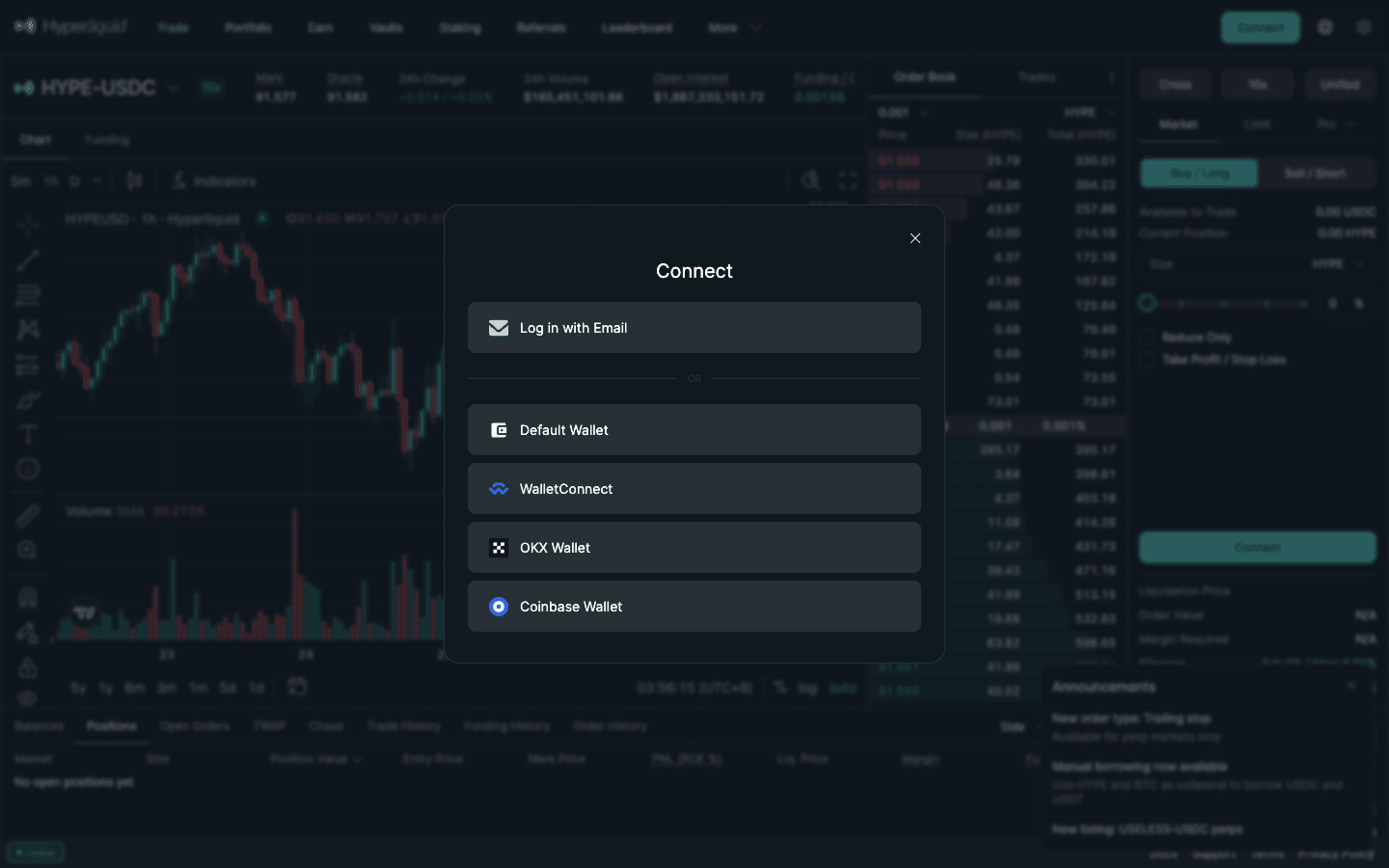
- Log in with Email. Enter an address and type the 6-digit code you receive. Hyperliquid creates a wallet for you.
- Default Wallet. Whatever EVM wallet is injected into your browser: Rabby, MetaMask, Brave Wallet, Phantom's EVM account, Frame and similar. Hardware wallets also connect this way, through the extension. The label can change: we saw "Default Wallet" in a clean browser, while other guides report a "MetaMask" or "Brave Wallet" button in the same spot. It is the same route either way.
- WalletConnect. Scan a QR code with a mobile wallet such as Trust Wallet, Rainbow, Bitget Wallet or MetaMask Mobile.
- OKX Wallet and Coinbase Wallet have their own buttons.
On a phone, the docs describe a Link Desktop Wallet option: connect on desktop first, click the PC+mobile icon in the top bar, sign, and scan the QR code with your phone. Your phone session then uses the desktop wallet's account without importing the seed onto the phone.
3. Hyperliquid wallets compared (15 wallets)
Every wallet below can hold the key to a Hyperliquid account. The differences are how it connects, whether it has its own Hyperliquid trading screen (and fee), and how well it protects the key.
| Wallet | Type | Connects via | Trades Hyperliquid inside the wallet? | Notes | Best for |
|---|---|---|---|---|---|
| Rabby | Browser extension, mobile app | Browser-wallet button (Default Wallet) | No: connect it to the app | HyperEVM built in; transaction simulation; pairs with Ledger and Trezor; the docs point to Rabby when other wallets misbehave | Most desktop traders |
| MetaMask | Browser extension, mobile app | Browser-wallet button; WalletConnect from the phone app | Yes, mobile and extension (total fee 0.1432% taker) | Add chain 999 by hand for HyperEVM; the docs note some HyperEVM issues | People who already use it |
| Ledger | Hardware | Through Rabby, MetaMask or Frame | No | Keys stay on the device; update firmware (docs fix for HyperEVM "Transfer Failed") | Anyone holding real size |
| Trezor | Hardware | Through Rabby or MetaMask | No | Set Safety Checks to Prompt (docs fix for "forbidden keypath") | Anyone holding real size |
| Email login | Wallet created by Hyperliquid | Log in with Email | Is the app itself | No extension; export the private key and back it up | A first small deposit |
| OKX Wallet | Extension, mobile app | Own button in the Connect window | Not covered here | Convenient if you already use OKX Web3 | OKX users |
| Coinbase Wallet | Extension, mobile app | Own button in the Connect window | Not covered here | Docs: mobile connections can fail, use the Chrome extension | Coinbase users |
| Phantom | Extension, mobile app (Solana-first) | Browser-wallet button (its EVM account) | Yes (0.05% Phantom fee on top) | No Arbitrum support, so USDC in and out needs workarounds; in-app perps not available with Ledger | Solana-first users |
| Trust Wallet | Mobile app, extension | WalletConnect, or the browser-wallet button | Yes, Hyperliquid and Aster perps (up to 40x on Hyperliquid) | No perps fee published on its perps page (re-checked October 15, 2026): read the order screen | Trust users on mobile |
| OneKey | Hardware + app | Through the OneKey app or extension | Yes, OneKey Perps (0.08% builder fee) | Hardware option with its own trading screen | Hardware users who want an app |
| Brave Wallet | Built into the Brave browser | Browser-wallet button (may be labelled Brave Wallet) | No | No extension to install; keep other wallet extensions off to avoid conflicts | Brave users |
| Rainbow | Mobile app, extension | WalletConnect, or the browser-wallet button | No | Clean mobile wallet; phone-to-desktop via QR | Mobile-first users |
| Bitget Wallet | Mobile app, extension | WalletConnect, or the browser-wallet button | No official Hyperliquid page found | Treat it as an ordinary EVM wallet | Bitget users |
| Okto | Mobile app | Its own app | Yes (its site says futures are powered by Hyperliquid) | No current fee schedule published that we could find: read the fee line in the app | App-only traders |
| Frame | Desktop app | Browser-wallet button | No | Desktop signer that works well with hardware wallets | Power users on desktop |
Connection routes from the app's Connect window and the Hyperliquid docs (September 25 and 27, re-checked October 15, 2026); in-wallet trading and fees from each vendor's help pages (September 27, re-read October 15, 2026, unchanged). "Not covered here": no official page from OKX or Coinbase describing Hyperliquid trading inside the wallet found. "HyperEVM" matters only if you use HyperEVM DeFi; trading on HyperCore works with every option. We have no relationship with any wallet listed.
4. Best wallets for Hyperliquid, ranked
1. Rabby: best overall
Rabby is the wallet the Hyperliquid docs keep coming back to. The onboarding page sends new users to rabby.io to create a wallet. The connectivity FAQ says switching to Rabby "often works more smoothly with Hyperliquid". The HyperEVM FAQ recommends it because it lists the HyperEVM as an integrated network, so you do not add chain 999 by hand. It also simulates transactions before you sign and pairs with Ledger and Trezor. If you are choosing from scratch, choose Rabby.
2. MetaMask: best if you already use it
MetaMask is the most familiar option and connects through the browser-wallet button. The docs note that "some users face issues with MetaMask on the HyperEVM" and suggest Rabby if those persist. Pure HyperCore trading (deposit, trade, withdraw) is not affected. To see EVM balances, add the HyperEVM manually (chain ID 999, RPC https://rpc.hyperliquid.xyz/evm, symbol HYPE). MetaMask also has its own Perps screen powered by Hyperliquid; its published total fee is 0.1432% taker / 0.1144% maker at Rewards levels 1–3 (section 5).
3. Hardware wallet behind Rabby or MetaMask: best for size
A Ledger or Trezor keeps the key off your computer. Because orders do not need a wallet signature after Enable Trading, trading with a hardware wallet is not tedious: you confirm on the device when you enable trading, deposit and withdraw. OneKey is the other hardware option the SERP names; it also has its own trading screen with a 0.08% builder fee. Details and the Ledger vs Trezor fixes are in section 7.
4. Email login: best for a first small deposit
No extension, no seed phrase to write down on day one. It suits someone testing Hyperliquid with a small amount. Before you add real money, export the key and store it properly (section 6).
5. OKX Wallet and Coinbase Wallet: fine if you already use them
Both have dedicated buttons. For Coinbase Wallet, the docs warn that "users on mobile may face connection problems" and recommend the Chrome extension instead.
6. Trust Wallet, Rainbow, Bitget Wallet: phone wallets over WalletConnect
These connect by scanning the WalletConnect QR code, or through their browser extensions as the browser wallet. Trust Wallet also trades Hyperliquid inside its app (up to 40x on Hyperliquid, per its perps page) but publishes no fee for it, so read the order screen. If WalletConnect prompts stop arriving, the session has gone stale: disconnect, remove the session in the wallet and reconnect.
7. Phantom: possible, with workarounds
Phantom's EVM account can connect as the browser wallet, and Phantom is listed in the docs as one of the interfaces for Hyperliquid. The catch is on the Hyperliquid side: Phantom does not support Arbitrum. You cannot bridge USDC in from Phantom, and a USDC withdrawal to Arbitrum lands on an address Phantom does not display. The docs' fix is to export Phantom's Ethereum private key into Rabby, or to sell some SOL on Hyperliquid spot for USDC to cover the 0.2 USDC withdrawal fee. If you mainly hold SOL, depositing native SOL works (minimum 0.12 SOL).
5. Trading inside your wallet: what it costs
More and more wallets let you trade Hyperliquid perps without leaving the wallet: Phantom, MetaMask, Trust Wallet, OneKey and Okto, plus dedicated apps such as Based. They all route orders to the same Hyperliquid order book, and they are typically paid through a builder code: a fee added to each order on top of Hyperliquid's own fee (up to 0.1% on perps). Three things most wallet guides skip:
- You pay twice per order: Hyperliquid's fee (0.045% taker at the base tier) plus the wallet's fee.
- Your Hyperliquid referral code still counts. The discount is tied to your address, so the referral discount also applies to orders placed through apps with a builder code. It takes 4% off Hyperliquid's part of the fee; the wallet's builder fee gets no Hyperliquid discount. We checked this on mainnet fills on October 1, 2026.
- Enter your code first. Apps such as Phantom often set their own Hyperliquid referral code on accounts that have none, so enter a code on Hyperliquid before you start using an app. A code cannot be added once the address has traded $10,000, so open
HOLYGRAILfirst.
| Route | Extra fee on perps | All-in taker fee (base tier) | Discount for you | Source |
|---|---|---|---|---|
| app.hyperliquid.xyz + any wallet, via HOLYGRAIL | None | 0.0432% | 4% off Hyperliquid fees (first $25M) | Hyperliquid docs |
| Based (app, web, iOS, Android) | 0.025% | 0.07% | 4% off Hyperliquid's part with a Hyperliquid code; none on Based's fee (our Based code HOLYGRAIL supports the site) | Based app |
| Phantom perps | 0.05% | 0.095% | 4% off Hyperliquid's part with a Hyperliquid code; none on Phantom's fee | Phantom Help Center |
| Liquid (app) | 0.05% | 0.095% | 4% off Hyperliquid's part with a Hyperliquid code, plus 10% off Liquid's fee with JV2EN2CX | Liquid app |
| OneKey Perps | 0.08% | 0.125% | 4% off Hyperliquid's part with a Hyperliquid code; none on OneKey's fee | OneKey Help Center |
| MetaMask Perps | Included in total | 0.1432% (Rewards levels 1–3), down to 0.0782% at levels 6–7 | Via MetaMask Rewards levels | MetaMask Help Center |
| Trust Wallet, Okto | Not published | Shown in the app | Not published | Vendor pages |
Fees read on each vendor's help or fee page on September 27 and re-read on October 15, 2026, unchanged (Based and Liquid: registry, verified September 24, 2026). App totals are shown without a Hyperliquid referral code. Hyperliquid's own fee falls with 14-day volume; builder fees do not, and HYPE staking discounts do not apply to them.
Worked example, one $10,000 market order: on app.hyperliquid.xyz with a referral code you pay $4.32. Through Based $7.00, Phantom $9.50, Liquid $9.50 ($9.00 with its code JV2EN2CX), OneKey $12.50, MetaMask Perps (levels 1–3) $14.32. The Based, Phantom, Liquid and OneKey figures are without a Hyperliquid referral code; with one, Hyperliquid's part of each of those orders costs $0.18 less. The wallet does not change the market or the fill; it changes the fee line. For active traders the cheapest setup is a normal wallet (Rabby, MetaMask, a Ledger) connected to the Hyperliquid app with HOLYGRAIL (how the discount works: Hyperliquid referral code guide; every app's builder fee: builder codes explained); on a phone, Based has the lowest extra fee of the in-app routes in the table above.
6. Email login: when it makes sense
Click Connect → Log in with Email, submit your address and type the 6-digit code. You are then logged in and can deposit by sending USDC on Arbitrum, Ethereum, Base or Polygon to the deposit address shown, or by sending BTC, ETH, SOL and several other native assets.
- Back up the key. Use Export Email Wallet in the settings dropdown, copy the private key, and import it into Rabby or another wallet. Then you are not dependent on the email login alone.
- Protect the email account. Anyone who can read your email can request a login code. Use strong two-factor authentication on the mailbox.
- Respect the minimums. Deposit at least 5 USDC. On this route the docs say smaller deposits are redirected to the email wallet, and deposits below 1 USDC are lost.
- Wrong asset sent? The export is also the documented way to recover an unsupported token you sent to the email wallet's address.
7. Hardware wallets (Ledger vs Trezor), multi-sig and Safe
Once your Hyperliquid balance is larger than you would carry in a physical wallet, put a hardware key behind it:
- Install Rabby (or MetaMask) in a browser profile you use only for trading.
- Connect your Ledger or Trezor inside the extension and use that account, not a hot account.
- On Hyperliquid, click Connect → Default Wallet, approve the connection, then sign Enable Trading on the device.
- Deposits and withdrawals will ask for a device confirmation; order entry will not.
| Device | Connects through | Known issue in the Hyperliquid FAQ | Fix |
|---|---|---|---|
| Ledger | Rabby, MetaMask, Frame | "Transfer Failed" on the HyperEVM | Update Ledger software and firmware |
| Trezor | Rabby, MetaMask | "forbidden keypath" error | Trezor Suite → Security / Safety Checks: Strict → Prompt |
Both work equally well for HyperCore trading; pick the one you already trust. Your HYPE is protected the same way as your USDC: it sits on the address the device controls, and every transfer out needs a confirmation on the device. Note that Phantom's in-app perps are not available with a Ledger, so hardware users should trade on app.hyperliquid.xyz.
For shared or treasury funds, Hyperliquid has native multi-sig accounts (More → Multi-Sig). You convert an account, add the authorised signers and a threshold, and every action then needs that many signatures. The docs require every authorised signer to be an existing Hyperliquid user (at most 10 signers per multi-sig account). One caveat from the docs: converting an account to multi-sig leaves its HyperEVM side controlled by the original wallet, so multi-sig accounts should not use the HyperEVM before or after conversion.
Safe{Wallet} on Hyperliquid: what works (checked October 15, 2026)
Safe (formerly Gnosis Safe) is the smart-contract multisig most teams already use, so it is natural to ask whether it works with Hyperliquid. The answer splits along the HyperCore / HyperEVM line (section 9):
- HyperEVM: supported. Safe's own network configuration lists HyperEVM (chain 999) with its transaction service, and the Hyperliquid docs list Safe, Den and Palmera as "SAFE multi-sig instances" for the HyperEVM. A Safe there holds HYPE and HyperEVM tokens like on any EVM chain.
- Trading on app.hyperliquid.xyz: not supported. HyperCore actions (Enable Trading, orders, withdrawals) are signatures from which Hyperliquid recovers the signer's address, per the docs' Signing page. A Safe is a contract with no private key, and neither Hyperliquid's docs nor Safe's documentation describe logging a Safe into the trading app. Do not send HyperCore funds to a Safe address expecting to trade or withdraw them in the app.
- Several approvals on a trading account: use native multi-sig. That is the job Hyperliquid's built-in multi-sig was made for ("a built-in primitive on HyperCore as opposed to relying on smart contracts", up to 10 signers), and each signer can be a Ledger-backed address.
- Developers: CoreWriter. A HyperEVM contract can send a set of HyperCore actions (orders, transfers, staking, vault deposits) for its own address through the system contract at 0x3333…3333. A Safe transaction that calls it would act for the Safe's address on HyperCore, but there is no app screen for this, orders sent that way are delayed on-chain for a few seconds, and we have not tested it. The docs add that CoreWriter does not work for accounts converted to native multi-sig, so a native multi-sig trading account cannot also be driven through CoreWriter.
| You need | Use | Signs with |
|---|---|---|
| Several people approve trades, transfers or withdrawals on a trading account | Hyperliquid native multi-sig (More → Multi-Sig) | Each authorised signer's own wallet or hardware key |
| A shared treasury for HYPE and tokens on the HyperEVM | Safe on HyperEVM (chain 999) | Safe owners, through app.safe.global |
| A bot that trades but cannot withdraw | API (agent) wallet (section 10) | The agent key your main account approved |
Wallet ready? Start with the discount attached
Connect through HOLYGRAIL, deposit at least 5 USDC and place a small test trade. No builder fee, 4% off Hyperliquid's fee.
8. Mobile: the official app, QR linking and third-party apps
Hyperliquid's official mobile app is on Android only (Google Play, Hyperliquid Corp). On iPhone there is no official app, so you have three routes:
- The web app in your phone browser, linked to your desktop wallet with the QR flow above, or connected with WalletConnect. No builder fee.
- Wallet apps with built-in Hyperliquid trading such as MetaMask, Phantom, Trust Wallet and OneKey. Convenient, but each adds its fee on top of Hyperliquid's 0.045% taker fee (section 5).
- Dedicated Hyperliquid trading apps such as Based (adds 0.025% on perps; our code
HOLYGRAIL) and Liquid (adds 0.05%; codeJV2EN2CXtakes 10% off Liquid's fee). Both run on Hyperliquid's order book.
On orders placed through an app, the app's builder fee is added, and the referral discount also applies to orders placed through apps with a builder code: with HOLYGRAIL on your address you keep 4% off Hyperliquid's part of the fee in apps such as Based and Liquid. Note that apps such as Phantom often set their own Hyperliquid referral code on accounts that have none, so enter a code on Hyperliquid before you start using an app. On desktop, app.hyperliquid.xyz with HOLYGRAIL remains the cheapest way to trade. Full comparison: Hyperliquid app for iPhone and Android.
Prefer an app? Open Based · Open Liquid
9. HyperCore vs HyperEVM: the same address, two balances
Hyperliquid has two parts: HyperCore, where the order book, perps and spot trading live, and the HyperEVM, an Ethereum-compatible smart-contract chain (chain ID 999). You have the same 0x address on both, but the balances are separate. Most wallet confusion comes from this split.
- "My funds disappeared after I clicked Transfer to/from EVM." They moved from HyperCore to the HyperEVM. Move them back with the same button. You need HYPE on the EVM for gas, and you can buy HYPE on spot and transfer it over first.
- "My wallet shows zero." Wallet extensions only show HyperEVM balances, and only after you add the network. HyperCore trading balances appear in the Hyperliquid app, not in your extension.
- The 0x2222… address is for HYPE only. Sending HYPE there moves it between HyperCore and the HyperEVM. Each spot asset has its own system address, and sending any other token to the HYPE address loses it.
- Gas: moving from the HyperEVM to HyperCore costs HYPE gas on the EVM, and the opposite direction costs HYPE on HyperCore spot. Trading on HyperCore itself is gas-free.
Moving funds from other chains: see the Hyperliquid bridge guide.
10. API (agent) wallets and builder-code approvals
Two pages under the More menu are worth a look even if you never write code:
- API. The app's own description: "API wallets (also known as agent wallets) can perform actions on behalf of an account without having withdrawal permissions." Bots and trading tools should sign with an agent wallet you generate here, never with your main key. The docs recommend a separate agent per trading process and warn against reusing old agent addresses, because previously signed actions could be replayed after an agent is deregistered. Setup: agent wallet guide and API key security.
- Builder Codes. Every third-party front end or in-wallet trading screen you used had to ask your main wallet to approve a maximum builder fee (up to 10 approvals are active at once). The Builder Code Approvals page lists them, and "previously approved builder codes can be removed here". Clean it up when you stop using an app.
- Sub-Accounts. These separate strategies or margin under one master wallet and share its fee tier. Using several wallets instead splits your volume and can keep you on a higher fee tier. See running several wallets below.
11. Running several wallets: hot, cold, sub-accounts and the staking link
Serious traders rarely keep everything in one wallet. The aim is to limit the "blast radius": if the key you trade with leaks, only the working margin should be at risk. On Hyperliquid you get most of that separation without extra wallets, because the account has built-in layers. Here is a setup that works, with the rules checked in the Hyperliquid, Lighter and Aster docs.
The three-wallet layout
| Wallet | What it holds | Connects to trading apps? | Suggested device |
|---|---|---|---|
| Cold / vault | Long-term holdings, including staked HYPE if you use the staking link | No (or only to sign the staking link once) | Hardware wallet, separate seed phrase |
| Trading | Only the margin for open positions plus a buffer | Yes: Hyperliquid, and other venues if you use them | Rabby, ideally with a second hardware key once the size matters |
| Receiving / profit | Withdrawn profits waiting to go to cold storage | No, it only receives transfers | Any wallet; sweep it to cold storage on a fixed schedule |
Use different seed phrases for cold and hot wallets. Deriving the trading wallet from the cold seed defeats the purpose, because one leaked phrase then exposes both. Set a sweep rule you will actually follow, for example "anything above the margin I need goes to the profit wallet every Friday".
Why sub-accounts usually beat a second trading wallet
The docs are specific about how Hyperliquid counts accounts, and it changes what you pay:
- Fee tiers are per user. Fees depend on rolling 14-day volume, and "sub-account volume counts toward the master account and all sub-accounts share the same fee tier". A second wallet is a separate user with its own 14-day volume, so splitting your trading across wallets can keep both on a worse tier.
- Sub-account limits. You can create up to 10 sub-accounts after $100,000 of volume; each further $100M of volume allows one more, up to 50 (More → Sub-Accounts).
- Referral discount. The 4% referral discount does not apply to sub-accounts, because the clearinghouse treats them as independent accounts. The master account keeps it. Every separate wallet is a new user and needs its own referral code, entered while that account is under $10,000 of volume.
- API wallets. A master account starts with 3 API wallets, and each sub-account adds 2. Give each bot or sub-account its own API wallet rather than sharing keys.
- No separate keys. A sub-account has no private key of its own; the master (or an API wallet) signs for it. That is convenient, but it also means the master key controls every sub-account, so protect it like the cold wallet.
Staking from a cold wallet: the staking link
HYPE staking gives a fee discount (from 5% at more than 10 HYPE up to 40% at more than 500,000 HYPE). If you want the HYPE to stay in a cold wallet but the discount to apply to your trading wallet, Hyperliquid supports staking linking: the trading user sends a link action first, the staking user finalises it ("Link Staking" on the Portfolio page). Read the docs' warnings before you do it:
- Both accounts must be controlled by you. The staking user can move all funds from the trading user to itself in a single irreversible transaction, so never link to someone else's staking account.
- Linking is permanent; unlinking is not supported.
- The staking user loses its own staking fee discount once linked.
- If you trade and stake from the same address, you do not need to link anything.
More on tiers: Hyperliquid staking guide.
If you also trade on Lighter or Aster
Each venue is a separate account, so the same logic applies: separate strategies inside the venue with its own sub-accounts before you create new wallets.
| Venue | Sub-accounts (docs) | Detail |
|---|---|---|
| Hyperliquid | 10 after $100,000 volume, up to 50 | Share the master's fee tier; no referral discount; signed by the master or an API wallet |
| Lighter | Standard 4 · Plus 16 · Premium 64 | Sub-accounts share the tier of the main L1 address; code 718610TD |
| Aster | VIP 1–2: 10 · VIP 3–4: 15 · VIP 5–6: 20 · MM tiers 30–50 | Each has its own positions, assets and API keys; Aster generates a private key for each sub-account and shows it only once; code DTLpLc |
Tracking PnL across wallets
More wallets make it harder to know what is working. A weekly spreadsheet is enough: wallet (last 6–8 characters), venue and sub-account, starting balance, ending balance, deposits and withdrawals in the period, unrealised PnL, and the net result (ending − starting − net deposits + unrealised change). Hyperliquid's Portfolio page and trade-history export give you the numbers per account; see our sub-accounts guide for the details of moving funds between them.
12. Secure setup in eight steps
- Create a separate browser profile used only for trading, with one wallet extension and no other extensions.
- Install Rabby (or MetaMask) from the official site. Create a new wallet or connect your hardware wallet. Write the seed phrase on paper or steel, never in a cloud note.
- Bookmark the Hyperliquid app and only open it from that bookmark. Our referral link takes you to the real domain, app.hyperliquid.xyz, with the code HOLYGRAIL attached.
- Click Connect → Default Wallet (or the button named after your wallet) and approve the connection.
- Click Enable Trading and sign the gas-less message.
- Deposit a test amount (at least 5 USDC). The standard route is USDC on Arbitrum with a little ETH for gas. See the deposit guide.
- Place a tiny trade, then withdraw a small amount to prove the full loop. The USDC withdrawal costs 0.2 USDC plus a tiny HyperEVM gas fee, so the test fee is small, but keep the amount above the 0.4 USDC minimum. See how to withdraw.
- Only then move real size, and keep long-term holdings in a different wallet or on the hardware device.
13. Security checklist
- Check the domain every time. Phishing copies of trading apps are common. Use your bookmark, not search ads or DMs.
- Read what you sign. Enable Trading, withdrawals and builder-fee approvals are the signatures that matter. Reject anything you did not start.
- Never type your seed into a website, a "support" chat or a form claiming to "fix stuck funds" or "claim an airdrop". Hyperliquid's genesis airdrop happened in November 2024, and no new one has been announced.
- Split hot and cold. Keep only your active margin on the trading key.
- Remember your address is public. Anyone can look up a Hyperliquid address's positions, PnL and history on explorers such as HypurrScan and wallet trackers. Do not link your trading address to your identity if you would rather keep your size private.
- Review approvals. Remove old builder-code approvals and old API wallets. Disconnect sites you no longer use from your extension.
- Protect your email if you use email login, and export and back up that key.
- Troubleshoot safely. If signing loops, the official FAQ suggests updating the extension, a hard refresh (Cmd/Ctrl+Shift+R), reconnecting, or resetting a stale WalletConnect session, never sharing your key.
More: DEX security checklist.
FAQ
What is a Hyperliquid wallet, and do I need one?
A Hyperliquid wallet is simply the EVM (0x) wallet that holds the key to your Hyperliquid account; there is no separate Hyperliquid-only wallet to download. You need one of three things: an existing EVM wallet such as Rabby or MetaMask, a hardware wallet behind one of those, or the built-in email login, which creates a wallet for you.
What is the best wallet for Hyperliquid?
For most people, Rabby on desktop, with a Ledger or Trezor behind it once the balance matters. Rabby connects through the browser-wallet (Default Wallet) button, lists the HyperEVM as a built-in network, and the Hyperliquid docs themselves suggest switching to Rabby when other wallets cause problems. MetaMask works too. To try Hyperliquid with a small amount, the built-in email login is fastest.
What wallets work with Hyperliquid?
Any EVM wallet. On October 15, 2026 the Connect window offered Log in with Email, Default Wallet (whatever wallet is injected into your browser: Rabby, MetaMask, Brave Wallet, Phantom's EVM account, Frame and others), WalletConnect (Trust Wallet, Rainbow, Bitget Wallet and other phone wallets), OKX Wallet and Coinbase Wallet. Hardware wallets such as Ledger and Trezor work through an extension like Rabby or MetaMask.
Which is the best wallet to use if I only have a phone?
Either link the web app to your desktop wallet with the QR flow, or use a dedicated app. Phone apps that trade Hyperliquid inside them add a builder fee: Based adds 0.025% on perps, Phantom 0.05%, OneKey 0.08%. On app.hyperliquid.xyz with a referral code there is no builder fee and you get 4% off.
Can I store Hyperliquid (HYPE) on a Ledger?
Yes, in the sense that matters: your HYPE sits on your Hyperliquid address, on HyperCore or on the HyperEVM, and whoever holds that address's key controls it. If the address is a Ledger account used through Rabby or MetaMask, every transfer or withdrawal of that HYPE needs a confirmation on the device. Your extension shows only the HyperEVM balance (after you add chain 999); HyperCore balances, including staked HYPE, appear in the Hyperliquid app.
Can I use a Ledger or Trezor with Hyperliquid?
Yes, through a browser extension such as Rabby or MetaMask. You approve the connection, then sign the one-time Enable Trading message and your deposits and withdrawals on the device. The Hyperliquid FAQ notes that a Ledger "Transfer Failed" error on the HyperEVM is fixed by updating Ledger software and firmware, and that Trezor users may need to switch Safety Checks from Strict to Prompt.
Is Rabby better than MetaMask for Hyperliquid?
For a new setup, yes: the Hyperliquid docs send wallet-less users to Rabby, say switching to it "often works more smoothly", and recommend it for the HyperEVM because the network is built in. MetaMask is fine for trading on HyperCore; you only need to add chain 999 by hand to see HyperEVM balances. Moving the same key between them changes nothing on Hyperliquid.
Can I use Phantom with Hyperliquid?
Yes, but with limits. Phantom does not support Arbitrum, so it cannot bridge USDC in, and withdrawals to Arbitrum do not appear in Phantom. The Hyperliquid FAQ suggests selling some SOL on spot for USDC to cover the withdrawal fee (0.2 USDC plus a little HyperEVM gas), or exporting the Ethereum key into Rabby. Trading inside the Phantom app costs 0.095% per order (0.05% Phantom plus Hyperliquid's 0.045%), and Phantom perps are not available with Ledger.
Does connecting a wallet let the site move my funds?
No. Connecting shares your address. What matters is what you sign: Enable Trading is a one-time gas-less signature so orders do not need a wallet pop-up each time, while withdrawals, transfers and builder-fee approvals each ask for your signature. Reject any signature you did not start, and only open the app from a bookmark.
Can I use Hyperliquid without a wallet?
Yes. Log in with Email creates a wallet for you after a 6-digit code. Export its private key from the settings menu and store it before you add real money. Deposit at least 5 USDC.
Do referral codes affect which wallet I use?
The code is tied to the account address, not the wallet app. Apply it once per address, before that address passes $10,000 of volume. If you move the same key from MetaMask to Rabby, the discount stays. A new wallet (new address) is a new account and needs the code again. Because the discount belongs to the address, the referral discount also applies to orders placed through apps with a builder code: you keep 4% off Hyperliquid's part of the fee, and the wallet's or app's builder fee is added on top without that discount. Note that apps such as Phantom often set their own Hyperliquid referral code on accounts that have none, so enter a code on Hyperliquid before you start using an app.
Do I need several wallets or sub-accounts on Hyperliquid?
Use at least two keys: a cold wallet for long-term holdings and a hot wallet for trading. For separating strategies, use sub-accounts rather than more wallets: they keep margin and positions apart but share the master account's fee tier. Separate wallets are separate users with their own 14-day volume, fee tier and referral code. The 4% referral discount does not apply to sub-accounts.
Is my HyperEVM address the same as my Hyperliquid trading address?
Yes, the same 0x address, but the balances are separate. HyperCore (where you trade) and the HyperEVM are two parts of the same chain. Assets move between them with the Transfer to/from EVM button, and gas on the HyperEVM is paid in HYPE. Sending anything other than HYPE to the 0x2222... system address loses it.
Is the Hyperliquid email login safe?
It is convenient, and you can export the private key (Export Email Wallet in the settings menu) and import it into a wallet such as Rabby. Your security then depends on your email account, so protect it with strong two-factor authentication. Deposit at least 5 USDC.
Does Safe (Gnosis Safe) work with Hyperliquid?
On the HyperEVM, yes: Safe's own network list includes HyperEVM (chain 999), and the Hyperliquid docs list Safe, Den and Palmera as Safe multi-sig instances. For trading on app.hyperliquid.xyz, no: every HyperCore action is a signature, and Hyperliquid recovers the signer's address from it; a Safe has no private key, and neither Hyperliquid nor Safe documents a Safe login to the app (checked October 15, 2026). For a trading account that needs several approvals, use Hyperliquid's native multi-sig (up to 10 signers). Developers can make a HyperEVM contract act on HyperCore through the CoreWriter contract, but that route has no app interface.
What is an API or agent wallet on Hyperliquid?
A separate key that your main account approves to sign trades on its behalf. According to the app, API wallets can act for the account without withdrawal permissions. Bots should use one instead of the main private key, one per trading process, and never reuse an old agent address.
Pick a wallet, then trade for less
Rabby plus a hardware key covers almost everyone. Open Hyperliquid with HOLYGRAIL for 4% off your fees on the first $25M of volume, with no builder fee on top.
Disclosure: HOLYGRAIL is our Hyperliquid referral code and our code for Based; JV2EN2CX is our Liquid code. We earn a share of referred accounts' fees at no extra cost to you. We have no relationship with Rabby, MetaMask, Ledger, Trezor, OKX, Coinbase, WalletConnect, Phantom, Trust Wallet, OneKey, Brave, Rainbow, Bitget, Okto or Frame. Connect options were checked in the Hyperliquid app and docs on September 25 and 27 and October 15, 2026; wallet trading fees on the vendors' help pages on September 27 and October 15, 2026; Safe support on Safe's network configuration and the Hyperliquid docs on October 15, 2026. We have no relationship with Safe.