
Short version. Phantom, MetaMask, Based, Liquid, fomo, Hyperdash and trading bots earn a builder fee on your Hyperliquid fills. Maximum: 0.1% perps / 1% spot, set per order in tenths of a basis point. You sign approveBuilderFee once per builder with your main wallet; at most 10 approvals can be active, and removing one re-signs it at 0%. A builder code does not cancel your Hyperliquid referral code: the 4% still comes off Hyperliquid’s part of the fee, and the builder fee is added on top. The cheapest way to trade is the official app with code HOLYGRAIL (0.0432% taker instead of 0.045%); set the code before you connect an app and it cuts Hyperliquid’s part there too.
Open Hyperliquid with code HOLYGRAIL → (4% off your first $25M of volume; join before you connect any app).
Builder fee by app: what one $10,000 market order costs
| Where you trade | Added per perp fill | All-in taker, no code | All-in taker with HOLYGRAIL | $10,000 order with HOLYGRAIL | Source |
|---|---|---|---|---|---|
| Hyperliquid app (official) | none | 0.045% | 0.0432% | $4.32 | HL docs |
| Hyperdash | +0.015% | 0.060% | 0.0582% | $5.82 | Hyperdash docs |
| Based | +0.025% | 0.070% | 0.0682% | $6.82 | Based docs |
| pvp.trade (Level 1) | +0.025%–0.04% | 0.070%–0.085% | 0.0682%–0.0832% | $6.82–$8.32 | pvp docs |
| Phantom | +0.05% | 0.095% | 0.0932% | $9.32 | Phantom help |
| Liquid | +0.05% | 0.095% | 0.0932% | $9.32 | Liquid docs |
| fomo | +0.05% | 0.095% | 0.0932% | $9.32 | fomo |
| OneKey | +0.08% | 0.125% | 0.1232% | $12.32 | OneKey help |
| MetaMask (Rewards levels 1–3) | total only | 0.1432% | not published | $14.32 | MetaMask support |
| Dexari | +0.10% | 0.145% | 0.1432% | $14.32 | Dexari |
Perps, Hyperliquid tier 0, market (taker) orders, cheapest first. Each app’s own fee page, checked September 24–27, 2026. “With HOLYGRAIL” is Hyperliquid’s tier-0 taker rate less the 4% referral discount (0.0432%) plus the app’s builder fee, which the Hyperliquid code does not reduce (mainnet check, October 1, 2026; section 6). MetaMask publishes only its all-in total (0.0782% at Rewards levels 6–7), so its $10,000 figure is that total. fomo creates its own wallet and Hyperliquid account and sets its own Hyperliquid code, so HOLYGRAIL cannot apply there; its “with HOLYGRAIL” figures are the rate with any Hyperliquid code on the account, such as fomo’s. Apps can charge less than your approved cap on any order but never more. Full referral options per app are in section 5.
Trade on the official app: no builder fee, 4% off
On app.hyperliquid.xyz there is no builder fee, and code HOLYGRAIL takes 4% off your fees for the first $25M of volume.
We earn a commission when you sign up through our links; it never raises your fees.
1. What a builder code is
Hyperliquid’s docs define builder codes as a way for “defi builders” (not block builders) to “receive a fee on fills that they send on behalf of a user.” In practice it is two extra fields on an order: b, the builder’s address, and f, the fee. When the order fills, HyperCore charges Hyperliquid’s normal fee plus the builder fee and credits the builder, all on-chain, in the same fee logic that handles every other trade.
This is how most of the Hyperliquid ecosystem makes money. Wallets with a built-in perps tab (MetaMask, Phantom, Trust Wallet, Rabby, OneKey), mobile apps (Based, Liquid, fomo, Dexari), analytics terminals (Hyperdash), copy-trading and grid-bot services all route orders to the same order book you see on app.hyperliquid.xyz, and all of them earn through a builder code rather than a separate exchange fee. You get the same liquidity and the same prices; the app adds its fee on each fill. Many users never notice it, because the wallet shows one combined fee.
Builder activity is public: Hyperliquid uploads each builder’s daily fills as a file, any builder’s accumulated fees can be read from the info API, and dashboards rank builders by revenue (section 8).
Builder codes are not the same as HIP-3. HIP-3 lets a deployer launch a whole new perp market (stocks, commodities, indices) with its own fee settings; a builder code adds a fee to orders on existing markets. The two can combine: an app can add its builder fee to an order on a HIP-3 market such as trade.xyz’s stock perps (see Hyperliquid stocks via trade.xyz).
2. The rules, from the official docs
| Rule | What the docs say (checked October 1, 2026) |
|---|---|
| Maximum builder fee | 0.1% on perps, 1% on spot |
| Which side pays | Both sides of perp trades; on spot only the side that pays its fee in the quote asset, so not the buying side of spot |
| Fee unit | f in tenths of a basis point: f = 10 is 1 bp (0.01%), f = 100 is the 0.1% perp maximum |
| User approval | A maximum fee per builder, via the ApproveBuilderFee action, signed by the main wallet, not an agent/API wallet; the user “can revoke permissions at any time” |
| Approval limit | At most 10 active builder approvals per user |
| Builder requirements | At least 100 USDC of perps account value and the standard account abstraction mode |
| How builders are paid | Claimed through the usual referral reward claim process |
| Referral codes | Not mentioned on the builder-codes page. The fee formula applies (1 - activeReferralDiscount) with no builder condition; on mainnet the referral discount also applies to orders placed through apps with a builder code (section 6) |
| Transparency | Every builder’s fills are published daily at stats-data.hyperliquid.xyz/Mainnet/builder_fills/<address>/<YYYYMMDD>.csv.lz4 (address in lowercase) |
The per-order design matters for you as a user: the app can charge less than your approved maximum on a given order, but it can never charge more. Your approval is the ceiling, not the price.
3. How to approve a builder fee, step by step
You rarely approve a builder fee on purpose: an app asks for it the first time you trade. Here is what happens and what to check.
- Connect your main wallet in the app (the wallet that holds your Hyperliquid account, not an API wallet).
- The app asks you to “enable trading” or “approve the builder fee.” Your wallet opens a signature request of type
HyperliquidTransaction:ApproveBuilderFeewith four fields:hyperliquidChain(Mainnet),maxFeeRate(a percent string such as"0.05%"),builder(the app’s address) and anonce. - Check the rate.
maxFeeRateshould match the fee the app publishes (see the table above). A request for the full 0.1% from an app that advertises 0.025% deserves a question before you sign. - Check the site. Make sure you opened the app from its official domain, and that the prompt says ApproveBuilderFee and nothing else.
- Sign. It is a signature, not an on-chain transaction, so there is no gas. You do this once per builder; every later order from that app may carry
bandfup to your cap without asking again.
What the approval can and cannot do. It cannot move, withdraw or trade your funds. It only lets that one builder address add a fee, up to your cap, to orders that are sent on your behalf. Placing those orders is a separate permission: most apps also ask you to approve an API (agent) wallet (ApproveAgent), which can trade but cannot withdraw. Transfers and withdrawals are different signatures again (UsdSend, SpotSend, Withdraw). Phishing warning: a fake site can dress up any of those as “enable trading,” so read the action name in the wallet prompt; if it says send or withdraw, reject it. The API key security guide explains agent wallets in detail.
For developers, the same approval is an approveBuilderFee action sent to api.hyperliquid.xyz/exchange; the official Python SDK example approves "0.001%" (0.1 bp) and then sends an order with f = 1, and stops with “Only the main wallet has permission to approve a builder fee” if you try it from an agent wallet.
4. How to check and revoke approvals (two ways)
Approvals persist until you remove them, even if you stop using the app, and you can hold at most 10. Revoking never touches your balance or positions; the app simply loses the ability to add a fee to your orders.
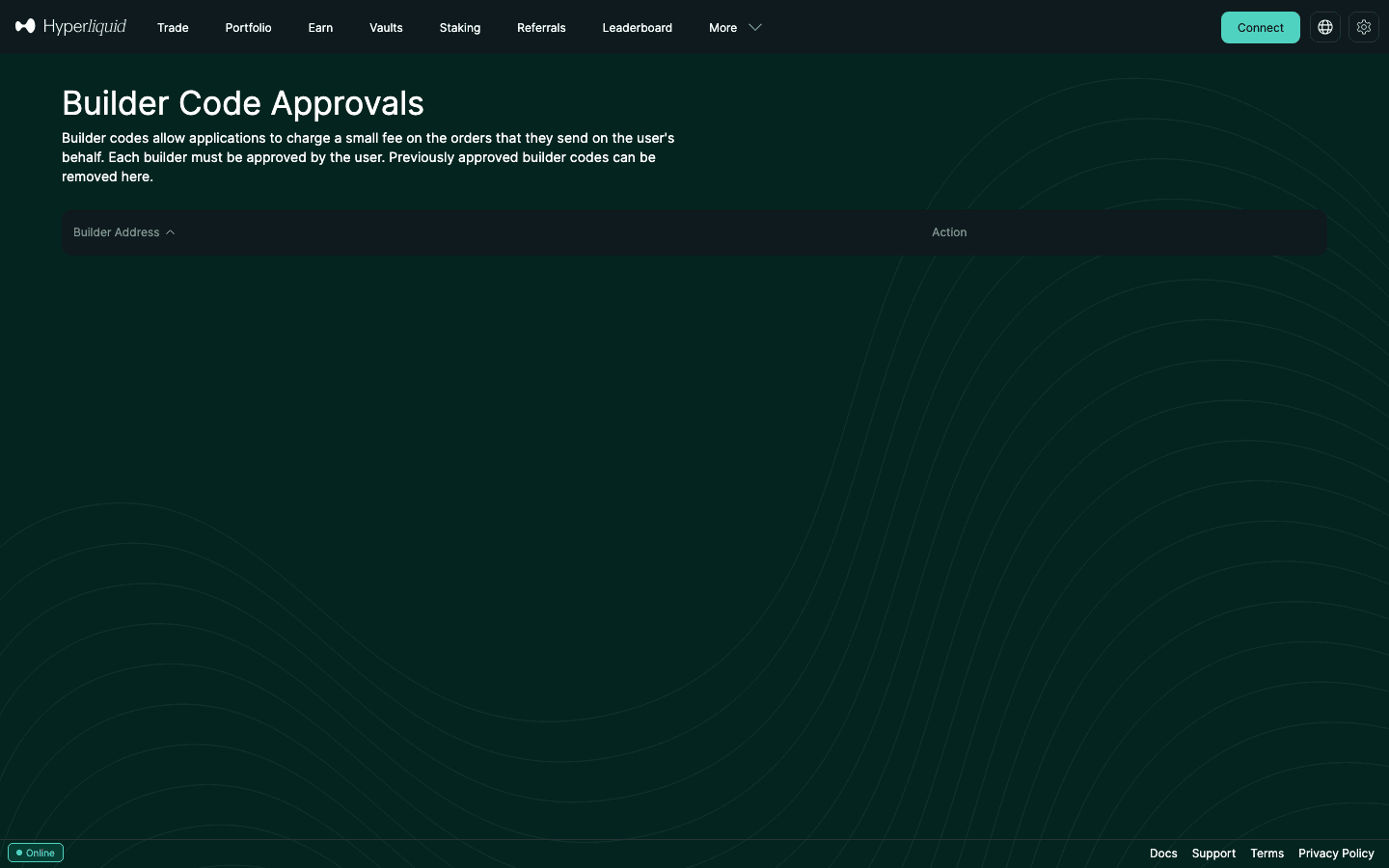
- Way 1: the official page. Open app.hyperliquid.xyz/builderCodes with the same wallet. “Builder Code Approvals” lists each approved builder address with a Remove action; click it and sign.
- Way 2: re-sign at 0%. Send
approveBuilderFeefor that builder withmaxFeeRate"0%"(SDK, script or any tool that builds the action). It is the same thing: the Remove button re-signs ApproveBuilderFee with a fee of 0 (read from the official page’s code on September 27, 2026).
Check any address (read-only)
To see which builders a wallet has approved without connecting it, use our checker: it sends Hyperliquid’s public info requests approvedBuilders and maxBuilderFee from your browser, names the known apps, shows what each cap costs per $10,000 and whether the account carries a referral code. The address is never stored or put in the URL.
5. What traders pay on each app, per trade and per year
The builder fee is added to Hyperliquid’s own fee, which is 0.045% taker / 0.015% maker on perps at tier 0 (full fee schedule). Published perp builder fees in September 2026, with the referral codes that apply on each route. A Hyperliquid referral code applies on every route that shows Hyperliquid’s fee separately, because it discounts Hyperliquid’s part of the fee, apps included (section 6). MetaMask publishes only an all-in total, so whether a code of yours changes its rate is not published:
| Where you trade | Builder fee (perps) | All-in taker, tier 0, with a Hyperliquid code | Plus the app’s own referral | Referral codes that apply |
|---|---|---|---|---|
| app.hyperliquid.xyz (official) | None | 0.045% (0.0432% with a code) | — | Hyperliquid referral (ours: HOLYGRAIL) |
| Hyperdash | +0.015% (copy trading +0.05%) | 0.0582% | 10% off its builder fee with a Hyperdash code | Hyperliquid referral + Hyperdash referral |
| Based | +0.025% | 0.0682% | No referee discount | Hyperliquid referral + Based referral (ours: HOLYGRAIL on both) |
| Phantom | +0.05% | 0.0932% | — | Hyperliquid referral (Phantom publishes no program of its own) |
| Liquid | +0.05% | 0.0932% | 0.0882% (10% off Liquid’s part) | Hyperliquid referral + Liquid referral (ours: JV2EN2CX) |
| fomo (perps) | +0.05% | 0.0932% | 10% off fomo’s fees with a code | fomo referral (ours: DailyWiseKite); fomo creates the account and sets its own Hyperliquid code, so HOLYGRAIL cannot be added |
| OneKey | +0.08% | 0.1232% | — | Hyperliquid referral |
| Dexari | +0.10% | 0.1432% | — | Hyperliquid referral + Dexari referral |
| MetaMask | Not split out | 0.1432% (levels 1–3), 0.0782% (levels 6–7), published totals | Lower with MetaMask Rewards levels | MetaMask Rewards |
Builder fees from each app’s docs and help pages (September 24–27, 2026; links in the first table). Based cuts its builder fee for $BASED stakers; pvp.trade’s fee falls with its level system; Hyperdash charges more for copy trading. Apps can change their fee per order up to your approved maximum; check the fee page before trading size.
Per year. Small differences per fill add up. Taker fees over 12 months at a steady monthly volume, with a Hyperliquid referral code on the account (all three volumes stay inside the $25M referral cap over a year):
| Route | $100,000/month | $500,000/month | $2,000,000/month |
|---|---|---|---|
| Official app + HOLYGRAIL | $518 | $2,592 | $10,368 |
| Based + HOLYGRAIL | $818 | $4,092 | $16,368 |
| Phantom or Liquid + HOLYGRAIL | $1,118 | $5,592 | $22,368 |
| OneKey + HOLYGRAIL | $1,478 | $7,392 | $29,568 |
| MetaMask (levels 1–3, published total) | $1,718 | $8,592 | $34,368 |
At $1M a month, trading through Phantom, Liquid or fomo instead of the official app costs $6,000 more per year, which is the builder fee alone (the 4% applies on both routes), and MetaMask at Rewards levels 1–3 charges about 3.3 times the official rate. Why do people pay it? Mostly convenience and mobile. Hyperliquid has no official iOS app, and Based, Liquid and fomo offer native mobile trading and features the official web app does not have. For the same order on a desktop, the official app is always the cheapest route. The mobile DEX comparison weighs the apps against each other, and best wallets for Hyperliquid covers the wallet side.
6. Builder codes vs referral codes: they stack
Many explainers say a builder code switches off your referral code on that order, and some cite Hyperliquid’s docs for it. The sentence they quote is real, but it sits in the background section of a page about a proposed staking referral program, which Hyperliquid says has “no definitive implementation” for mainnet:
“Unlike builder codes, referral codes are tied to users and apply regardless of how the user trades in perpetuity. Note that builder codes override referral codes for that order…”
Hyperliquid Docs, Referrals → Proposal: Staking referral program (read October 1, 2026; describes a proposal, not current behaviour)
The live rules point the other way. The builder-codes page does not mention referral codes, and the developer fee formula on the fees page multiplies your fee by (1 - activeReferralDiscount) with no builder condition. We checked mainnet fills from four large builders, including Based and Phantom, on September 29–30, 2026: the referral discount also applies to orders placed through apps with a builder code. Referred accounts paid exactly 0.96 × their Hyperliquid rate on builder-coded fills, accounts without a code paid the full rate, and the referrer still earns 10% of Hyperliquid's part of the fee on orders placed through apps (not of the app's builder fee).
Method, per-app results and the aggregate data of a fresh re-run (October 6, 2026, five apps): our mainnet study of referral codes through apps.
| Hyperliquid referral code | Builder code | |
|---|---|---|
| Set by | You, once (app.hyperliquid.xyz/referrals or a /join/ link) | The app, on every order it sends |
| Effect on your fee | −4% on Hyperliquid’s part of the fee, first $25M of volume | + up to 0.1% perps / 1% spot |
| Who earns | The referrer: 10% of Hyperliquid’s part of your (discounted) fees, app orders included, first $1B | The builder: the whole builder fee |
| On the same order | Both apply. Hyperliquid’s part of the fee gets the 4% discount, then the builder fee is added. An app’s own referral code discounts only the builder fee. | |
Order matters. A Hyperliquid referral code is set once per account and cannot be changed, and the Enter Code field locks after $10,000 of volume. Apps often set their own Hyperliquid referral code on accounts that have none: in late September 2026, all 30 of the most active Phantom accounts we sampled carried Phantom’s own code (our reading of on-chain referral data, not a policy Phantom publishes). So join with HOLYGRAIL on app.hyperliquid.xyz first, then connect the app with the same wallet, then enter the app’s own code where it gives a discount. This works in apps you connect with the same wallet, such as Based and Liquid; fomo has no wallet connection (Apple, Google or email only) and creates its own wallet and Hyperliquid account, so HOLYGRAIL cannot apply there and fomo’s own code is the one that counts. Phantom is itself the wallet: with your Phantom wallet, open app.hyperliquid.xyz/join/HOLYGRAIL before you first use Phantom’s perps. Ours:
- Hyperliquid (first, before any app): code HOLYGRAIL, 4% off Hyperliquid’s part of the fee for your first $25M, on the official app and inside apps you connect with the same wallet.
- Liquid: code JV2EN2CX, 10% off Liquid’s fee for life (Liquid docs, September 27, 2026).
- fomo: code DailyWiseKite, 10% off fomo’s fees (the code that counts there, since fomo creates its own account).
- Based: code HOLYGRAIL (Based’s own program, which has the same name as our Hyperliquid code); Based currently offers no discount to referred users.
Full referral terms are on the HOLYGRAIL referral page.
7. Worked example: one $10,000 trade, ten routes
A tier-0 trader opens a $10,000 BTC long with a market order and closes it the same way (two taker fills, $20,000 traded). The builder fee is paid on both fills. Funding ignored.
| Route | Rate per fill | Round trip | Per $1M of volume |
|---|---|---|---|
| Official app with HOLYGRAIL | 0.0432% | $8.64 | $432 |
| Official app, no code | 0.045% | $9.00 | $450 |
| Hyperdash + HOLYGRAIL | 0.0582% | $11.64 | $582 |
| Based + HOLYGRAIL | 0.0682% | $13.64 | $682 |
| Liquid + HOLYGRAIL + Liquid code | 0.0882% | $17.64 | $882 |
| Phantom or Liquid + HOLYGRAIL | 0.0932% | $18.64 | $932 |
| Phantom or Liquid, no code | 0.0950% | $19.00 | $950 |
| OneKey + HOLYGRAIL | 0.1232% | $24.64 | $1,232 |
| MetaMask (levels 1–3, published total) | 0.1432% | $28.64 | $1,432 |
| Dexari + HOLYGRAIL | 0.1432% | $28.64 | $1,432 |
Maker orders feel builder fees even more: a resting limit order costs 0.015% on the official app, and a 0.05% builder fee more than quadruples that to 0.065%; MetaMask’s published maker total is 0.1144%. That is why market makers and maker-rebate strategies trade directly through the API, and why a bot’s builder fee should be the first thing you check (see trading bots compared).
The cheapest Hyperliquid fill is on the official app
No builder fee, and 4% off with HOLYGRAIL: 0.0432% taker, 0.0144% maker for your first $25M.
8. Builder rankings: who earns the most
In the 30 days to September 25, 2026, DefiLlama counted $7.57M of builder-code revenue across 94 Hyperliquid front-ends. The top of the list is wallets, not trading apps: MetaMask, Trust Wallet and Phantom alone took about 53%.
| # | Builder | Builder revenue, 30 days | Share |
|---|---|---|---|
| 1 | MetaMask | $1.49M | 19.7% |
| 2 | Trust Wallet | $1.33M | 17.6% |
| 3 | Phantom | $1.17M | 15.5% |
| 4 | fomo | $886,000 | 11.7% |
| 5 | Rabby | $341,000 | 4.5% |
| 6 | Invo | $311,000 | 4.1% |
| 7 | Hyperdash | $244,000 | 3.2% |
| 8 | Blockchain Wallet | $208,000 | 2.7% |
| 9 | Liquid | $201,000 | 2.6% |
| 10 | OneKey | $167,000 | 2.2% |
DefiLlama fees API (“Interface” protocols on Hyperliquid whose revenue is builder-code fees; only their Hyperliquid revenue is counted, not fees some terminals also earn on other exchanges), 30 days to September 25, 2026, fetched September 27, 2026. trade.xyz is left out because its revenue is HIP-3 deployer fees, not builder codes. Rankings move weekly; for live numbers see DefiLlama, HyperTracker (builders) and Blockworks.
What it means for you: the most-used builders are wallets whose perps tab shows one combined fee, so many of their users pay 2.2 times (Phantom, even with a Hyperliquid code) to 3.3 times (MetaMask’s published total, levels 1–3) the official rate with a referral code, without seeing a separate “builder fee” line. If you trade more than occasionally, compare the all-in rate in the first table before you pick where to trade.
9. How to become a builder
There is no application or whitelist. If you run a front-end, bot or strategy service and want to charge for it:
- Prepare the builder address. It needs at least 100 USDC of perps account value and must use the standard account abstraction mode (not Unified or Portfolio margin).
- Get users to approve you. Have each user sign
approveBuilderFeewith their main wallet and amaxFeeRateno higher than what you plan to charge. Asking for the full 0.1% when you charge a fraction of it is a red flag to informed users. - Attach the builder field. Add
{"b": address, "f": number}to each order action you send for the user. The official Python SDK has a worked example (examples/basic_builder_fee.py). - Track and claim. Your accumulated fees appear as
builderRewardsin thereferralinfo response; claim them through the referral claim flow (referral rewards can be claimed once above $1 and arrive in the spot balance). Your fills are in the daily builder_fills file.
Builders also carry support and security: users sign approvals and often API-wallet authorisations in your UI. The Hyperliquid API guide covers signing and info requests.
10. User checklist
- Read the approval before signing. The prompt should say ApproveBuilderFee and show the builder address and maximum rate. If an app asks for 0.1% but advertises 0.025%, ask why.
- Review your list every few months. Use the builder fee checker or app.hyperliquid.xyz/builderCodes and remove apps you no longer use. You can hold only 10 active approvals.
- Check the fee on a small first trade. In the API your fill’s
feeincludes the builder fee and abuilderFeefield shows the builder’s share; in the app, compare the fee on the fill with 0.045% (taker) or 0.015% (maker) of notional. - Use the official app for size. For large or frequent orders, trade on app.hyperliquid.xyz with a referral code; keep the mobile app or wallet tab for monitoring and small trades.
- Separate API wallets from approvals. Bots should trade through an API (agent) wallet, which cannot withdraw and cannot sign builder approvals. Revoke the API wallet on app.hyperliquid.xyz/API when you stop the bot.
- Set the Hyperliquid code first, then the app’s code. Join with a Hyperliquid referral code before you connect any app (apps often set their own on accounts that have none, and a referrer cannot be changed); it keeps cutting Hyperliquid’s part of the fee on app orders. Then enter the app’s own code, which discounts the builder fee.
New to decentralized exchanges? Start with what a DEX is, how to use Hyperliquid and the best DEX comparison.
11. FAQ
What is a Hyperliquid builder code?
A builder code is an optional field on an order, b (the builder’s address) and f (the fee), that lets the app, wallet or bot which sent the order collect an extra fee on the fill. HyperCore charges it on-chain on top of Hyperliquid’s own fee, and only up to the maximum you approved for that builder: 0.1% on perps and 1% on spot at most.
What is the maximum builder fee on Hyperliquid?
0.1% of notional on perps and 1% on spot (Hyperliquid docs, checked October 19, 2026). The builder sets f per order in tenths of a basis point (f = 10 is 1 bp, 0.01%), and it can never exceed the maximum you signed for that builder. Builder fees apply to both sides of a perp trade but not to the buying side of a spot trade.
How do I approve a builder fee on Hyperliquid?
Connect your main wallet in the app. The first time you trade, the app asks you to sign an approval; the wallet shows HyperliquidTransaction:ApproveBuilderFee with the builder’s address and a maxFeeRate such as "0.05%". Check that the rate matches the app’s published fee and sign. It is a signature, not a blockchain transaction, so it costs no gas, and you approve each builder once, not per trade. An API (agent) wallet cannot sign it.
How do I revoke a Hyperliquid builder fee approval?
Two ways, and they are the same action. On app.hyperliquid.xyz/builderCodes, connect the same wallet and click Remove next to the builder: the page signs ApproveBuilderFee for that builder with a fee of 0. Developers can send approveBuilderFee themselves with maxFeeRate "0%". Revoking moves no funds and does not close positions; the app simply cannot add a fee to your orders any more. It also frees one of your 10 approval slots.
Is approving a builder fee safe? Can it move my funds?
The approval itself cannot move funds: it only sets the highest fee that one builder address may add to orders sent on your behalf. Transfers and withdrawals are different signatures (UsdSend, SpotSend, Withdraw). The real risk is a fake site asking you to sign one of those, or an approval with a higher cap than the app advertises, so read the action name and the maxFeeRate in the wallet prompt before signing.
Do I pay builder fees automatically?
Only on orders sent through an app you approved. The fee is taken inside the fill’s trading fee, so there is no separate bill; in the API the fill’s fee field includes it and a builderFee field shows the builder’s part. Orders you place on app.hyperliquid.xyz carry no builder code, so there is no builder fee there.
Does MetaMask or Phantom charge a builder fee on Hyperliquid?
Yes. Phantom’s help center lists 0.095% per fill (0.05% Phantom plus 0.045% Hyperliquid). MetaMask publishes only an all-in total: 0.1432% taker and 0.1144% maker at MetaMask Rewards levels 1–3 (and without Rewards), down to 0.0782% taker at levels 6–7 (checked October 15, 2026). The official app with a referral code charges 0.0432% taker, and a Hyperliquid referral code also cuts Hyperliquid’s part inside Phantom to 0.0432%, for 0.0932% in total.
Which Hyperliquid app has the lowest builder fee?
The official app has none. Among third-party apps in September 2026: Hyperdash +0.015%, Based +0.025%, pvp.trade +0.025%–0.04% at Level 1, then Phantom, Liquid and fomo +0.05%, OneKey +0.08% and Dexari +0.10%. A referral code at Liquid or fomo takes 10% off the app’s part, on top of the 4% a Hyperliquid referral code takes off Hyperliquid’s part.
Do builder codes and referral codes stack?
Yes. On mainnet the referral discount also applies to orders placed through apps with a builder code: in builder-coded fills from September 29–30, 2026, referred accounts paid exactly 0.96 × their Hyperliquid rate (0.0432% instead of 0.045% taker at tier 0) and the builder fee on top, and the referrer still earns 10% of Hyperliquid's part of the fee on orders placed through apps (not of the app's builder fee). An app’s own referral code discounts only its builder fee, so both can apply to one order. Enter the Hyperliquid code on app.hyperliquid.xyz before you connect an app: apps often set their own Hyperliquid code on accounts that have none, and a referrer cannot be changed. The often-quoted line that builder codes override referral codes comes from a page about a proposed staking referral program that Hyperliquid says is not implemented; on mainnet both the discount and the referrer’s reward are kept.
Do I pay the builder fee on both open and close?
Yes. The builder fee is charged on every fill the app sends, so opening and closing a position each pay it; on perps it applies whether you buy or sell. A $10,000 position opened and closed with market orders on Phantom costs $18.64 in fees with a Hyperliquid referral code on the account ($19.00 without one), against $8.64 on the official app with a referral code.
Which builders earn the most on Hyperliquid?
Wallets. In the 30 days to September 25, 2026, DefiLlama counted $7.57M of builder-code revenue across 94 front-ends, and MetaMask, Trust Wallet and Phantom took about 53% of it; fomo, Rabby, Invo, Hyperdash and Liquid followed. HyperTracker, DefiLlama and Blockworks keep live rankings.
How do I become a Hyperliquid builder?
Keep at least 100 USDC of perps account value on the builder address, use the standard account abstraction mode, have users approve your address, and attach b and f to the orders you send for them. There is no application or whitelist. Fees are claimed through the same claim flow as referral rewards.
Can I see what a builder charged me or which builders I approved?
Yes, without connecting a wallet. The info request approvedBuilders lists every builder you have approved, and maxBuilderFee returns the cap for one builder in tenths of a basis point. Our free builder fee checker runs both for any address and also shows whether the account carries a referral code. Each fill’s fee field includes the builder fee.
Open Hyperliquid with HOLYGRAIL
Trade on the official app with no builder fee and 4% off for your first $25M. The same 4% follows your Hyperliquid account into apps you connect with the same wallet, such as Based and Liquid (not fomo, which creates its own account), so join with the code before you connect one. On mobile, prefer apps whose own referral code also cuts the builder fee: Liquid (10% off its fee, code JV2EN2CX) or fomo (10% off, code DailyWiseKite; on fomo this is the only code you can use).
Disclosure: HOLYGRAIL (Hyperliquid and Based), JV2EN2CX (Liquid) and DailyWiseKite (fomo) are our referral codes; we earn a share of referred accounts’ fees at no cost to you. We hold no code for Phantom, MetaMask, OneKey, pvp.trade, Hyperdash or Dexari. Builder-code rules are from Hyperliquid’s official documentation and app fees from each app’s published pages, re-checked on October 1, 2026. Not investment advice.