
Short answer. Hyperliquid unlocks up to 10 sub-accounts after $100,000 of trading volume, plus one more for every additional $100M, up to 50. Sub-accounts have separate margin and positions but share the master’s fee tier. They have no private key: the master (or its API wallet) signs for them, and withdrawals go through the master. The 4% referral discount does not apply to sub-account trades. API wallets: “3 for all master accounts, +2 per sub-account”. Create them at app.hyperliquid.xyz/subAccounts.
No Hyperliquid account yet?
Open one with code HOLYGRAIL for 4% off fees on your first $25M. The discount applies to your master account’s trades, and those trades also count toward the $100,000 you need to unlock sub-accounts.
We earn a commission when you sign up through our links; it never raises your fees.
1. What a Hyperliquid sub-account is
On Hyperliquid, your wallet address (or email login) is your master account. A sub-account is a separate account on HyperCore with its own address, its own perp and spot balances, its own positions, orders and history, and its own margin. What it does not have is a private key. Every action for a sub-account (orders, cancels, transfers) is signed by the master account or by an API wallet the master has approved. The API docs describe the mechanism: “Subaccounts and vaults do not have private keys. To perform actions on behalf of a subaccount or vault signing should be done by the master account and the vaultAddress field should be set to the address of the subaccount.”
In practice a sub-account is a separate trading desk that you can fund in one click and that shares your fee tier. It is not separate custody: whoever controls the master key controls every sub-account. Hyperliquid does not number sub-accounts; you tell them apart by the name you give them and by their 0x address.
2. Sub-account vs separate wallet vs isolated margin
People searching for “Hyperliquid multiple accounts” usually want one of three things, and they are not interchangeable. Isolated margin ring-fences a single position inside your existing account: the docs say it “allows an asset’s collateral to be constrained to that asset”, and a liquidation there does not touch your other positions. A sub-account ring-fences a whole account. A separate wallet also separates the key.
| Sub-account | Isolated margin | Separate wallet | |
|---|---|---|---|
| What it is | A second account with its own address under your master | A margin mode for one position inside the same account | A different wallet and address, unrelated on-chain |
| Separate margin and liquidation | Yes, for everything in it | Yes, for that one position only | Yes |
| Opposite position in the same coin | Yes (hedge from another account) | No: one net position per coin per account | Yes |
| Separate key | No, the master key controls it | No | Yes |
| Fee tier | Shared with the master | Same account, same tier | Starts at tier 0 |
| Referral discount (4%) | No | Yes (it is still the master account) | Only if that wallet enters a code before $10,000 of volume |
| Requirement | $100,000 of volume | None: pick Isolated in the order form | None |
| Moving funds | Instant, free internal transfer | Add or remove margin on the position | External withdrawal (0.2 USDC fee + tiny gas for USDC to Arbitrum) + deposit |
Hyperliquid docs (sub-accounts, margining, referrals) and the app, checked September 27, 2026.
Rule of thumb: to cap the risk of one trade, use isolated margin. That needs no volume and keeps the referral discount. To run a separate strategy or a bot with its own PnL, limits and API wallet, or to hold the opposite side of a coin, use a sub-account. To separate keys (a hardware wallet for long-term funds, a small hot wallet for bots), use a separate wallet and give it its own referral code before it passes $10,000 of volume.
3. Requirements and limits at a glance
| Item | Rule (Hyperliquid docs and app, September 27, 2026) |
|---|---|
| Unlock requirement | $100,000 of trading volume on the master account |
| How many | Up to 10 at first; +1 for every additional $100M of volume; hard cap 50 |
| Cost | No creation fee is documented (it is a signed action, like placing an order) |
| Name | 1 to 16 characters in the app; rename any time |
| Private key | None. The master account (or its API wallet) signs for the sub-account |
| Fee tier | Shared with the master; sub-account volume counts toward the master’s 14-day tier |
| Referral discount (4%) | Does not apply to sub-account trades |
| Margin | Separate. A liquidation in one sub-account cannot touch another account’s collateral |
| Account mode | Set per account (Unified, Portfolio margin or Standard); portfolio margin treats sub-accounts separately |
| Address-based rate limits | Each sub-account is a separate user (own request budget and open-order limit) |
| API wallets | Docs: “starts at 3 for all master accounts and increases by 2 per sub-account”. The API reference splits this into 1 unnamed + 3 named, +2 named per sub-account |
| Deposits / withdrawals | Through the master: transfer to master, then withdraw |
The $100,000 threshold is trading volume, not deposit size. A trader who deposits $1,000 and opens and closes a 5x position trades $10,000 of volume per round trip ($5,000 in, $5,000 out), so 10 such round trips reach it. Active traders get there quickly; buy-and-hold users never do. The next sub-account after the first 10 needs another $100M of volume, so almost everyone works with 10. Public account data shows that the cap is real: on September 27, 2026 we found master accounts with exactly 50 sub-accounts.
4. How to create a sub-account
- Reach $100,000 of trading volume on the master account. The docs state the threshold only as “$100,000 in volume”; deposits and account value do not count.
- Open the Sub-Accounts page. In the app, go to More → Sub-Accounts, or open
app.hyperliquid.xyz/subAccountsdirectly. The page shows a Master Account table and a Sub-Accounts table, both with the columns Name, Address, Perps Account Equity, Spot Account Equity and Action (screenshot below). - Click “Create Sub-Account”, type a name of up to 16 characters (for example “BTC-scalp” or “Bot-1”) and confirm. The app confirms “Created new sub-account with address 0x…”. You can change the label later with Rename Sub-Account.
- Fund it. Use Sub-Account Transfer (“Transfer tokens between sub-account and master account”) in the Action column to move USDC or spot tokens in. Hyperliquid charges a one-time activation fee of 1 USDC on the first transaction sent to a brand-new HyperCore account. In public ledgers we checked on September 27, 2026, the first send into some newly created sub-accounts paid that fee and others did not, so keep 1 USDC of headroom on the first transfer.
- Trade from it. Click Trade in the sub-account’s row, or pick it in the address dropdown in the navigation bar (“Master” switches back). While a sub-account is selected, the app shows the banner “IMPORTANT: You are trading on behalf of your sub-account …”, and the Trade page shows that account’s balances and positions. Some actions stay master-only: sending funds shows “Can only send from master account”, and some pages carry the banner “Data and actions taken on this page are for your master account.”
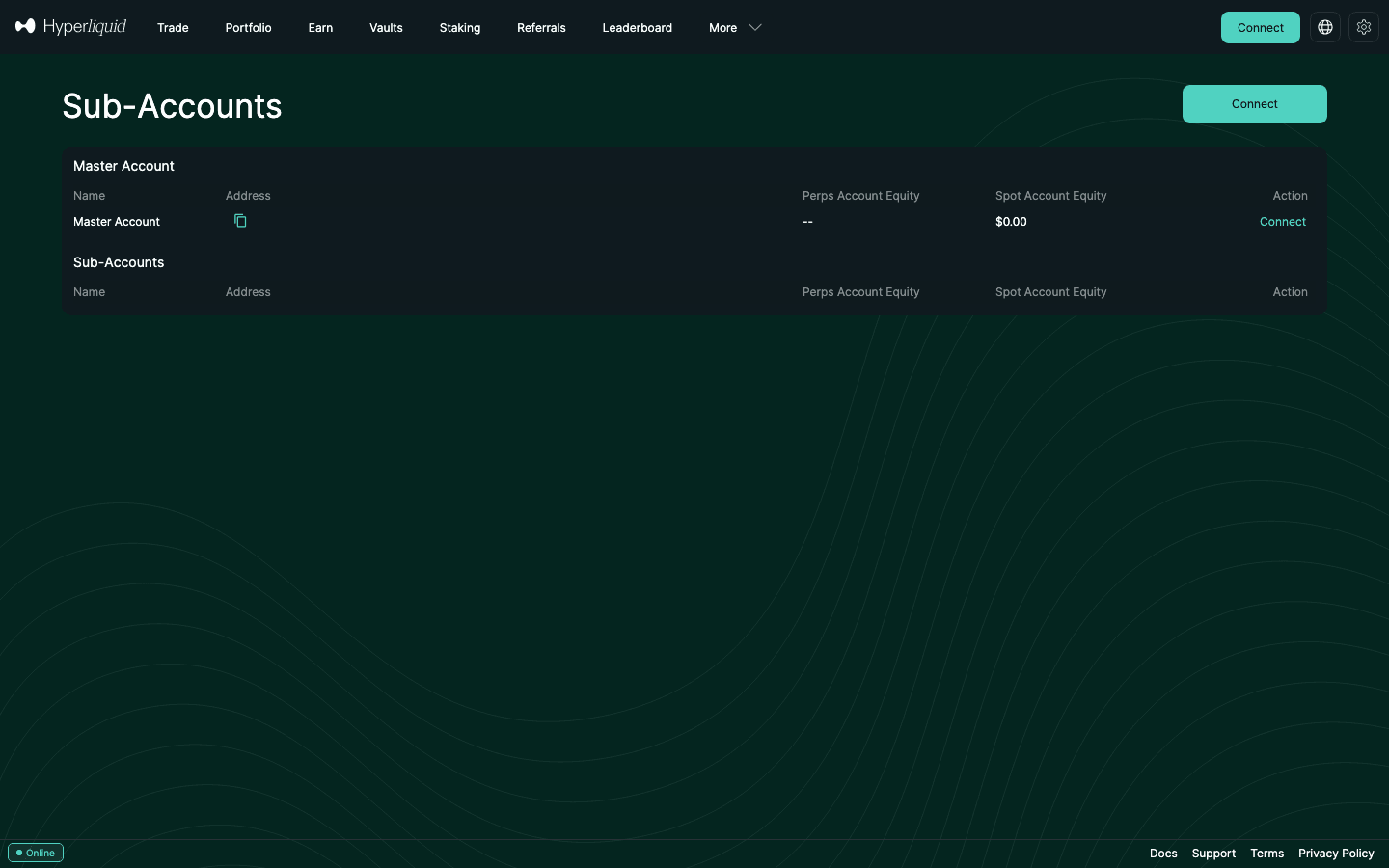
Want to rehearse first? The testnet app has the same page at app.hyperliquid-testnet.xyz/subAccounts, and the official SDK’s own sub-account example runs on testnet. See the Hyperliquid testnet guide for getting mock USDC.
5. Sub-accounts in code: create, fund, trade, query
Bot builders need the calls rather than the buttons. With the official Python SDK (pip install hyperliquid-python-sdk), the whole life cycle takes about a dozen lines. The master key signs the creation and the transfers; orders for the sub-account are signed by the master or an API wallet with vault_address set to the sub-account.
from eth_account import Account
from hyperliquid.exchange import Exchange
from hyperliquid.info import Info
from hyperliquid.utils import constants

URL = constants.MAINNET_API_URL
master = Account.from_key(MASTER_KEY)             # signs creation and transfers
ex, info = Exchange(master, URL), Info(URL, skip_ws=True)

ex.create_sub_account("bot-1")                    # action: createSubAccount
sub = next(s["subAccountUser"] for s in info.query_sub_accounts(master.address)
           if s["name"] == "bot-1")               # info type: subAccounts
ex.sub_account_transfer(sub, True, 100_000_000)   # deposit 100 USDC (usd is in millionths)

bot = Exchange(master, URL, vault_address=sub)    # or an API wallet key + vault_address
bot.order("ETH", True, 0.01, px, {"limit": {"tif": "Gtc"}})  # px = your limit price
print(info.user_state(sub))                       # always query the sub-account's own address
Three details trip people up. The usd amount in sub_account_transfer is an integer in millionths (the SDK example sends 1_000_000 for 1 USD). Spot tokens move with sub_account_spot_transfer. And query_sub_accounts returns, for each sub-account, its name, subAccountUser address, master and full clearinghouseState, so one request can drive a dashboard. The order must still meet the $10 minimum. Signing, WebSocket and error handling are covered in the Hyperliquid API guide.
Third-party tools need the same three things: the master address, a key that may sign (an API wallet), and the sub-account address. In CCXT, for example, you set walletAddress and privateKey, then pass vaultAddress (or subAccountAddress) in the order and cancel params and subAccountAddress for balance queries. Terminals and signal routers differ, so check that yours has a sub-account or vault-address field before you rely on it.
6. Moving funds: transfers, withdrawals and the 10% rule
- Master ↔ sub-account: internal HyperCore transfers. They settle in the next block with no gas and never touch Arbitrum. In the SDK these are
subAccountTransferfor perp USDC andsubAccountSpotTransferfor spot tokens; the generalizedsendAssetaction also takes afromSubAccountfield and can move tokens between perp DEXs, spot and sub-accounts. - Sub-account ↔ sub-account: route through the master (sub → master → sub), or use
sendAssetwithfromSubAccount. - Withdrawals: sub-accounts cannot withdraw to an external chain. Move the balance to the master first, then withdraw. USDC to Arbitrum costs a flat 0.2 USDC fee plus a tiny HyperEVM gas fee (withdrawal guide).
- Deposits: deposit to the master, then transfer in.
- Margin you can move: for an account with open perp positions, anything that removes margin (withdrawal, transfer to spot, transfer out) must leave at least the larger of the initial margin and 10% of total open notional. Example: a sub-account with $30,000 of open positions must keep at least $3,000 of margin (more if initial margin is higher), so you cannot sweep it to zero while positions are open.
7. Fees: shared tier, lost referral discount
The fee docs are explicit: “Sub-account volume counts toward the master account and all sub-accounts share the same fee tier.” Splitting your trading across ten sub-accounts therefore does not push you back to tier 0. Tiers start at 0.045% taker / 0.015% maker on perps and 0.070% / 0.040% on spot, and drop above $5M of 14-day weighted volume (full fee table). HYPE staking discounts apply to the account that stakes, or to a trading account linked to it.
The catch is the referral discount. Hyperliquid’s referral page says: “Referral discounts do not apply to vaults or sub-accounts because those are treated as independent accounts in the clearinghouse.”
Worked example. You joined with a referral code and trade $2M a month of perp taker volume at tier 0.
- All from the master: 0.045% × 0.96 → $864 a month.
- All from sub-accounts: 0.045% → $900 a month.
The difference is $36 a month, or 4% of your fee bill, until your first $25M of volume is used up. If the referral discount matters to you, keep your main discretionary trading on the master and use sub-accounts for bots and ring-fenced strategies. The mechanics are in the HOLYGRAIL referral guide.
8. API wallets (agent wallets), nonces and rate limits
Sub-accounts matter most for automated traders, and the details are where bots break.
- Signing: sign with the master key or an approved API (agent) wallet, and set
vaultAddressto the sub-account address on orders, cancels and leverage updates. - What an API wallet can do: in the app's words, API (agent) wallets “can perform actions on behalf of an account without having withdrawal permissions.” A leaked bot key can place bad trades but cannot withdraw your funds, which is why every bot should get its own API wallet instead of the master key.
- How many API wallets: the sub-accounts page puts it as “The number of API wallets available starts at 3 for all master accounts and increases by 2 per sub-account.” The API reference is more precise: an account can have 1 unnamed and up to 3 named API wallets, plus 2 more named API wallets per sub-account. A named API wallet can carry an expiry of at most 180 days (
valid_until). Approving a new unnamed wallet deregisters the previous unnamed one. - Nonces: Hyperliquid stores the 100 highest nonces per signer, not per account. If one API wallet signs for three sub-accounts, all three share one nonce set, and parallel processes collide. The docs recommend a separate API wallet for each sub-account (and each trading process).
- Do not reuse API wallet addresses. When an agent is deregistered or expires, its nonce state can be pruned and old signed actions could be replayed. Generate a fresh key instead.
- Querying: pass the sub-account’s own address to info endpoints. Querying the API wallet’s address returns an empty result, a common pitfall.
- Rate limits: IP limits (1,200 weight per minute for REST) are shared by everything on that IP. Address-based limits apply per user, and sub-accounts are treated as separate users: each address gets its own budget of 1 request per 1 USDC traded since inception plus an initial buffer of 10,000 requests, and its own open-order limit (1,000, plus 1 per $5M of volume, up to 5,000).
- Account mode per sub-account: the
userSetAbstractionaction accepts a sub-account as the user, so each can run Unified, Portfolio margin or Standard mode. Builder-code addresses must be in Standard mode.
Step by step: create, name, expire, assign and revoke an API wallet
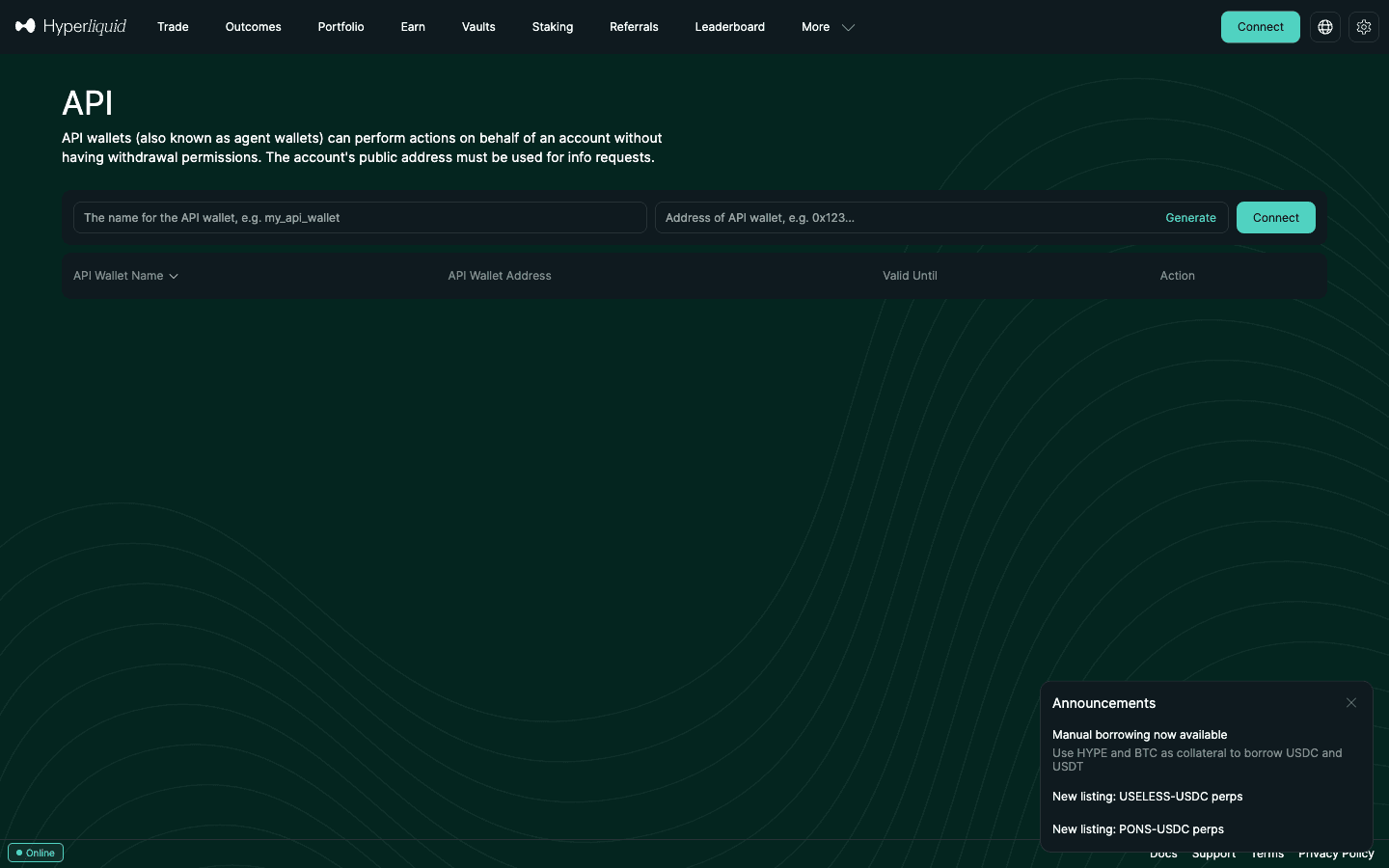
An API wallet (the docs also call it an agent wallet) is a separate key that your master account authorizes to sign for it. It holds no funds: margin stays on the master account or sub-account. The whole setup takes a few minutes in the web app:
- Open the API page. Connect your main wallet at
app.hyperliquid.xyz/API. The page lists your API wallets with the columns API Wallet Name, API Wallet Address, Valid Until and Action. - Name it. Enter an API Wallet Name of up to 16 characters (the app says names “must be less than 17 characters”). Use one name per bot or process (for example
grid-eth-sub1), because approving a new wallet with the same name replaces the old one. - Choose the key. Either paste the address of a key you generated yourself on the machine that will run the bot (safest: the private key never leaves it), or click Generate. If you generate in the app, copy the private key now; the app warns: “Be sure to save the randomly generated private key. It will no longer be accessible once authorized.”
- Set the expiry. Click Authorize API Wallet and set Days Valid. The protocol allows at most 180 days; use 30 days or less for anything experimental. When it expires, the key stops working and you authorize a fresh one.
- Sign with the main wallet. Approving an agent is a user-signed action (
approveAgent), so only the master key can do it. The app confirms “API wallet authorized successfully” and the row shows its Valid Until date. - Assign it to a sub-account. API wallets belong to the master account and can sign for the master or any sub-account: the bot sets
vaultAddressto the sub-account’s address on each action. Each sub-account adds 2 named API wallet slots, and the docs recommend one API wallet per sub-account and per trading process so nonce sets never collide. - Configure the bot. Give it the API wallet’s private key (as a secret or environment variable, never in a repository) for signing, and the master or sub-account address for all info queries. Querying the API wallet’s own address returns nothing.
- Test with one small order. Place a minimum-size order (at least $10), confirm it appears under the right account, check the fee line, then cancel.
- Revoke it. In the Action column choose Remove API Wallet (“API wallet removed successfully”). Programmatically, approving a new unnamed agent removes the old unnamed one, and approving a named agent with the same name replaces it. Do not re-authorize a removed address later: its nonce state may have been pruned, which could let old signed actions be replayed.
| Layer | Holds funds? | Can withdraw? | Purpose | Notes |
|---|---|---|---|---|
| Master wallet | Yes | Yes | Deposits, withdrawals, approving API wallets, creating sub-accounts | Keep on a hardware wallet or tightly controlled signer |
| Sub-account | Yes (own margin) | No (transfer to master first) | Strategy isolation, separate liquidation | No private key; signed for via vaultAddress |
| API (agent) wallet | No | No | Signing orders, cancels, leverage changes for bots | 1 unnamed + 3 named, +2 named per sub-account; expiry up to 180 days |
Hyperliquid docs (sub-accounts, exchange endpoint “Approve an API wallet”, nonces and API wallets) and the /API page, checked September 27, 2026.
What a compromised API key can do is trade badly on purpose: open maximum-leverage positions or sell into thin books. That is the risk to manage. Keep expiries short, cap notional and leverage in the bot’s own code, pull the account’s fills daily so rogue size shows up within 24 hours, and rotate the key at the first doubt. For time-sensitive orders, the optional expiresAfter field makes an action invalid after a timestamp; note that an action cancelled for a stale expiresAfter costs 5 times the usual address rate limit.
Request budgets, WebSocket limits and bot architecture are covered in the rate limits section of the trading bot guide and the Hyperliquid API guide.
Build on the deepest on-chain perp book
Gas-free orders, a public REST + WebSocket API and up to 50 sub-accounts. Start with 4% off fees using HOLYGRAIL on your master account.
9. Use cases: strategy separation, bots and hedging
Risk isolation between strategies
Margin is not shared across accounts. A 20x scalping account can be liquidated without touching the collateral of a low-leverage swing account or a spot stack. Inside one account, cross-margin positions share collateral, and in the default Unified Account mode your spot USDC also backs cross perps. Sub-accounts are the clean way to build a wall.
One bot, one sub-account
Give each bot its own sub-account and its own API wallet. You get separate PnL, separate open-order limits, a separate address-based rate budget and no nonce collisions. If a bot misbehaves you can revoke its API wallet without touching anything else.
Hedging and two-sided positions
Hyperliquid keeps one net position per market per account, so there is no hedge mode (one-way vs hedge mode). A sub-account can hold the opposite side: long BTC on the master for a swing trade, short BTC in a sub-account for a short-term hedge. Both legs pay trading fees and hourly funding, so this costs more than simply reducing the position.
Clean records
Each sub-account has its own address, trade history and funding history, which makes per-strategy PnL and bookkeeping easier. Tax tools that import by address need each sub-account added separately. It does not change who owes tax: all sub-accounts belong to you.
10. Sub-accounts vs vaults vs separate wallets
| Sub-account | Vault (legacy HyperCore) | Separate wallet | |
|---|---|---|---|
| Who can deposit | Only you (master) | Anyone (public vault) | Only you |
| Creation | Free, needs $100,000 volume | 100 USDC deposit + 10,000 USDC creation gas fee | Free |
| Markets | Perps, HIP-3, spot | Validator-operated perps only (legacy vaults) | Everything |
| Fee tier | Shared with master | Tracked separately | Starts at tier 0 |
| Referral discount | No | No | Yes, if joined with a code |
| Profit share | n/a | Leader gets 10% of profits; must keep ≥ 5% of the vault | n/a |
| Key / custody | Master key controls all | Leader trades; depositors withdraw their share | Separate key per wallet |
| Moving funds | Instant, free internal transfer | Deposit / withdraw | External withdrawal (0.2 USDC fee + tiny gas for USDC to Arbitrum) + deposit |
Vault figures from the “For vault leaders (legacy)” docs page, verified for our facts registry. New vaults can be built on HyperEVM with custom accounting, and those can trade spot and HIP-3.
Use a sub-account to organize your own money. Use a vault only if you want other people’s deposits and a 10% profit share; the 10,000 USDC creation fee makes it a business decision. Use a separate wallet when you want separate keys (for example a hardware wallet for long-term holdings), a different login, or a fresh referral discount. The trade-offs are that it starts at fee tier 0 and every move between wallets is an external withdrawal. For team setups where several people must approve, Hyperliquid also supports native multi-sig accounts.
11. Multiple accounts on Hyperliquid: a practical setup
Multi-account trading on Hyperliquid is about risk isolation, not about farming. You separate strategies so a liquidation in a high-leverage scalp book cannot wipe a swing book or a long-term stack, and so a bot error stays inside the bot's own account. There are two building blocks, and they solve different problems.
| Sub-accounts | Separate wallets | |
|---|---|---|
| Separates | Margin, positions, PnL, rate limits | Margin, positions, PnL, rate limits and keys |
| Key isolation | No. One master key controls all | Yes |
| Fee tier | Shared; volume pooled with the master | Each wallet starts at tier 0 (0.045% taker / 0.015% maker) |
| Referral discount (4%) | Not applied | Applied per wallet, if that wallet enters a code before it passes $10,000 of volume |
| HYPE staking discount | Applies to the address that stakes, or to one trading address linked to it (see below). The docs do not say that sub-accounts inherit it. | |
| Moving money | Instant, free internal transfer | Withdrawal (0.2 USDC fee + tiny gas for USDC to Arbitrum) and a new deposit, or an on-chain send |
| Best for | Several strategies run by one person | Security tiers: cold storage, hot trading, bot-only keys |
A hybrid setup works well for most active traders. Keep one well-protected master wallet (ideally a hardware wallet) for the main book and its sub-accounts. Keep long-term holdings off the exchange or in a separate wallet, and give each bot an API wallet rather than a key that can withdraw.
A four-step blueprint
- Define the books before you open accounts. For example: (A) a scalp book with tight stops and little overnight exposure; (B) a swing book with lower leverage and wider stops; (C) automated strategies, one sub-account each. Size each book by the volatility of the method, not by equal splits.
- Fund only what each book needs. Sub-account transfers are instant, so there is no reason to park the whole balance in the riskiest account. Top up on a schedule, not after every losing trade.
- One API wallet per bot and per sub-account. Nonces are tracked per signer. Sharing one API wallet across bots makes parallel orders collide, and revoking it would stop every bot at once. You get 2 extra named API wallets per sub-account for exactly this.
- Name and log everything. Names can be up to 16 characters, so keep them short and descriptive: “HL-Scalp”, “HL-Swing” or “Bot-Grid-1” (Rename Sub-Account). Keep a journal of transfers between books. Each sub-account has its own trade and funding history, which makes per-strategy PnL and your yearly tax records far easier. It does not change who owes the tax.
Risk rules that make separate books worth it
- A daily loss limit per book (for example 1–2% of that book's equity), after which that book stops for the day.
- No “revenge” transfers from a winning book into a losing one mid-session.
- Lower max leverage on the swing book than on the scalp book, even if the app allows more.
- Reduce-only exits and stops on every discretionary position.
- Monitor margin per account, not just total equity. A green day on the swing book can hide a scalp book that is about to be liquidated, because margin is never shared across accounts. The margin ratio guide shows what to watch. If you monitor over WebSocket, one IP can follow user-specific data for at most 10 unique addresses. A master plus 10 sub-accounts is 11, so poll the rest over REST (one
subAccountsrequest returns all of them).
Fee maths: why not just use many wallets?
Splitting volume across separate wallets keeps every wallet at tier 0. A trader doing $6M of 14-day volume in one account (or across its sub-accounts) is above the $5M line and reaches tier 1: 0.040% taker instead of 0.045%. The same $6M split over three wallets leaves each at $2M and 0.045%. Sub-accounts avoid that, but give up the 4% referral discount on their own trades. In practice: keep discretionary trading on the master, where the discount applies until $25M, and put bots and ring-fenced strategies in sub-accounts.
Linking a staking wallet to a trading wallet
If you keep HYPE staked in a cold wallet and trade from a hot one, Hyperliquid lets a “staking user” be linked to a “trading user” so the stake's fee discount applies to the trading wallet. Read the rules first. Both must be controlled by the same person. Linking is permanent. The staking user loses its own staking discount. For security, the staking user can move all funds out of the trading user in one irreversible action. Never link to a wallet someone else controls. The link is set up under “Link Staking” on the Portfolio page.
Security and operational hygiene
- Sub-accounts are for organising, not for security: a phished master signature exposes every one of them.
- Use a hardware wallet for the master of any large book and keep seed phrases offline, never in the same cloud note.
- Use a separate browser profile for high-balance accounts, with no unneeded extensions.
- Give bots API wallets only, never the master key, and do not reuse an API wallet address after revoking it.
- Sweep profits from hot books to cold storage on a schedule. Withdrawals always leave from the master (withdrawal guide). For teams where several people must approve actions, Hyperliquid also has native multi-sig accounts; the desk setup below shows how a desk combines them with sub-accounts and API wallets.
More: API key security and best wallets for Hyperliquid (multi-wallet management).
Common mistakes
- Five accounts running the same strategy at the same leverage. That is correlation, not diversification.
- One API key shared by every bot and every book.
- Moving capital between books after every losing trade.
- Opening a new wallet for a “fresh start” after $10,000 of volume elsewhere and forgetting the code. Each wallet must set its referral code before it passes $10,000.
- Beginners splitting a small balance across many accounts. Master one account and one strategy first; multi-account setups pay off once you have two proven, different approaches.
12. Desk / institutional setup
A trading desk or fund can run on Hyperliquid with the controls it expects from a prime broker, built from the pieces above: no account application, no KYB, and the same rules as everyone else. The controls that matter, from the docs as re-read in September 2026:
| Desk need | What Hyperliquid provides |
|---|---|
| Books per strategy | Sub-accounts: 10 after $100,000 of volume, up to 50. Each has its own margin and its own address-based rate limits |
| Keys for bots | API wallets trade but cannot withdraw, expire after at most 180 days, one per process; 3 named plus 2 more per sub-account |
| Who approves withdrawals | Native HyperCore multi-sig (not a smart contract): up to 10 authorized users and a signing threshold on every action, orders included |
| Margin across spot and perps | Portfolio margin: master accounts above $5M weighted volume or $10,000 account value, below $25M (the support FAQ says $5M); 50,000 actions a day |
| “VIP” pricing | No negotiated deals: the public ladder runs to 0.024% taker / 0% maker above $7B of 14-day volume, maker rebates to -0.003% above 3% of maker volume, and HYPE staking takes up to 40% off |
| Reporting | Trade and funding history export as CSV in the app; via API, userFillsByTime returns 2,000 fills per request and only the 10,000 most recent fills are kept |
The usual pattern: a multi-sig master whose signers hold hardware wallets owns the funds and the sub-accounts; each strategy runs in its own sub-account on its own API wallet that can trade but never withdraw; withdrawals need the multi-sig threshold. One leader submits each multi-sig action and can itself be an API wallet, which is how an automated strategy trades a multi-sig account. Two caveats from the docs: converting to multi-sig leaves the HyperEVM side of the address controlled by the original key, and CoreWriter does not work for multi-sig accounts.
What a desk does not get: a licensed counterparty (Hyperliquid’s Terms of Use, updated June 15, 2026, say it is not licensed or registered anywhere and exclude the US, Ontario and sanctioned regions), a designated-market-maker deal (“There is no DMM program, special rebates / fees, or latency advantages”) or privacy: public trade feeds carry both addresses, so treat every address as public. Archive fills continuously if you trade often, and book from the ledger, not the portfolio chart. Accounting steps: trade-history CSV export and DEX tax reporting; key handling: API key security.
13. Limitations and gotchas
- Same key, same risk. A compromised master key or a phished signature exposes every sub-account. Sub-accounts are for organizing, not for security separation.
- No referral discount on sub-account trades (section 7).
- No direct withdrawals or deposits. Everything goes through the master.
- Portfolio margin does not cross accounts. The docs note that sub-accounts are still treated separately under portfolio margin.
- Hard cap. 10 sub-accounts until you have traded another $100M; 50 maximum.
- Third-party apps. Sub-account support differs between third-party front-ends, terminals and mobile apps. Check that yours can select a sub-account (or accepts a vault address) before you rely on it.
14. FAQ
How do I create a sub-account on Hyperliquid?
Once your master account has $100,000 of trading volume, open app.hyperliquid.xyz, go to More → Sub-Accounts (app.hyperliquid.xyz/subAccounts), click Create Sub-Account, type a name of up to 16 characters and confirm. The new address appears in the Sub-Accounts table; fund it with Sub-Account Transfer from the master.
How many sub-accounts can I have on Hyperliquid?
Up to 10 after $100,000 of volume. Every additional $100M of volume unlocks one more, up to a maximum of 50 sub-accounts per master account.
What is the difference between a separate account and a sub-account?
A separate account is a different wallet with its own key: it starts at fee tier 0, needs its own deposits and withdrawals, and gets the 4% referral discount only if it enters a code itself. A Hyperliquid sub-account lives under your master: it has its own address, margin and positions, shares the master’s fee tier and moves funds instantly, but the master key controls it and the referral discount does not apply to its trades.
Do Hyperliquid sub-accounts share the fee tier?
Yes. Sub-account volume counts toward the master account’s rolling 14-day volume and all sub-accounts trade at the master’s tier. The 4% referral discount, however, does not apply to sub-account trades, and vault volume is tracked separately.
Is a sub-account the same as isolated margin?
No. Isolated margin ring-fences one position inside the same account; you still have one net position per coin and one fee and referral setup. A sub-account is a whole second account: it can hold the opposite side of a coin, has its own open-order and rate limits, and can be handed to a bot with its own API wallet.
Can I withdraw directly from a sub-account?
No. Sub-accounts have no private key. Transfer the balance back to the master account with Sub-Account Transfer (instant, no gas) and withdraw from the master. USDC to Arbitrum costs a flat 0.2 USDC fee plus a tiny HyperEVM gas fee.
What is a sub-account number on Hyperliquid?
Hyperliquid does not number sub-accounts. Each one has a name you choose and its own 42-character address (0x…), shown in the Address column of the Sub-Accounts page. That address is what you pass as vaultAddress when trading through the API and what you query for balances, fills and tax records.
Is it subaccount or sub-account?
Both mean the same thing. The Hyperliquid app and user docs write “sub-account”, the API reference writes “subaccount”, and the API fields use camelCase (createSubAccount, subAccountUser).
How do I trade a sub-account through the API?
Sign with the master account or one of its API (agent) wallets and set the vaultAddress field to the sub-account’s address; in the Python SDK that is Exchange(wallet, url, vault_address=sub). Query balances and fills with the sub-account’s own address, not the API wallet’s. Use a separate API wallet per sub-account so nonces do not collide.
How do I create an API (agent) wallet on Hyperliquid?
Connect your main wallet at app.hyperliquid.xyz/API, enter an API Wallet Name (up to 16 characters), paste the address of a key you generated yourself or click Generate, then click Authorize API Wallet, choose Days Valid (up to 180 days) and sign with the main wallet. If you used Generate, save the private key before authorizing: the app warns it will no longer be accessible afterwards.
Can a Hyperliquid API wallet withdraw my funds?
No. In the app’s words, API wallets “can perform actions on behalf of an account without having withdrawal permissions.” Withdrawals, transfers to other addresses and approving new API wallets need the master key. A leaked API key can still place bad trades, so give it a short expiry and remove it if in doubt.
What is the difference between a vault and a sub-account?
A sub-account is a private, free extra trading account under your master with a shared fee tier. A vault is a public pool other people can deposit into; the leader earns 10% of profits, must keep at least 5% of the vault, and legacy vaults can trade only validator-operated perps. Creating a vault costs a 10,000 USDC gas fee plus a 100 USDC minimum deposit.
Can I hedge with a sub-account on Hyperliquid?
Yes. Hyperliquid keeps one net position per market per account, so you cannot be long and short BTC in the same account. A sub-account is a separate account with separate margin, so it can hold the opposite position. Remember both legs pay fees and funding.
Start on Hyperliquid
Trade from your master account with 4% off fees (HOLYGRAIL), and add sub-accounts once you pass $100,000 of volume.
Disclosure: HOLYGRAIL is our Hyperliquid referral code; we earn a share of referred accounts' fees at no cost to you. Limits, API behaviour and UI labels come from the official Hyperliquid documentation, the official Python SDK and the app, checked on September 27, 2026. Not investment advice.