The code takes 4% off your fees on the first $25M of volume and can only be added before $10,000 of volume; apps such as Phantom often set their own Hyperliquid referral code on accounts that have none, so join here before connecting any app. Want to practise first? The Hyperliquid testnet has the same Sell / Short button with mock USDC. We earn a commission when you sign up through our links; it never raises your fees.
By BLTZ · Published · 9 min read · Button names checked in the Hyperliquid app's English interface on October 25, 2026; rules from the Hyperliquid docs · How we verify
Can you short on Hyperliquid?
Yes, on every perpetual market. A perp is a contract that tracks a price with no expiry, and either side can open it, so a short is simply a sell that opens a position. You post USDC as margin, nothing is borrowed, and your profit or loss is (entry price − exit price) × size, minus fees, plus or minus funding. On October 25, 2026 the API listed 178 validator-operated perps and 164 builder-deployed (HIP-3) perps such as stocks, indexes, gold and currencies; all of them can be shorted.
Spot is different. On a spot pair such as HYPE/USDC you can only sell coins you already hold. Hyperliquid's spot borrowing covers only USDC and USDT (against HYPE or BTC collateral), so there is no way to borrow HYPE or BTC and sell it short on spot. If you hold HYPE and want to protect it, short the HYPE perp instead (how to hedge crypto with perpetuals).
One position per coin. Hyperliquid has no hedge mode. The app's own wording: "Your position on this coin is either short or long. Orders specify a size and direction only; there is no distinction between open and close when placing an order." A sell while you are long therefore reduces the long, and a sell bigger than the long flips you short.
Who cannot use it. The Terms of Use exclude the US, Ontario (Canada) and sanctioned jurisdictions (plus citizens of sanctioned jurisdictions). Country-by-country detail: Hyperliquid restricted countries.
Long vs short on Hyperliquid: what changes
Long
Short
You make money when
The price rises
The price falls
Button in the order form
Buy / Long
Sell / Short
Liquidation price
Below your entry
Above your entry
Stop loss sits
Below entry (a sell)
Above entry (a buy)
Funding when the rate is positive
You pay it
You receive it
Funding when the rate is negative
You receive it
You pay it
Most you can lose
The margin behind the position
The margin behind the position (on isolated); the rise itself has no ceiling
Everything else is identical: the same fees (0.045% taker / 0.015% maker at the base tier), the same margin modes, the same leverage cap per market and the same order types. The app's own help text for trigger orders shows the mirror image: Stop Market and Stop Limit "trigger above market for longs, below for shorts", and Take Market and Take Limit trigger "below market for longs, above for shorts".
Labels below are the English ones in app.hyperliquid.xyz, read from the app on October 25, 2026. The flow is the same on the desktop site and in the phone browser.
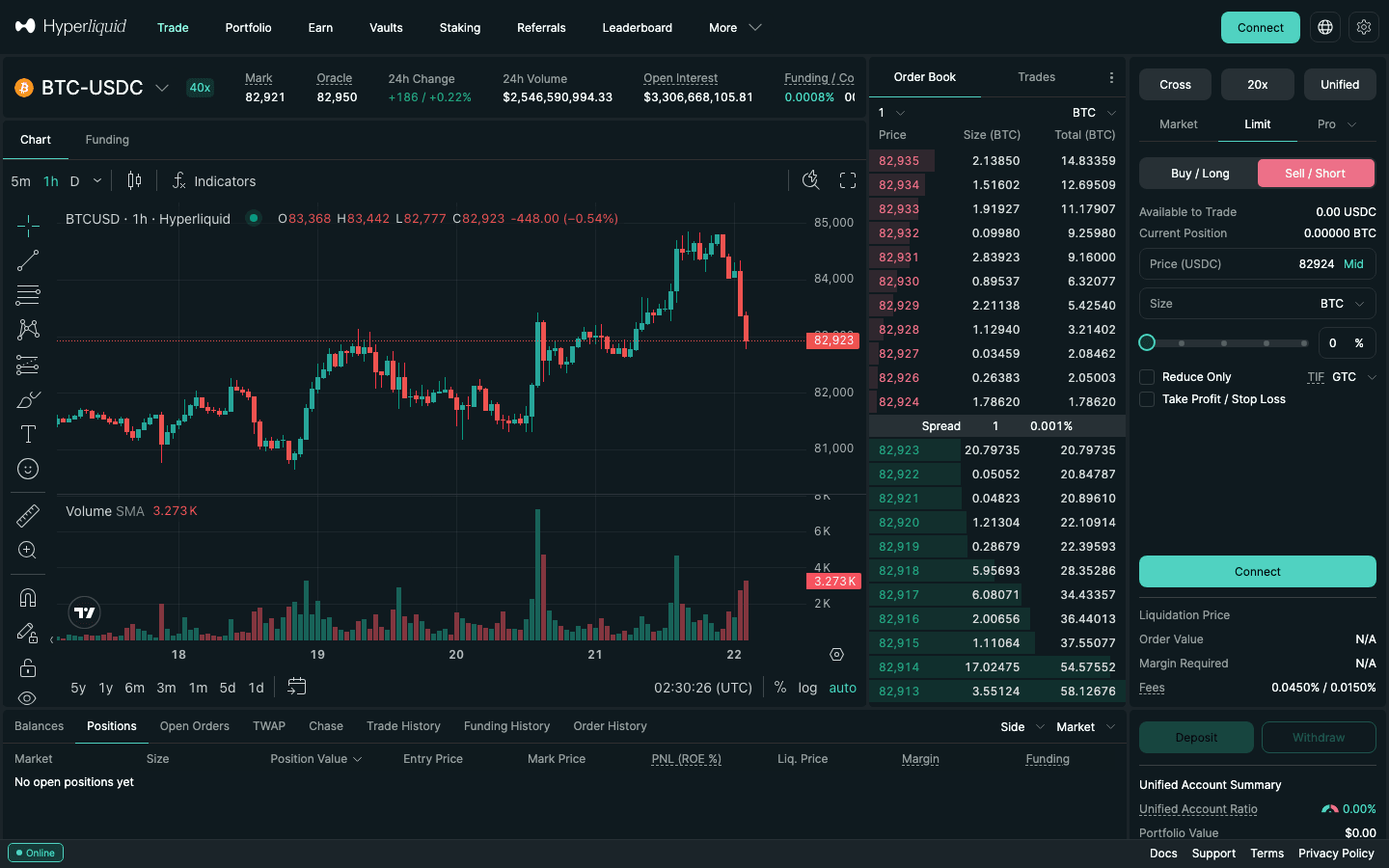
The BTC-USDC order form with Sell / Short selected on the Limit tab, captured logged out on October 22, 2026 (logged in, the Connect button reads Place Order). Cross, leverage and account mode sit above the form; Liquidation Price, Order Value, Margin Required and Fees below it.
Pick the market. Click the pair name at the top left (it opens the market list) and choose the perp, for example BTC-USDC. Glance at Funding / Countdown in the header: a positive rate means longs pay shorts.
Choose the margin mode. Click Cross above the order form. The "BTC Margin Mode" window offers Cross and Isolated; choose Isolated and Confirm. Isolated caps what this short can lose at the margin you give it. The mode can't be changed while you hold a position in that coin (cross vs isolated margin).
Set leverage. Click the leverage button (it shows "20x" by default on BTC). The Adjust Leverage window says "Control the leverage used for BTC positions. The maximum leverage is 40x" and warns that a higher setting "increases the risk of liquidation". Every market has its own cap (Hyperliquid max leverage by market).
Pick an order type.Market fills now as a taker (0.045%); Limit rests at your price and pays the maker fee (0.015%) if it rests; Pro holds Stop, Take, Scale, TWAP and trailing orders (every order type).
Click Sell / Short and enter the size in the coin or in USDC, or drag the slider. Leave Reduce Only unticked: that box is for closing.
Add the stop. Tick Take Profit / Stop Loss. For a short the take-profit price sits below entry and the stop above it. The docs warn that TP/SL attached to an order are placed only once that order fully fills, and cancelling a partly filled order cancels them too, so check Open Orders afterwards (TP/SL guide).
Read the three numbers under the form:Liquidation Price, Order Value and Margin Required. On a short the liquidation price is above your entry, and your stop must sit between the entry and that price, well clear of it. Then press Place Order.
The order form only places orders for a funded account. If you don't have one yet, open it with code HOLYGRAIL: 4% off taker and maker fees on your first $25M of volume, set automatically when you join through the link.
Follow the same seven steps and click Buy / Long in step 5. Three things flip: the stop goes below your entry, the liquidation price is below it, and when funding is positive you pay it every hour instead of receiving it. To close a long, sell the same size with Reduce Only, or use the Market or Limit link in the Positions table (next sections). If you only want to own the coin, with no liquidation price at all, buy it on spot instead: Hyperliquid spot trading.
Worked example: where a BTC short is liquidated
Take a $1,000 BTC short at the build-time mark price of $80,788 (October 25, 2026, 01:04 UTC), isolated. Hyperliquid's published formula is liq_price = price − side × margin_available ÷ position_size ÷ (1 − l × side), with side = −1 for a short and l = BTC's maintenance rate of 1.25% (half the initial margin at its 40x maximum). Margin available is the isolated margin minus that maintenance:
Leverage
Isolated margin
Short liquidated near
Rise from entry
2x
$500.00
≈ $119,686
+48.1%
3x
$333.33
≈ $106,388
+31.7%
5x
$200.00
≈ $95,749
+18.5%
10x
$100.00
≈ $87,770
+8.64%
20x
$50.00
≈ $83,780
+3.70%
40x (BTC max)
$25.00
≈ $81,786
+1.23%
Our arithmetic with the docs formula; funding and fees move the real value slightly, and the app's own estimate is what counts before you click.
At 3x the short survives a rise of about +31.7%; at 10x only about +8.64%, which a single volatile day can deliver. A stop 4% above entry ($84,020) sits comfortably inside the 3x liquidation price and closes the trade with a loss of about $40 plus fees. Opening and closing $1,000 as a taker costs $0.90 at the base tier, or $0.86 with the 4% referral discount.
Open positions sit in the Positions tab under the chart, with size, entry and mark price, PnL (ROE %), Liq. Price, margin and funding. The close column offers Market, Limit and Reverse links for each position, and its header carries Close All:
Way to close
What it does
Watch out
Market (Positions table)
Closes the whole position at once at market
Max slippage 8%, not your order-form setting
Limit (Positions table)
Closes at a price you type; rests on the book until filled
Pays the maker fee if it rests
Order form + Reduce Only
Opposite-side order for part or all of the size
Reduce Only stops it from opening a new position the other way
Take Profit / Stop Loss
Triggers on the mark price and closes at market (or your limit)
Market TP/SL: max slippage 10%
Reverse (Positions table)
Closes the position and opens the same size the other way
One market order for twice the size: two taker fees
Close All (column header)
Closes every open position, at market or with limit orders at the mid price
Also cancels their TP/SL orders
Labels and tooltips from the app's English interface, read October 25, 2026. Slippage limits from the app's own text: "Closing positions will use max slippage of 8% and market TP/SL orders will use max slippage of 10%".
Close part of a short: in the order form choose Buy / Long, tick Reduce Only and enter the part you want to close. Without Reduce Only, an oversized buy would flip you long.
Close at a limit price: the Limit link closes at the price you type (or Chase Limit Close, which rests one tick off the best bid or ask and follows it while your browser tab stays open). A limit close that rests on the book pays the maker fee instead of the taker fee.
Close from the chart: TP/SL lines can be dragged on the TradingView chart; dragging one past the current price is rejected, so close manually instead.
After the close: realised PnL lands in your USDC balance at once, and on isolated the margin is released. If the position had TP/SL orders attached, check Open Orders: Close All cancels them, a manual partial close does not resize fixed-size ones.
How to short stocks, gold and indexes on Hyperliquid (HIP-3)
The 164 HIP-3 markets are perps deployed by third parties on Hyperliquid's order book, most of them by trade.xyz (NVDA, TSLA, an S&P 500 index, gold, oil, currencies). The short flow is the same, with three differences:
Many are isolated only. On October 25, 2026, 137 of the 164 live HIP-3 markets did not allow cross margin, so a short there always has its own isolated margin.
Your account mode decides what backs a cross short. In the default Unified account, cross positions on markets with the same collateral share one balance; in Manual (standard) mode cross margin applies only within each DEX. Accounts still on the discontinued DEX-abstraction setting see "Cross margin on HIP-3 not supported for current account. Use isolated margin or enable unified account in Settings."
The underlying closes; the perp does not. Stock and index perps keep trading on weekends and overnight on an internal price, so a short can gap when the real market reopens. Hours and weekend rules: trade.xyz stocks on Hyperliquid; every market with its own page: Hyperliquid markets.
Funding when you are short
Funding is paid every hour between longs and shorts, with no fee taken by the exchange. The app's description: "The hourly rate at which longs pay shorts (if negative, shorts pay longs)." The docs build the rate from a premium plus a fixed interest component of 0.01% per 8 hours, which they describe as "11.6% APR paid to short", and cap it at 4% an hour. So in a quiet market a short collects a small income: at that baseline a $1,000 short receives about $0.30 a day.
On October 25, 2026 the BTC rate at build time was 0.00125% an hour, which on a $1,000 short is about $0.30 a day received. The sign flips quickly on crowded small coins, where shorts can pay many times the trading fee in a day. Funding is settled from your margin, so on an isolated position it moves the liquidation price. Full explanation: Hyperliquid funding rate.
Short squeezes, liquidation and ADL
A short squeeze is a fast rally fuelled by shorts being stopped out and liquidated, each forced buy pushing the price higher. Warning signs are funding turning negative (shorts paying longs every hour) and open interest rising while the price stops falling; small caps squeeze hardest. What Hyperliquid does when a short is caught:
Book liquidation. When the position's margin falls below maintenance, the exchange sends market orders to the book; above 100,000 USDC only 20% of the position goes at a time. Anything left after maintenance is met stays yours, and there is no liquidation fee beyond the normal taker fee.
Backstop. If equity drops below two-thirds of maintenance first, the liquidator vault inside HLP takes the position over and the maintenance margin is not returned. A stop above your entry avoids that.
Auto-deleveraging. As a last resort, profitable positions on the other side are closed; the app tells the affected trader "Your position was auto-deleveraged because the opposite side could not be liquidated." How the insurance layers work: Hyperliquid insurance fund and ADL. Where other traders' liquidation prices cluster: Hyperliquid liquidation map.
Six mistakes that cost short sellers
Shorting a coin because it already fell. Bounces in a downtrend are violent; wait for a failed rally rather than chasing the low.
Cross margin by default. Cross is the default mode, so a squeezed short can drain the whole cross balance. Switch to Isolated before the first order.
A stop below entry. On a short the stop is a buy above entry; a stop typed on the wrong side is rejected or triggers at once.
Forgetting Reduce Only on exits. An oversized buy flips you long instead of flat.
Holding through negative funding. Check the Funding / Countdown header before holding a small-cap short overnight.
Max leverage. At the cap the liquidation distance is about the maintenance rate, a move that can happen within an hour.
FAQ
Can you short on Hyperliquid?
Yes. Every Hyperliquid perpetual market can be shorted: choose Sell / Short in the order form, set a size and place the order. No coins are borrowed; the short gains when the price falls and loses when it rises. You need a funded account (minimum deposit 5 USDC) and the smallest order is $10 of position value. Spot pairs cannot be shorted, because spot borrowing covers only USDC and USDT (against HYPE or BTC collateral).
How do I short BTC on Hyperliquid?
Open the BTC-USDC market, click the Cross button and pick Isolated, set leverage with the button next to it (BTC allows up to 40x), choose Sell / Short, enter the size, tick Take Profit / Stop Loss and put the stop above your entry, check Liquidation Price under the form, then Place Order. At 3x isolated, a BTC short was liquidated about +31.7% above entry at the October 25, 2026 price.
How do I close a position on Hyperliquid?
In the Positions table, click Market to close at once (closing orders use up to 8% slippage) or Limit to close at your price. To close only part, place an opposite-side order for that size with Reduce Only ticked. Close All closes every position and cancels their TP/SL orders.
What does Reverse do on Hyperliquid?
Reverse closes your position and opens one of the same size in the opposite direction. The app sends a single market order for twice the position size, so you pay the taker fee on both halves and accept market slippage. It is a fast way to flip from long to short, not a hedge: Hyperliquid keeps one net position per coin.
Can I be long and short the same coin on Hyperliquid?
Not in one account. Hyperliquid has no hedge mode: the app says your position on a coin "is either short or long", so a sell while you are long reduces the long and a bigger sell flips you short. A second, opposite position needs a sub-account or another exchange.
Can US residents short on Hyperliquid?
No. Hyperliquid's Terms of Use exclude Restricted Persons (the US, Ontario (Canada) and sanctioned jurisdictions (plus citizens of sanctioned jurisdictions)) and forbid disguising your location. Which countries are named, and what that means elsewhere, is on our restricted-countries page. Where Hyperliquid is restricted →
Shorting crypto in general (puts, inverse ETFs, spot margin on CEXs, nine methods compared): how to short crypto.
Open your first short with the fee discount
Join Hyperliquid with code HOLYGRAIL before your first deposit: 4% off taker and maker fees on your first $25M of volume. On the $1,000 example above that is $0.86 instead of $0.90 per round trip.
Disclosure: HOLYGRAIL is our referral code; we earn a share of referred accounts' fees at no cost to you. Button labels and tooltips come from the Hyperliquid app's English interface and the trading rules from the Hyperliquid docs, both read on October 25, 2026; the BTC price and funding rate in the example were read from the Hyperliquid API when this page was built. Perpetual futures can lose more than you expect at high leverage. Not investment advice.