
Short answer. To set a stop loss and take profit on Hyperliquid, tick Take Profit / Stop Loss in the order form and type a TP Price and SL Price before you enter, or open TP/SL on the position in the Positions tab once you are in the trade, or drag the TP/SL line on the chart. Every TP/SL triggers on the mark price and executes as a market order with a 10% slippage cap unless you give it a limit price (possible in the position TP/SL window, not with the order-form checkbox). Stop Market, Stop Limit, Take Market, Take Limit and a native Trailing Stop are in the Pro menu, for perps only. Limit, post-only, reduce-only, TWAP and the rest of the menu are compared in one table in our Hyperliquid order types guide.
Trade on Hyperliquid with 4% lower fees
Code HOLYGRAIL takes 4% off your fees for your first $25M of volume, stops and targets included.
We earn a commission when you sign up through our links; it never raises your fees.
1. The 3 ways to set TP/SL on Hyperliquid
Hyperliquid gives you three places to set a stop loss and take profit on a perp. They trigger the same way, but they differ in what you can configure:
| Method | Where | Order type | Partial size? | Goes live |
|---|---|---|---|---|
| 1. At entry (order form) | Tick Take Profit / Stop Loss in the Market or Limit tab | Market only | No, same size as the entry | When the entry fills in full |
| 2. On an open position | Positions tab → TP/SL → "TP/SL for Position" | Market, or a limit via TP/SL Limit Price | Yes, with Configure Amount | Immediately |
| 3. Drag on the chart | Drag the TP/SL line on the TradingView chart | Keeps the order type | Keeps the size | Immediately (moves an existing order) |
The order-form checkbox is deliberately simple. The app's own help text says it "places simple market TP/SL orders. For advanced features such as limit prices or partial TP/SL, set the TP/SL on an open position" (checked September 27, 2026).
Method 1: set TP/SL at entry (order form)
- Open the market, for example
app.hyperliquid.xyz/trade/ETH, and choose the Market or Limit tab. - Pick Buy / Long or Sell / Short and enter the size (in coin or USD, or with the % slider).
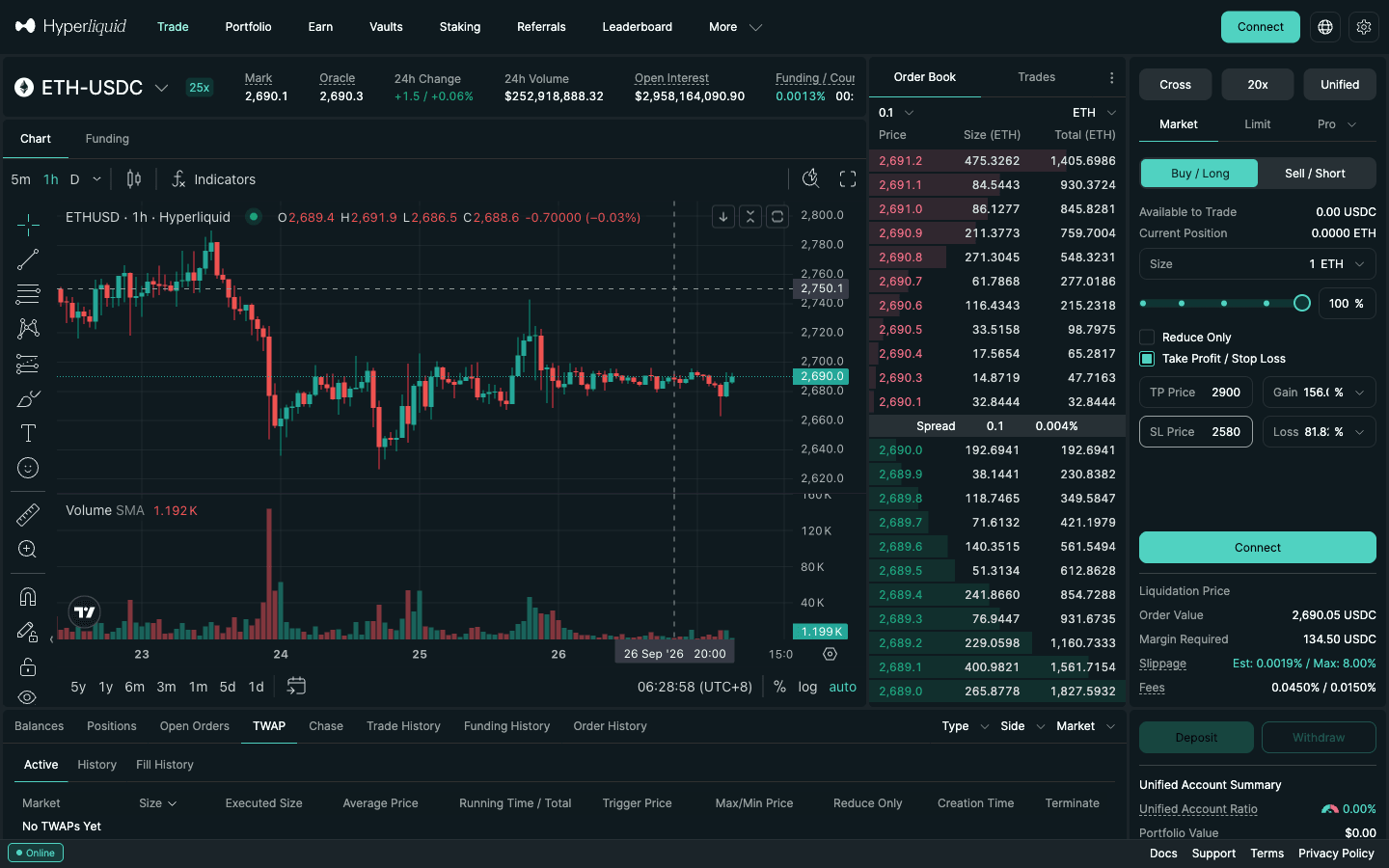
- Tick Take Profit / Stop Loss. Four fields appear: TP Price, Gain %, SL Price and Loss %. Type a price or a percentage; the other field fills in.
- Read the percentages carefully: Gain % and Loss % are measured on your margin, not on the price. In the screenshot below, 1 ETH at 20x with a TP at 2,900 shows Gain 156% and an SL at 2,580 shows Loss 82%, although the price moves are only about 8% and 4%. Type prices if you think in chart levels.
- Check the Liquidation Price under the button: your SL must sit well before it.
- Place the order. When the entry has filled in full, the TP and SL appear in Open Orders.
Method 2: add TP/SL to an open position
- Go to the Positions tab under the chart and find the position.
- Click TP/SL on that row. The TP/SL for Position window opens.
- Enter the TP Price and/or SL Price. By default, as the window says, "take-profit and stop-loss orders apply to the entire position" and "automatically cancel after closing the position".
- Optional: turn on Configure Amount to protect only part of the position (for example half at the first target). A configured size is fixed "no matter how the position changes in the future".
- Optional: set a TP Limit Price or SL Limit Price to turn the market TP/SL into a limit order with your own worst price (section 8).
- Confirm, then check Open Orders: the TP and SL sizes should add up to what you hold.
This is the more robust method for limit entries, because it is live at once and, left at the default size, closes whatever is open when it triggers. It is also the only way to set several take profits on one position.
Method 3: drag TP/SL lines on the chart
Once a TP or SL exists, it appears as a horizontal line on the TradingView chart. Drag it to the new level (the app hint reads "Drag to modify price"); the order is modified in place. The docs note one guard: a drag that would make the order execute immediately is rejected with an error. If you actually want out now, close the position instead.
When you want out now: close manually
The Positions table also has Market Close and Limit Close on each row, plus Close All, which will "close all your … positions and cancel their associated TP/SL orders", and Reverse Position, which closes and opens the same size the other way. Market closes use a 8% slippage cap (TP/SL market orders: 10%). Scaling out in pieces: section 11.
2. Stand-alone stop loss and take profit orders (Pro menu)
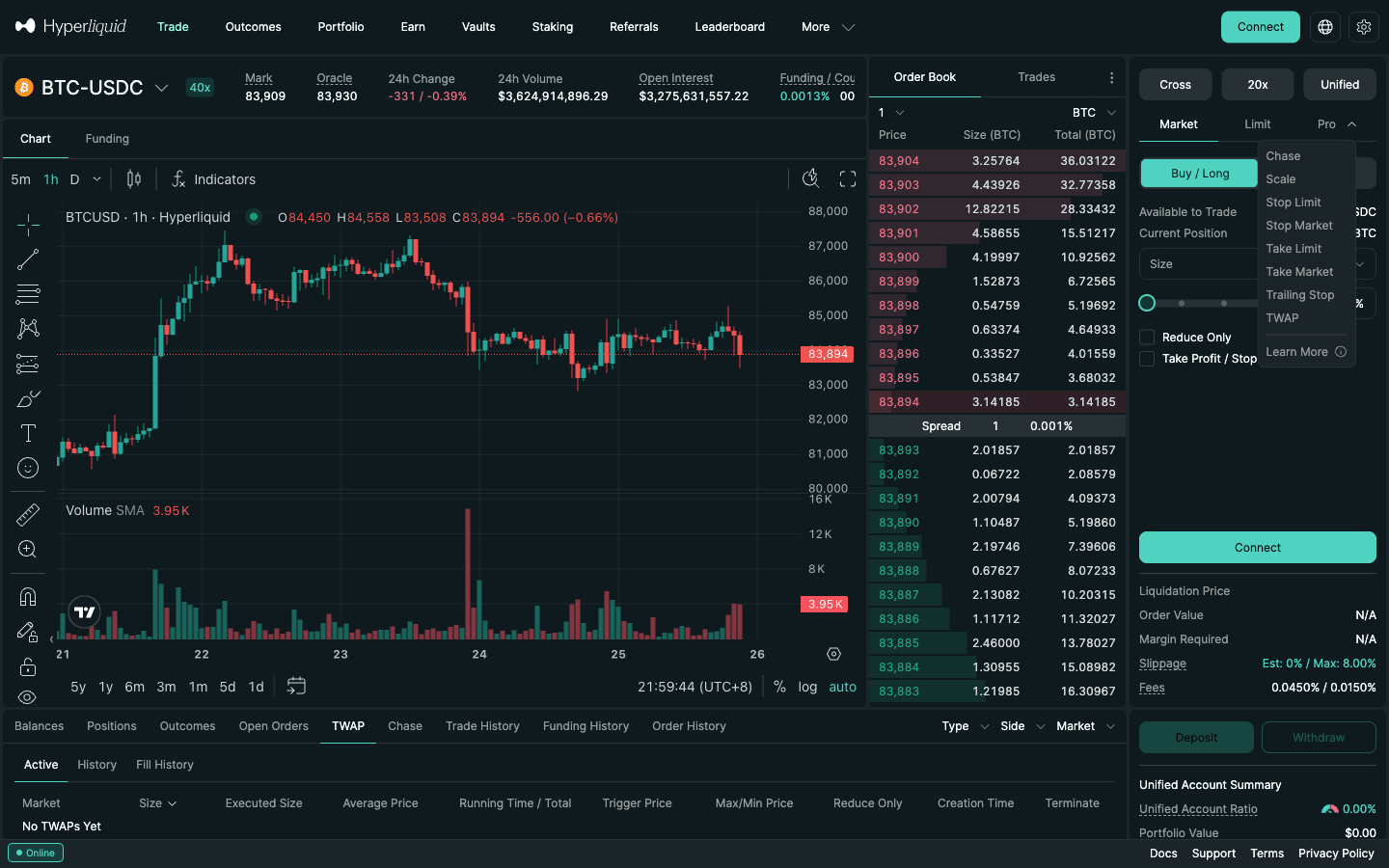
The Pro dropdown next to the Market and Limit tabs holds the stand-alone conditional orders: Stop Market, Stop Limit, Take Market, Take Limit and Trailing Stop. Use them when you want a stop that is independent of any entry, a breakout entry, or a stop-limit without opening the position window. On a phone the same orders sit in the Order Type dropdown of the web app (checked October 19, 2026).
| Conditional order | What it does | Executes as | Typical use |
|---|---|---|---|
| Take Profit / Stop Loss (checkbox) | Attaches a simple market TP and/or SL to the order you are placing (Market or Limit tab) | Market | Bracket at entry |
| Stop Market | Market order once the mark crosses your trigger | Market, 10% slippage cap | Protective stop, breakout entry |
| Stop Limit | Limit order placed once the trigger is hit | Limit at your price | Stop with a worst-price cap |
| Take Market | Market order once price reaches your profit target | Market | Profit target that must fill |
| Take Limit | Limit order placed at the target once triggered | Limit | Profit target at an exact price |
| Trailing Stop | Trigger follows the best mark price by a % or distance, never moves back | Stop Market | Locking in a trend (perps only) |
Setting a Stop Limit (or Stop Market) step by step
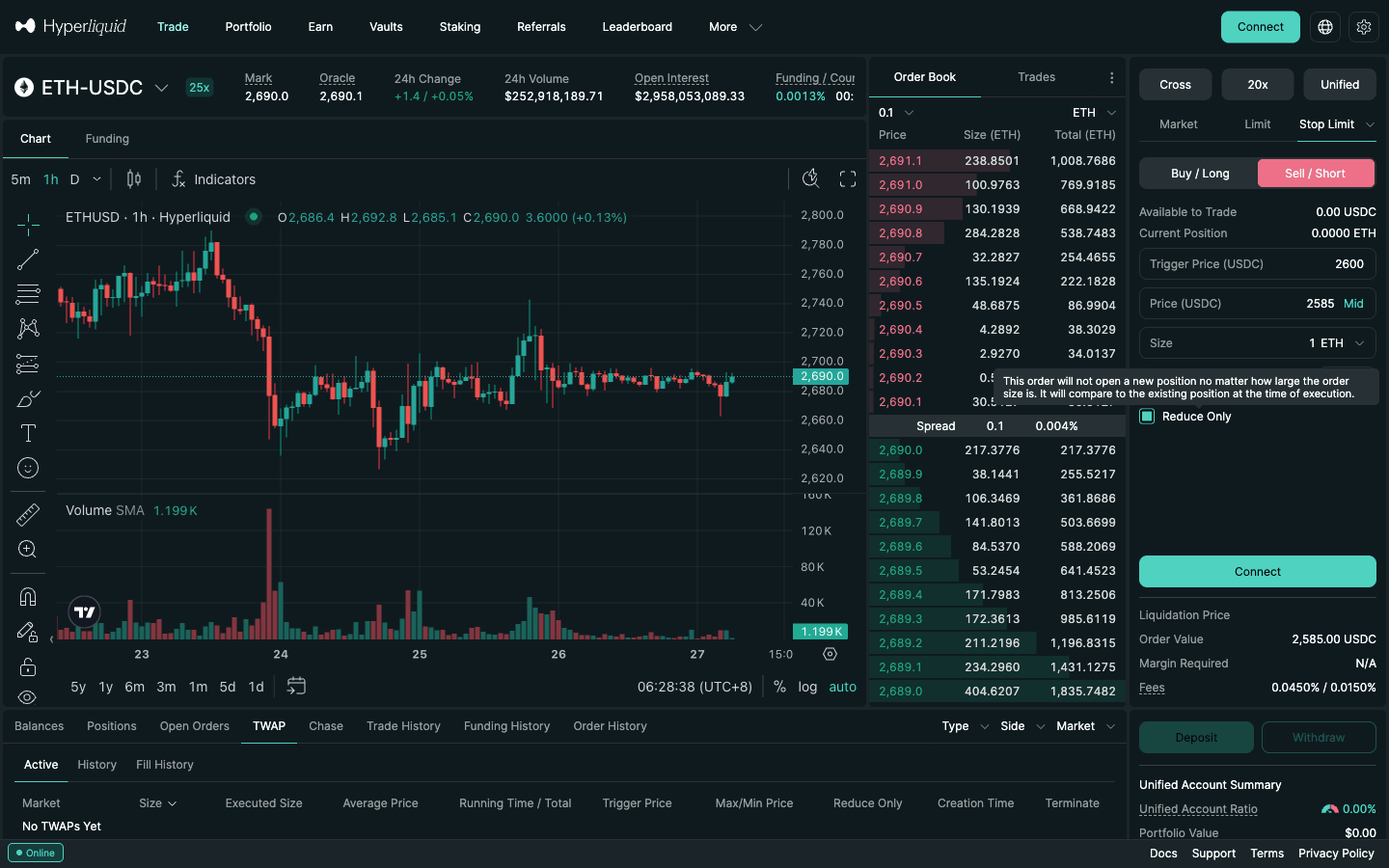
- Open Pro and choose Stop Limit (or Stop Market).
- Choose the side that closes your position: Sell / Short to stop out a long, Buy / Long to stop out a short.
- Enter the Trigger Price (USDC). For Stop Limit, also enter the limit Price (USDC), a little beyond the trigger.
- Enter the size and tick Reduce Only. The app explains it: "This order will not open a new position no matter how large the order size is."
Direction rules from the docs: a Stop Market that buys needs a trigger above the mid price and one that sells needs a trigger below it; Take Market works the other way round. For a breakout long, place a Stop Market buy above resistance and leave Reduce Only unticked. Scale, TWAP, Chase and the GTC / IOC / ALO time-in-force options are in the Hyperliquid order types table.
Practise a bracket on a real market
Open a small position, attach a TP/SL, then partly close it and watch what happens to the orders. Join with HOLYGRAIL first so the 4% discount applies from your first trade.
Want to practise with test funds first? Use the Hyperliquid testnet.
3. Long vs short: where the TP and SL go
| Position | Take profit | Stop loss | Pro order for the TP | Pro order for the SL | Trailing stop |
|---|---|---|---|---|---|
| Long | Above entry | Below entry | Take Market / Take Limit, side Sell | Stop Market / Stop Limit, side Sell | Follows the highest mark |
| Short | Below entry | Above entry | Take Market / Take Limit, side Buy | Stop Market / Stop Limit, side Buy | Follows the lowest mark |
The app checks this for you: a TP or SL on the wrong side of the price shows an error of the form "TP price must be … than …" (or "SL price must be … than …"), and the API rejects it with "Invalid TP/SL price."
4. How to choose your stop loss and take profit levels
The top guides stop at "type a number". The number is the hard part. A simple, repeatable method:
- Put the stop where the idea is wrong. For a long, that is usually just below the last swing low or the level you are trading from; for a short, just above the swing high. Add a small buffer, because the trigger is the mark price, not the wick on the chart (section 6).
- Size the position from the stop, not from leverage. Decide how much of the account one losing trade may cost (1% is a common choice), then: size = money at risk ÷ distance to the stop. Leverage only decides how much margin that size ties up.
- Set the take profit at a multiple of the risk. With a target at twice the stop distance (2R), you need to win only about one trade in three to break even before fees. Place it just before an obvious level, where other traders' orders sit.
- Scale out with fixed-size TPs. In the position TP/SL window, use Configure Amount to take half at 1R and the rest at 2R or with a trailing stop. Keep the stop loss at the default "entire position" size so it always covers what is left.
- Keep a liquidation buffer. The stop must trigger long before the liquidation price (section 13). If it does not fit, lower the leverage or the size.
Example. Account $5,000, risk 1% = $50. ETH long at $2,690 with the stop at $2,580 ($110 per ETH). Size = $50 ÷ $110 ≈ 0.45 ETH ($1,223 notional, $245 margin at 5x). If the stop fills at the trigger you lose $50 plus about $0.51 in fees. Take half (0.23 ETH) at $2,800 (1R) and the rest at $2,900.
What about the "7% rule"? It is a stock-investing rule of thumb popularised by William O'Neil: cut a stock that falls 7–8% below your buy price. It does not transfer to leveraged perps as a number. A 7% price move is a 70% loss of margin at 10x and more than a full margin at 20x, so decide the stop in price terms from the chart, then size the position. More in position sizing for perps and perp risk management.
5. Worked example with real numbers
ETH marked at about $2,690 on September 26, 2026 (22:27 UTC); its maximum leverage is 25x. Suppose you go long 1 ETH at 5x isolated margin:
- Notional: $2,690. Margin: $2,690 ÷ 5 = $538.
- Entry fee (market, taker 0.045%): $1.21. With HOLYGRAIL (0.0432%): $1.16.
- Stop loss at $2,580, a 4.1% price drop. The Loss % field shows about 20% at 5x, because it measures the loss against margin. Filled at the trigger: loss $110 plus about $1.11 exit fee.
- Take profit at $2,900, a 7.8% rise (about 39% in Gain %): profit $210 minus about $1.25 exit fee. Reward-to-risk is about 1.9:1.
- Liquidation (rough, isolated, ignoring fees and funding): ETH's maintenance margin is half of the initial margin at 25x, i.e. 2% of notional. The position is liquidated near $2,196, about 18% below entry, far below the stop, which is what you want.
- Worst case for a market stop: the 10% tolerance allows a fill as low as about $2,322 in an extreme gap. A stop-limit at trigger $2,580 and limit $2,565 caps the worst fill at $2,565, at the cost of possibly not filling at all.
Funding is paid hourly on top. At the baseline 0.00125% per hour, holding 1 ETH for 24 hours costs about $0.81; crowded markets pay far more. Read the rate in the market header before leaving a bracket running overnight. See the funding rate guide.
6. What actually triggers your stop: the mark price
Hyperliquid triggers every TP/SL on the mark price, not on the last traded price. According to the docs, the mark is the median of three values:
- The oracle price (a weighted median of CEX prices published by validators) plus a 150-second EMA of the gap between Hyperliquid's mid price and the oracle.
- The median of Hyperliquid's best bid, best ask and last trade.
- A weighted median of the perp mid prices on Binance (weight 3), OKX (2), Bybit (2), Gate (1) and MEXC (1).
Mark and oracle prices update about every 3 seconds. What this means in practice:
- A single aggressive trade on Hyperliquid will not stop you out on its own. One print through your level moves only one of the three inputs. This is the main protection against stop hunts on a thin book.
- Your stop can fire even if Hyperliquid never traded at your price. If Binance, OKX and Bybit all drop, the mark can cross your trigger while Hyperliquid's own last price lags.
- The chart shows trades, not mark. When you place a stop near a recent wick, compare it with the Mark figure in the market header. Details: mark price vs oracle price.
- Liquidation uses the same mark price, so a stop and a liquidation are judged on the same number.
7. Position TP/SL vs order TP/SL (the OCO pair)
This is the difference that catches most people, and the docs warn that order-attached TP/SL is "more complicated". Both trigger on the mark price, but they behave differently when the entry only partly fills or the position size changes.
| TP/SL on a position | TP/SL on an order (OCO) | |
|---|---|---|
| Where you set it | Positions tab, on the open position | Order form, ticked before you submit the entry |
| Size | Whole position by default; fixed if you use Configure Amount | Always equal to the parent order size |
| Limit price / partial size | Yes (TP Limit Price, SL Limit Price, Configure Amount) | No: the app places simple market TP/SL |
| When it goes live | Immediately | Only when the parent fully fills (or is partly filled then cancelled for insufficient margin) |
| If you cancel a partly filled entry | Not affected | Child TP/SL are cancelled too: the filled part is left unprotected |
| When the position is closed | Cancelled automatically | Cancelled automatically (the other leg: siblingFilledCanceled) |
The rule to remember, in the docs' words: children TP/SL orders are placed if and only if the parent order fully fills, or partially fills and is then cancelled for insufficient margin. If you place a large limit entry, get half filled and cancel the rest, the half you hold has no stop. Re-protect it at once with a position TP/SL.
How the OCO bracket behaves in every case
A bracket is an entry plus a take profit and a stop loss that belong to it. On Hyperliquid you build one by ticking Take Profit / Stop Loss on the entry; in the API it is one order action with grouping = normalTpsl. From the TP/SL docs and the info endpoint's order statuses:
| What happens to the entry | What happens to the TP and SL | What you need to do |
|---|---|---|
| Market entry fills in full at once | TP and SL are placed immediately, like a position TP/SL | Nothing |
| Limit entry rests, nothing filled yet | TP and SL wait in an untriggered state; nothing is on the book | Nothing yet; cancelling the entry also cancels them |
| Limit entry fills completely later | TP and SL are placed at that moment, sized to the parent | Nothing |
| Limit entry partly fills, you cancel the rest | TP and SL are fully cancelled | Add a position TP/SL to the filled part at once |
| Limit entry partly fills, then is cancelled for insufficient margin | TP and SL are placed as if the parent had filled in full | Check the sizes against what you actually hold |
| TP fills (or SL fills) | The other leg is cancelled with status siblingFilledCanceled | Nothing; confirm in Order History |
| You add to the position afterwards | The children keep the parent size and do not grow | Add or edit a TP/SL for the extra size |
- Is it OCO? There is no separate OCO order type on Hyperliquid (and no FOK: time-in-force is GTC, IOC or ALO). But the attached TP/SL pair behaves as one-cancels-other: the docs title it "a.k.a. one-cancels-other, OCO", and the info endpoint's status
siblingFilledCanceled("TP/SL only. Canceled due to sibling order being filled") is the automatic cancel. - The legs can only close. The API rejects "non-reduce-only TP/SL orders" in pre-validation, so a leftover leg cannot open a new position. A reduce-only order with nothing left to reduce is cancelled as
reduceOnlyCanceled. - Liquidation clears them. Orders cancelled because of a liquidation show
liquidatedCanceled. A stop only helps if it fires before liquidation. - No OCO between two entries. You cannot link a breakout buy-stop above a range and a sell-stop below it so that one fill cancels the other. Cancel the second order yourself, or have a bot do it on the fill event.
8. Stop-market vs stop-limit: the slippage trade-off
TP/SL orders are market orders by default, and Hyperliquid gives TP/SL market orders a 10% slippage tolerance. That is wide on purpose: a stop exists to get you out. On BTC or ETH the book is usually deep enough that fills land close to the trigger. On a thin altcoin during a liquidation cascade, a fill several percent away is a real possibility.
A limit price (SL Limit Price in the position window, or a Pro Stop Limit) lets you choose your own tolerance. The docs' example:
- A stop on a long with trigger $10 and limit $10 hits the book when the mark drops below $10. If the price falls from $11 to $9 in one jump, the order is "quite likely" to rest at $10 unfilled, and you are still in the trade.
- With trigger $10 and limit $8, it is likely to fill somewhere between $9 and $8.
A practical middle ground is a limit a little beyond the trigger, about the asset's usual one-minute range. For take profits the logic reverses: a Take Limit exactly at the target is fine, because missing a profit target is annoying while missing a stop is dangerous. The app's own warning for large positions suggests "setting a limit price" and "partial TP/SL orders at different trigger prices". More on fills: price impact and slippage.
Fees: a triggered market order pays the taker fee; a triggered limit order pays taker if it crosses the book immediately and maker if it rests. At tier 0 that is 0.045% or 0.015% (0.0432% / 0.0144% with a referral discount). There is no gas and no extra fee for having a TP/SL on file. Full schedule: Hyperliquid fees.
9. Reduce-only and position flips
Reduce Only guarantees an order can only shrink an existing position, never open one in the opposite direction; the app compares it "to the existing position at the time of execution". It matters in three situations:
- Stale stops. You close a long by hand but forget the stand-alone Stop Market sell below. Without Reduce Only, a later drop would open a fresh short.
- Over-sized exits. A fixed-size TP from last week is larger than today's position after a partial close. Reduce Only trims it to what you hold.
- Scale and TWAP exits. Both forms have a Reduce Only box. Tick it when laddering out or slicing an exit with Hyperliquid TWAP orders, so the last orders cannot overshoot.
TP/SL from the checkbox or the position window are closing orders by nature. The box matters most for stand-alone Pro stops, take orders, trailing stops and scaled exits. Which forms carry the checkbox, and the exact rejection messages: reduce-only on Hyperliquid.
10. Trailing stops
Hyperliquid has a native Trailing Stop in the Pro menu, for perp markets only. Forum threads from 2025 that say "Hyperliquid has no trailing stop" are out of date. For a trailing stop that closes a long, the trigger follows the highest mark price since activation; for one that closes a short, the lowest. It never moves back. When the mark retraces by your distance or percentage, a Stop Market order is placed.
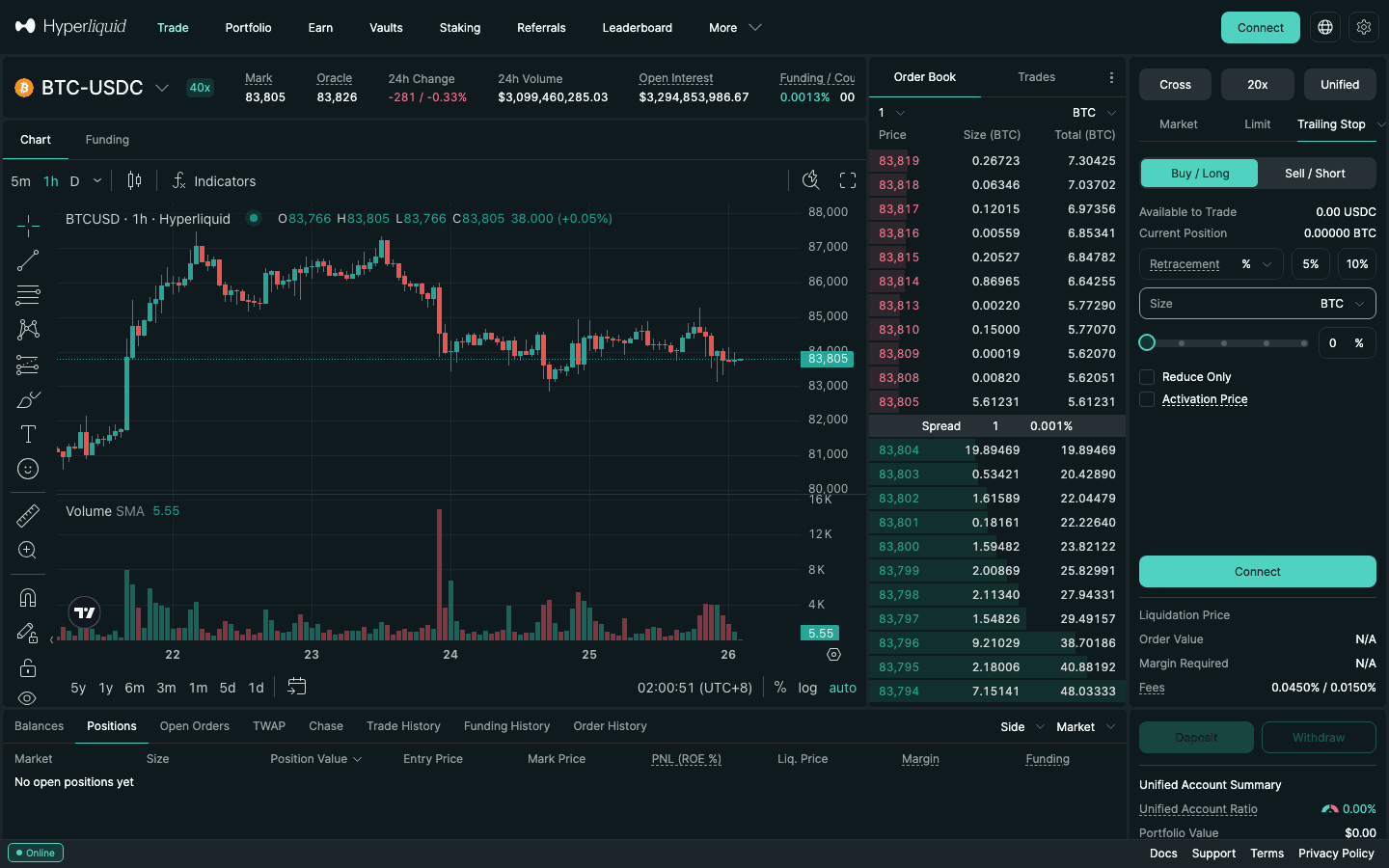
- Open Pro → Trailing Stop.
- Set the Retracement as a percentage (presets 5% and 10%) or a distance.
- Optionally tick Activation Price so the trail only starts once the trade is in profit.
- Enter the size, tick Reduce Only, submit.
Choosing the distance is the whole game: too tight and normal noise closes a good trade, too loose and you give back most of the move. How to size it and when to use an activation price: Hyperliquid trailing stop tutorial.
11. Partial close and take-profit ladders (scaling out)
To take profit in stages, close part of the position from its row in the Positions tab, place reduce-only limit orders at each target, or give a position TP/SL a configured amount. A Scale order builds a whole ladder in one ticket and a trailing stop handles the runner. Closing part of a position never changes your entry price: Hyperliquid's docs keep the entry price for closing trades and only re-average it when you add.
| Method | What it places | Fee at tier 0 | Best for |
|---|---|---|---|
| Position row → Limit or Market close | One closing order for the size you enter | 0.015% if the limit rests; 0.045% for market | A quick manual partial close |
| Order form, opposite side, Reduce Only | Limit (GTC or ALO), Market or IOC | 0.015% with ALO | A ladder of take-profits at exact prices |
| Position TP/SL with Configure Amount | Trigger on mark → market (10% slippage cap) or limit | Usually taker | Hands-off partial exits, hidden until triggered |
| Scale order, Reduce Only | Up to 100 limit orders across a price range | 0.015% per fill | A whole exit zone in one ticket |
| Trailing Stop, Reduce Only | Market order after a set retracement from the best mark | Taker when it fires | The runner after the targets |
| TWAP, Reduce Only | Suborders every 30 s or more, 3% max slippage each | Taker per suborder | Large exits in thin books |
Order types and limits from Hyperliquid's docs (order types, TP/SL) and the web app, checked September 25, 2026.
- Position row: the row's Limit (“Limit Close at Mid Price”) or Market close with a size smaller than the position. The remainder keeps its entry, leverage and any full-position TP/SL. Chase Limit Close is a post-only exit that re-prices to the best bid or ask while your browser tab stays open. Close All closes every position and cancels their TP/SL: an emergency button, not a scale-out tool.
- Reduce-only ladder: opposite side, Limit tab, target price, slice size, tick Reduce Only and set TIF to ALO to guarantee the maker rate. Repeat for each target. Every order needs at least $10 of value. The ladder sits on the book and fills on real trades, not on the mark price.
- Sized TP/SL: in the position's TP/SL dialog, Configure Amount sets a TP or SL for part of the size. The app says such an order “will be for that size no matter how the position changes in the future”, so re-check it after any manual partial close. Stack three sized TPs at three triggers and you have a hidden ladder; the app's own slippage warning recommends exactly this for large positions.
- Scale order: Pro → Scale with Reduce Only, Start and End prices, Total Orders (up to 100) and Size Skew (2.0 makes the order at the end price twice the size of the one at the start). Selling 0.6 ETH between $2,800 and $3,000 in 5 equal rungs gives five resting sells of 0.12 ETH.
Worked example: a three-rung BTC ladder
Illustrative prices. Long 0.1 BTC at $100,000 with a stop at $97,000, so one unit of risk (1R) is $300. Plan: 30% at +1R, 40% at +2R, 30% at +3R.
| Rung | Price | Size | Profit | Fee as maker (0.015%) | Fee as taker (0.045%) |
|---|---|---|---|---|---|
| TP1 | $103,000 (+1R) | 30% · 0.03 BTC | +$90 | $0.46 | $1.39 |
| TP2 | $106,000 (+2R) | 40% · 0.04 BTC | +$240 | $0.64 | $1.91 |
| TP3 / runner | $109,000 (+3R) | 30% · 0.03 BTC | +$270 | $0.49 | $1.47 |
| Total | 100% | +$600 (2R) | $1.59 | $4.77 |
- All rungs fill: +$600, or 2R. TP1 fills, then price reverses to a stop you moved to breakeven: +$90 instead of −$300. Nothing fills: −$300 plus fees.
- Round trip: entry $4.50 as a market order or $1.50 as a resting limit; all-maker $3.09 against all-taker $9.27 ($2.97 and $8.90 with the 4% HOLYGRAIL discount). The number of tranches does not change the fee, because fees are a share of notional; maker versus taker does.
- After TP1 the position shows 0.07 BTC with the entry still $100,000; the rung's Closed PNL is $90 minus its fee. Adding later re-averages the entry: long 6 SOL from $200 plus 4 SOL bought at $210 gives (6 × 200 + 4 × 210) ÷ 10 = $204.
Splits to consider: front-load scalps and event trades (50/30/20), back-load trend trades (20/20/60 with a trailing runner). After the first fill, move the stop to breakeven, check that no sized TP/SL is now larger than the position, and do not spend the freed margin on more leverage. How the trailing runner works: section 10; Scale and TWAP exits in detail: Hyperliquid TWAP and Scale orders.
12. Stop loss on Hyperliquid spot
"Hyperliquid spot stop loss" is a common search, and the honest answer is that the app does not offer one today. On a spot pair such as HYPE/USDC the order form has Market, Limit and Pro, and Pro contains only Chase, Scale and TWAP. There is no Take Profit / Stop Loss checkbox and no Stop or Take order (checked September 26, 2026).
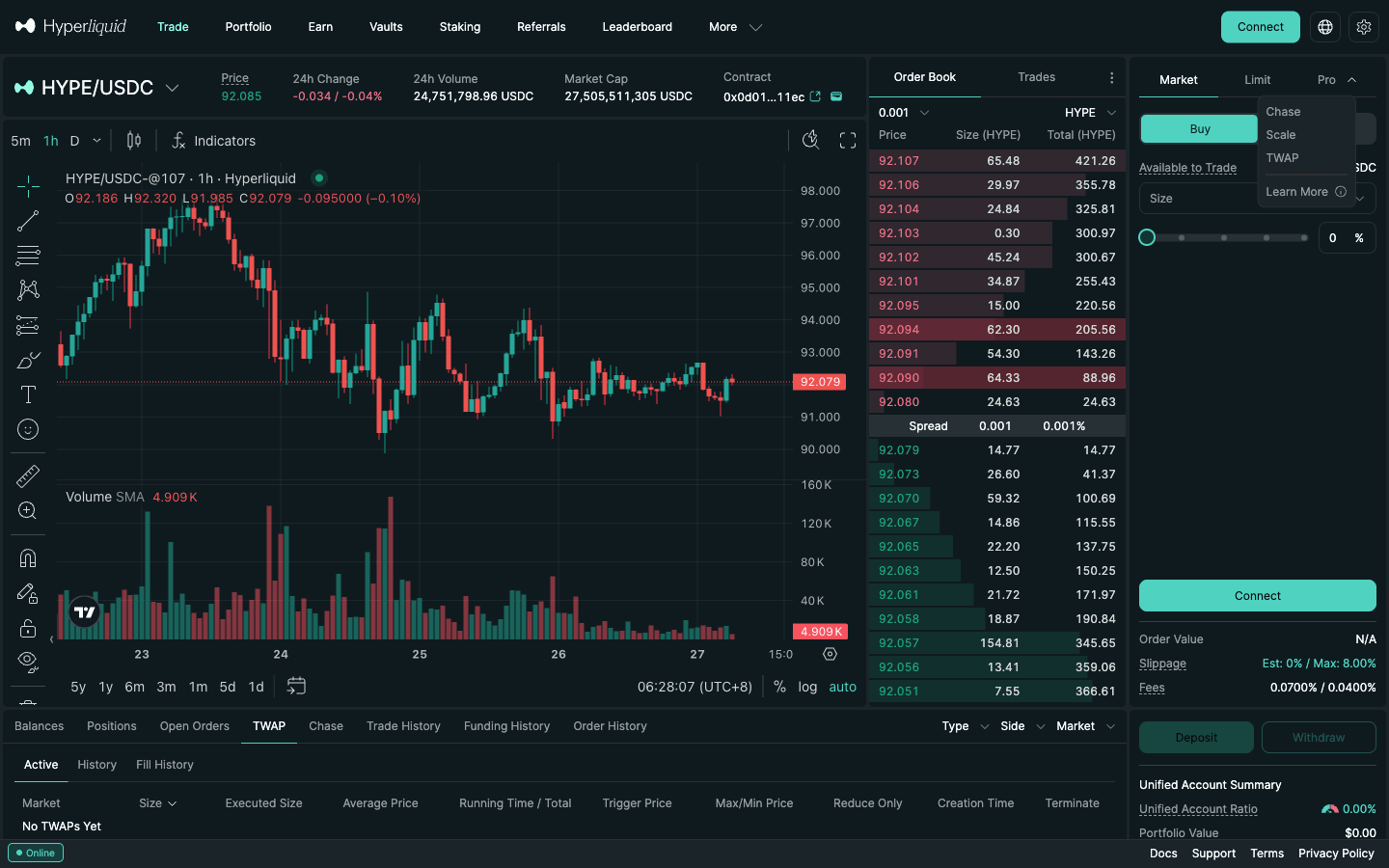
What you can do on spot: rest a Limit sell above the price as a take profit, or ladder exits with Scale. For a real stop, either watch the price yourself, run a bot on the API, or express the trade on the perp market (for example a 1x long), where every stop type is available. Spot basics: Hyperliquid spot trading guide.
13. Stops vs liquidation price
A stop only protects you if it triggers before liquidation. Hyperliquid liquidates a position when account value falls below maintenance margin, which is half of the initial margin at the asset's maximum leverage: 1.25% of notional for BTC (40x max), 2% for ETH (25x), 2.5% for SOL (20x) and 5% for a 10x asset such as HYPE. At high leverage the gap between entry and liquidation is small, and a stop placed "just above liquidation" can be skipped in a fast move.
- Keep the stop well inside the liquidation distance.
- In cross margin, the liquidation price moves with your other positions and your free USDC. Check it again after opening other trades.
- The maximum market order value is capped per asset ($30M for assets with 25x+ max leverage, $500,000 for assets below 10x). Very large positions in thin markets should exit in slices (TWAP, Scale) rather than rely on one stop.
See where liquidations cluster with the Hyperliquid liquidation map, and how cascades form in how to avoid a liquidation cascade.
14. Setting TP/SL through the API
This is the part the developer results (SDK issues, API references) ask about. The exchange endpoint uses one order action. Each order has an order type t that is either a limit (time-in-force Gtc, Ioc or Alo) or a trigger with isMarket, triggerPx and tpsl (tp or sl). Reduce-only is the boolean r.
- Bracket at entry: send the parent and its TP/SL children in one action with
grouping=normalTpsl. - TP/SL on an existing position:
grouping=positionTpsl. - Plain orders:
grouping=na. - Dead man's switch:
scheduleCancelcancels all open orders at a set time (at least 5 seconds ahead; at most 10 triggers per day). - The endpoint has no trailing order type; bots trail by moving the trigger with
modify.
Sign bot orders with an API (agent) wallet, not your main key: Hyperliquid API trading bot guide and agent wallet setup.
15. Common mistakes
- Cancelling a partly filled entry. Its OCO children die with it. Re-protect the filled part right away.
- Expecting a limit price or partial size from the checkbox. It places simple market TP/SL. Use the position window for both.
- Assuming a fixed-size TP/SL follows the position. It does not. After adding size, edit the TP/SL or use the whole-position default.
- Reading Loss % as a price move. It is relative to margin. A "5%" Loss at 25x is a 0.2% price move, which normal noise will hit within minutes.
- Placing the stop on a chart wick. The trigger is the mark price. Compare with the Mark in the header.
- Using a stop-limit at exactly the trigger. In a gap it rests unfilled. Give it room, or use a market stop.
- Forgetting Reduce Only on stand-alone stops. A forgotten stop can open a new position the other way.
- Stop too close to liquidation. At 20x or more, one fast candle can skip both.
- Relying on Chase for protection. It runs in your browser tab; close the tab and it stops. TP/SL, stop and trailing orders keep working on the exchange.
- Ignoring a third-party front-end's fee line. Apps add a builder fee on top of Hyperliquid's. The TP/SL mechanics are the same; the cost is not.
FAQ
How do I set a stop loss and take profit on Hyperliquid?
Three ways. (1) Before entering, tick "Take Profit / Stop Loss" in the Market or Limit tab and type a TP Price and SL Price (or Gain % / Loss %). (2) On a position you already hold, open TP/SL in the Positions tab; this "TP/SL for Position" covers the entire position by default and is the only place for a limit price or a partial size. (3) Drag an existing TP/SL line on the chart to move it. All of them trigger on the mark price.
How do I place conditional orders on Hyperliquid?
Conditional orders wait off the book until the mark price reaches a trigger. On a perp market, open the Pro menu (on a phone: the Order Type dropdown) and choose Stop Market or Stop Limit for a stop loss or breakout entry, Take Market or Take Limit for a profit target, or Trailing Stop; enter the trigger price, the size and, for a limit version, the limit price, and tick Reduce Only if the order should only close. For a stop loss and take profit tied to a trade, use the Take Profit / Stop Loss checkbox or the TP/SL button on the position instead. Spot markets have no stop, take, TP/SL or trailing orders (perps only).
What is a bracket order on Hyperliquid?
An entry with a take profit and a stop loss attached. Tick Take Profit / Stop Loss on a Market or Limit order and fill in both prices: the TP and SL are placed once the entry fills in full and behave as one-cancels-other, so when one fills the other is cancelled. If a limit entry only partly fills and you cancel the rest, the bracket is cancelled too, so add a position TP/SL to what you hold.
Can I set both a stop loss and a take profit at the same time?
Yes. Fill in both the TP and SL fields, either in the order form or in the position TP/SL window. They work as a pair: when one fills, Hyperliquid cancels the other automatically (order status siblingFilledCanceled), and both are cancelled when the position is closed.
Does my stop loss stay active if I close the browser?
Yes. TP/SL, Stop, Take and Trailing Stop orders are sent to Hyperliquid and wait there as trigger orders, so they keep working when your browser, phone or wallet is closed. The exception is Chase: the docs say Chase orders run in the browser tab where they were created (up to 5 at once), so closing the tab stops them.
Can I set several take profits (partial TP) on one position?
Yes, from the position TP/SL window. Turn on Configure Amount and enter a size for each TP; the app itself suggests partial TP/SL orders at different trigger prices to reduce slippage on large positions. A configured size is fixed and does not follow the position later, so leave the stop loss at the default "entire position" size so that it always covers whatever is left.
Does Hyperliquid trigger stops on the mark price or the last price?
The mark price. Mark is the median of three inputs (the oracle plus a 150-second EMA of the Hyperliquid basis, the median of Hyperliquid best bid, best ask and last trade, and a weighted median of Binance, OKX, Bybit, Gate and MEXC perp mids) and updates about every 3 seconds. One print on Hyperliquid alone does not trigger your stop.
What is the difference between stop-market and stop-limit on Hyperliquid?
A stop-market sends a market order when the trigger is hit, with a 10% slippage tolerance, so it almost always fills but can fill well past your trigger in a gap. A stop-limit places a limit order at the price you choose, so it caps your worst price but may not fill if the market jumps past it. The docs example: a stop at $10 with a $10 limit may rest unfilled if price drops from $11 to $9; with an $8 limit it likely fills between $9 and $8.
Does Hyperliquid have OCO orders?
Not as a separate order type, and there is no FOK either (time-in-force is GTC, IOC or ALO). But a TP/SL attached to an entry behaves as one-cancels-other: the docs call it "a.k.a. one-cancels-other, OCO", and when one leg fills the other is cancelled. There is no way to link two unrelated entry orders so that one cancels the other.
Does Hyperliquid have a trailing stop?
Yes, for perps. Trailing Stop is a native order type in the Pro menu. You set a retracement as a percentage (the form offers 5% and 10% presets) or a distance, plus an optional activation price; when the mark retraces that far from its best level, a Stop Market order is placed. Older forum posts saying Hyperliquid has no trailing stop are out of date.
Can I set a stop loss on Hyperliquid spot?
Not in the app today. On a spot pair such as HYPE/USDC the order form has Market, Limit and Pro, and Pro only offers Chase, Scale and TWAP: there is no TP/SL checkbox and no Stop order (checked September 26, 2026). For spot you can rest a limit sell as a take profit, or trade the perp market, where every stop type is available.
Why did my Hyperliquid stop loss fill below my trigger price?
Because TP/SL market orders are allowed up to 10% slippage. In a fast move the book can be thin beyond your trigger, and on low-liquidity altcoins the fill can be much worse than the trigger. Use a stop-limit (SL Limit Price in the position window, or a Pro Stop Limit) with a limit a little beyond the trigger if you need a hard worst price, and accept that it may not fill.
What is the best stop loss and take profit, and what is the 7% rule?
There is no single best level. Put the stop where your trade idea is proven wrong (below the swing low for a long), size the position so that hitting it costs a fixed share of your account (often 1%), and set the take profit at least about twice as far as the stop. The "7% rule" is a stock rule of thumb from William O'Neil: sell when a stock falls 7–8% below your buy price. On a perp, think in price, not margin: a 7% price move is a 70% loss of margin at 10x.
Do TP/SL orders cost extra on Hyperliquid?
No separate fee. When they trigger, they pay the normal trading fee: a market TP/SL pays the taker rate (0.045% at tier 0, 0.0432% with a referral discount), and a limit TP/SL that rests on the book pays the maker rate (0.015% at tier 0). Placing, editing and cancelling orders costs no gas.
How do I partially close a position on Hyperliquid?
Three ways. In the Positions tab use the row's Limit or Market close and enter a size smaller than the position; or place an opposite-side order from the order form with Reduce Only ticked and the slice size; or open the position's TP/SL, use Configure Amount and set a trigger for part of the size. In every case the rest stays open with the same entry price.
Does a partial close change my entry price on Hyperliquid?
No. For closing trades Hyperliquid keeps the entry price; only opening trades (adding in the same direction) re-average it. The closed slice realises side × (price − entry) × size, and the app's Closed PNL includes the fee (0.015% if a resting limit filled, 0.045% for a market close at tier 0).
Set your first stop loss on Hyperliquid
Gas-free orders, mark-price triggers, native trailing stops. Join with HOLYGRAIL for 4% off fees on your first $25M of volume.
Disclosure: HOLYGRAIL is our Hyperliquid referral code; we earn a share of referred accounts' fees at no extra cost to you. Order mechanics are summarised from Hyperliquid's official documentation (TP/SL, order types, robust price indices, margining, exchange endpoint) and the live app, checked on September 26–27, 2026. Leveraged trading can lose more than you expect; this is not investment advice.