
Key takeaways
- Cross margin: one shared pool. More room before liquidation and PnL offsets between positions, but a liquidation can take every cross position and the whole cross balance.
- Isolated margin: one position, one budget. The loss is capped at the margin you assign and other positions cannot move its liquidation price, but it is liquidated after a smaller move.
- Which to use: isolated for beginners, high leverage, new tokens and anything you won't watch; cross for hedges, basis trades and low-leverage books you manage. You can use both in one account.
- On Hyperliquid cross is the default. Maintenance margin is half the initial margin at max leverage (BTC 1.25%). A 40x isolated BTC long is liquidated about −1.27% from entry, a 10x one about −8.86%. You cannot switch the mode of an open position.
Trading perps on Hyperliquid?
Join with code HOLYGRAIL for 4% off trading fees on your first $25M of volume. Apply it before your account passes $10,000 of volume; joining through the link does that for you.
We earn a commission when you sign up through our links; it never raises your fees.
First, the two words both modes rely on. Margin is the collateral you post to open a leveraged position. The initial margin is what it takes to open (position value ÷ leverage). The maintenance margin is the smaller amount the position must keep; fall below it and the exchange liquidates. The margin mode answers one question: which of your money counts toward that maintenance margin?
1. What is cross margin?
With cross margin, every position in cross mode draws on one shared pool: your available balance. The exchange compares your total account value, including unrealized profit and loss on all cross positions, with the total maintenance margin of those positions. Liquidation starts only when the whole account can no longer cover it.
Advantages
- More room before liquidation. Idle balance stands behind every position, so a trade survives a bigger move.
- PnL offsets. A winning leg supports a losing one, which is what hedges and pair trades need.
- Capital efficiency. You don't park a separate buffer in each trade; unrealized profit can margin new positions.
- Less babysitting per position. No need to top up individual trades.
Risks
- The whole balance is at stake. A liquidation can take all cross positions and all cross margin.
- Cascading liquidations. One loser pulls every other cross position's liquidation price closer, and correlated positions fall together.
- Hidden leverage drift. As losses shrink equity, effective leverage rises without you clicking anything. The leverage calculator shows your effective account leverage and the cross liquidation move for your equity.
- Harder to read. The liquidation price of a position keeps moving with the rest of the account.
2. What is isolated margin?
With isolated margin, you give one position its own budget. Only that margin, plus the position's own PnL, backs the trade. If the price reaches the liquidation level, the exchange closes that position and at most the isolated margin is lost. The rest of your balance and your other positions are untouched.
Advantages
- Capped loss. The worst case is the margin you assigned.
- A fixed liquidation price. Other positions cannot move it, so you can plan a stop inside it.
- Clean experiments. A new token or a high-leverage idea cannot blow up the rest of the account.
- Adjustable. You can add margin to push the liquidation price away, or remove excess.
Risks
- Liquidated sooner. At the same leverage, less collateral stands behind the trade.
- No help from winners. Profit elsewhere in the account does not protect it.
- More management. Each position needs its own margin decision.
- The top-up trap. Adding margin again and again to a loser turns it into cross margin with extra steps.
3. Cross vs isolated margin: side-by-side
| Cross margin | Isolated margin | |
|---|---|---|
| Collateral scope | Your whole available balance, shared by all cross positions | Only the margin assigned to that position |
| Liquidation trigger | Total account value falls below the total maintenance margin of all cross positions | The position's own margin (plus its PnL) falls below its maintenance margin |
| Most you can lose | The whole cross balance and every other cross position | The isolated margin you assigned |
| PnL offsetting | Yes, winners support losers | No, each position stands alone |
| Room before liquidation (same leverage) | More: idle balance counts | Less: only the assigned margin counts |
| Capital efficiency | High | Lower (each trade holds its own buffer) |
| Management effort | Watch one account number | Manage margin per position |
| Cascading-liquidation risk | High: one loser can take down the rest | Contained to the position |
| Adding / removing margin | Deposit to add; locked initial margin cannot be withdrawn | Add or remove per position (within limits) |
| Best for | Hedges, basis trades, low-leverage books you watch | Beginners, high leverage, new tokens, unattended trades |
None of this is specific to Hyperliquid. Binance, Bybit, Bitget and most perp DEXs offer the same Cross / Isolated switch, and the trade-off in this table applies on all of them. What differs by venue is the maintenance rate and the liquidation procedure, so take those numbers from each exchange's own documentation.
4. Same trade, two modes: a dollar example
Take one account with $2,000 and one trade: a long of 0.1 BTC at $84,000 ($8,400 position) at 10x leverage. The numbers use Hyperliquid's published liquidation formula and its BTC maintenance margin of 1.25%, so they are what the exchange would do.
| Isolated (10x) | Cross | |
|---|---|---|
| Margin backing the trade | $840 assigned | The full $2,000 |
| Liquidation price | ≈ $76,557 (−8.86%) | ≈ $64,810 (−22.8%) |
| BTC falls 10% | Liquidated on the way down; loss about $744, at most $840 | Still open, $840 unrealized loss, $1,160 left |
| Loss if liquidated | About $744; the other $1,160 is untouched | About $1,919, and up to the whole $2,000 in a backstop liquidation |
That is the trade-off in one table: isolated is liquidated earlier but loses less; cross survives more but can lose everything. The leverage number alone doesn't tell you how far the price can move. The table below shows how quickly the margin runs out as leverage rises, and where Hyperliquid actually liquidates an isolated BTC long once the maintenance margin is included:
| Leverage | Price move that erases the initial margin | Hyperliquid BTC isolated long is liquidated at |
|---|---|---|
| 2x | 50% | −49.4% |
| 3x | 33.3% | −32.5% |
| 5x | 20% | −19.0% |
| 10x | 10% | −8.86% |
| 20x | 5% | −3.80% |
| 25x | 4% | −2.78% |
| 40x | 2.5% | −1.27% |
Middle column: 100 ÷ leverage, before fees and funding. Right column: 0.1 BTC at $84,000, isolated, maintenance 1.25%; liquidation comes a little before the margin is gone because the maintenance margin must stay in the position. BTC's maximum on Hyperliquid is 40x.
5. Which should you use? A decision matrix
| Situation | Use | Why |
|---|---|---|
| Your first leveraged trades | Isolated | The loss per trade is capped and the liquidation price is fixed, so mistakes stay small. |
| One directional idea above about 5x | Isolated | At high leverage the liquidation distance is a few percent (section 4); cap what it can cost. |
| High-leverage scalp | Isolated | A wick should cost the trade's margin, not the account. |
| Testing a new or volatile token | Isolated | Listing-day swings and thin books cannot reach the rest of the account. |
| Several positions that move together (e.g. BTC, ETH and SOL longs) | Isolated, or cross at a much smaller total size | On cross, correlated losers pull each other's liquidation prices closer (Example B). |
| Hedge: long one asset, short a correlated one | Cross | The winning leg funds the losing leg, so neither is liquidated on a move that leaves the pair flat. |
| Basis or carry trade: spot long, perp short | Cross (portfolio margin on Hyperliquid) | Spot and perp PnL offset only when they share margin. |
| Low-leverage core position you check daily | Cross | The whole balance acts as a buffer, as long as nothing risky shares the account. |
| Position you won't watch for hours | Isolated + stop loss | Place the stop inside the liquidation distance. |
| Bot or new strategy | Isolated or a separate sub-account | A runaway strategy cannot reach the main book. |
| A single position, low leverage, nothing else open | Either | The difference is only how much of the balance you are willing to put behind it. |
Using both together is normal. Modes are set per asset, so an isolated 10x altcoin trade can sit next to a cross-margined BTC/ETH hedge. Decide before entering how much you would ever add to an isolated loser; topping it up without a limit defeats the point of isolating it. Position size matters more than the mode: see position sizing and how to avoid a liquidation cascade.
6. Cross and isolated margin on Hyperliquid
You choose the margin mode per asset, before opening, with the Cross button at the top of the order form. The two buttons next to it show your leverage (for example "20x") and your account mode ("Unified"). The app describes the two main modes this way: cross means "All cross positions share the same cross margin as collateral. In the event of liquidation, your cross margin balance and any remaining open positions under assets in this mode may be forfeited." Isolated lets you "manage your risk on individual positions by restricting the amount of margin allocated to each."
Switching modes: the docs say "when opening a position, a margin mode is selected", and the exchange rejects a switch while that asset has an open position. To move a trade from cross to isolated (or back), close it, change the setting for that asset and reopen.
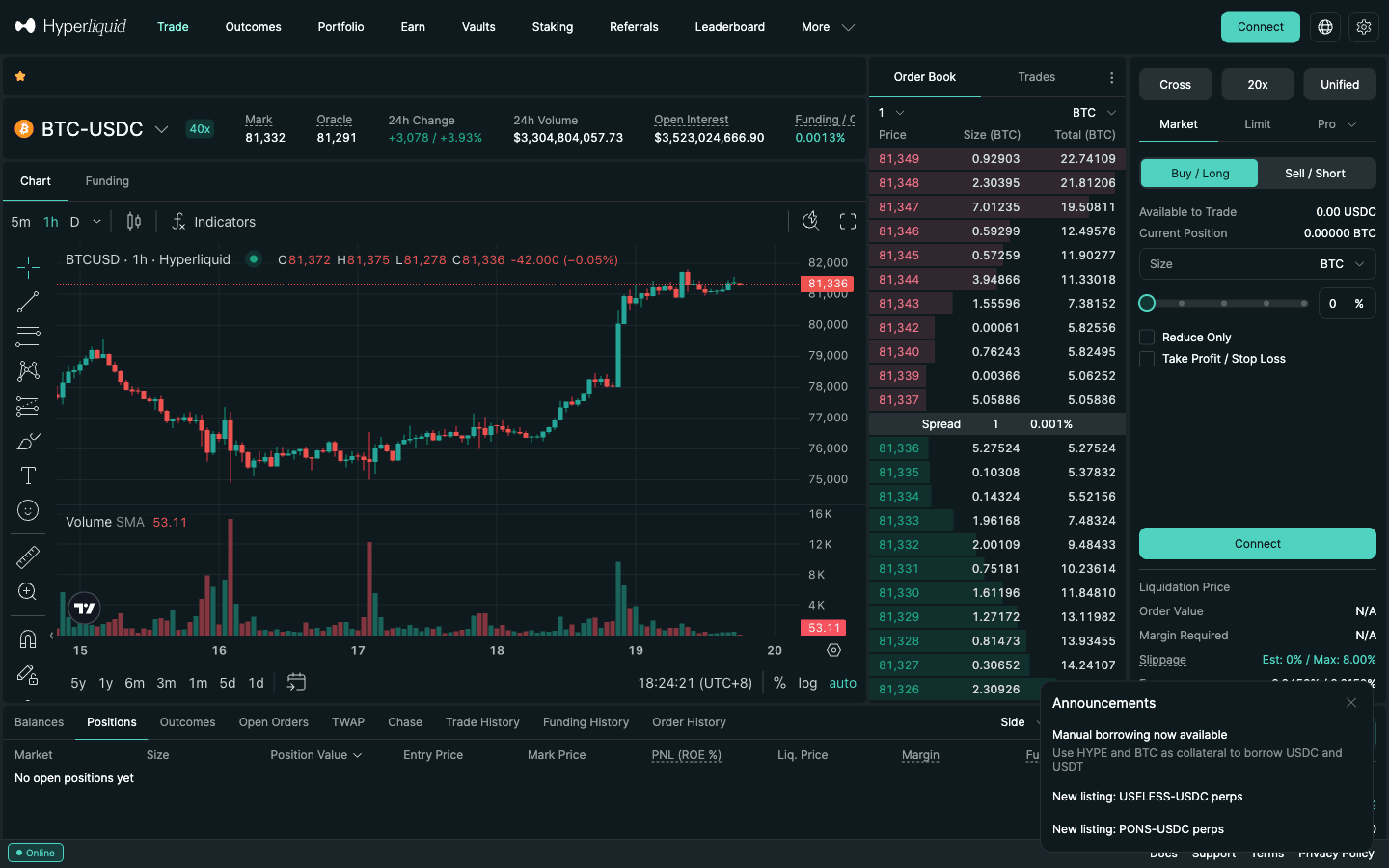
| On Hyperliquid | Cross margin (default) | Isolated margin |
|---|---|---|
| Collateral | Shared by all cross positions (in Unified mode: your whole USDC balance, spot included) | A fixed amount allocated to that one position |
| Unrealized PnL | Automatically usable as initial margin for new positions | Added to that position's margin only |
| Add / remove margin | Deposit or transfer in USDC; initial margin cannot be withdrawn while open | Add or remove after opening (Adjust Margin) |
| Does your leverage setting move the liquidation price? | No. Lower leverage only reserves more collateral | Yes. Leverage decides how much margin is allocated |
| Backstop liquidation takes | All cross positions and all cross margin | Only that position and its margin |
Strict isolated works like isolated, except that margin cannot be removed; it is released proportionally as you close. In the live API on September 27, 2026, no live validator-operated perp used it: the flag sat only on 8 delisted legacy markets, and all 178 live validator-operated perps accept both cross and isolated. Some HIP-3 dexes still use strict isolated on live markets (7 of the 8 live markets on the io dex and 1 of the 4 on mkts that day), so check the order form before assuming you can take margin back out. HIP-3 markets (builder-deployed perps such as the trade.xyz stock and commodity markets) can also be set to "no cross": isolated only, but margin can be removed. On trade.xyz, 90 of the 109 live markets were no-cross that day, including HOOD, COIN, PLTR and ORCL. Large ones such as XYZ100, NVDA, TSLA, AAPL, META and GOLD allow cross (trade.xyz guide).
Two margining rules from the docs trip people up. First, leverage is an integer from 1 to the asset's max and is only checked when you open. You can raise leverage on an open position without closing it, and after that "the user is responsible for monitoring the leverage usage to avoid liquidation." Second, any transfer that removes margin must leave at least the larger of the initial margin and 10% of total open notional. That covers a withdrawal, a transfer to spot or a sub-account, or taking margin off an isolated position. With $30,000 of open positions you cannot take the account below $3,000.
7. Initial and maintenance margin, with the tier table
The initial margin to open is size × mark price ÷ leverage. The maintenance margin, the level where liquidation starts, is half the initial margin at the asset's maximum leverage. That puts it between 1.25% on the one 40x asset (BTC) and 16.7% on 3x assets. Most of the list is low-leverage: of the 178 live perps on September 27, 2026, 1 allows 40x (BTC), 1 allows 25x (ETH), 2 allow 20x (SOL, XRP), 30 allow 10x, 56 allow 5x and 88 allow only 3x. Large positions move into a second tier with lower max leverage and a higher maintenance rate. A "maintenance deduction" keeps the total requirement continuous across the boundary, so only the notional above the boundary pays the higher rate.
| Asset | Notional (USDC) → max leverage | Maintenance margin rate |
|---|---|---|
| BTC | $0–$150M: 40x · above: 20x | 1.25% → 2.5% |
| ETH | $0–$100M: 25x · above: 15x | 2% → 3.33% |
| SOL | $0–$70M: 20x · above: 10x | 2.5% → 5% |
| XRP | $0–$40M: 20x · above: 10x | 2.5% → 5% |
| HYPE, DOGE, AVAX, LINK, SUI, ZEC, ENA, kPEPE and others (21 markets) | $0–$20M: 10x · above: 5x | 5% → 10% |
| ARB, BNB, DOT, JUP, ONDO, PAXG, TRX, XPL and others (9 markets) | $0–$3M: 10x · above: 5x | 5% → 10% |
| Everything else (single tier) | 5x or 3x | 10% or 16.7% |
Source: Hyperliquid docs "Margin tiers" and the live meta margin tables, checked September 2026. Per-asset caps: leverage limits by asset.
8. The liquidation price formula
Hyperliquid publishes the exact formula, and it is the same for both modes. Only margin_available changes:
liq_price = price − side × margin_available ÷ position_size ÷ (1 − l × side)
side= 1 for a long, −1 for a short.l= 1 ÷ maintenance leverage, which equals the maintenance rate: 1.25% for BTC, 2% for ETH, 2.5% for SOL, 5% for 10x assets. For tiered assets, use the tier that applies at the liquidation price.- Cross:
margin_available = account_value − maintenance_margin_required. Account value includes unrealized PnL on every cross position. - Isolated:
margin_available = isolated_margin − maintenance_margin_required.
Liquidation triggers on the mark price, which blends external CEX prices with Hyperliquid's own book. In a fast move it can sit some distance from the last trade. The number in the order form before you trade is an estimate, and the app notes it "assumes all other prices stay constant". Once you are in, the displayed liquidation price is based on your real entry. It still drifts with funding payments and, on cross, with every other position's PnL. When risk is very low the Positions table may show no liquidation price at all ("Position risk is low, so there is no liquidation price for the time being"). A step-by-step calculator for other venues: how to calculate liquidation price.
9. Worked examples: BTC and ETH, cross and isolated
Example A: isolated BTC, 0.1 BTC at $84,000
Notional is $8,400 and maintenance is 1.25% × $8,400 = $105 at every leverage. Only the isolated margin changes, and with it the liquidation distance:
| Leverage | Isolated margin | Maintenance | Long liquidation | Move | Short liquidation |
|---|---|---|---|---|---|
| 40x (max) | $210 | $105 | ≈ $82,937 | −1.27% | ≈ $85,037 (+1.23%) |
| 20x | $420 | $105 | ≈ $80,810 | −3.80% | ≈ $87,111 (+3.70%) |
| 10x | $840 | $105 | ≈ $76,557 | −8.86% | ≈ $91,259 (+8.64%) |
| 5x | $1,680 | $105 | ≈ $68,051 | −19.0% | ≈ $99,556 (+18.5%) |
| 3x | $2,800 | $105 | ≈ $56,709 | −32.5% | ≈ $110,617 (+31.7%) |
Check the 40x long: margin available = $210 − $105 = $105; $105 ÷ 0.1 = $1,050; ÷ (1 − 1/80) = $1,063; liquidation at $84,000 − $1,063 = $82,937. At that price the remaining margin equals 1.25% of the new, smaller notional, so the two lines meet. A short liquidates slightly closer (+1.23%) because the denominator becomes 1 + l. Rule of thumb: at max leverage the liquidation distance is roughly the maintenance rate, and BTC's normal hourly range can exceed it.
Example B: the same 0.1 BTC long on cross, $5,000 account
Now margin_available is the whole account minus total maintenance, and the leverage setting stops mattering. Add a second cross position, 3 ETH long at $2,700 (notional $8,100, maintenance 2% = $162). Then watch the BTC liquidation price move as the ETH leg's PnL changes (BTC held constant):
| Scenario | Account value | Total maintenance | BTC liquidation price | Move from $84,000 |
|---|---|---|---|---|
| 0.1 BTC long only | $5,000 | $105 | ≈ $34,430 | −59.0% |
| + 3 ETH long at $2,700 (flat) | $5,000 | $267 | ≈ $36,071 | −57.1% |
| ETH leg down $2,000 | $3,000 | $227 | ≈ $55,919 | −33.4% |
| ETH leg up $2,000 | $7,000 | $307 | ≈ $16,223 | −80.7% |
That table is the whole cross-vs-isolated argument. Cross gives the BTC trade huge staying power, but a $2,000 loss on ETH pulls the BTC liquidation price up by about $20,000. In a real sell-off both legs fall together. If BTC and ETH drop by the same percentage, this $5,000 account with $16,500 of longs is liquidated after a fall of about 29%, not 59%. The liquidation price rises just as the market heads toward it. The isolated 10x version liquidates at $76,557 whatever ETH does.
Example C: ETH isolated
3 ETH long at $2,700; maintenance 2% × $8,100 = $162. At 25x (max) the isolated margin is $324 and liquidation lands near $2,645 (−2.04%). At 10x the margin is $810 and liquidation is near $2,480 (−8.16%).
10. Margin ratio: the account-health numbers the app shows
"Margin ratio" is the single number that tells you how close the account is to liquidation. Hyperliquid defines it as maintenance margin divided by what backs it, so it rises as you get closer to liquidation. Which ratio you see depends on the account mode (section 11):
| Label in the app | Where it applies | Definition | Danger line |
|---|---|---|---|
| Cross Margin Ratio | Standard (manual) account | Maintenance Margin ÷ Portfolio Value | Cross positions liquidated at 100% |
| Unified Account Ratio | Unified Account (app default) | Cross maintenance margin ÷ (collateral balance − isolated margin), per collateral token; the highest counts | “When the value is greater than 95%, your portfolio may be liquidated” |
| Portfolio Margin Ratio | Portfolio margin | Portfolio maintenance requirement ÷ portfolio liquidation value (includes borrows and LTV-weighted collateral) | Liquidatable above 95% |
| Isolated position margin ratio | Any mode, per isolated position | Position maintenance margin ÷ isolated margin (incl. its PnL) | “If the margin ratio of an isolated position reaches 100%, the position will be liquidated” |
| Health Factor | Borrowing (manual borrows / PM) | LTV-weighted account value ÷ borrowed amount | Below 100% blocks new borrows; not itself a liquidation trigger |
Wording and formulas from the app's English UI strings and the docs pages "Account abstraction modes" and "Portfolio margin", re-read September 27, 2026.
Many CEXs and Japanese brokers show the inverse, account equity ÷ required margin, which falls toward danger. To convert, divide 1 by Hyperliquid's ratio. A Cross Margin Ratio of 25% means equity is four times the maintenance requirement. 50% means twice. 100% means none left.
Worked example (standard account). In Example B with the ETH leg flat, the maintenance margin is $267 and the portfolio value $5,000, so the Cross Margin Ratio is 5.3%. If BTC and ETH both fall 10%, the account value drops to $3,350 against $240 of maintenance: 7.2%. At a 20% fall it is $1,700 against $214: 12.6%. At about 29% it reaches 100%. The ratio does not climb in a straight line, so treat a ratio that has doubled since entry as the warning, not the 95% line.
The leverage figures sit next to the ratio. Cross Account Leverage = total cross positions value ÷ cross account value. Unified Account Leverage = total cross positions value ÷ total collateral balance. Portfolio Account Leverage divides by the LTV-adjusted portfolio value. Example B starts at 3.3x ($16,500 ÷ $5,000). After the ETH leg loses $2,000 it is 4.8x ($14,500 ÷ $3,000), although you never clicked anything. That drift is why the docs leave monitoring "to the user".
11. Unified Account, portfolio margin and standard mode
Your account abstraction mode decides what collateral backs cross margin. The app's mode button sits at the top right of the order form and shows the current mode.
| Mode | What backs cross positions | Health number | Best for |
|---|---|---|---|
| Unified Account (default, recommended) | One balance per collateral asset. USDC backs validator perps, USDC-collateral HIP-3 perps (e.g. trade.xyz) and spot. "All USDC collateral will be used as cross margin once Unified Account is enabled." | Unified Account Ratio (danger above 95%) | Most traders |
| Portfolio margin | All cross perps plus spot HYPE, BTC, USDC and USDT, with automatic borrowing (LTV: HYPE 65%, BTC 50%) | Portfolio Margin Ratio (liquidatable above 95%) | Spot-plus-perp hedges, carry trades |
| Standard / manual | Separate perp and spot balances; cross margin only within each DEX | Cross Margin Ratio (liquidation at 100%) | Market makers, bots, builder-code addresses (required) |
What changes in practice:
- Unified means your spot USDC is at risk. In standard mode, USDC in the spot wallet is outside the perp account. In Unified mode the same USDC protects cross positions, so a cross liquidation can consume it. If you want a cash buffer that liquidation cannot touch, use isolated positions or a separate sub-account. Opt out with the Unified button at the top right of the order form.
- Action limit. Unified and portfolio-margin accounts are limited to 50,000 user actions per day; standard mode has no such cap. High-frequency bots belong in standard mode.
- Portfolio margin is "a generalization of cross margin". Spot BTC or HYPE can collateralize perp shorts, and missing USDC is borrowed automatically; the stablecoin borrow rate starts at 5% APY and climbs steeply once utilization passes 80%. The docs require a master account with more than $10,000 account value or $5M weighted volume, and an account value under $25M; the support FAQ says under $5M, so check the limit the app shows you. You also need no open positions, orders or TWAPs when you switch. Liquidations go straight to the backstop liquidator, with no order-book phase. "Sub-accounts are still treated separately under portfolio margin."
More on the spot side of this: Hyperliquid spot trading guide and perps vs spot margin. Cross vs isolated decides which positions share margin, not which asset the margin is held in (outside portfolio margin, a stablecoin such as USDC). On centralized exchanges that asset is set by the contract type; see coin-margined vs USDT-margined.
12. One-way positions: Hyperliquid has no hedge mode
Hyperliquid keeps one net position per market per account (one-way mode); there is no hedge mode. Selling while long reduces the long, and selling more than you hold flips you short in the same order. We checked four places on September 25, 2026: the API's clearinghouseState returns every position as "type": "oneWay" with a signed size (szi, negative = short); the API docs say the isBuy flag on isolated-margin updates "won't have any effect until hedge mode is introduced"; the order form has margin mode, leverage and account mode but no position-mode switch; and CCXT closed a request for setPositionMode on Hyperliquid as not supported. The app's explorer code can already display a "One way" / "Hedge" position-type change, so the groundwork may exist, but there is no user switch and no announced date.
- Margin mode is per asset, not per side: BTC is either cross or isolated in that account.
- Resting orders on both sides are fine. They are orders, not positions; whichever fills moves the single net position.
- Use Reduce Only on every exit, so a stale stop or take-profit can never open a position in the other direction.
- Where hedge mode exists: Aster's order-book perps (Settings → Position Mode, only with no open positions or orders), Binance (
dualSidePosition, for every symbol at once) and Bybit (per symbol). Lighter is one-way too and uses sub-accounts.
Five ways to hedge without hedge mode
| Method | Needs | Cost and funding | Main risk |
|---|---|---|---|
| Reduce or close the position | Any account | One taker fee on the part you close | You lose the original entry; re-entry costs fees and spread |
| Opposite leg in a sub-account | $100,000 of volume on the master | Fees on both legs (no referral discount on the sub-account); same-market funding nets to about zero | Each leg can be liquidated on its own; margin is not shared |
| Spot long + perp short | A spot market for the asset (HYPE, UBTC) | Spot 0.07% + perp 0.045% taker; the short receives positive funding | In Unified mode spot does not margin the short; portfolio margin does |
| Correlated perp, same cross account | None | One extra position; different funding on each leg | Basis risk: the two assets do not move one-for-one |
| Opposite leg on another venue | An account there | Fees on both venues; two funding schedules | Two margin accounts, transfer delays, venue risk |
Reducing is usually the right hedge. A 0.1 BTC long plus a 0.1 BTC short is economically flat, with two sets of fees and two liquidation prices. An opposite leg only makes sense when the original position must stay open: a bot manages it, you want to keep its entry, or you are hedging a short, defined window such as a data release.
Sub-account hedge, worked example (sub-accounts unlock after $100,000 of volume on the master; how to create one). The master holds 0.1 BTC long at $84,000 ($8,400 notional). Before an event you open 0.1 BTC short in a sub-account, isolated at 10x ($840 margin). Net exposure and same-market funding net to about zero. Fees to open and close both legs at taker: $7.26 on the master (with the 4% referral discount) plus $7.56 on the sub-account, which gets no discount, against $3.63 to simply close the long once. The trap is liquidation: by the formula in section 8 the short is liquidated near $91,259 (+8.64%). At that price the master shows +$726, but that profit sits in another account and does nothing for the short. Fund the hedge at 3x instead and its liquidation moves to about $110,617 (+31.7%); set alerts on both accounts, move profit across (internal transfers are instant and free) and close both legs together.
Spot long, perp short: safe only under portfolio margin, where spot HYPE or BTC counts as collateral and spot and perp PnL offset each other. In the default Unified Account "Perps can only use the settlement asset as collateral", so a rally can liquidate the short while the spot gain does not count. When funding is positive the short also collects it (funding rate arbitrage). Bots: there is no position-side parameter; send buy or sell with reduce-only, reconcile against the signed szi, and give each strategy its own sub-account so two bots do not fight over one net position. Broader hedging strategies: how to hedge crypto with perpetuals.
13. What actually happens at liquidation
- Market liquidation on the book. When cross account value, or an isolated position's margin, drops below maintenance, the clearinghouse sends market orders for the full size. Positions above 100,000 USDC are sent 20% at a time. After any partial liquidation there is a 30-second cooldown, during which further market liquidation orders are for the whole position. If enough closes to meet maintenance, the remaining collateral stays with you. There is no clearance fee; the fill pays a normal taker fee. The fill shows as "Market Liquidation" in your Trade History.
- Backstop liquidation. If equity falls below two-thirds of maintenance before the book absorbs the position, the liquidator vault (a strategy inside HLP) takes it over. On cross it takes all cross positions and cross margin, leaving zero equity if you hold nothing isolated. On isolated it takes only that position. The maintenance margin is not returned. This is why the docs recommend stop losses: exiting before the mark hits your liquidation price keeps that margin (stop loss guide).
- Auto-deleveraging is the last resort if the backstop cannot absorb a position. Profitable opposite-side positions are then closed at the previous mark price.
Liquidation PnL flows to HLP depositors, not to an operator (HLP and vaults). A visual of where other traders' liquidations cluster: Hyperliquid liquidation map.
Set it up properly from the first trade
Open Hyperliquid with HOLYGRAIL: 4% off taker and maker fees on your first $25M. On a $10,000 BTC position opened and closed as taker, that saves $0.36 per round trip at the base tier ($9.00 → $8.64).
14. Monitoring account health in the app
- Account summary. The summary panel on the Trade page ("Unified Account Summary" or "Portfolio Margin Summary", depending on your mode) shows your mode's ratio (Unified Account Ratio, Portfolio Margin Ratio or Cross Margin Ratio), Portfolio Value, Unrealized PNL, Perps Maintenance Margin and account leverage. Write down the ratio where you stop adding risk (for example 30%) and where you cut (for example 50%). Both sit well below the 95%/100% lines, because the ratio accelerates as equity shrinks.
- Positions tab. The columns are Market, Size, Position Value, Entry Price, Mark Price, PNL (ROE %), Liq. Price, Margin and Funding. Check the distance from Mark Price to Liq. Price in percent, not the PnL; a green PnL can sit on a thin cushion. The Funding column shows net funding since the position opened. On a multi-day hold at hourly funding, it slowly eats margin (funding explained).
- Order form, before you click. Read Liquidation Price, Order Value and Margin Required. Remember the estimate assumes other prices stay constant and, in the app's words, "does not account for hedged positions between spot and perps".
- After every fill that changes size, recheck the ratio. Partial closes and flipped positions are where forgotten size appears. Use Reduce Only on exits so a close cannot open the opposite side.
- Available to Trade vs your deposit. On cross, closing a winner does not free all its margin if other positions are underwater. The support FAQ notes that the freed amount "goes toward these existing positions".
A simple traffic-light framework: green means the ratio is stable, the liquidation distance is well outside your stop, and funding is neutral. Yellow means the ratio has doubled since entry or the distance is inside a normal daily range: tighten stops and cut size, never "average down" by default (if you do add, check the new liquidation price first with the average down calculator). Red means the ratio is approaching your cut level or several correlated legs are losing: reduce until you are back to yellow.
15. Monitoring via API and setting alerts
The app does not document margin-ratio push alerts. Its settings list "Push Notifications" under Notifications & Sounds, but not what triggers them. If you need alerts you can rely on, build them from the public API. No API key is needed to read an address's state:
- Snapshot: POST
https://api.hyperliquid.xyz/infowith type"clearinghouseState"and your address (weight 2 of the 1,200-per-minute IP budget). The response carriesmarginSummary.accountValue,totalMarginUsed,totalNtlPos,crossMaintenanceMarginUsedandwithdrawable. Each position listsliquidationPx,marginUsed,positionValue,leverage.type(cross or isolated) andcumFunding. crossMaintenanceMarginUsed ÷ accountValue is your cross margin ratio. - Unified / portfolio margin: the docs say to read balances from
spotClearinghouseState("individual perp dex user states are not meaningful"). The account-abstraction page publishes the exact Unified Account Ratio function: cross maintenance margin across all perp DEXs, divided by the collateral token's balance minus isolated margin, taking the maximum over tokens.userAbstractiontells you which mode an address uses. - Streaming: subscribe over WebSocket to
clearinghouseState(orallDexsClearinghouseStateif you trade HIP-3), plususerEvents, which pushes fills, funding and liquidation events. - Limits for multi-account monitors: one IP can hold 10 WebSocket connections, 1,000 subscriptions and user-specific subscriptions for at most 10 unique addresses. A master plus 10 sub-accounts is 11, so poll the rest or split across IPs. Polling 10 addresses every 5 seconds costs 240 weight a minute, well inside the budget.
A minimal alert loop: every few seconds, compute the ratio for each address and each isolated position's distance to liquidationPx. Notify at your yellow line, send reduce-only orders at your red line, and block new entries while the account is yellow. A bot can be right about direction while the account is already yellow, so gate its entries on health. API setup: Hyperliquid API guide, WebSocket guide and rate limits.
16. Comparison: Lighter's three-threshold model
Lighter also offers cross and isolated margin, but its risk engine works with three margin fractions per market. For BTC and ETH (50x max) the API shows initial 2%, maintenance 1.2% and close-out 0.8%. Between initial and maintenance, the account is in pre-liquidation and can only reduce risk. Below maintenance, the engine cancels open orders and sends IoC orders at a "zero price" that cannot worsen account health. Fills better than that price pay up to a 1% fee to LLP, the insurance pool. Below close-out, LLP takes the positions over.
| Hyperliquid | Lighter | |
|---|---|---|
| BTC max leverage | 40x (to $150M notional) | 50x |
| BTC maintenance margin | 1.25% | 1.2% (close-out 0.8%) |
| First liquidation step | Market orders to the book; 20% slices above 100,000 USDC | Orders cancelled, then IoC orders at the zero price |
| Liquidation fee | None (maintenance margin lost only in a backstop) | Up to 1% to LLP on fills better than the zero price |
| Backstop | Liquidator vault (HLP) below two-thirds of maintenance | LLP takeover below close-out, then ADL |
| Base trading fees | 0.045% taker / 0.015% maker | 0% / 0% on Standard accounts |
Lighter's free Standard tier makes an isolated-plus-stop routine cheap to run. Sign up with Lighter code 718610TD (referee benefit: first week of Premium fees rebated, once you opt into Premium). Full comparison: Hyperliquid vs Lighter.
17. FAQ
What is cross margin?
Cross margin is a margin mode in which every cross position shares one pool of collateral: your whole available balance. Profits on one position support the others and a position can ride out a bigger move, but one losing trade can drain the whole account, and a liquidation can take every cross position at once. It is the default mode on Hyperliquid.
What is isolated margin?
Isolated margin assigns a fixed amount of collateral to one position. Only that amount (plus the position's own PnL) backs the trade, so a liquidation takes that margin and nothing else. The price has less room to move before liquidation, but the rest of your balance and your other positions are untouched.
Is it better to use cross or isolated margin?
Neither is better in general. Isolated is better for a single directional trade, high leverage, a new or volatile token and anything you will not watch, because the loss is capped at the margin you assign. Cross is better for hedged or offsetting positions (long one asset, short a correlated one; perp short against spot) and for low-leverage positions you manage actively, because gains on one leg support the other. A sensible default is isolated, with cross chosen on purpose.
Is cross margin riskier than isolated margin?
Per account, yes: cross puts your whole available balance behind every cross position, so a single bad trade or several correlated losers can wipe the account. Per trade, cross is actually less likely to be liquidated, because more collateral stands behind it. In our $2,000 example a 10x BTC long is liquidated after a −8.86% move on isolated but survives until −22.8% on cross; on cross, though, the loss can reach the whole account.
Can I lose my entire account with cross margin?
Yes. If cross positions are liquidated, the cross balance behind them can be lost. On Hyperliquid, if equity falls below two-thirds of the maintenance margin before the order book absorbs the position, the liquidator vault takes over all cross positions and all cross margin, and with no isolated positions the docs say you end up with zero account equity. In the default Unified Account your spot USDC also counts as cross collateral. Money in isolated positions or a separate sub-account is not touched.
Does isolated margin prevent liquidation?
No. It limits what a liquidation can take, not whether it happens. An isolated position has only its own margin behind it, so at the same leverage it is liquidated sooner than a cross position in a larger account. On Hyperliquid an isolated position is liquidated when its margin ratio reaches 100%; you can delay that by adding margin, reducing size or using a stop loss.
Can I switch from cross margin to isolated margin on an open position?
Not on Hyperliquid. The docs say the margin mode is selected when a position is opened, and the exchange rejects a switch while that asset has an open position ("Cannot switch leverage type with open position."). Close the position, flip the Cross/Isolated setting for that asset in the order form, then reopen. What you can change on an open position: raise the leverage and, on isolated, add or remove margin.
Can you use both isolated margin and cross margin at the same time?
Yes. The mode is set per asset, so one account can hold an isolated 10x altcoin trade next to a cross-margined BTC/ETH pair. The isolated position does not use the cross balance, and a cross liquidation does not touch it. The reverse also holds: an isolated liquidation leaves the cross positions alone.
Is isolated margin better for beginners?
Usually, yes. It caps the loss on each trade at the margin you allocate, gives a liquidation price that other positions cannot move, and makes it obvious where to put the stop loss. Start with isolated at low leverage (2x–3x), and use cross only when you deliberately hold offsetting positions.
Is margin mode the same as leverage?
No. Leverage decides how much initial margin a position locks (notional ÷ leverage). The margin mode decides which collateral can be lost if it goes wrong. On Hyperliquid you set both per asset, in the two buttons above the order form. For isolated positions the leverage also sets the liquidation price; for cross positions the docs state the liquidation price is independent of the leverage setting.
What is the default margin mode on Hyperliquid?
Cross margin is the default. Isolated margin is available on every live validator-operated perp (all 178 on September 27, 2026). Some builder-deployed HIP-3 markets are isolated only, for example 90 of the 109 trade.xyz markets that day were "no cross".
What is the maintenance margin on Hyperliquid?
Half of the initial margin at the asset's maximum leverage: BTC (40x max) 1.25%, ETH (25x) 2%, SOL and XRP (20x) 2.5%, 10x assets 5%, 5x assets 10% and 3x assets 16.7%. Positions above a tier boundary (for example BTC above $150M notional) use the next tier's higher rate. The leverage you choose does not change the maintenance rate.
What is the margin ratio on Hyperliquid and when am I liquidated?
In a standard account the app shows the Cross Margin Ratio, defined as Maintenance Margin ÷ Portfolio Value; cross positions are liquidated when it reaches 100%. In the default Unified Account the app shows the Unified Account Ratio and warns that above 95% the portfolio may be liquidated; portfolio-margin accounts use the Portfolio Margin Ratio with the same 95% line. An isolated position is liquidated when its own margin ratio reaches 100%.
How do I monitor my Hyperliquid account health with the API?
Call the info endpoint with type "clearinghouseState" (weight 2) or subscribe to the WebSocket channel of the same name. It returns marginSummary.accountValue, crossMaintenanceMarginUsed, withdrawable and, per position, liquidationPx, marginUsed and the leverage type. crossMaintenanceMarginUsed ÷ accountValue is the cross margin ratio. Unified and portfolio-margin accounts should read balances from spotClearinghouseState.
Does Hyperliquid have hedge mode?
No, as of September 25, 2026. Hyperliquid keeps one net position per market per account (one-way): the API returns every position with "type": "oneWay", the order form has no position-mode setting, and the API docs say a hedge-related flag "won't have any effect until hedge mode is introduced". To hold a long and a short on the same coin, put the second leg in a sub-account (after $100,000 of volume) or on another venue; each leg then has its own margin and liquidation price.
Can I be long and short the same coin on Hyperliquid at the same time?
Not in one account. A sell while you are long reduces the long, and a larger sell flips you short. The second leg has to live in a sub-account or on another exchange, and because margin is not shared, the winning leg does not protect the losing one until you move funds across.
Trade with 4% lower fees
Open Hyperliquid with code HOLYGRAIL: 4% off taker and maker fees on your first $25M of volume, applied automatically when you join through the link.
Disclosure: HOLYGRAIL and 718610TD are our referral codes; we earn a share of referred accounts' fees at no cost to you. Margin rules, formulas and UI labels are quoted from the Hyperliquid and Lighter documentation, public APIs and app, re-checked on October 14, 2026. Prices in the examples are round illustrative numbers near late-September 2026 marks. Not investment advice.