Which Hyperdash? This review covers hyperdash.com, the Hyperliquid terminal (X: @hypurrdash). It is not Hyper Dash, the Meta Quest VR shooter that most "Hyper Dash review" results are about, not the DASH coin, and not the discontinued machine-learning monitoring app of the same name.
Trading through Hyperdash? Join Hyperliquid with HOLYGRAIL first using Rabby or MetaMask, then log in to Hyperdash with that same wallet. You keep 4% off Hyperliquid's part of the fee on Hyperdash orders too (why the order matters).
Hyperdash review in short
What it does well
- The deepest free analytics layer on Hyperliquid: cohorts, top positions per market, liquidation heatmaps, a PnL leaderboard and labeled wallets, with no account needed to browse.
- A trader profile for any address: PnL chart and calendar, win rate, trading style, leverage, positions with liquidation prices, and a copy score.
- Copy trading built in: mirror or counter up to 10 traders from one wallet, with a leverage cap, max worse entry and asset filters.
- Non-custodial: trades run through an agent key that cannot withdraw and expires after 180 days; 2FA by passkey or authenticator app.
- Card, bank and local-rail deposits in 34 fiat currencies, plus crypto on 11 networks.
What to watch
- Every trade carries a builder fee: 0.015% on perps, 0.03% on spot and prediction markets, 0.05% on copy trades, on top of Hyperliquid's own fee.
- On xyz stock and commodity perps in growth mode the builder fee makes a trade about 2.7 times as expensive as on app.hyperliquid.xyz.
- Google, Apple and email logins create a new wallet, a Hyperliquid account without your referral discount (4% off with HOLYGRAIL).
- Copy-trade volume earns no fee rebates, and copied orders follow within seconds, not in the same block.
- No owner named on the site (Bankless reports PVP Trade); the United States is a prohibited jurisdiction in its terms.
Verdict: use Hyperdash for free research and wallet tracking; pay its builder fee only for Chase/Swarm orders, saved layouts or copy trading. For everything else the same order is 28% cheaper per taker fill on app.hyperliquid.xyz with code HOLYGRAIL than on Hyperdash without a code.
Trading through Hyperdash? Two steps, in this order
- Join Hyperliquid with our code first, using Rabby or MetaMask. That account keeps 4% off Hyperliquid's part of every fee for its first $25M, on Hyperdash orders too. app.hyperliquid.xyz itself is also the cheapest place to trade. Step 1: join Hyperliquid with HOLYGRAIL →
- Log in to Hyperdash with that same wallet (Continue with Wallet, then Approve Agent), not Google, Apple or email: those create a new Turnkey wallet, a different Hyperliquid account without the 4%. A new wallet that Hyperdash creates for copy trading is a separate account too. Step 2: connect it to Hyperdash →
Why this order: apps such as Phantom often set their own Hyperliquid referral code on accounts that have none, so enter a code on Hyperliquid before you start using an app. A code is set once per account (and only while it has traded $10,000 or less), and the referral discount also applies to orders placed through apps with a builder code (mainnet fills checked October 1, 2026). We hold no Hyperdash code (Hyperdash's own referral program). Only researching? Cohorts, heatmaps and profiles need no account. More: Hyperliquid referral code HOLYGRAIL · Hyperliquid builder codes explained.
We earn a commission when you join Hyperliquid through our links; it never raises your fees. We have not funded a Hyperdash account for this review: fees and copy-trading rules come from Hyperdash's docs, and the screenshots show its public pages.
1. What Hyperdash is, and who owns it
Hyperdash calls itself a global trading platform and data analytics company. In practice it is two products on one site. The first is a data layer: it reads Hyperliquid's public on-chain state, which includes every position, order, fill and liquidation, and turns it into rankings, cohorts and heatmaps. The second is a trading terminal: a third-party front-end that sends orders to Hyperliquid's order book with Hyperdash's builder code attached. Crypto perps, spot, prediction markets and the xyz stock, index, commodity and FX perps are all available (see our trade.xyz guide).
Because Hyperliquid is a fully on-chain order book, none of this data is private. Hyperdash's value is in how it is organized. The official explorer shows you one address at a time. Hyperdash shows you which addresses matter and what they are doing as a group.
Who owns Hyperdash (and what happened to "Hyperdash legacy")
Hyperdash has been active on X as @hypurrdash since 2024. It does not name an owner on its site or in its docs; the terms of use only refer to "Hyperdash (the Company)". According to Bankless (January 7, 2026), Hyperdash was acquired by PVP Trade, the team behind the pvp.trade Telegram trading bot on Hyperliquid, and relaunched that week with a rebuilt terminal. The pre-relaunch interface that older guides call "Hyperdash legacy" no longer exists: legacy.hyperdash.com now redirects to hyperdash.com (checked October 14, 2026). Screens in older reviews may therefore look different from what you see today.
2. What each section shows
| Section | What it shows | Use it to… |
|---|---|---|
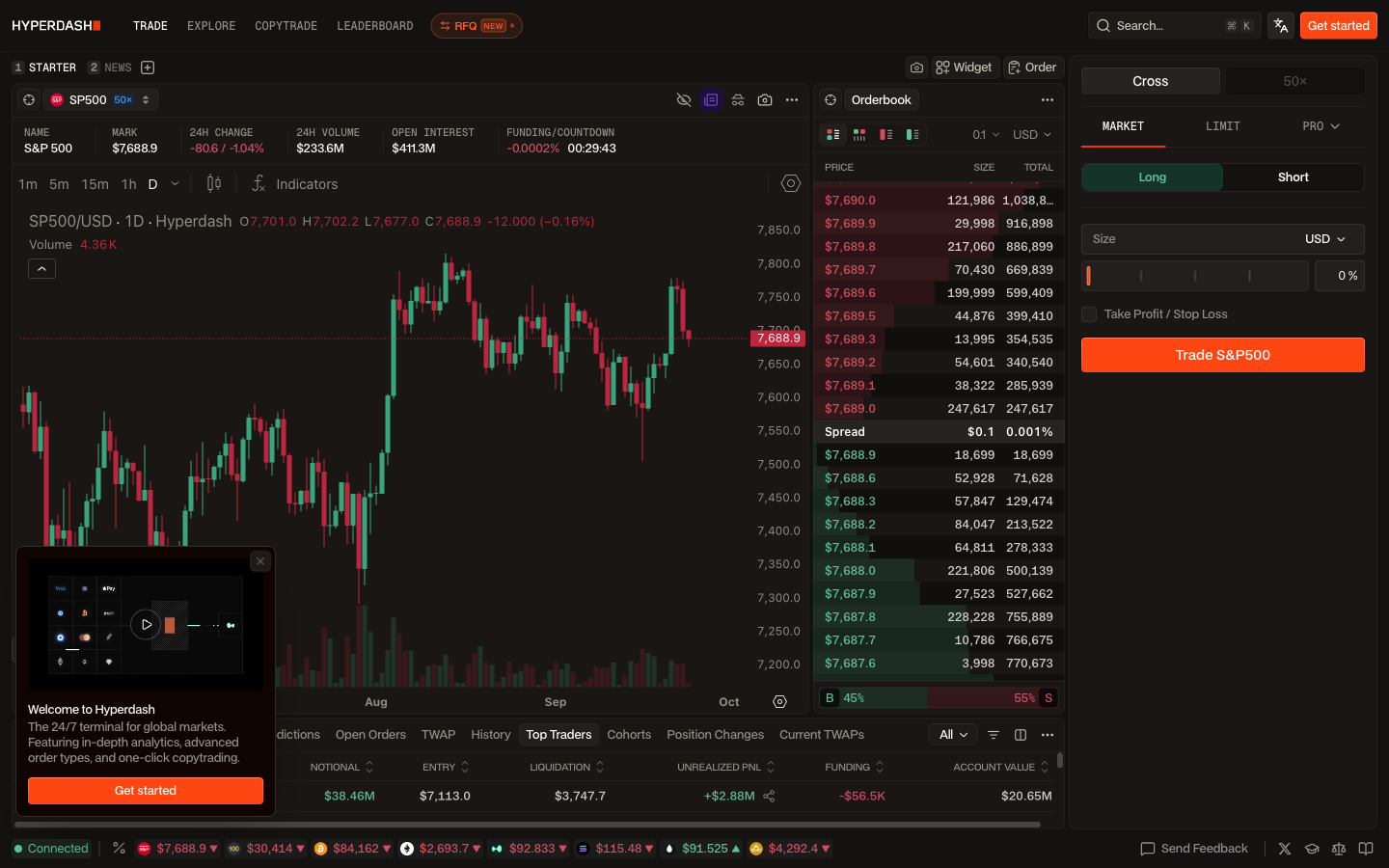
| Terminal (Trade) | Chart, order book and order form, plus tabs for Top Traders, Cohorts, Position Changes and Current TWAPs on the market you are viewing | See who holds the biggest positions in a market, with entry and liquidation prices, before you trade it |
| Markets hub and asset pages | Every listed market (178 crypto perps and 108 xyz stock, index, commodity and FX perps on Hyperdash's own list dated September 21, 2026) gets a page with chart, funding, open interest and cohort bias | Check how profitable traders sit in a stock or coin before you open the terminal |
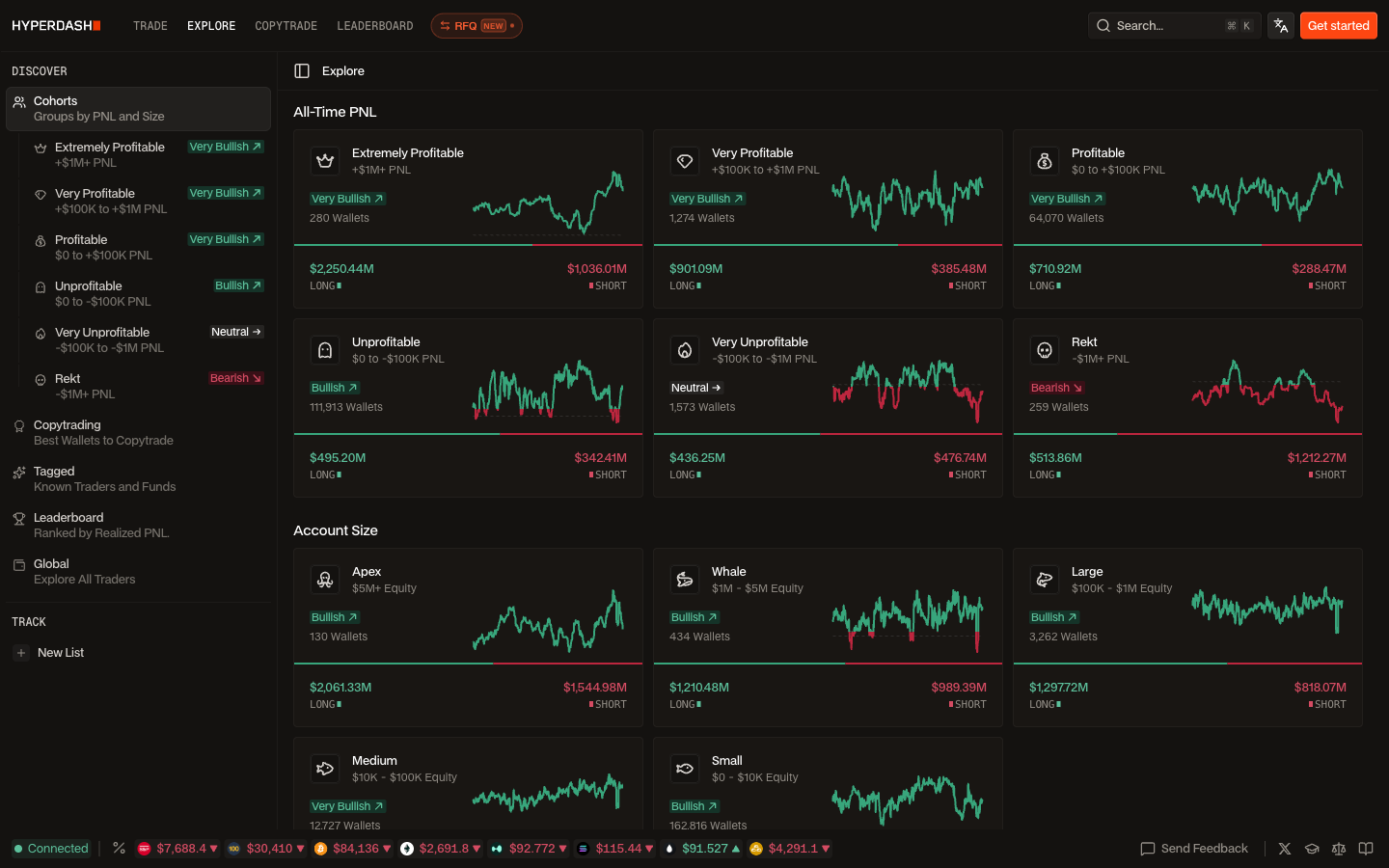
| Explore → Cohorts | Every wallet grouped by all-time PnL (Extremely Profitable → Rekt) and by account size (Apex → Small), with long/short notional for each group | Compare how the profitable and the losing crowd are positioned |
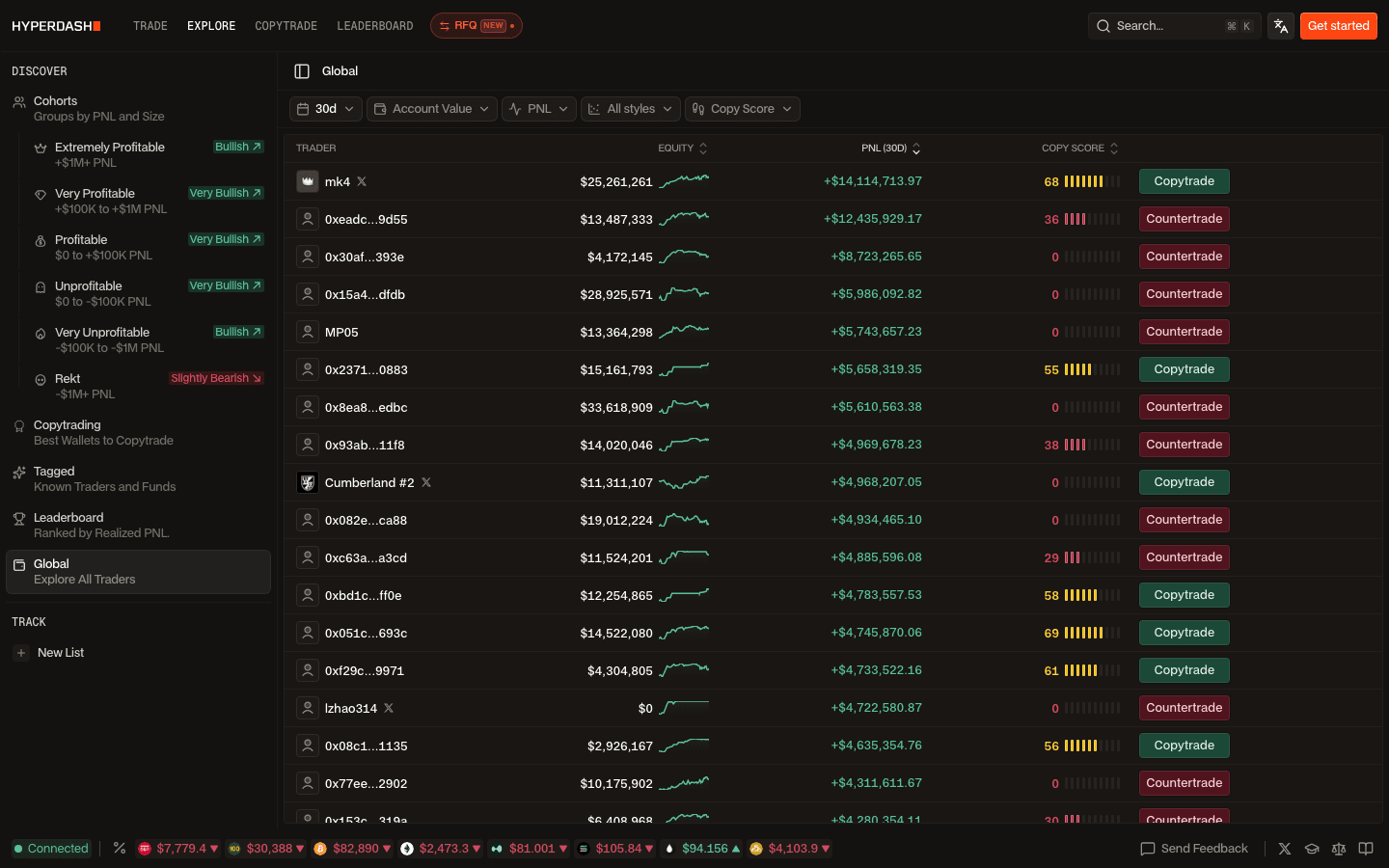
| Explore → Global / Tagged | Filter every Hyperliquid wallet by period, PnL, account value, trading style (Algo, Scalp, Intraday, Swing, Position) and copy score; labeled funds and known traders | Find wallets worth tracking; build shareable watch lists |
| Trader profile | Positions, PnL chart and calendar, fills, TWAPs, transfers, win rate, leverage, margin usage and trading style for any address | Check a trader before copying or following them |
| Leaderboard | Ranked by net realized PnL; tabs for Overall, Equities, Commodities, Majors, Alts; 24H to All Time | Find who actually makes money in a given market |
| Heatmaps and live feeds | Live, Depth and Historical liquidation and stop-loss heatmaps (5m–1d); live trades or live liquidations in place of the book | Spot price levels where liquidations or stops cluster |
| Predictions | Prediction markets listed by category at hyperdash.com/predictions (builder fee 0.03%) | Trade event outcomes from the same account |
| RFQ (private beta) | Request quotes from whitelisted market makers for perp orders up to $500,000; you have 30 seconds to execute | Large orders in SP500, XYZ100 and big-cap stocks during Nasdaq hours |
| Copytrade | Mirror (Copytrade) or oppose (Countertrade) up to 10 traders from a dedicated wallet, with leverage cap, max worse entry and asset filters | Automate following a trader, at a price (see fees) |
| Tracked feed and Telegram Flows | Fills and deposits/withdrawals of the wallets you track stream into the terminal's Tracked feed; the public channel t.me/hyperdashflows posts every liquidation of $50,000 or more, large TWAPs, OI and funding surges | Watch the market without keeping a tab open |
Cohorts: the most useful screen on the site
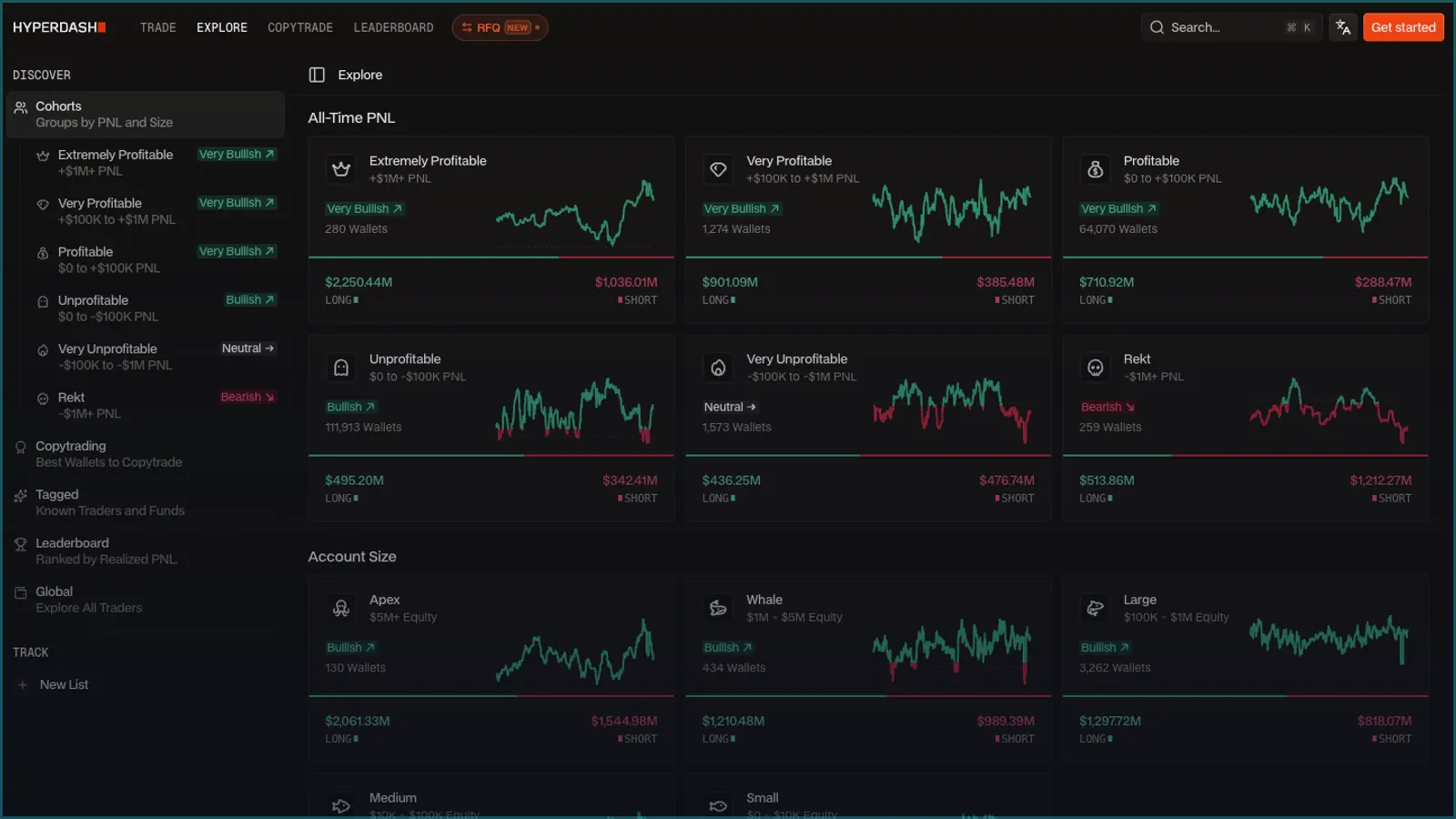
Cohorts split all Hyperliquid wallets by all-time PnL and show the long and short notional of each group. Here is how it read on September 24, 2026 (Hyperdash's own figures):
| Cohort (all-time PnL) | Wallets | Long | Short | Hyperdash label |
|---|---|---|---|---|
| Extremely Profitable (+$1M or more) | 286 | $2,254M | $1,038M | Very Bullish |
| Very Profitable (+$100K to +$1M) | 1,290 | $906M | $388M | Very Bullish |
| Profitable ($0 to +$100K) | 64,816 | $716M | $290M | Very Bullish |
| Unprofitable ($0 to −$100K) | 113,107 | $502M | $345M | Bullish |
| Very Unprofitable (−$100K to −$1M) | 1,593 | $440M | $492M | Neutral |
| Rekt (−$1M or worse) | 262 | $514M | $1,226M | Bearish |
Read it as a sentiment gauge, not a signal. On that day the most profitable wallets were net long by ~$1.2B and the "Rekt" cohort was net short by ~$0.7B. Three weeks later, on October 14, the labels had shifted: Extremely Profitable read "Bullish", the four middle cohorts "Very Bullish" (Very Profitable, Profitable, Unprofitable) or "Bullish" (Very Unprofitable), and Rekt only "Slightly Bearish" (sidebar of the Explore → Global screenshot below). Big accounts often hedge elsewhere, and all-time PnL says nothing about this week, so click a cohort and look at how its positioning changed before reading anything into it.
3. Wallet tracking walkthrough: find, vet and follow a wallet
This is the part of Hyperdash most people come for, and the first four steps need no account. We ran steps 1–3 logged out on October 14, 2026; step 4 follows Hyperdash's docs (the terminal screenshot above is from September 24).
- Find candidates in Explore → Global. The table lists every Hyperliquid wallet with equity, PnL for the chosen period and copy score. Filter by period (1d, 7d, 30d, All), account value, PnL, trading style and copy score. Tagged narrows it to known traders and funds that Hyperdash has labeled; Leaderboard ranks by net realized PnL per market group, which is why it differs from the official board, where token holders that never trade can top the 30-day list (how to read the Hyperliquid leaderboard).
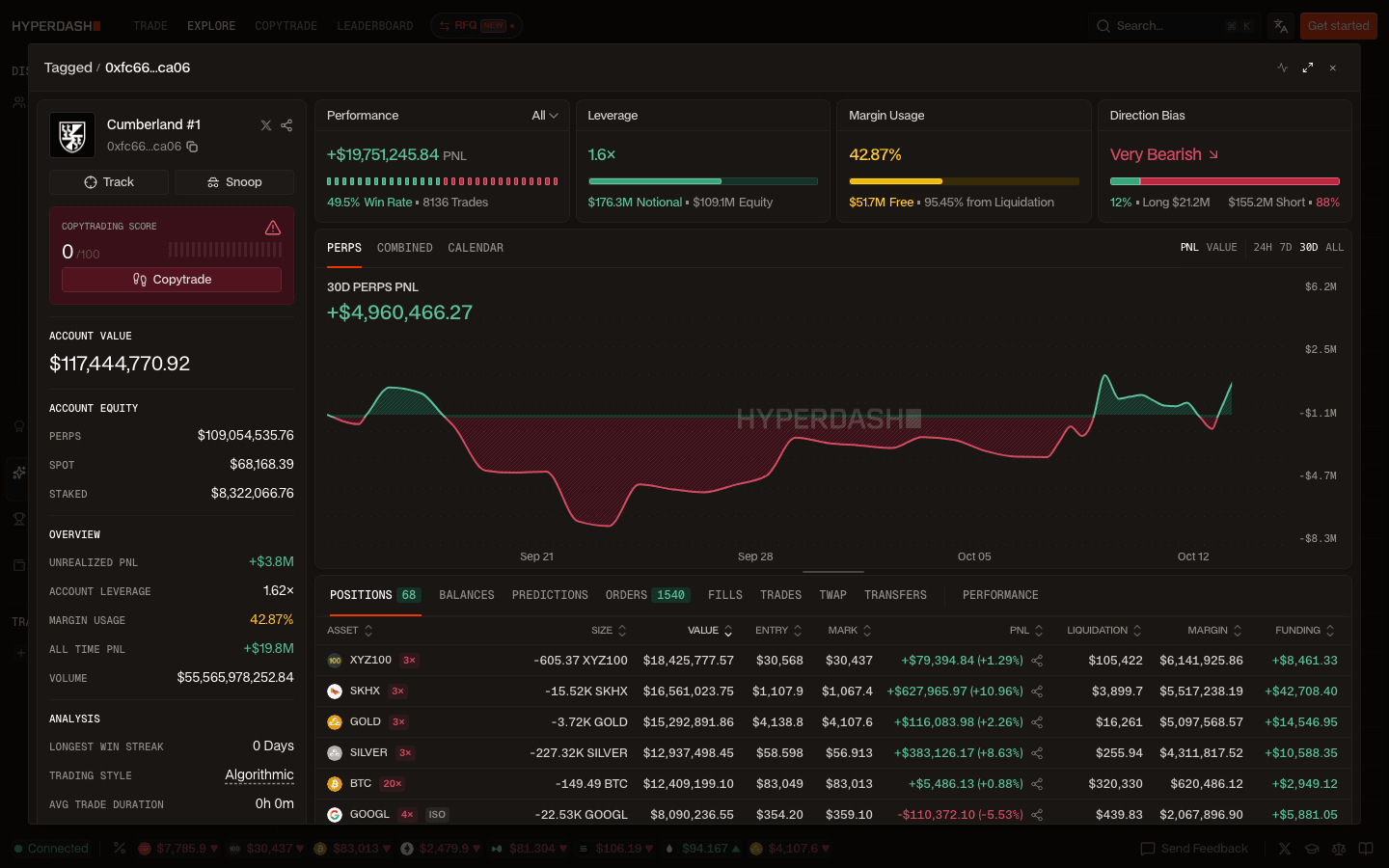
- Open a profile. Click any row. The profile shows performance and win rate, leverage, margin usage, direction bias, a PnL chart (perps, combined or calendar) and tabs for positions, balances, orders, fills, trades, TWAPs and transfers. In our example, Hyperdash's tagged wallet "Cumberland #1", the positions table listed 68 open perps with entry, mark, liquidation price and funding.
- Read the analysis block. Trading style, average trade duration and the longest win streak tell you whether a wallet is a human swing trader or a market maker. That example wallet was labeled Algorithmic with a copy score of 0/100 and a warning that copy results may vary because of execution speed: a wallet to watch, not to copy.
- Check the market, not just the wallet. In the terminal, Top Traders shows the largest open positions in the coin you are viewing, Position Changes shows who added or cut size over 15 minutes to 7 days, and the Live heatmap plots where liquidations and stops cluster. Our Hyperliquid liquidation map guide explains how to read the heatmaps without over-trusting them.
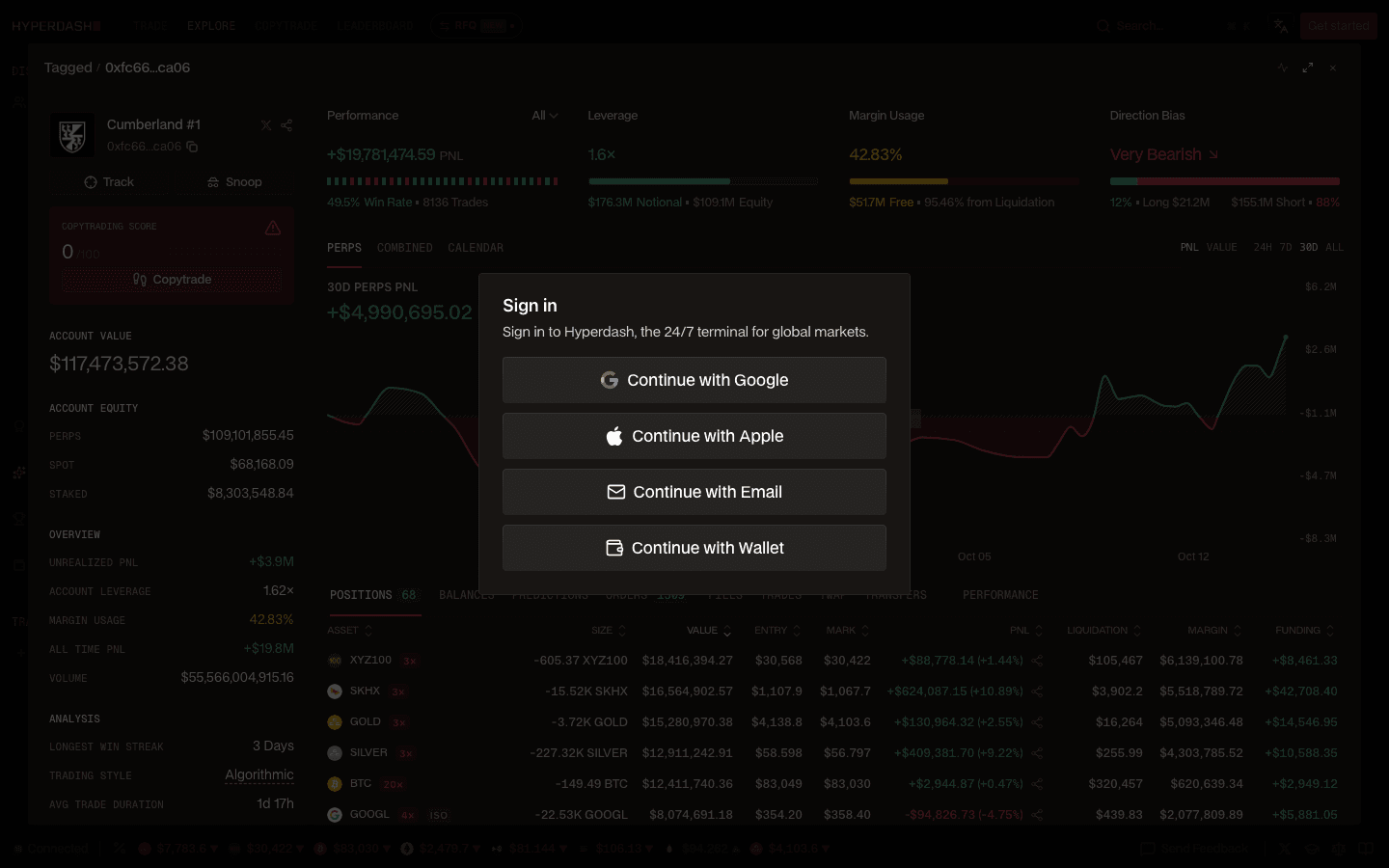
- Track it (sign-in needed). Track saves the wallet under an alias to a named list. Lists can be shared by link, and the wallet's fills, deposits and withdrawals stream into the Tracked feed in the terminal, filterable by list, direction and size. Logged out, the Track button opens the sign-in dialog.
- Cross-check on-chain. For anything you will act on, open the same address in HypurrScan or the official explorer (see Hyperdash vs HypurrScan). For a free way to follow whales without an account anywhere, see our Hyperliquid whale tracker guide.
4. Copy trading walkthrough
Hyperdash copy trading places real orders from a wallet dedicated to that strategy; it is not an alert feed. The steps below follow Hyperdash's copy-trading docs; we checked the public part (the ranking and the buttons) on October 14, 2026, when pressing Copytrade while logged out opened the sign-in dialog.
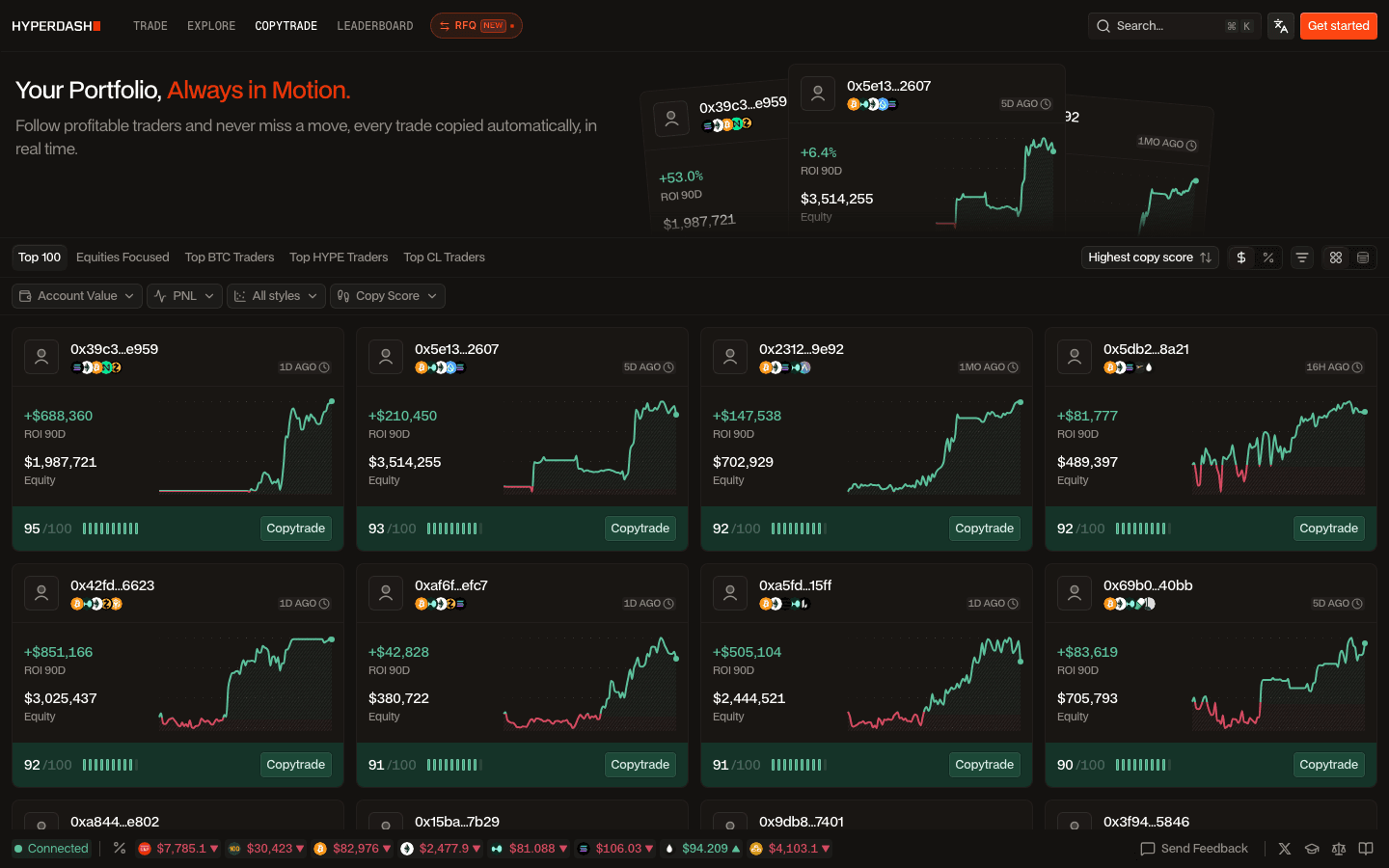
- Pick a trader. The Copytrade page ranks the top 100 copyable traders by Hyperdash's copy score, with 90-day ROI, equity and last trade time, plus tabs such as Equities Focused and top BTC, HYPE and CL traders. You can also paste any address.
- Copy or counter. Copytrade mirrors their perp positions; Countertrade takes the opposite side. One wallet can follow up to 10 traders.
- Set the risk limits (settings and defaults in the table below).
| Setting | What it does | Default |
|---|---|---|
| Trading mode | Copytrade mirrors positions, Countertrade takes the opposite side | Copytrade |
| Target traders | Up to 10 addresses per wallet, equal or custom weights | Equal weights |
| Max position leverage | Caps copied positions even when the target uses more: 1x to 40x | 20x |
| Max worse entry | How much worse your entry may be than the trader's: 0% to 50% | 10% |
| Only copy newly opened positions | Skips positions already open when you press Start | Off |
| Include spot and staked assets | Counts spot and staked HYPE in copy sizing | Off |
| Asset filters | Whitelist or blacklist specific assets | All assets |
- Fund the copy wallet. Create New makes a wallet managed under your Hyperdash account and funds it with USDC from your main wallet; it is a separate Hyperliquid account. Use Existing keeps funds in your own wallet: it needs at least 100 USDC, an API key valid for 180 days, approval of the 0.05% builder fee and unified account mode. If that wallet joined Hyperliquid with code HOLYGRAIL, its 4% discount still applies to Hyperliquid's part of the fee.
- Start, watch, stop. Running wallets show equity, PnL and a log of every action, including trades skipped and why. Stopping closes the wallet's open positions; archiving a Hyperdash-created wallet sends its balance back to your main wallet.
Before you switch it on, do the arithmetic. At 0.0950% taker all-in, a trader who turns over their book daily costs you far more than their leaderboard PnL suggests, and copy-trade volume earns no fee rebates. Orders follow within seconds, not in the same block, which is why Hyperdash warns that algorithmic traders may not be replicable. Start small with a low leverage cap. For vaults and other copy engines, see Hyperliquid copy trading.
5. Hyperdash fees and the builder fee
Hyperdash's fee page is clear about it. Trades carry a builder fee of 0.015% on perps and 0.03% on spot and prediction markets, "added to the base Hyperliquid fee schedule". Copy trading uses a 0.05% builder fee, and copy-trade volume is not eligible for fee rebates. Traders who sign up with a Hyperdash referral code pay 10% less builder fee. You also earn cashback on your own Hyperdash fees, from 5% (Wood tier) and 10% from $100,000 of 30-day volume, up to 22.5% from $500M, and 25% for VIPs.
A builder fee is charged through a one-time approval that your wallet signs when you connect: it lets Hyperdash's builder address take up to the approved rate on each order. You can see which front-ends your wallet has approved, and at what maximum rate, with our Hyperliquid builder fee checker (paste a public address; no wallet connection).
What Hyperdash's page does not spell out is how this combines with a Hyperliquid referral code. Hyperdash orders carry its builder code, but on Hyperliquid the referral discount also applies to orders placed through apps with a builder code: mainnet fills we checked on October 1, 2026 show referred accounts paying 4% less on Hyperliquid's part of app orders, while the builder fee is charged in full. The discount sits on the Hyperliquid account, so it carries over when you connect a wallet that already has a code; a Google, Apple or email login creates a new wallet that starts without one. At the base tier, on a $10,000 market order:
| Where you place the order | Taker | Maker | Fee on $10,000 (taker) | Note |
|---|---|---|---|---|
| app.hyperliquid.xyz with code HOLYGRAIL | 0.0432% | 0.0144% | $4.32 | Official interface, no builder fee; 4% off your first $25M |
| app.hyperliquid.xyz, no code | 0.0450% | 0.0150% | $4.50 | Base tier |
| Hyperdash, signed up with a Hyperdash referral code | 0.0585% | 0.0285% | $5.85 | Hyperliquid fee + builder fee 0.0135% (−10%) |
| Hyperdash, no referral code | 0.0600% | 0.0300% | $6.00 | Hyperliquid fee + builder fee 0.015% |
| Hyperdash, Hyperliquid account joined with HOLYGRAIL | 0.0582% | 0.0294% | $5.82 | Hyperliquid fee −4%, builder fee 0.015% in full |
| Hyperdash copy trading | 0.0950% | 0.0650% | $9.50 | Hyperliquid fee + 0.05% copy-trade builder fee |
Hyperdash cashback reduces its rows slightly, and HYPE staking discounts and volume tiers apply to the Hyperliquid part everywhere. The trade panel shows your effective rate before each order.
Is the Hyperdash builder fee worth it?
The fee buys workflow, not better fills. Your order lands in the same Hyperliquid order book either way, so the price you get is the same. For a few swing trades a week that is pure cost: $100,000 of monthly taker volume costs $15.00 a month in Hyperdash builder fees, on top of what the same trades cost on app.hyperliquid.xyz. It starts to pay when you actually use these:
- Chase and Chase TWAP. A post-only limit order that rests one tick inside the opposite side of the book and re-prices continuously, so you fill as a maker without babysitting it.
- Stealth TWAP and Swarm. TWAP with a Stealth option that runs through Hyperdash's infrastructure instead of on-chain, and Swarm, which splits an order into up to 200 clips sent in parallel.
- Trailing stops, scale orders and Quick Trade buttons with preset sizes, plus saved widget layouts and keyboard shortcuts.
- RFQ (private beta). Block liquidity for perp orders up to $500,000 in SP500, XYZ100 and large-cap stocks during Nasdaq hours, at no extra fee.
- Card and bank deposits in 34 fiat currencies, if you do not already hold USDC.
What we recommend: research on Hyperdash, then place the order on app.hyperliquid.xyz with code HOLYGRAIL. It is the same wallet, the same markets and the same order book, 28% cheaper per taker order than Hyperdash without a code. Keep the Hyperdash terminal for the days you need the order types above or copy trading.
6. Is Hyperdash safe?
Short answer: the design is non-custodial and limits what Hyperdash can do with your funds, but any third-party front-end adds risk compared with trading on app.hyperliquid.xyz. What Hyperdash's security docs say, and what it means for you:
- Agent wallet, not your key. Hyperdash generates a separate trading key (an agent or API wallet) in your browser, encrypts it there, and your wallet signs an approval for it. The agent can place, modify and cancel orders but cannot withdraw or transfer; withdrawals are signed by your own wallet. It expires after 180 days, Refresh Agent Key in the Agent Manager replaces it, and an agent you no longer use can be revoked on app.hyperliquid.xyz/API. Note what "cannot withdraw" leaves open: a leaked agent key can still trade your balance into a loss. Our Hyperliquid API key security guide explains agent wallets, rotation and revocation in detail.
- The builder-fee approval. It is a cap, not a charge, but it stays until you remove it on app.hyperliquid.xyz/builderCodes. Check what your address has approved with the builder fee checker before and after you try a new front-end.
- Sign-in method decides custody. Wallet sign-in only signs a message (no transaction). Google, Apple and email create a non-custodial wallet secured by Turnkey; a copy wallet made with Create New is managed under your Hyperdash account.
- 2FA. Turn on a passkey or authenticator app under Settings → Security and save the backup codes. Hyperdash asks for it after sign-in (you can trust a device for 30 days) and again before a withdrawal.
- Deposits. Deposit addresses are network-specific, and Hyperdash's docs say wrong-network deposits are permanently lost. Send a small test amount first.
- Jurisdiction. The terms (last updated June 27, 2025) exclude the United States and other listed jurisdictions; see the FAQ below.
Hyperliquid itself never needs a third-party front-end. If you only want to act on what you see on Hyperdash, open Hyperliquid directly with code HOLYGRAIL and your wallet never signs anything for Hyperdash.
7. How to sign up, log in and deposit on Hyperdash
You do not need an account to browse cohorts, profiles, the leaderboard or heatmaps. You need one to track wallets, trade or copy-trade. If you only want to trade what you find, open Hyperliquid with code HOLYGRAIL instead and skip steps 2 to 4. If you will trade on Hyperdash, join Hyperliquid with the code first and then use that same wallet in step 1 (why).
- Sign in at hyperdash.com. The dialog offers Continue with Google, Apple, Email or Wallet. Choose Wallet if your Hyperliquid account already exists (or joined with a referral code); the other three create a new Turnkey wallet.
- Import an existing Hyperliquid account (wallet login). Connect the wallet, then Approve Agent: Hyperdash generates an API key in your browser, valid for 180 days, that can trade but cannot withdraw.
- Approve the builder fee. A second signature allows Hyperdash's fee on your orders. This is the step that adds 0.015% to every perp trade, so read the maximum rate you are approving.
- Deposit. Send crypto on 11 networks (Ethereum, Arbitrum, Base, Optimism, Polygon, BSC, Solana, Bitcoin, Tron, HyperEVM and Hyperliquid), pull from one of 7 connected exchanges (Binance, Coinbase, Bybit and others), or pay by card, Apple Pay, Google Pay, bank transfer or local rails in 34 fiat currencies. The deposit modal shows the minimum and settlement time per method.
- Enable 2FA (passkey or authenticator) under Settings → Security, and save the backup codes.
8. Stocks, gold and oil on Hyperdash
Many people land on Hyperdash through its asset pages for Micron, SanDisk, Intel, gold or crude oil. Those are not Hyperdash's own products. They are xyz markets: USDC-margined perpetual futures that trade.xyz deploys on Hyperliquid under HIP-3. You get price exposure, not shares, and they trade 24/7. Every one of them is also listed on app.hyperliquid.xyz, where no builder fee is added and your referral discount applies.
| Market | Ticker on Hyperliquid | Max leverage | Fee mode (Oct 14, 2026) |
|---|---|---|---|
| S&P 500 (licensed index perp) | xyz:SP500 | 50x | growth (0.009% taker) |
| Nvidia | xyz:NVDA | 20x | growth (0.009% taker) |
| Micron | xyz:MU | 10x | growth (0.009% taker) |
| SanDisk | xyz:SNDK | 10x | growth (0.009% taker) |
| Intel | xyz:INTC | 10x | growth (0.009% taker) |
| Kioxia | xyz:KIOXIA | 10x | growth (0.009% taker), isolated only |
| SoftBank | xyz:SOFTBANK | 10x | growth (0.009% taker), isolated only |
| Nikkei 225 | xyz:JP225 | 20x | growth (0.009% taker), isolated only |
| Gold | xyz:GOLD | 25x | standard (0.09% taker) |
| Silver | xyz:SILVER | 25x | growth (0.009% taker) |
| WTI crude oil | xyz:CL | 20x | growth (0.009% taker) |
Growth mode is where Hyperdash's fee hurts most. Hyperliquid's own taker fee on those markets is only 0.009%, so a 0.015% builder fee makes the same trade about 2.7 times as expensive. On a $10,000 market order in a growth-mode stock perp:
| Where you place the order | Taker, all-in | Fee on $10,000 |
|---|---|---|
| app.hyperliquid.xyz with code HOLYGRAIL | 0.0086% | $0.86 |
| app.hyperliquid.xyz, no code | 0.0090% | $0.90 |
| Hyperdash | 0.0240% | $2.40 |
| Hyperdash copy trading | 0.0590% | $5.90 |
Gold was not in growth mode on both September 27 and October 14, 2026, so it pays the standard HIP-3 rate. Check the fee line on the ticket before a large trade; our Hyperliquid gold guide covers that market. Hyperliquid's HIP-3 spec says these markets keep the usual fee discounts, including referral rewards, so HOLYGRAIL's 4% applies to stock perps too. Use Hyperdash's asset pages for the cohort bias and biggest positions in a stock, then trade it on Hyperliquid with HOLYGRAIL.
9. Hyperdash referral program
Every Hyperdash account can claim a referral code on its profile page. Referred traders pay 10% less builder fee. The referrer earns a share of Hyperdash's fees from their direct referrals: 20%, rising to 25% at $2.5M, 30% at $25M and 35% at $100M of 30-day referred volume. Levels never go down once reached. Rewards are claimable from $10 and, per the docs, are usually paid within a week. An affiliate program with custom VIP terms is open to creators and communities at hyperdash.com/affiliates. Hyperdash referral code: we do not hold one yet. Any Hyperdash user's code gives the same 10% builder-fee discount.
Note that this is a discount on Hyperdash's 0.015% only. It saves $0.15 on a $10,000 trade (the builder fee is $1.50). The 4% Hyperliquid referral discount is worth $0.18 on the same trade and applies on Hyperdash as well, so a Hyperliquid referral code and an app's own referral code both apply on the same order: the 4% comes off Hyperliquid's part of the fee, the app's discount off its builder fee.
10. Hyperdash vs HypurrScan
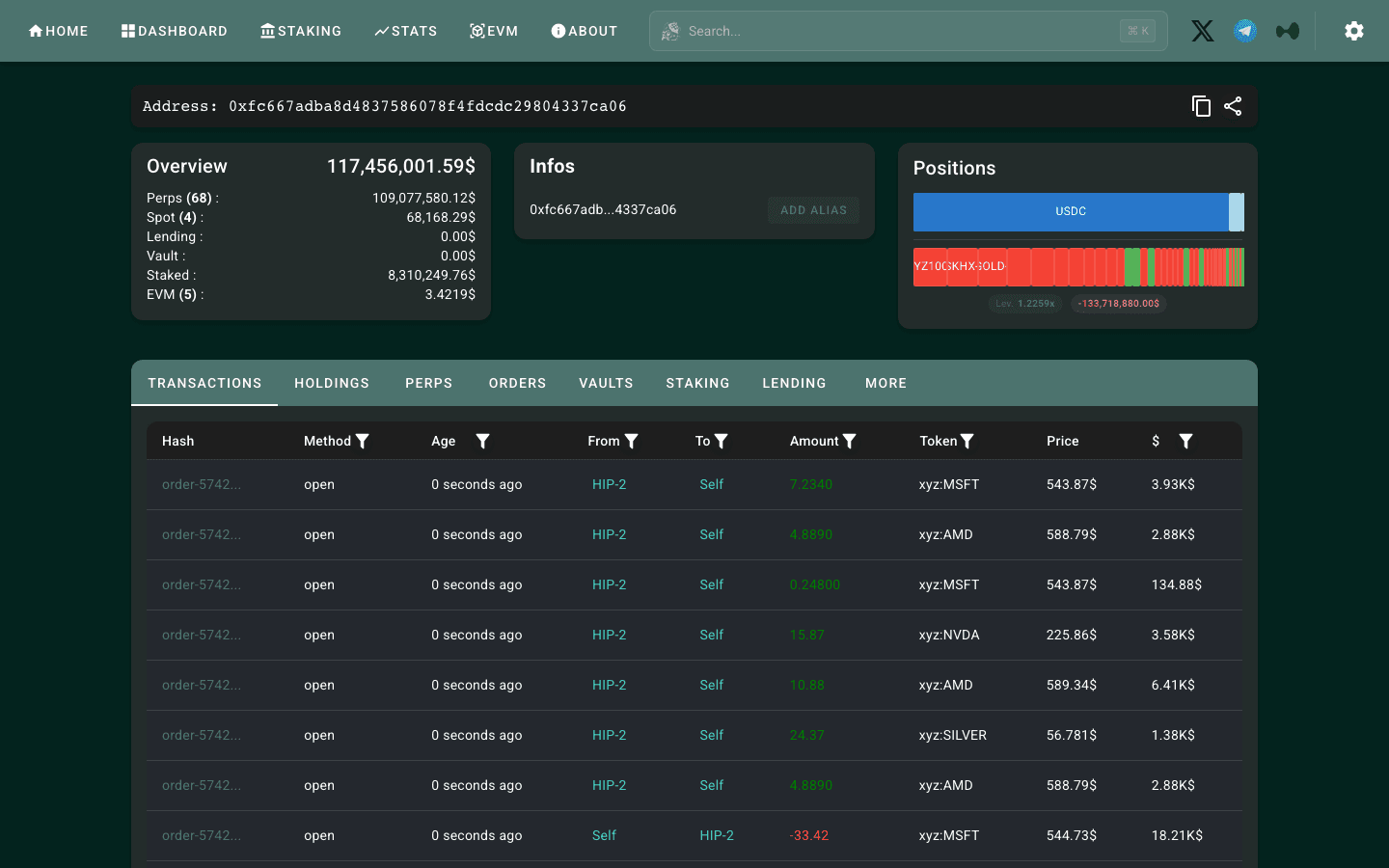
They are often mentioned together because both show what any Hyperliquid wallet holds, for free. We opened the same address, Hyperdash's tagged "Cumberland #1" wallet, on both sites on October 14, 2026. Both showed about the same account value, roughly $117.4M (positions were moving between page loads), but the views are built for different jobs:
| Hyperdash | HypurrScan | |
|---|---|---|
| What it is | Trading terminal and analytics site (a third-party front-end) | Community explorer for HyperCore |
| Account needed | No to browse; sign-in to track, trade or copy | No; viewing never asks for a signature |
| Wallet page | Label (for tagged wallets), PnL chart, win rate, trading style, leverage, copy score, positions with liquidation prices | Totals across perps, spot, staking, vaults, lending and HyperEVM; transaction-by-transaction feed; holdings, perps, orders, vaults and staking tabs |
| Finding wallets | Cohorts, leaderboard, Global filters, Tagged traders and funds | Search by address, transaction or token; dashboard and stats |
| Trading | Yes, with a 0.015% builder fee on perps (0.05% on copy trades) | No |
| Cost | Free to browse | Free |
| Best for | Deciding which wallets are worth following, and copy trading | Checking exactly what a wallet did, one transaction at a time |
Hyperdash told us who the wallet is (its tag), how it trades (algorithmic, copy score 0) and where its liquidation prices sit. HypurrScan showed no label but a raw, second-by-second feed of the orders it was placing on xyz stock perps, and balances across HyperEVM, staking and vaults that a trading view leaves out. Use Hyperdash to decide which wallets matter; use HypurrScan to verify what one of them actually did. Our Hyperliquid explorer guide covers HypurrScan, the official explorer and the HyperEVM explorers tab by tab.
11. Hyperdash alternatives
| Tool | Cost | Best for | Our guide |
|---|---|---|---|
| Official leaderboard + explorer (app.hyperliquid.xyz) | Free, first-party | Ranking, any wallet's actions and fills | Read |
| HypurrScan, HyperTracker, CoinGlass | Free tiers | Whale positions, wallet pages, liquidation maps | Read |
| CoinGlass / Hyperliquid liquidation maps | Free tiers | Liquidation clusters by price | Read |
| HyperX, Dexly (copy trading) | Varies by app | Alternative copy engines; Dexly has native mobile apps | Read |
| Hyperliquid vaults | Leader takes a profit share | Hand money to a strategy instead of copying trades | Read |
For trading on mobile rather than analytics, third-party Hyperliquid apps such as Based (0.025% builder fee) or Liquid (0.05%) are the comparison. Every one of them costs more per trade than the official interface. HOLYGRAIL's 4% still comes off Hyperliquid's part of the fee on orders placed there, provided your Hyperliquid account joined with the code first: apps such as Phantom often set their own Hyperliquid referral code on accounts that have none, so enter a code on Hyperliquid before you start using an app. If you use one anyway, our codes are HOLYGRAIL on Based (the same word as our Hyperliquid code, but a separate code in Based's own program) and JV2EN2CX on Liquid. See the Hyperliquid app guide and Hyperliquid builder codes, fees by app.
Who should use Hyperdash
| You are… | Use Hyperdash for | Place orders on |
|---|---|---|
| A discretionary trader who wants positioning data | Cohorts, Top Traders, Position Changes, heatmaps (free) | app.hyperliquid.xyz (cheapest) |
| A stock, gold or oil trader | Asset pages: cohort bias and biggest positions | app.hyperliquid.xyz (same xyz markets, no builder fee) |
| A whale watcher | Tracked lists and the Telegram Flows channel | app.hyperliquid.xyz |
| An active trader who needs Chase/Swarm orders and saved layouts | The terminal itself | Hyperdash (accept +0.015%) |
| Someone who wants to follow a trader automatically | Copytrade, with small size and a leverage cap | Hyperdash (0.05% builder fee) |
| Buying crypto with a card to start trading | Fiat on-ramp in 34 currencies | Either; compare the on-ramp quote |
FAQ
What is Hyperdash?
Hyperdash (hyperdash.com, X: @hypurrdash) is a third-party trading terminal and analytics site built on Hyperliquid. It shows positions, PnL and liquidation data for every Hyperliquid wallet, groups traders into cohorts, ranks them on a leaderboard, draws liquidation heatmaps, and lets you trade or copy-trade Hyperliquid markets (crypto perps, spot, prediction markets and the xyz stock, commodity and FX perps) from its own interface. Orders placed there carry Hyperdash's builder code and a 0.015% builder fee on perps. It is not part of Hyperliquid.
Is Hyperdash safe?
Hyperdash is non-custodial. It trades through an agent (API) key that can place, modify and cancel orders but cannot withdraw or transfer, and that expires after 180 days. Withdrawals are signed by your own wallet, and 2FA (passkey or authenticator app) is asked after sign-in and again before a withdrawal. Email, Google and Apple sign-ins create a wallet secured by Turnkey. The remaining risks are those of any third-party front-end: a hijacked session or leaked agent key could trade your balance badly, a copy wallet that Hyperdash creates is managed under your Hyperdash account, and the builder-fee approval allows fees up to the rate you signed. You can see that approval for any address with our Hyperliquid builder fee checker.
Is Hyperdash free?
Browsing the analytics (cohorts, trader profiles, leaderboard, top traders, heatmaps) is free and needs no account; tracking wallets needs a free sign-in. Trading is not free: Hyperdash adds a builder fee of 0.015% on perps and 0.03% on spot and prediction markets on top of Hyperliquid's own fee, and 0.05% on copy-trading orders. Cashback on your own Hyperdash fees starts at 5%.
Hyperdash vs HypurrScan: which should I use?
Both are free and read the same public Hyperliquid data, but they answer different questions. HypurrScan (hypurrscan.io) is a community explorer: paste an address and you get its balances across perps, spot, staking, vaults and HyperEVM, and every transaction one by one. Hyperdash is an analytics site and trading terminal: it labels known funds and traders, scores wallets, groups them into cohorts and ranks them, and lets you track or copy a wallet. Use Hyperdash to find wallets worth following and HypurrScan to verify exactly what a wallet did. Only Hyperdash can trade, at a 0.015% builder fee on perps.
What is Hyperdash trading?
Trading on Hyperdash means sending orders to Hyperliquid's order book through Hyperdash's terminal instead of through app.hyperliquid.xyz. The markets, the order book and your wallet are the same; what Hyperdash adds is its own order types (Chase, Chase TWAP, Stealth TWAP, Swarm, trailing stops), saved layouts, card deposits and copy trading. The price for that is a builder fee of 0.015% on perps and 0.03% on spot and prediction markets, on top of Hyperliquid's own fee.
What is Hyper Dash?
Two different things share the name. Hyperdash (one word, hyperdash.com) is the Hyperliquid trading terminal this review covers. Hyper Dash is a multiplayer VR shooter for Meta Quest and Steam, unrelated to crypto, and most "Hyper Dash review" results are about the game. There is also a podcast called Hyperdash, an older, discontinued machine-learning monitoring app of the same name, and DASH, a separate cryptocurrency that Hyperdash lists as one of its markets.
Who owns Hyperdash?
Hyperdash does not name its owner on its site or in its docs; its terms of use just say "Hyperdash (the Company)". Bankless reported on January 7, 2026 that Hyperdash had been acquired by PVP Trade (pvp.trade, a Telegram trading bot on Hyperliquid) and had relaunched that week with a rebuilt terminal. The pre-relaunch version, sometimes called Hyperdash legacy, is gone: legacy.hyperdash.com now redirects to hyperdash.com (checked October 14, 2026).
How do I sign up or log in to Hyperdash?
Open hyperdash.com and sign in with Google, Apple, email or any EVM wallet (on October 14, 2026 the dialog offered exactly these four). Google, Apple and email logins create a non-custodial wallet secured by Turnkey; a wallet login can import an existing Hyperliquid account after you approve an agent key (valid 180 days, trading only) and Hyperdash's builder fee. If you want your Hyperliquid referral discount on Hyperdash orders, join Hyperliquid with a code such as HOLYGRAIL first and then use Continue with Wallet with that same wallet.
Can I trade gold, oil or stocks on Hyperdash?
Yes. Hyperdash lists the xyz markets, perpetual futures on stocks, indices, gold, silver, crude oil and FX that trade.xyz runs on Hyperliquid under HIP-3. They are USDC-margined perps, not shares, and trade 24/7. The same markets are on app.hyperliquid.xyz without a builder fee: most run in growth mode at 0.009% taker, so Hyperdash's 0.015% makes a trade about 2.7 times as expensive. Gold was not in growth mode on September 27 and October 14, 2026 and pays the standard 0.09%.
Does Hyperdash have copy trading?
Yes. You can mirror (Copytrade) or take the opposite side of (Countertrade) up to 10 traders from a wallet dedicated to that strategy. Settings include a max position leverage cap (1x to 40x, default 20x), max worse entry (default 10%), new-positions-only mode and asset filters. Copy-trade orders carry a 0.05% builder fee, and that volume does not earn fee rebates. Copytrade needs a signed-in account.
Is it cheaper to trade on Hyperdash or on Hyperliquid directly?
Hyperliquid directly. On a $10,000 market order at the base tier you pay $4.50 on app.hyperliquid.xyz ($4.32 with a referral code such as HOLYGRAIL) versus $6.00 on Hyperdash ($5.85 with a Hyperdash referral code). Hyperdash orders carry a builder code, but the referral discount also applies to orders placed through apps with a builder code: a Hyperliquid account that joined with HOLYGRAIL pays $5.82 on Hyperdash, because the 4% comes off Hyperliquid's part of the fee and the builder fee is added in full.
Is there a Hyperdash referral code, and do you have one?
We do not hold a Hyperdash referral code, so none of our Hyperdash links earn us anything. Every Hyperdash account can claim a code on its profile page, and any valid code gives the same 10% off Hyperdash's 0.015% builder fee (it does not stack with promos). That saves $0.15 on a $10,000 trade. A Hyperliquid referral code is a different thing: it sits on your Hyperliquid account and is worth $0.18 on the same trade. The referral discount also applies to orders placed through apps with a builder code. To have it on Hyperdash, join Hyperliquid with a code such as HOLYGRAIL using Rabby or MetaMask first, then log in to Hyperdash with that same wallet.
Can I use Hyperdash from the US or Japan?
Hyperdash's terms (last updated June 27, 2025, re-read October 14, 2026) list the United States as a prohibited jurisdiction and also define it as a "Perpetual Futures Prohibited Jurisdiction", along with Ontario, China and a list of sanctioned or restricted countries. Japan is not on that named list. Both definitions also end in catch-all clauses covering any jurisdiction where perpetual futures are prohibited or where serving users could require a local licence, so the named list is not a guarantee. Check the current terms for your country before depositing.
Research on Hyperdash, trade on Hyperliquid for less
Same wallet, same markets, stocks and gold included. Join with code HOLYGRAIL for 4% off your first $25M, with no builder fee on top.
Want the Hyperdash terminal or copy trading instead (builder fee 0.015% on perps, 0.05% on copy trades)? Keep the 4% with two steps:
- Join Hyperliquid with
HOLYGRAILusing Rabby or MetaMask.
Step 1: join Hyperliquid → - Log in to Hyperdash with that same wallet (Continue with Wallet, not Google, Apple or email).
Step 2: open Hyperdash →
Disclosure: HOLYGRAIL is our Hyperliquid referral code; we earn a share of referred accounts' fees. The Based and Liquid links carry our referral codes for those apps. Links to Hyperdash carry no referral of ours. Hyperdash features, fees and terms were read from docs.hyperdash.com and hyperdash.com on September 24 and re-checked on October 14, 2026; we did not fund a Hyperdash account. Screenshots 3 to 7 were taken logged out on October 14, 2026; cohort figures are Hyperdash's own display on September 24. Hyperliquid fees and referral rules come from hyperliquid.gitbook.io and mainnet fills; xyz leverage and fee modes from the Hyperliquid API on September 27, re-checked on October 14, 2026. Ownership is as reported by Bankless; Hyperdash has not published it.