Hyperliquid Order Types Explained (2026): Every Order, Time-in-Force and Flag
Hyperliquid has two core order types, Market and Limit, plus 8 more on perps: Stop Market, Stop Limit, Take Market, Take Limit, Trailing Stop, Scale, TWAP and Chase. A limit order is GTC, IOC or ALO (post-only); there is no FOK. Reduce Only and Take Profit / Stop Loss are checkboxes, every trigger fires on the mark price, and the minimum order is $10. Orders that take liquidity pay 0.045%, orders that rest pay 0.015% (base tier). The whole menu in one table:
Desktop order form, checked October 19, 2026. Spot pairs offer only Market, Limit, Chase, Scale and TWAP; the phone layout drops Chase (mobile). Fees: Hyperliquid's base tier; code HOLYGRAIL takes 4% off both (0.0432% taker, 0.0144% maker) on your first $25M.
By BLTZ · Published · Updated · Checked against hyperliquid.gitbook.io, the desktop Pro menu and the phone layout of app.hyperliquid.xyz on October 19, 2026 (desktop order form September 27, 2026) · How we verify
1. Where each order type sits in the app
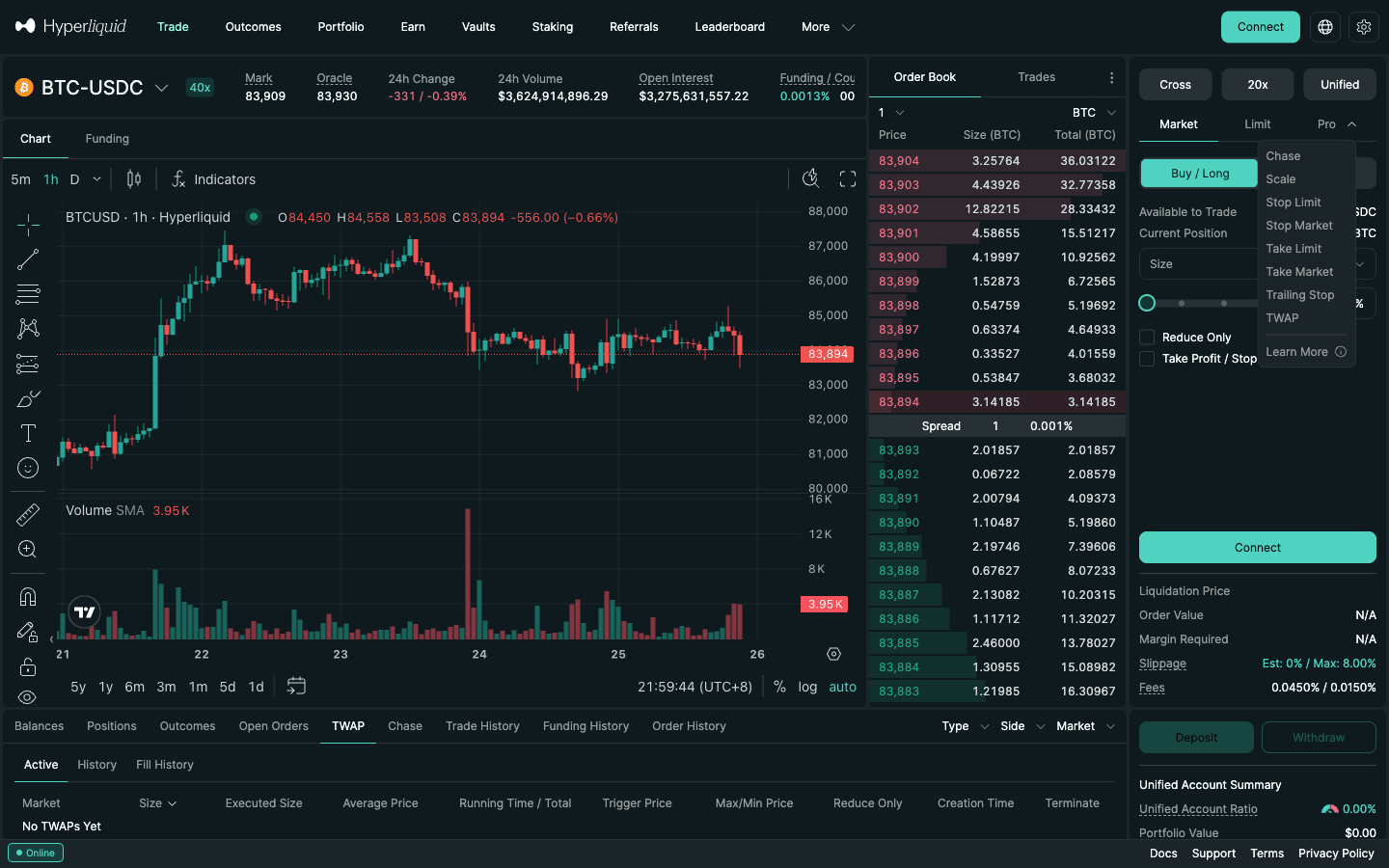
On Hyperliquid the order form sits to the right of the chart. Market and Limit are tabs; everything else is in the Pro dropdown, which on October 19, 2026 held exactly 8 entries on perps: Chase, Scale, Stop Limit, Stop Market, Take Limit, Take Market, Trailing Stop and TWAP. Reduce Only and Take Profit / Stop Loss are checkboxes under the size field, and a limit order's time-in-force is a TIF dropdown. Margin mode and leverage are not order types: the Cross / Isolated and leverage buttons above the tabs set them per market (cross vs isolated margin on Hyperliquid).
The Pro menu of the Hyperliquid order form (screenshot September 25, 2026; the same eight entries on October 19, 2026): Chase, Scale, Stop Limit, Stop Market, Take Limit, Take Market, Trailing Stop and TWAP, next to the Market and Limit tabs.
Two things Hyperliquid does not have, whatever older guides say: no FOK (fill-or-kill) flag, and no iceberg or hidden orders. The order action has no hidden or display-size field, so every resting order is visible in the book.
2. Limit or market: which should you use?
The short rule: use a market order when getting filled matters more than the price, and a limit order when the price or the fee matters more than getting filled. On Hyperliquid the difference is also a 3× fee difference at the base tier, because a limit order that rests on the book pays the maker rate.
Market order
Limit order
Price you get
Whatever the book offers, up to your max slippage
Your price or better, never worse
Will it fill?
Yes, if there is liquidity inside the slippage band
Only if the market trades to your price
Fee (base tier)
0.045% taker
0.015% maker if it rests (0.045% on any part that crosses)
Best for
Stop-outs, fast news, small size on BTC/ETH
Entries at a level, take-profits, thin altcoins, anything fee-sensitive
Main risk
Slippage on thin books and in fast moves
Missing the move because it never filled
Two refinements cover most real situations. For a hard price cap but a trade right now, use a limit with IOC. To be certain you pay the maker fee, use a limit with ALO (post-only). Protective exits are the exception to "limit is cheaper": a stop-loss that does not fill is worse than any fee, so stops are usually Stop Market or market TP/SL orders.
3. How to place a limit order on Hyperliquid, step by step
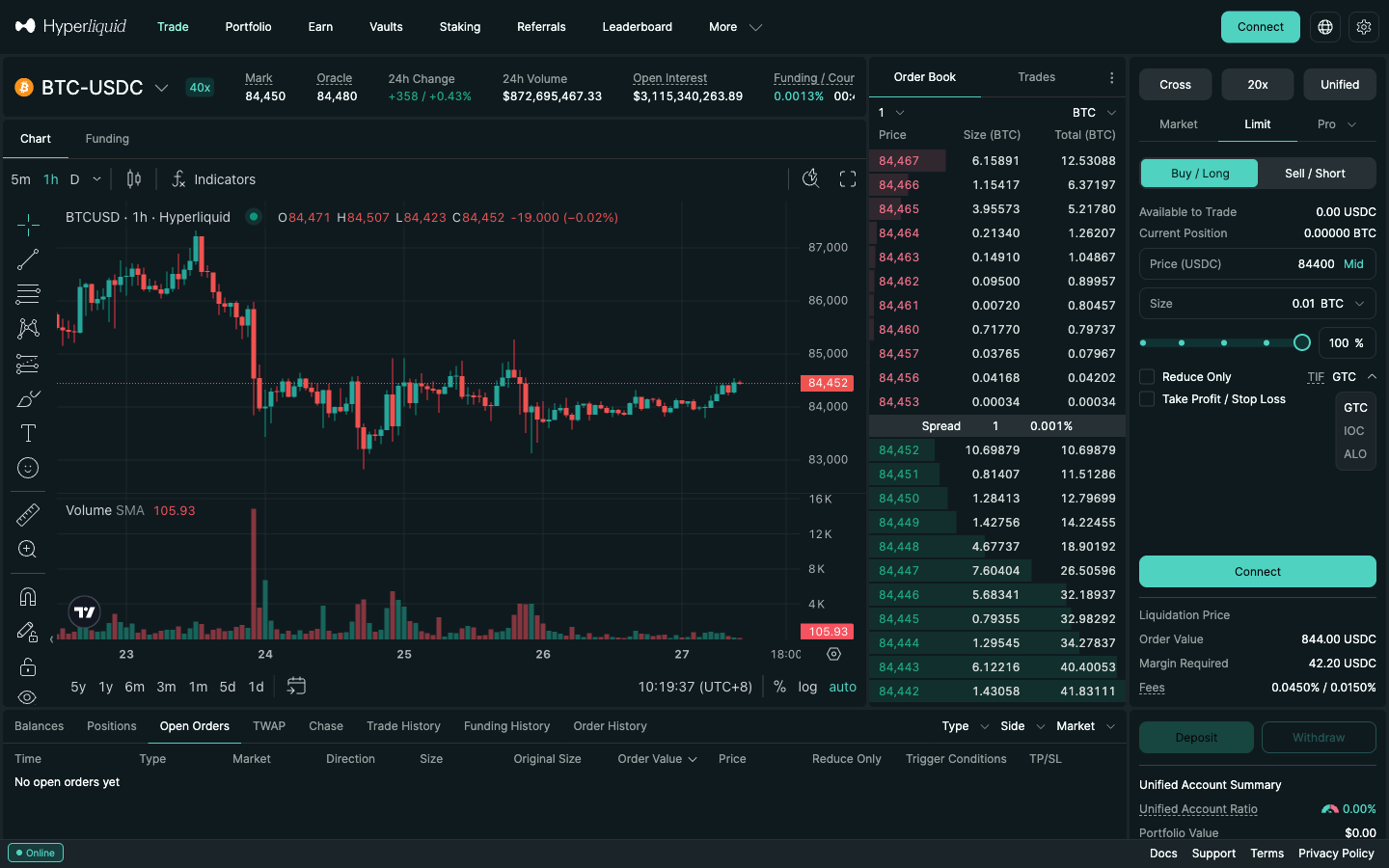
You need a connected account with USDC in it; if you have not got that far, start with how to use Hyperliquid (connect, Enable Trading, deposit). The screenshots below show the desktop BTC-USDC order form on September 27, 2026; on October 19, 2026 the desktop Pro menu was unchanged and the phone layout showed the same Limit and Market fields.
A 0.01 BTC limit buy at $84,400 on the Limit tab, with the TIF dropdown open (GTC, IOC, ALO). Under the button: Order Value 844.00 USDC, Margin Required 42.20 USDC at 20x, Fees 0.0450% / 0.0150%. Hyperliquid, September 27, 2026, 02:19 UTC.
Pick the market and your margin. Open the pair (for example app.hyperliquid.xyz/trade/BTC) and check Cross / Isolated and the leverage button above the tabs; isolated margin and modest leverage are the safer start.
Click the Limit tab and choose Buy / Long or Sell / Short.
Set the price. Type it in Price (USDC) or click Mid to fill in the current mid price, then adjust. A buy below the market (or a sell above it) will rest; one that crosses the spread fills at once as a taker.
Set the size in coins, in USD, or with the percentage slider. The order has to be worth at least $10.
Choose the TIF.GTC to rest until filled or cancelled, IOC to fill what you can now, ALO to post only. Closing a position? Tick Reduce Only. Want a bracket? Tick Take Profit / Stop Loss.
Read the summary under the button: Liquidation Price, Order Value, Margin Required and Fees (0.0450% taker / 0.0150% maker at the base tier).
Click Place Order. The first time on a wallet login you sign a free Enable Trading message; after that orders need no signature pop-up and no gas.
Watch it in Open Orders. It stays there until it fills or you cancel it; fills move to Positions and Trade History, and anything cancelled or rejected is listed with its status in Order History.
If nothing happens for a long time, your price is simply not being traded: move it closer, or accept a taker fill with IOC. Orders at the same price fill in time priority, so the market touching your level is not always enough for a fill.
4. Market orders, slippage, price impact and size caps
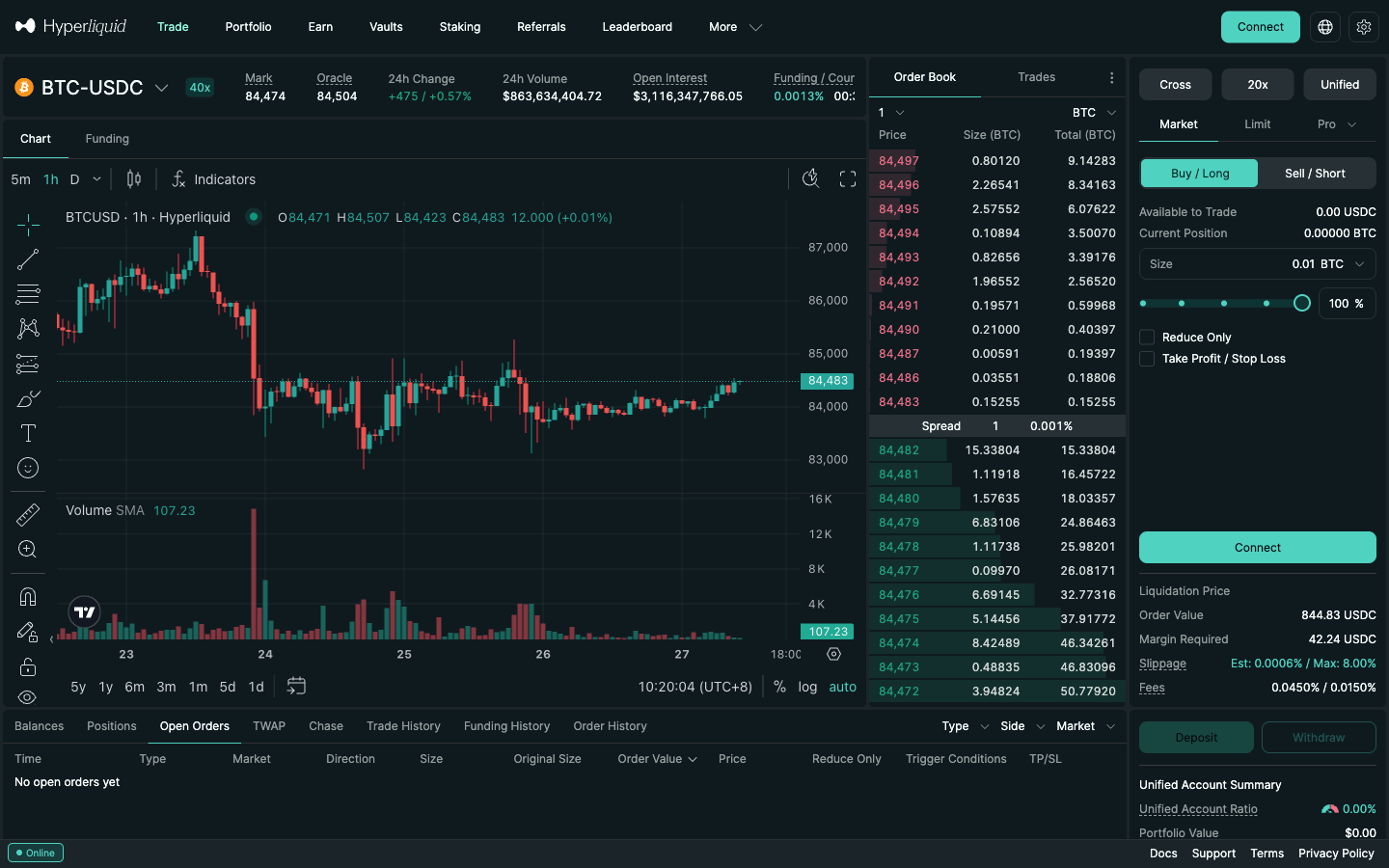
A market order executes immediately against the best resting orders. In the app it is protected by a maximum slippage: the form shows Slippage Est / Max, with a default maximum of 8% that you can change. The app's help text says this setting only affects market orders placed from the form: closing a position uses 8% and market TP/SL orders use 10%.
The Market tab on BTC-USDC: no price field, and a Slippage line (Est 0.0006% / Max 8.00%) above the fees. Hyperliquid, September 27, 2026, 02:20 UTC.
Under the hood there is no separate "market" order type in the exchange API. A market order is a limit order with time-in-force IOC, priced far enough through the book to fill. The official Python SDK does exactly that, with a default of 5% slippage from the mid price, and market orders sent from the web app show up in the API's order history with tif = FrontendMarket.
Two limits apply to every order. The minimum is $10 of notional; the API rejects anything smaller with "Order must have minimum value of $10." The maximum market order depends on how much leverage the market allows, and a limit order may be 10 times larger:
Caps from the contract-specifications page. Market counts and examples (largest by 24h volume first) are read from the Hyperliquid API when this page is built, October 20, 2026. Most altcoins are 3x or 5x markets, so their single-order cap is $500,000.
Max slippage by order path
"Max" is a worst-case price limit, not a cost: the order walks the book at the best available prices and whatever cannot fill inside the limit is cancelled. Each way of sending a market order has its own cap:
Order path
Maximum slippage
Market order from the order form
8% by default (click Max next to Slippage to change it)
Closing a position from the Positions tab
8%
Market TP/SL
10%
TWAP suborders
3% per suborder
Python SDK market_open / market_close
5% by default: an IOC limit at mid × (1 ± slippage)
Limit or IOC order
Your limit price is the hard cap
On majors you can lower the form setting to 1–2% as fat-finger protection; on thin markets 8% can be a lot of money, so use a limit or IOC price instead.
Price impact: what $10k, $100k and $1M market buys cost
Slippage on an order book is half the spread plus price impact, the extra you pay as a large order eats through several levels, plus any move while the order is in flight. Hyperliquid has no AMM curve: you pay what the resting orders ask, and the impact goes to those makers, not to the exchange. We pulled the public l2Book for ten markets on September 25, 2026 (09:55–09:57 UTC) and simulated market buys:
Market
24h volume
Spread (bp)
$10k buy
$100k buy
$1M buy
BTC
$3.21B
0.12
0.0006%
0.0007%
0.012%
ETH
$916M
0.37
0.0018%
0.0018%
0.0027%
SOL
$270M
0.85
0.023%
0.041%
0.068%
XRP
$168M
0.64
0.0032%
0.014%
0.068%
HYPE
$629M
0.11
0.0005%
~0.023%
~0.086%
ENA
$77M
2.68
0.031%
~0.089%
~0.53%
JUP
$10M
4.13
0.022%
~0.19%
~2.2%
xyz:SP500 (HIP-3)
$351M
0.13
0.0008%
0.0053%
0.015%
xyz:COIN (HIP-3)
$4.7M
0.50
0.011%
0.041%
~0.35%
HYPE/USDC spot
$91M
0.11
0.0007%
0.019%
~0.11%
Average fill above mid, including half the spread, before fees. "~" = the order ran past the 20 full-precision levels and was estimated from the aggregated book, usually on the high side. 1 bp = 0.01%. Books change every block: SOL's $10k buy was 0.004% at 09:55 and 0.023% a minute later, and depth is not symmetric (a $1M SOL sell cost about 0.018%).
BTC and ETH: impact is smaller than the fee even at $1M, so the fee is your main cost; a post-only limit saves more than any slicing.
Mid caps (SOL, XRP, HYPE): fine to about $100k; above that, split with TWAP or a Scale ladder (section 8).
Small caps, thin HIP-3 names and spot tokens: check the book first and lower the max slippage. Spot books are thinner than the matching perp (HYPE/USDC about 0.11% for $1M against about 0.086% on the HYPE perp) and spot fees are higher (0.070% taker).
Estimating it yourself: walk the ask side level by level, filling min(remaining USD, price × size) at each level; average price = USD spent ÷ coins bought; impact = average ÷ mid − 1. Two worked examples from the snapshot:
BTC, $1M market buy: impact about $120, taker fee $450 ($432 with HOLYGRAIL). A post-only limit at the bid would cost $150 in fees and no impact.
JUP, $100k market buy: impact about $190, fee $45. A one-hour TWAP (a slice every 30 seconds) gives makers time to refill between slices, at the risk of the price moving while it runs. At 10x leverage, the roughly 0.24% cost of the single sweep is about 2.4% of your margin before the trade has moved.
Reading depth before you trade: type your size in the Market tab and read Est; in the book, the Total column is cumulative size, so the row where it passes your notional is roughly your worst fill. Check the other side too (your exit), and treat any order above about 1% of a market's daily volume as large. Developers get the same data from l2Book (20 levels per side) and the WebSocket bbo and trades feeds (API guide). On an AMM swap, by contrast, the pool formula moves the price along a curve and a loose slippage tolerance invites sandwich bots (AMM vs order book).
5. GTC, IOC and post-only ALO (and why there is no FOK)
A limit order names a price and fills at that price or better. Its time-in-force (TIF) decides, in the API docs' words, "the behavior of the order upon first hitting the book". The TIF dropdown on the Limit tab offers exactly GTC, IOC and ALO, on perps and spot alike.
TIF
API value
CoreWriter code
Behaviour on arrival
Use it for
GTC
Gtc
2
Matches whatever crosses, the remainder rests until filled or cancelled
Patient entries and exits
IOC
Ioc
3
Matches what it can now at your limit or better, cancels the rest; never rests
Taking liquidity with a price cap
ALO (post-only)
Alo
1
Cancelled instead of matching if any part would cross; can only rest
Guaranteed maker fee
FOK (fill-or-kill)
not available
—
Not offered: the API, CoreWriter and the app list only the three above
Use a depth check + IOC
GTC (Good Til Cancelled) is the default: an order that "rests on the order book until it is filled or canceled". Whatever crosses the spread fills at once as a taker, the remainder rests, and it never expires on its own.
IOC (Immediate or Cancel) takes what is available at your limit or better and cancels the rest: a hard price cap and, possibly, a partial fill. If nothing is available the order is rejected with "Order could not immediately match against any resting orders."
ALO (Add Liquidity Only) is Hyperliquid's post-only flag. If any part would match immediately, the whole order is rejected ("Post only order would have immediately matched", with the best bid and offer at that moment). It can only rest, so it only ever pays the maker fee.
When post-only (ALO) is worth it
A GTC limit one tick inside the spread looks passive on screen, but if the market moves just before it lands, it fills as a taker and costs 3 times as much (0.045% vs 0.015%); ALO turns that into a rejection you can re-price. Maker fees fall to 0% at the $500M 14-day volume tier while taker still pays 0.028% (full fee schedule). ALO actions are also processed before GTC and IOC orders inside each block, which is why market makers quote with it (market making guide). Do not use ALO where you must be filled: stop-outs belong to market, IOC or trigger orders with Reduce Only.
No FOK: how to get all-or-nothing anyway
Fill-or-kill is missing from the API enum ("Alo" | "Ioc" | "Gtc"), from the HyperEVM CoreWriter encoding (1 = Alo, 2 = Gtc, 3 = Ioc) and from the app. If a hedge really must be complete, either size to the visible book (add up the size at or better than your limit in the book or l2Book, then send an IOC no larger than that), or IOC, then reconcile (read the filled size, size the other leg to it, or close the partial with a reduce-only IOC).
Worked example: IOC vs market
BTC was marked at $84,442 at 13:15 UTC on September 25, 2026. You want 0.5 BTC (about $42,200) but will not pay more than $84,460. A market order walks the book until 0.5 BTC is filled, wherever that ends (within the slippage cap). An IOC at $84,460 buys only what rests at or below $84,460. Suppose that is 0.3 BTC: you get 0.3 BTC and the other 0.2 BTC is cancelled. Either way the filled part pays the taker fee: 0.045% of about $25,330, or roughly $11.40 ($10.94 with the 4% referral discount). IOC trades certainty about size for certainty about price.
6. Reduce-only on Hyperliquid
Reduce Only makes an order close-only: it can shrink your position but never open or flip one. The docs define it as an order that "reduces a current position as opposed to opening a new position in the opposite direction". If you are long 1 BTC and send a reduce-only sell of 1.5 BTC, only 1 BTC can execute; without the flag the same order would leave you short 0.5 BTC, with a liquidation price you did not plan for. A reduce-only order that would increase your position is rejected ("Reduce only order would increase position."), and a resting one that no longer reduces anything is cancelled with status reduceOnlyCanceled.
The checkbox is on the Market, Limit, Stop Limit, Scale, TWAP, Chase and Trailing Stop forms of perp markets (the phone layout has it too; spot forms have none, since there is no position to reduce). Tick it on anything whose job is to get you flatter: stops, partial take-profits, scaled exits and bot exits. If you close by hand and forget a stop below the market, reduce-only means it simply fails later instead of opening a fresh short. TP/SL orders are reduce-only by design. Taking profit in pieces with reduce-only orders: partial closes and take-profit ladders.
7. Stop and take orders (summary)
Stop Market and Stop Limit protect a position or enter a breakout, Take Market and Take Limit close at a profit target, and the Take Profit / Stop Loss checkbox (or TP/SL on an open position in the Positions tab) attaches both at once as a one-cancels-other pair. All of them trigger on the mark price, which updates about every 3 seconds, and a market TP/SL may fill up to 10% away from the trigger unless you give it a limit price. Direction rule from the docs: a stop that buys needs a trigger above the mid and a stop that sells one below; take orders work the other way round.
Place a $10–20 ALO, an IOC and a bracket on BTC and watch how each one behaves. Join with HOLYGRAIL first so the 4% discount applies from your first trade.
Trailing Stop (perps only) is a market order that fires when the mark price retraces from its best level by your distance or percentage; the trigger follows the best mark since activation and never moves back. The form has Retracement (5% and 10% presets), Size, Reduce Only and an optional Activation Price. How to size the distance: Hyperliquid trailing stop tutorial.
Scale places several limit orders between a start and an end price in one ticket (Size, Start, End, Total Orders, Size Skew); legs that rest pay the maker rate and each must be worth $10. With Reduce Only ticked it becomes a take-profit ladder. TWAP splits a large order into suborders sent every 30 seconds or more over 5 minutes to 7 days (at least $100 in total, 3% max slippage per suborder); suborders pay the taker fee, so it cuts price impact, not fees. Depth numbers and worked examples: Hyperliquid TWAP and Scale orders guide.
Chase is an ALO limit order that re-prices itself to stay one tick inside the best bid or ask until it fills, so it always pays the maker fee. Up to 5 can run at once, and they run in your browser tab: closing or refreshing the tab, switching address or an order rejection (below $10, insufficient margin) ends a chase. It is an execution tool on desktop, never a safety net.
9. Hyperliquid order types on mobile
In the phone layout of the web app you get every Hyperliquid order type except Chase. Hyperliquid's own mobile options are the web app at app.hyperliquid.xyz in any mobile browser and an official Android app on Google Play (last updated September 9, 2026); there is no official iOS app (App Store checked October 19, 2026), so iPhone users trade in Safari. Third-party mobile apps built on Hyperliquid add their own fee on top: Hyperliquid app options for iOS and Android.
We opened the web app in a 375-pixel phone layout on October 19, 2026. The order form sits behind Trade in the bottom bar, and the order type is a dropdown next to the margin mode and leverage buttons rather than tabs:
Perps: the Order Type sheet lists Market, Limit and an Advanced list (Scale, Stop Limit, Stop Market, Take Limit, Take Market, Trailing Stop, TWAP), 7 advanced types against 8 on desktop. Chase is not offered in the phone layout of the web app.
Spot: Market, Limit, Scale and TWAP only.
Limit: Price with a Mid button, Size, Reduce Only, a TIF dropdown (GTC, IOC, ALO) and the Take Profit / Stop Loss checkbox, as on desktop.
Market: Size, Reduce Only, Take Profit / Stop Loss and the Slippage line with the same 8% default maximum.
Trailing Stop: Retracement %, Size, Reduce Only and Activation Price.
Fees, the referral discount and the mark-price triggers are identical on every device: an order placed on the phone pays 0.045% or 0.015% at the base tier like one placed on desktop. Two phone habits are worth having: lower the market order's max slippage before you tap, since a fat-fingered size on a thin market is expensive, and set the stop loss before you lock the screen, because TP/SL and stop orders wait on the exchange and keep working when the app is closed.
10. Spot vs perps: which order types work where
Hyperliquid's spot markets (such as HYPE/USDC) use the same order form but a shorter menu: the desktop Pro menu holds only 3 entries, Chase, Scale and TWAP, and the spot Market and Limit tabs have neither Reduce Only nor the Take Profit / Stop Loss checkbox.
Order / option
Perps
Spot
Market, Limit (GTC / IOC / ALO)
Yes
Yes
Chase, Scale, TWAP
Yes
Yes
Stop Market / Stop Limit / Take Market / Take Limit
Yes
No
Take Profit / Stop Loss checkbox, position TP/SL
Yes
No
Trailing Stop
Yes
No
Reduce Only
Yes
No (there is no position to reduce)
Minimum order
$10
10 USDC (10 units of the quote token)
Fees, base tier (taker / maker)
0.045% / 0.015%
0.070% / 0.040%
So a spot holder who wants a stop-loss has to watch the market or hedge with a perp. If you need stops, brackets or trailing exits, trade the perp.
11. Which order pays which fee
The order type is a fee decision. At the base tier (under $5M of 14-day volume) a trader doing 100 round trips of $10,000 a month ($2,000,000 of volume) pays $900 as a pure taker and $300 as a pure maker, a $600 difference for the same trades.
Depends: GTC, Stop Limit, Take Limit, limit TP/SL and Scale legs pay taker on any part that crosses on arrival and maker on the part that rests.
What a $10,000 order costs on Hyperliquid
Order and code
Rate
Fee on $10,000
Market / IOC (taker), no code
0.045%
$4.50
Market / IOC (taker), code HOLYGRAIL
0.0432%
$4.32
Limit ALO (maker), no code
0.015%
$1.50
Limit ALO (maker), code HOLYGRAIL
0.0144%
$1.44
Posting with ALO saves more than any code; the code then takes another 4% off whatever you pay, on your first $25M of volume. Enter it before you trade: HOLYGRAIL.
HYPE staking takes another 5–40% off on top. There is no extra fee for having a trigger order on file, no gas for placing or cancelling, and funding is charged hourly whatever order type you used (funding guide). Third-party apps add their own builder fee on top of these rates. Details: HOLYGRAIL referral code · Hyperliquid fees.
12. Why an order gets rejected
Most "my order did not go through" questions are one of these messages from the official error list:
Message
Cause
Fix
Order must have minimum value of $10.
The order is worth less than $10 (spot: 10 USDC)
Raise size; for Scale and TWAP check every leg / suborder
Price must be divisible by tick size.
Too many digits: prices allow 5 significant figures and at most 6 minus szDecimals decimals on perps
Round the price. Integer prices are always valid, so 84,441 works on BTC; 84,441.5 does not (6 significant figures)
Post only order would have immediately matched
Your ALO price crossed the book (the message includes the current best bid/offer)
Move the price one tick away, or use GTC / IOC if you really want the fill
Order could not immediately match against any resting orders.
An IOC found nothing at your limit or better
Widen the limit or accept that nothing traded
Reduce only order would increase position.
A reduce-only order points the wrong way or you are already flat
Check side and position size
Invalid TP/SL price.
The trigger is not valid for that order, for example on the wrong side of the mid for its type
Stops: buy above mid, sell below. Takes: the opposite
No liquidity available for market order.
No resting orders within your slippage band
Use a limit order or wait for the book to refill
Order price too far from oracle
A limit far away from the oracle price
Place closer to the market
Insufficient margin to place order.
Not enough free margin at your leverage
Add collateral, cut size or raise leverage
Other statuses you may see in Order History: marginCanceled (a resting order no longer had margin to fill), liquidatedCanceled (orders cancelled during a liquidation), siblingFilledCanceled (the other half of a TP/SL pair filled) and scheduledCancel (an API dead man's switch fired).
13. Order types in the API
Everything above maps onto one order action on the exchange endpoint. Each order carries a (asset), b (is buy), p (price), s (size), r (reduce-only), an optional c (client order ID) and a type t:
limit with tif = Gtc, Ioc or Alo. Market orders are aggressive IOC limits.
trigger with isMarket (true = market once triggered), triggerPx and tpsl (tp or sl). These are the stop, take and TP/SL orders.
grouping: na for plain orders, normalTpsl for an entry plus its children, positionTpsl for TP/SL on an existing position.
TWAP is a separate twapOrder action. The API has no trailing-stop or chase type; bots trail by modifying a trigger order.
Prices allow up to 5 significant figures and at most 6 minus szDecimals decimals on perps (8 minus on spot), and integer prices are always accepted; sizes round to szDecimals (BTC uses 5).
scheduleCancel is a dead man's switch: at least 5 seconds ahead, at most 10 triggers per day.
Market and Limit, plus 8 more in the Pro menu on perps: Stop Market, Stop Limit, Take Market, Take Limit, Trailing Stop, Scale, TWAP and Chase. A limit order takes a time-in-force of GTC, IOC and ALO (post-only); there is no FOK. Reduce Only and Take Profit / Stop Loss are checkboxes on the order. Every trigger order fires on the mark price.
Should I use a limit or a market order on Hyperliquid?
Use a market order when getting filled matters more than the price: stop-outs, fast news, small size on liquid pairs. Use a limit order when the price matters or you want the lower fee: a resting limit order pays the 0.015% maker fee instead of 0.045% taker (base tier), but it may never fill. To guarantee the maker fee, set the limit order's TIF to ALO (post-only).
How do I place a limit order on Hyperliquid?
Open the market, choose Limit, pick Buy / Long or Sell / Short, type a price (or tap Mid), enter a size of at least $10, pick the TIF (GTC to rest, IOC to fill now or cancel, ALO for post-only), tick Reduce Only if the order closes a position, check the order value, margin and fees, and click Place Order. The order then waits in the Open Orders tab, where you can cancel it for free.
Which Hyperliquid order types work as a stop loss?
Four perp order types can close a position at a loss: Stop Market (a market order once the mark price crosses your trigger), Stop Limit (a limit order at your price, which may not fill in a fast move), the SL half of a TP/SL pair (market, up to 10% slippage unless you set a limit), and Trailing Stop, whose trigger follows the best mark price. Spot has none of them. Setup steps are in our stop loss and take profit guide.
What does reduce-only do on Hyperliquid?
A reduce-only order can only shrink your current position; it never opens a position in the other direction. If it would increase the position it is rejected ("Reduce only order would increase position."), and a resting reduce-only order that no longer reduces anything is cancelled. Tick it on every stop, take-profit, scaled exit and TWAP exit. Spot has no Reduce Only box because there is no position to reduce.
What is post-only (ALO) on Hyperliquid?
ALO means Add Liquidity Only. An ALO limit order that would match immediately is rejected with "Post only order would have immediately matched" instead of trading, so it can only rest on the book and fill as a maker: 0.015% at the base tier instead of the 0.045% taker fee. Chase orders are ALO orders that re-price automatically.
What does IOC mean on Hyperliquid?
Immediate or Cancel. The order fills whatever is available at your limit price or better at the moment it reaches the book, and the unfilled remainder is cancelled instead of resting. It always pays the taker fee. Through the API, a market order is an IOC limit priced through the book; the official Python SDK uses a 5% default slippage for that price.
Does Hyperliquid have FOK (fill-or-kill) orders?
No. The exchange API accepts exactly three time-in-force values for limit orders (Gtc, Ioc and Alo), the HyperEVM CoreWriter encodes the same three (1 = Alo, 2 = Gtc, 3 = Ioc), and the TIF dropdown in the app lists GTC, IOC and ALO. To approximate fill-or-kill, check the visible depth at your limit first, send an IOC, and flatten any partial fill with a reduce-only IOC.
Can I use every Hyperliquid order type on my phone?
Almost. In the phone layout of the web app (checked October 19, 2026) the Order Type sheet lists Market, Limit and an Advanced list (Scale, Stop Limit, Stop Market, Take Limit, Take Market, Trailing Stop, TWAP) on perps, so every type except Chase, which is desktop-only there. Limit orders keep the GTC / IOC / ALO choice, and Reduce Only and Take Profit / Stop Loss are on the form. Hyperliquid has an official Android app on Google Play; there is no official iOS app (App Store checked October 19, 2026), so iPhone users trade in Safari at app.hyperliquid.xyz.
Why did my limit order not fill on Hyperliquid?
A resting limit order only fills when the market trades to your price, and orders at the same price fill in time priority, so price touching your level is not always enough. Check the Open Orders tab: if the order is still there it is waiting; if it is gone, look in Order History for the status (for example rejected, or cancelled for margin). An IOC that found nothing at your price is cancelled at once.
How do I cancel or change an open order on Hyperliquid?
Open the Open Orders tab and cancel the order there; cancelling costs no gas and no fee. To change price or size, cancel and place a new order (bots use the modify action). TP/SL orders can also be dragged on the chart.
What is the minimum and maximum order size on Hyperliquid?
The minimum is $10 of notional per order on perps (10 USDC on spot). The maximum market order depends on the market's maximum leverage: $30M at 25x or more (BTC, ETH), $5M for 20x to under 25x, $2M for 10x to under 20x and $500,000 below 10x. A limit order may be 10 times larger.
Which order types work on Hyperliquid spot?
On spot the desktop form offers Market, Limit (GTC, IOC and ALO) and a Pro menu with only 3 entries: Chase, Scale and TWAP. Stop, take, TP/SL, trailing stop and reduce-only are perp features.
Do stop orders on Hyperliquid trigger on the last price?
No. Stop, take, TP/SL and trailing stop orders trigger on the mark price, a median of an oracle-based price, Hyperliquid's own bid/ask/last and CEX perp mids that updates about every 3 seconds. A single odd print on Hyperliquid does not fire your stop on its own, but the fill can differ from the trigger.
Does max slippage mean I will lose 8% on Hyperliquid?
No. 8% is the default worst-case price limit for market orders from the order form, not a cost. The order fills at the best available prices up to that limit; on September 25, 2026 a $100k market buy moved the average BTC or ETH price by less than 0.002%. Closing a position uses 8%, market TP/SL 10% and TWAP suborders 3%.
Is price impact a fee that Hyperliquid charges?
No. Price impact is the cost of consuming resting orders on the book, and that money goes to the makers you trade against. The exchange fee is separate: 0.045% taker and 0.015% maker at the base tier, 4% less with a referral code on your first $25M.
Use the right order type, pay less on each one
Gas-free orders, post-only and native trailing stops. Code HOLYGRAIL takes 4% off your fees on the first $25M of volume.
Disclosure: HOLYGRAIL is our Hyperliquid referral code; we earn a share of referred accounts' fees at no extra cost to you. Order behaviour is taken from Hyperliquid's official documentation (order types, TP/SL, contract specifications, order book, exchange endpoint, error responses) and the live order form (desktop form September 27, 2026; desktop Pro menu and phone layout October 19, 2026). Leveraged trading can lose more than you expect; this is not investment advice.